How to Increase Mobile Signal Strength: 10 Easy Fixes That Work
Published: 19 Oct 2026
Are you on an important call when your signal suddenly drops? It is frustrating, right? Many people ask how to increase mobile signal strength, and the good news is that you can fix it quickly. Most fixes are free and take only a minute. In this guide, you will learn why your signal gets weak and how to check it. Then you will try simple free fixes first. If they do not work, you can try paid options, like a signal booster. Ready to get a stronger signal? Let’s start.
Why Is My Mobile Signal Weak?
Why is my signal so bad? Many things can weaken your signal. Here are the most common ones:
- Distance from the tower: Your phone connects to a cell tower. The farther you are, the weaker the signal gets.
- Thick walls and metal: Concrete and metal block signals. Some modern windows block them too.
- Hills and trees: They also stand in the way.
- Busy network: Too many people use the same tower at once. This is called network congestion. Evenings are often the worst time.
- Bad weather: Heavy rain or storms can lower the signal.
- Old phone or software: Outdated settings can cause a weak cell signal.
Real-life example: You get full bars on the roof. Then you walk into a concrete basement, and your signal drops. The walls block it.
Do you see your problem on this list? Next, let’s check how strong your signal really is.
How to Check Your Signal Strength First
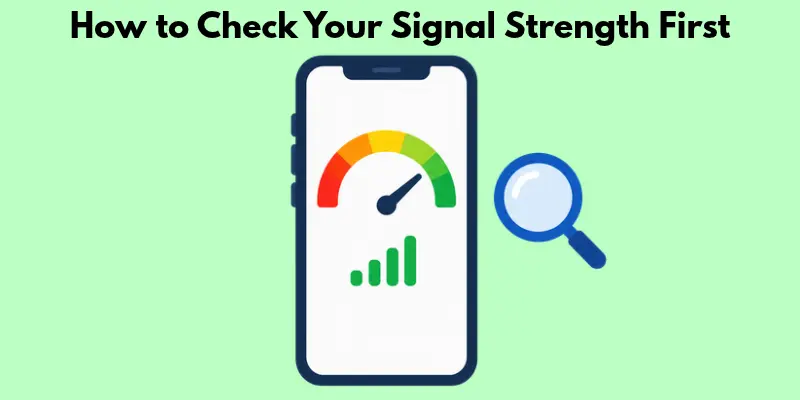
Do you trust your signal bars? You should not. Bars are only a rough guess. Your phone may show four bars, but your calls can still break up. A better way is to check your signal strength on mobile using dBm. This is a number that shows how strong your signal is. It is always negative. The closer to zero, the stronger the signal.
What Is a Good Signal Strength?
| Signal (dBm) | Quality | What You Get |
| -50 to -80 | Excellent | Clear calls, fast data |
| -80 to -100 | Good | Steady service |
| -100 to -110 | Fair | Slower data |
| -110 to -120 | Poor | Dropped calls |
Real-life example: -70 dBm is strong. -115 dBm is weak. The weak one will drop your calls.
Check Signal Strength on iPhone.
- Turn off Wi-Fi.
- Open the Phone app.
- Dial *3001#12345# and press call.
- Find the number next to RSRP. This is your signal strength.
Check Signal Strength on Android
- Turn off Wi-Fi.
- Open Settings.
- Tap About Phone, then Status.
- Tap SIM Status. Your dBm is under Signal Strength.
The steps may change a little on each phone brand.
Now you know your number. Ready to improve it?
Free Ways to Increase Mobile Signal Strength
Do you want to boost your phone signal without spending money? Try these free fixes. Start with the first one and move down the list.
1. Move Near a Window or a Higher Floor
Walls block signals. So change your spot first.
- Walk near a window or step onto the balcony.
- Go to a higher floor. Signals are often stronger up high.
Real-life example: You get no bars in your bedroom. You move to the living room by the window, and your signal comes back.
2. Turn Airplane Mode On and Off
This is a quick reset. Your phone searches for the best signal nearby.
- Turn on airplane mode and wait 10 seconds.
- Turn it off and check your bars.
3. Restart Your Phone
A restart clears small network glitches.
- Switch your phone off and wait a few seconds.
- Switch it on again. It takes only one minute.
4. Remove a Thick or Metal Case
Some cases block signals. Metal cases are the worst.
- Take the case off and check your bars.
- If the signal improves, buy a thinner plastic case.
5. Update Your Phone Software and Carrier Settings
Updates fix network bugs.
- Open Settings, find Software Update, and install it.
- Install any carrier settings update that your phone shows.
6. Set Your Network Type to 4G or 5G
Newer networks give a better connection. Most new phones switch automatically. Older phones may need a manual change.
- Open your SIM or Mobile Network settings.
- Find Preferred Network Type and choose 4G or 5G.
7. Turn On Wi-Fi Calling
Do you have Wi-Fi at home but a weak signal? Your calls can go over the internet, not the tower.
- Open mobile network or Calls settings and turn on Wi-Fi Calling.
- Check that your carrier supports this feature.
8. Turn Off Battery Saver
On some phones, battery saver limits network features.
- Turn it off in weak signal areas.
- Keep your phone charged. Check your bars again.
9. Clean or Replace Your SIM
Dust can stop your SIM from working well.
- Switch off your phone, take out the SIM, and wipe it gently with a soft, dry cloth.
- If the SIM looks damaged, ask your carrier for a new one.
10. Reset Network Settings
This is your last free fix. It clears all network settings and starts fresh. It also removes saved Wi-Fi passwords and bluetooth pairings.
- Write down your Wi-Fi password first.
- Open Settings, find Reset, and tap Reset Network Settings.
Quick tip: Check your signal strength in dBm after each fix. This shows which fix worked for you.
Still no luck? Don’t worry. Wi-Fi may be the problem. Let’s look at that next.
How to Improve Signal Strength on Wi-Fi
Is your Wi-Fi also weak? Then Wi-Fi calling will not help much. Try these quick fixes to boost your Wi-Fi signal on your phone.
1. Place Your Router in the Center
Your router sends signal in all directions. A good spot makes a big difference.
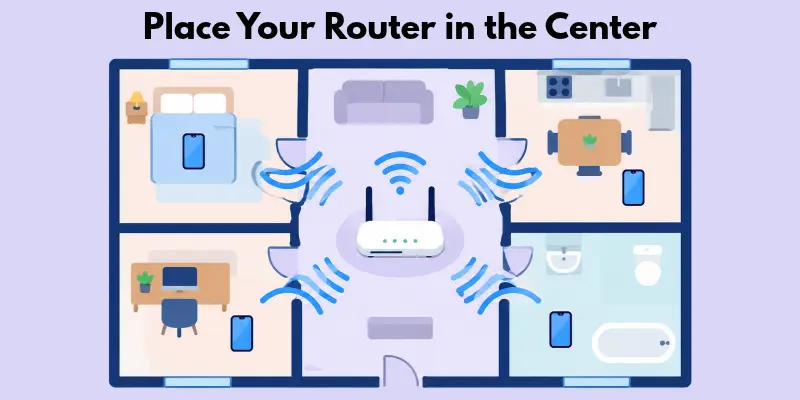
- Put it in the middle of your home, not in a corner.
- Place it high on a shelf, not on the floor.
Real-life example: Your router sits in the last room. Your bedroom gets one bar. You move the router to the hall, and the signal improves.
2. Restart Your Router
A router can slow down after many days. A restart gives it a fresh start.
- Unplug the router and wait 30 seconds.
- Plug it back in and wait two minutes.
3. Switch to the 5 GHz Band
Your router has two bands. The 5 GHz band is faster. It works best at a short distance.
- Open your phone’s Wi-Fi list and look for the name with “5G” at the end.
- Connect to it when you are near the router.
4. Keep Your Router Away from Walls and Machines
Thick walls and kitchen machines can weaken your Wi-Fi.
- Keep the router away from microwaves and cordless phones.
- Avoid placing it behind metal shelves or thick walls.
Is your Wi-Fi strong now, but your mobile signal is still weak? Then you may need a paid option. Let’s look at those next.
Paid Ways to Boost Mobile Signal
Did the free fixes fail? Then you may need a paid option. These cost money, but they work well when your signal is weak all day.
1. Cell Phone Signal Booster
Do signal boosters really work? Yes, a good one does. It grabs the weak signal outside, makes it stronger, and sends it inside.
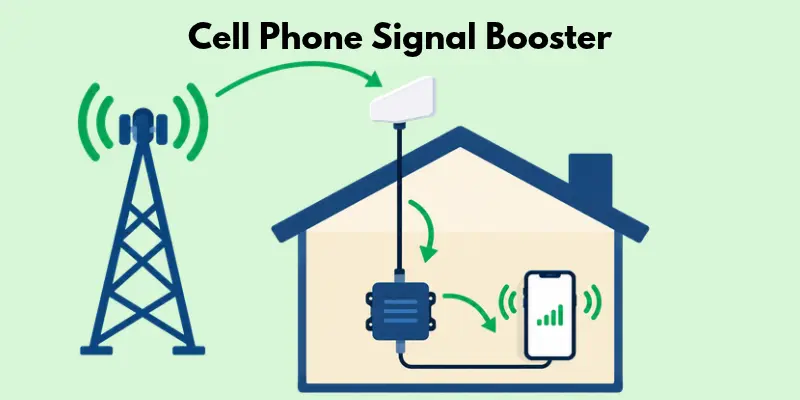
- It has three parts: an outside antenna, an amplifier, and an inside antenna.
- Check your local rules before you buy. Some countries need approval for boosters.
Real-life example: A family lives far from the tower. They get one bar at home. After they fit a booster, they get full bars in most rooms.
2. Femtocell or Small Cell
This small device works like a mini tower at home. It needs an internet connection.
- Ask your carrier if they offer one.
- Place it in the middle of your home for the best coverage.
3. Switch to a Better Carrier
Your carrier may have a weak tower near you. Another carrier may have a closer one.
- Ask friends and neighbors which carrier works well in your area.
- Try a cheap SIM from that carrier before you switch fully.
4. Upgrade to a Newer Phone
Do newer phones have better reception? Often, yes. They support newer networks like 5G.
- Check if your phone is more than four or five years old.
- Look for a phone that supports 4G and 5G in your area.
Do you want to know which tricks to skip? Let’s bust some myths next.
Signal Booster Myths You Should Skip
Have you seen tricks that promise a quick signal boost? Most of them do not work. Skip these myths and save your time.
Myth 1: A Secret Code Boosts Your Signal
Some websites say you can dial *3370# to boost your signal. This is a myth. No code can make your signal stronger.
- Do not trust codes you find online.
- Use the real fixes from this guide instead.
Myth 2: Signal Booster Apps Work
Some apps claim to boost your signal. They cannot. An app cannot change how far the tower is.
- Use apps only to check your signal, not to boost it.
- Delete any app that asks for too many permissions.
Myth 3: Homemade Boosters Work
You may see videos of boosters made from foil or wire. These do not work. They can even make your signal worse.
- Do not waste money on homemade boosters.
- Buy a proper booster from a trusted brand if you need one.
Conclusion
A weak signal is annoying, but you can fix it. Now you know how to increase mobile signal strength step by step. First, check your signal in dBm. Then try the 10 free fixes one by one. Fix your Wi-Fi if it is weak too. Use a booster only as your last option, and skip the myths because they waste your time. Which fix worked for you? Start with the first one today and see the difference. Stay connected!
Faqs
Yes, a good booster works well. It makes the outside signal stronger and sends it inside. But it needs some outside signal to start with. Without any signal, it cannot help.
A good signal sits between -50 and -100 dBm. Anything below -110 dBm is weak. At that level, you may face dropped calls and slow data.
Many things can cause this. The tower may be down for repair. The network may be busy. Your SIM may be loose. Try airplane mode, then restart your phone. Still no bars? Call your carrier.
Often, yes. Newer phones support 4G and 5G. They also have better antennas. But a new phone cannot fix a weak tower in your area.
Yes, it can help. Wi-Fi calling lets you make calls over the internet. So your calls do not need the tower. You must turn it on in your settings. Your carrier must also support it. But Wi-Fi does not boost your mobile signal bars. It only gives you another way to call.

- Be Respectful
- Stay Relevant
- Stay Positive
- True Feedback
- Encourage Discussion
- Avoid Spamming
- No Fake News
- Don't Copy-Paste
- No Personal Attacks
- Be Respectful
- Stay Relevant
- Stay Positive
- True Feedback
- Encourage Discussion
- Avoid Spamming
- No Fake News
- Don't Copy-Paste
- No Personal Attacks
