Smartphone vs Computer: Key Differences and Which One You Need
Published: 25 Oct 2026
Is your smartphone a computer? Yes, it is. A smartphone is a small computer that fits in your pocket. But a computer still does heavy work better. Can you edit a video on your phone as easily as on a laptop? Most people say no. So what is the real difference in the smartphone vs computer debate? And how do a smartphone and a computer work together in daily life? In this article, you will learn how they are alike, where they differ, and which device suits each task. You will also get simple tips to pick the right one for you. Let’s start!
Is a Smartphone a Computer?
Yes, a smartphone is a computer. It has a processor that thinks. It has memory and storage to hold your apps, photos, and files. It also has an operating system, like Android or iOS, that runs everything. When you open a map app or play a game, your phone runs a program, just like a laptop does. So, is a cell phone a computer too? Not always. A basic phone only makes calls and sends texts. But a smartphone does much more, so it counts as a computer.
What Is a Smartphone?
A smartphone is a mobile phone that works like a small computer. You use it to call, text, and do much more. It connects to the internet through mobile data or Wi-Fi. You can also download apps for maps, banking, games, and chats. Here are its main features:
- Touchscreen: You tap and swipe to control it.
- Camera: You take photos and videos.
- Apps: You add new tools whenever you need them.
A basic phone only makes calls and sends texts. A smartphone does all that and more. Which one do you use every day?
What Is a Computer?
A computer is a machine that takes your input, processes it, and shows you the result. You type on a keyboard or click with a mouse. The computer does the work and shows the answer on a screen. Most computers have a big screen, a full keyboard, and strong power. There are three common types:
- Desktop: It stays on a desk and has a separate screen.
- Laptop: It folds shut, so you can carry it.
- All-in-one: It puts the screen and the parts in one body.
Do you use a computer at work or at home?
What Is a Mobile Computer? Is a Laptop a Mobile Device?
A mobile computer is a computer you can carry and use anywhere. It runs on a battery, so you do not need a wall plug all day. A laptop and a smartphone are both mobile computers. So, is a laptop a mobile device? Yes, in most cases. You can carry it from home to work or to a cafe. Some people use “mobile device” only for phones and tablets. But a laptop still counts as a mobile computer. Here is a quick list:
| Device | Mobile device? |
| Smartphone | Yes |
| Tablet | Yes |
| Laptop | Yes |
| Desktop | No |
A desktop stays in one place. A laptop and a smartphone go with you. Which one do you carry the most?
Smartphone vs Computer: Key Differences
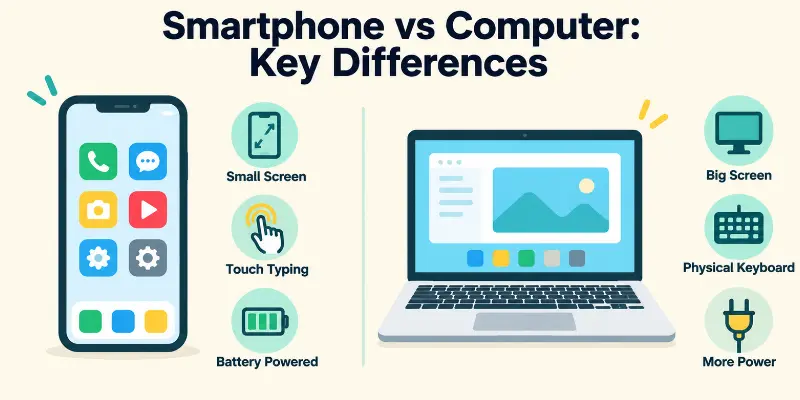
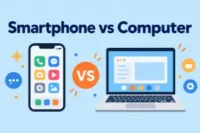
A smartphone and a computer both run apps and connect to the internet. But they differ in size, power, and use. Let’s look at each one in the smartphone vs computer comparison.
Smartphone Key Differences
- Power: It is good for daily tasks like chats, maps, and videos.
- Screen: It is small, about 5 to 7 inches.
- Typing: You use a touchscreen keyboard.
- Multitasking: It is limited. You mostly use one or two apps at a time.
- Storage: It is limited, but cloud storage helps.
- Battery and size: It is light and fits in your pocket. The battery lasts about a day.
- Upgrades: You cannot upgrade its parts.
- Operating system: It runs a mobile system, like Android or ios.
Computer Key Differences
- Power: It is stronger and handles heavy work like video editing and gaming.
- Screen: It is large, usually 13 inches or more.
- Typing: You use a full keyboard and a mouse.
- Multitasking: It is easy. You can open many windows at once.
- Storage: It is large, and you can add more.
- Battery and size: It is heavier. A desktop needs a power plug all the time.
- Upgrades: You can upgrade parts like memory and storage.
- Operating system: It runs a desktop system, like Windows or macOS.
How Are Smartphones and Computers Similar?
A smartphone and a computer look different. But inside, they work in the same way. Here is how they are alike:
- Brain: Both have a processor that does the thinking.
- Memory and storage: Both hold your apps, photos, and files.
- Internet: Both connect through Wi-Fi.
- Apps: Both run programs for work, fun, and chats.
- Updates and security: Both need updates and strong passwords.
So, how are desktop and mobile operating systems similar? Both manage your files and apps. Both show icons and let you open many apps. Both also ask you to update them often. Think about your email. You can read it on your phone or on your laptop. The same inbox opens on both. Which device do you use to check email first?
Mobile vs Desktop Usage
People do not use a phone and a computer in the same way. Each device has its own job. Let’s look at a normal day.
How People Use a Smartphone
You pick up your phone many times a day. It is quick and always with you. People use it to:
- Send messages and make calls
- Watch short videos and scroll social media
- Check maps and order food
- Pay bills and use banking apps
How People Use a Computer
You sit down at a computer when the task is bigger. It gives you more space and more power. People use it to:
- Write long documents and emails
- Edit photos and videos
- Study, code, or attend online classes
- Play big games
A Real-Life Example
Imagine you want to apply for a job. You find the job post on your phone while you travel. Then you sit at your laptop to write your CV. A phone is great for quick tasks. A computer is better for long and careful work.
So which device do you use for most of your day?
Smartphone and Computer Solutions: Which One for Which Task?
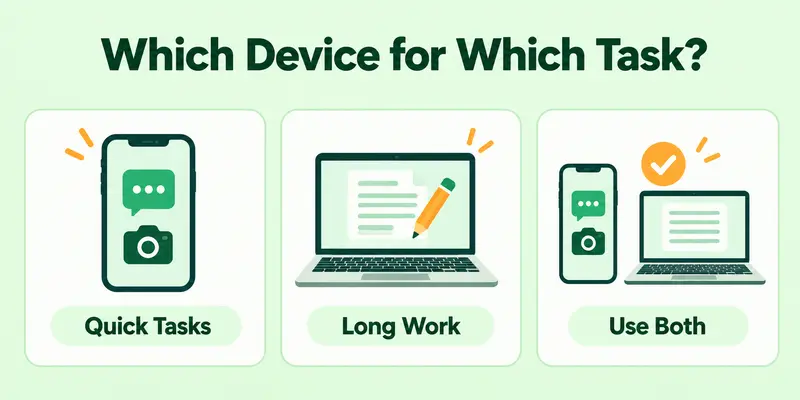
Not sure which device to pick? Look at your task. Some jobs fit a phone. Some fit a computer. Some work well on both. Here are simple smartphone and computer solutions.
Use a Smartphone For:
- Calls and messages: It is always with you.
- Photos and quick edits: The camera and editing apps are ready.
- Banking on the go: You can pay or check your balance fast.
Use a Computer For:
- Writing long documents: A full keyboard saves time.
- Video editing and design: It has more power and a bigger screen.
- Big games: It runs heavy games more smoothly.
Use Both For:
- Online classes: Join a quick class on your phone. Take notes on your computer.
- Work projects: Check updates on your phone. Finish the main work on your computer.
A Real-Life Example
Think of a student. She reads a class message on her phone. Then she writes her assignment on a laptop. At the end, she snaps a photo of her notes with her phone and sends it to her teacher. She used both devices, and each one did what it does best.
Quick Tip
Before you start a task, ask yourself two questions:
- Is this task quick or long?
- Do I need a big screen or a full keyboard?
Quick task? Use your phone. Long task? Use your computer.
Pros and Cons of Each
Every device has strengths and weaknesses. Let’s see what a smartphone and a computer do well, and where they fall short.
Smartphone
Pros:
- It fits in your pocket, so you carry it everywhere.
- It is quick to use. You tap and start.
- It has a good camera and works for calls, chats, and apps.
- It costs less than most computers.
Cons:
- Its small screen tires your eyes during long tasks.
- Typing long text is slow.
- It struggles with heavy work like video editing.
- Its battery drains fast when you use it a lot.
Computer
Pros:
- It has strong power for heavy tasks.
- A big screen and full keyboard make long work easy.
- You can open many windows and upgrade its parts.
- It has more storage for big files.
Cons:
- It is heavy. A desktop stays in one place.
- It costs more for strong models.
- It is slow to carry around and set up.
- It often needs a power plug, especially a desktop.
Which Side Matters More to You?
Think about your daily needs. Do you move around a lot? A smartphone may suit you. Do you sit and work for hours? A computer may suit you better.
Can a Smartphone Replace a Computer?
Sometimes, yes. It depends on what you do every day. Many people now do most of their work on a phone. But a phone cannot do everything. So, phone or computer? Let’s see who can switch and who cannot.
A Smartphone May Be Enough If You:
- Mostly chat, browse, and watch videos
- Use social media and banking apps
- Write short emails and notes
- Study with light apps and online videos
You Still Need a Computer If You:
- Edit videos or design graphics
- Write long reports or work with big files
- Code or run heavy programs
- Play big games
A Real-Life Example
Imagine two friends. Sara sells homemade candles on social media. She takes photos, replies to chats, and takes orders. Her phone is enough. Ali is a video editor. He works with large files all day. He cannot do that on a phone, so he needs a computer.
Quick Tip
Not sure about phone or laptop? Try this:
- List your top five daily tasks.
- Mark the ones that need a big screen or a keyboard.
- If most tasks have a mark, buy or keep a computer.
What do you do most on your device?
How to Use a Smartphone and Computer Together
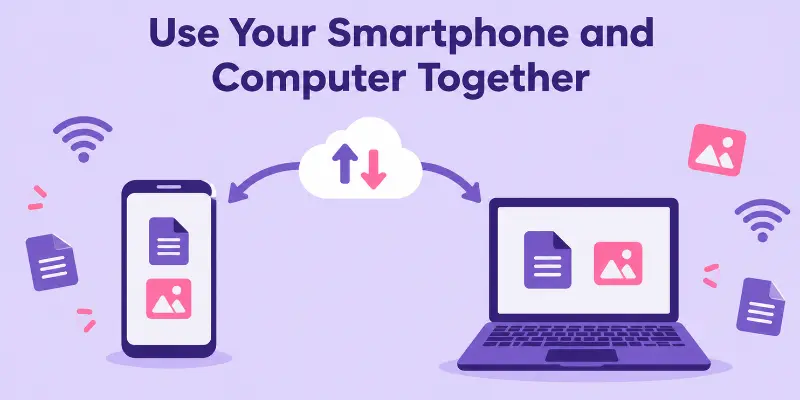
A smartphone and a computer work best as a team. When you connect them, your work gets faster and easier. Here are simple steps to try:
Save Your Files in the Cloud
Use a cloud storage app like Google Drive or iCloud. You save a file on your phone. Then you open it on your computer. No cables needed.
Share Your Phone’s Internet
No Wi-Fi? Turn on the hotspot on your phone. Then connect your computer to it. You can work from anywhere.
Use the Same Account on Both
Sign in with one account on both devices. Your emails, contacts, and notes then match everywhere.
See Phone Messages on Your Computer
Many phones let you read messages on a computer. You do not need to pick up your phone each time. This helps you stay focused.
Send Files Fast
Need to move a photo from your phone to your computer? Use email, a chat app, or a USB cable. Pick the one that feels easiest.
A Real-Life Example
Think of a student. She takes a photo of her notes with her phone. The photo goes to the cloud. At home, she opens it on her laptop and adds it to her assignment. It takes less than a minute.
How to Choose: Smartphone or Computer?
Still not sure which one you need? Ask yourself three simple questions.
What Do You Do Most?
Think about your daily tasks. Do you chat, scroll, and take photos? A smartphone fits you well. Do you write, edit, or study for hours? A computer is the better pick.
What Is Your Budget?
A good smartphone often costs less than a strong computer. If money is tight, start with a smartphone. You can add a computer later.
Do You Need a Big Screen and Keyboard?
Your eyes and hands matter too. A big screen is easy on the eyes. A full keyboard makes typing fast. If you need both, choose a computer.
Quick Guide
- Pick a smartphone if you want something small, simple, and always with you.
- Pick a computer if you want power, comfort, and space for long work.
- Pick both if you want to work fast and stay connected.
A Real-Life Example
Think of a shop owner. He uses his phone to talk to customers and take payments. At night, he uses a computer to check his sales and send reports. Each device has its own job, so he keeps both.
Conclusion
A smartphone is a small computer, but a computer is still stronger for heavy work. In the smartphone vs computer comparison, neither device wins every time. A phone is quick and always with you. A computer gives you power, a big screen, and a full keyboard. So look at your daily tasks and pick what fits you. Or use both as a team. They are partners, not rivals. Now it’s your turn. Which device will you use for your next task?
Faqs
Yes, a smartphone is a computer. It has a processor, memory, storage, and an operating system. It runs apps just like a laptop does. The main difference is size and power. A phone is small and made for quick tasks. A computer is bigger and handles heavy work better.
Yes, in most cases. A laptop is a mobile computer because you can carry it and use it on battery. Some people use the term mobile device only for phones and tablets. But a laptop still moves with you. A desktop, on the other hand, stays in one place.
The main difference is size and power. A phone is small, light, and always with you. It suits quick tasks like chats, calls, and photos. A computer is bigger and stronger. It has a large screen and a full keyboard, so it suits long and heavy work.
No, not everything. A phone can handle chats, browsing, banking, and light study. But it struggles with video editing, coding, and big games. The small screen and slow typing also make long work hard. For heavy tasks, a computer is still the better choice.
A laptop is better for most students. It makes writing, research, and online classes easier. A phone still helps a lot. Students use it for quick notes, class messages, and photos of the board. The best choice is to use both. Each one does a different job well.

- Be Respectful
- Stay Relevant
- Stay Positive
- True Feedback
- Encourage Discussion
- Avoid Spamming
- No Fake News
- Don't Copy-Paste
- No Personal Attacks
- Be Respectful
- Stay Relevant
- Stay Positive
- True Feedback
- Encourage Discussion
- Avoid Spamming
- No Fake News
- Don't Copy-Paste
- No Personal Attacks
