What Happens If You Delete an eSIM? Complete Guide for iPhone & Android
Published: 13 Sep 2026
Many smartphone users wonder what happens if they delete an eSIM from their device. An eSIM is a digital SIM that lets your phone connect to a mobile network without a physical SIM card. People often delete it when they change phones, reset their devices, or try to fix network problems. But what actually happens after you delete it? Will your number disappear, or will your network stop working? In this guide, you will learn what deleting an eSIM does and what you should know before removing it from your phone.
What Happens If You Delete an eSIM?
Many users ask what happens if you delete your eSIM from a phone. The answer is simple. When you delete an eSIM, the mobile plan is removed from your device. Your phone will no longer connect to the carrier network using that eSIM. This means your cellular service stops on that phone. You cannot make calls, send SMS, or use mobile data through that plan. However, the mobile plan usually still exists with your carrier. It is only removed from the device, not canceled.
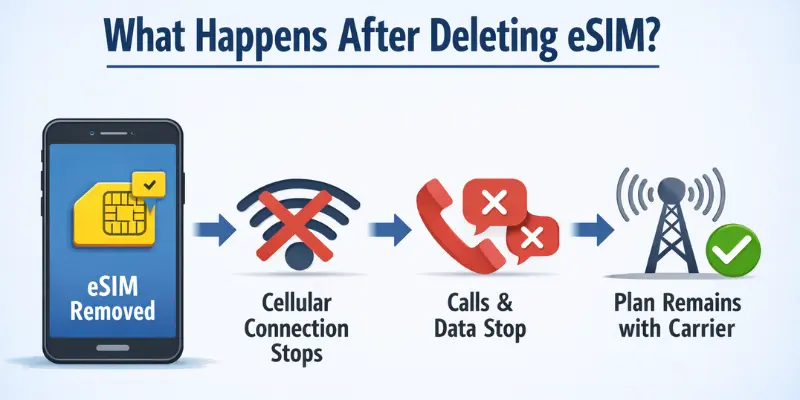
Here is what happens when you delete an eSIM:
- The mobile plan is removed from the phone.
- Cellular connection stops immediately.
- Your phone number may become temporarily inactive on that device.
- You cannot use calls, texts, or mobile data through that eSIM.
- The plan usually remains active with your carrier.
For example, imagine you delete your eSIM while switching to a new phone. Your old phone will lose network service. But your carrier can activate the same plan again on another device.
Does Deleting eSIM Cancel Your Plan or Stop Billing?
Here’s something many people miss. Deleting an eSIM does not cancel your mobile plan. It only removes the profile from your phone. Your carrier may still charge you every month.
This surprises a lot of users. They think deleting the eSIM ends everything. But that’s not true.
What actually happens:
- The eSIM is removed from your device.
- Your phone stops connecting to that network.
- Your plan and billing usually stay active with the carrier.
- You may keep getting charged until you cancel it yourself.
Example: You delete your eSIM and sell your phone. You forget to call your carrier. Next month, you still get billed.
What you should do:
- Contact your carrier before or after deleting the eSIM.
- Ask them to confirm if your plan is still active.
- Request a full cancellation if you no longer need the service.
Quick tip: Always check your next bill after deleting an eSIM. This helps you catch any charges you didn’t expect.
What Happens If I Delete My eSIM on iPhone or Android?
Many users ask what happens if they delete their eSIM on their phone. The result is mostly the same on both iPhone and Android. The mobile plan is removed from the device, and the network connection stops. Your phone will not connect to the carrier until the eSIM is added again.
iPhone
If you delete an eSIM on an iPhone, the cellular plan is removed from the device. Your phone will lose network service for that plan. You will not be able to make calls, send texts, or use mobile data using that eSIM.
Here is what usually happens:
- The cellular plan is removed from the iphone.
- The phone shows no network for that plan.
- Calls, SMS, and mobile data stop working.
- You can install the eSIM again using the QR code from your carrier.
For example, if you switch to a new iPhone, you can scan the QR code again and activate the same plan.
Android
The process is very similar on Android phones. When you delete the eSIM, the mobile plan disappears from the device, and the cellular connection stops.
Here is what happens on Android:
- The eSIM profile is deleted from the phone.
- Your phone loses network access for that plan.
- Calls, texts, and data will stop working.
- You can activate the eSIM again using a QR code or a carrier app.
The only difference is the settings location. On many Android phones, you can find it in Settings → Network & Internet → SIMs or Mobile Network.
So, in simple words, deleting the eSIM removes the mobile plan from your device, but the plan usually still exists with your carrier.
What Does “Delete eSIM and Erase Data” Mean?
Many phones show the option “Delete eSIM and Erase Data” when you reset the device. This option is part of a factory reset. A factory reset returns your phone to its original state, just like when it was new.
When you choose this option, two things happen at the same time:
- The eSIM is removed from the phone.
- All personal data is erased.
- Apps, photos, contacts, and settings are deleted.
- The phone resets to default factory settings.
For example, if you sell your phone and select this option, your eSIM and all your personal files will be removed from the device.
Difference Between “Delete eSIM” and “Keep eSIM and Erase Data.”
It is important to understand the difference between these two options.
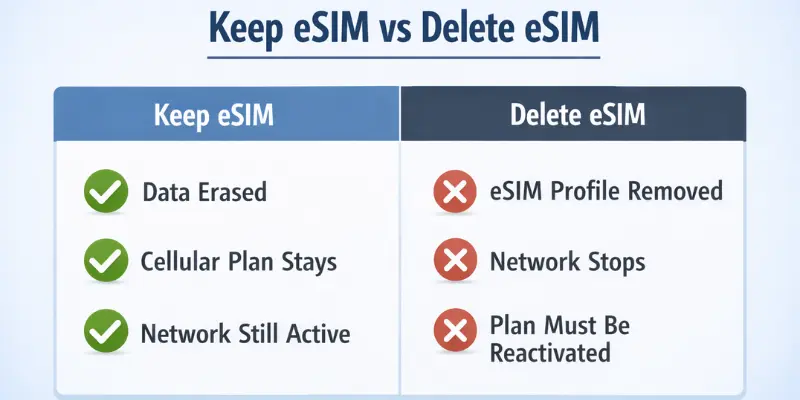
Delete eSIM.
- Removes the mobile plan from the phone.
- Cellular service stops on that device.
- The plan usually still stays with your carrier.
Keep eSIM and Erase Data
- All personal data is deleted from the phone.
- The eSIM and cellular plan remain active.
- Your phone will still connect to the mobile network after the reset.
So before resetting your phone, ask yourself a simple question: Do you want to keep your mobile plan on the device or remove it completely? This will help you choose the right option.
Should You Delete eSIM From Your Old Phone?
Many users are unsure whether they should remove the eSIM from an old device. The answer depends on what you plan to do with the phone. In some situations, deleting the eSIM is important for security and privacy.
When You Should Delete eSIM
You should remove the eSIM in these situations:
- Selling your phone: This removes your mobile plan from the device. The new owner cannot access your number.
- Trading in your device: It protects your mobile account before giving the phone to a store or carrier.
- Switching to a new phone: You may delete the eSIM on the old device before activating it on the new one.
- Security reasons: Removing the eSIM protects your mobile number and carrier account.
Example:
If you sell your old phone online, deleting the eSIM ensures the buyer cannot use your cellular plan.
When You Should NOT Delete eSIM
Sometimes it is better to keep the eSIM on the phone.
- If you still use the phone daily.
- If you are doing a temporary reset or troubleshooting.
- If you plan to keep the device as a backup phone.
In these cases, keeping the eSIM helps you stay connected to your mobile network without activating the plan again later.
Does Deleting eSIM Affect Your New Phone?
Many people worry about this when switching devices. They want to know if deleting the eSIM from the old phone will affect the new phone. The simple answer is no. Deleting the eSIM from your old phone does not affect your new phone. It only removes the mobile plan from the old device.
Here is how it works:
- The eSIM is removed only from the old phone.
- Your mobile plan still stays with the carrier.
- You must activate the eSIM on the new phone to use the network.
- Once activated, your calls, texts, and mobile data will work on the new device.
Example:
If you buy a new smartphone and delete the eSIM from your old phone, the new phone will not automatically connect to the network. You must activate the eSIM again using a QR code or carrier app.
What Happens If You Delete eSIM by Mistake?
Accidentally deleting an eSIM can be stressful. Many users wonder what happens if they delete the eSIM by mistake and whether they lose their mobile plan forever. The good news is: it can usually be restored easily.
Here’s what to do:
- Contact your carrier: Call or message your mobile provider. They can help reactivate the eSIM or provide a new QR code.
- Scan the QR code again: If you have the original QR code from your carrier, you can scan it to reinstall the eSIM on your phone.
- Reinstall the eSIM profile: Some carriers allow you to reinstall the eSIM via their mobile app. Check your carrier’s instructions for easy setup.
Example:
If you accidentally delete the eSIM while resetting your phone, don’t panic. Contacting the carrier or using the QR code will restore your mobile plan quickly.
Can You Recover a Deleted eSIM?
Many users worry about losing their mobile plan after deleting an eSIM. The good news is simple: in most cases, you can recover it.
Here’s how:
- Carrier reactivation: Many mobile carriers allow you to reactivate a deleted eSIM on your phone.
- New QR code: Your carrier can provide a new QR code to reinstall the eSIM.
- Carrier app activation: Some carriers let you restore the eSIM directly through their mobile app without needing a QR code.
Example:
If you accidentally delete the eSIM from your iPhone or Android device, you can contact your carrier, request a new QR code, or use the carrier app to quickly recover your plan.
Should You Disable eSIM Instead of Deleting It?
Before you hit delete, ask yourself one question: do you need this eSIM later? If yes, don’t delete it. Just turn it off.
Disabling an eSIM is different from deleting it. Disabling means the profile stays on your phone, but it’s paused. Deleting removes it completely.
Choose Disable if:
- You’re switching to another SIM for a short time.
- You plan to use this number again soon.
- You’re not sure yet if you’ll need the eSIM later.
Choose Delete if:
- You’re selling or giving away the phone.
- You’re done using that carrier for good.
- You want to free up space for a new eSIM profile.
Quick tip: Disabling saves you time. Deleting means starting over with a new QR code later.
How to Delete an eSIM (Step-by-Step)
Deleting an eSIM is simple, but it’s important to follow the right steps so you don’t accidentally lose your mobile plan.
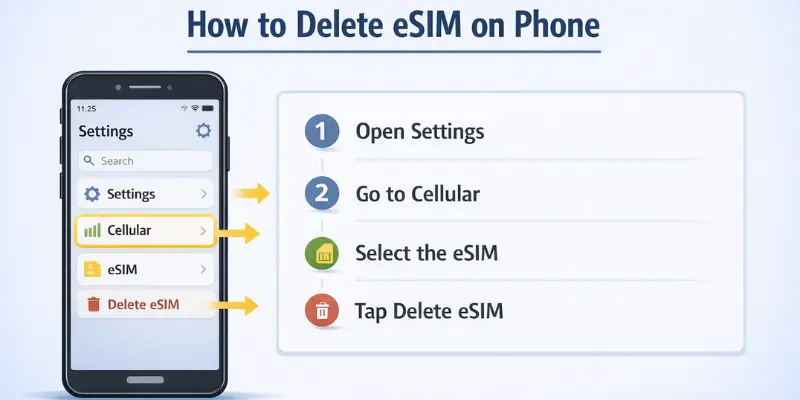
iPhone
- Open Settings.
- Go to Cellular.
- Select the eSIM you want to delete.
- Tap Delete eSIM.
- Confirm the deletion.
Android
- Open Settings.
- Go to Network & Internet (or Connections, depending on your device).
- Select SIM Manager or SIMs.
- Choose the eSIM you want to remove.
- Tap Remove eSIM and confirm.
After following these steps, the eSIM will be deleted from your device. Remember, your mobile plan may still exist with the carrier and can usually be reactivated later if needed.
Common Situations When People Delete an eSIM
People delete an eSIM for several common reasons. Understanding these situations helps you decide when it’s necessary to remove them.
- Switching carriers: When changing to a new mobile provider, users delete the old eSIM.
- Changing phones: Deleting the eSIM from the old device before activating it on a new phone.
- Factory reset: Users remove the eSIM while resetting the phone to clear all data.
- Travel eSIM removal: Temporary eSIMs for travel may be deleted after returning home.
These examples show why knowing what happens if you delete an eSIM is important before taking action.
Conclusion
Deleting an eSIM removes the mobile plan from your phone, stopping calls, texts, and mobile data. You should delete it when selling, trading, or switching phones, or for security reasons. Avoid deleting it if you are still using the device or doing a temporary reset. Understanding what happens if you delete eSIM helps you make the right choice and avoid losing network access.
FAQs
Deleting an eSIM removes the mobile plan from your phone. Your cellular connection stops, and calls, texts, and mobile data won’t work on that device. The plan usually stays active with your carrier and can be reactivated later.
No, deleting the eSIM does not cancel your phone number. The number remains with your carrier and can be used again when you reinstall the eSIM on the same or a new device.
Yes. Most carriers allow you to recover a deleted eSIM. You can reactivate it using a new QR code, through the carrier app, or by contacting your provider.
It depends on the option you choose. If you select Delete eSIM and Erase Data, the eSIM is removed along with all personal data. If you choose Keep eSIM, your mobile plan stays active while other data is erased.
Yes. Deleting an esim does not affect a physical SIM. You can still insert and use a physical SIM card on the same phone without any issues.
No. Deleting the eSIM from your old phone does not affect a new device. You just need to activate the eSIM again on the new phone to start using your mobile plan.


- Be Respectful
- Stay Relevant
- Stay Positive
- True Feedback
- Encourage Discussion
- Avoid Spamming
- No Fake News
- Don't Copy-Paste
- No Personal Attacks
- Be Respectful
- Stay Relevant
- Stay Positive
- True Feedback
- Encourage Discussion
- Avoid Spamming
- No Fake News
- Don't Copy-Paste
- No Personal Attacks
