Types of Phone Display: Which One Is Best for You?
Published: 17 Oct 2026
Why does your friend’s phone look brighter than yours? Often, the answer is the display type. There are many types of phone displays today. Each one shows colors and brightness differently. The quick answer is simple. OLED is best for most people. LCD is a good pick for low budgets. In this guide, you will learn how they differ, which phones have the best display, and how to pick yours. Ready to start?
What Is a Phone Display?
A phone display is the part you look at and touch. It shows your photos, videos, and apps. Most people also call it the phone screen. Both words mean the same thing in daily use.
A display has three main layers:
- Panel: This layer makes the picture.
- Touch layer: This layer reads your finger taps.
- Protective glass: This layer guards the panel from scratches.
Think of a framed photo. The panel is the photo, and the glass is the cover. Now, which types of phone screens exist? Let’s see!
Types of Phone Displays at a Glance
Short on time? Here are the main types in one look.
- LCD: Good colors and a low price. It is best for budget phones.
- OLED: Rich, deep colors and a medium to high price. It is best for movies and gaming.
- Newer types: Very good quality and a high price. They appear on flagship phones.
Each type has its own strengths. Let’s start with the most common one.
What Is an LCD on a Phone?
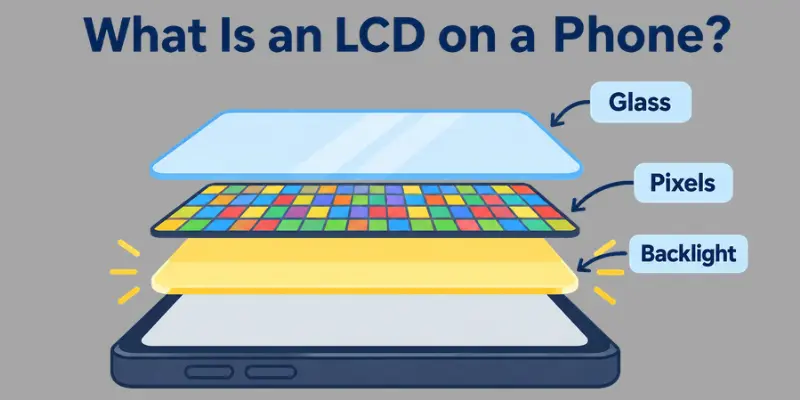
LCD stands for Liquid Crystal Display. It is the older display type, and many phones still use it today. An LCD has a backlight. This light shines through tiny dots called pixels, which make the picture. Are phone screens LED? Not exactly. Many LCDs use LED lights as the backlight, so people often say “LED screen.” But the panel is still an LCD.
TFT LCD
This is the basic LCD type. It costs less and appears on old and budget phones.
- Colors look weaker.
- The picture fades when you tilt the phone.
IPS LCD
This type is a big step up. Two friends can watch one video together, and both see clear colors.
- Colors look more natural.
- Viewing angles are wide.
Pros and Cons
Pros:
- Low price
- Long life
- Easy to repair
Cons:
- Black looks gray
- Thicker body
- More battery use
What Is an OLED Display?
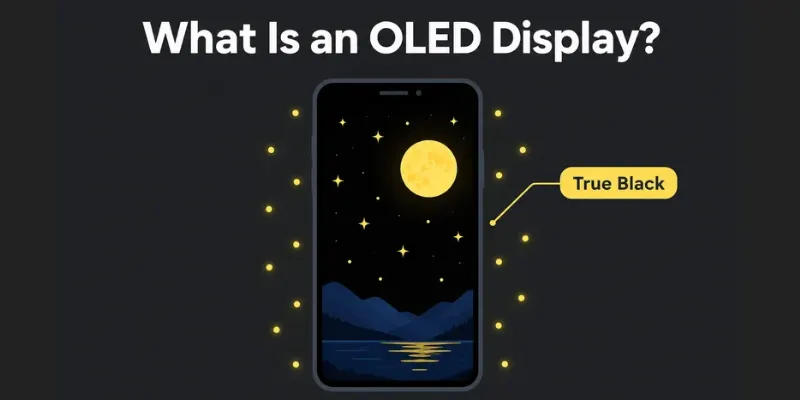
OLED stands for Organic Light-Emitting Diode. In this display, each pixel makes its own light. There is no backlight. When a pixel turns off, it shows true black. Think of a night scene in a movie. On an OLED, the dark sky looks truly dark, and the stars pop out. That is why many people love OLED for movies and gaming.
AMOLED and Super AMOLED
These are the most common OLED types on Android phones. Samsung made them popular.
- Colors look bright and rich.
- Super AMOLED has a thinner touch layer, so the screen reacts faster.
POLED and Flexible OLED
These types use plastic instead of glass under the panel. This makes the screen bendable.
- Phones can have curved edges.
- Foldable phones use this type.
Pros and Cons
Does OLED sound perfect? It has good and bad sides too.
Pros:
- Deep black and rich colors
- Thin design
- Battery saving in dark mode
Cons:
- Higher price
- Burn-in can happen if one image stays on screen for a long time
- Screens may look dim at low brightness on some phones
Newer Display Types You May See
Display technology keeps growing. New types now appear on flagship phones. Some save battery, and some bend in half. Let’s meet the main ones.
LTPO
This type is an upgraded OLED. It changes the refresh rate on its own. The refresh rate is how many times the screen updates each second.
- It slows down when you read, so the battery lasts longer.
- It speeds up when you game, so the screen feels smooth.
Foldable Displays
These screens fold like a book. They use flexible OLED. Open the phone, and you get a small tablet.
- You get a big screen in your pocket.
- The fold line can show a small crease.
Mini-LED and Micro-LED
These types use tiny lights for better contrast. They are rare on phones today.
- Mini-LED is more common on tablets and TVs.
- Micro-LED is still very costly.
LCD vs OLED: Quick Comparison
Can’t pick between the two? This quick comparison will help. Let’s check them side by side.
- Colors: OLED shows richer colors. LCD shows good, natural colors.
- Black level: OLED shows true black. LCD shows dark gray.
- Brightness: LCD stays bright in the sun. Top OLED phones also get very bright.
- Battery: OLED saves power in dark mode. LCD uses the same power all the time.
- Price: LCD costs less. OLED costs more.
- Lifespan: LCD lasts long. OLED can show burn-in after many years.
Who Should Pick Which?
- Pick OLED if you watch movies, play games, or love deep colors.
- Pick LCD if you want a low price and a long-lasting screen.
Display Features That Matter Beyond Type
The display type is only half the story. Two OLED phones can look very different. Why? Other features change the look and feel. Let’s check the key ones.
Refresh Rate
This is how many times the screen updates each second. It is measured in Hz.
- 60Hz is basic. 90Hz and 120Hz feel smoother.
- Higher rates make scrolling and games look better.
Brightness
Brightness is measured in nits. More nits mean a brighter screen.
- 1,000 nits or more is easy to read in the sun.
- Low nits can look dim outside.
Resolution and HDR
Resolution is the number of pixels. HDR adds more light and color detail.
- Full HD is sharp enough for most people.
- HDR makes videos look more real.
Eye Comfort and Glass
Some screens flicker very fast to dim the light. This is called PWM dimming. It can tire sensitive eyes.
- Look for “high-frequency PWM” or “DC dimming” in the specs.
- Strong glass protects the screen. Read our gorilla glass guide to learn more.
Which Phone Has the Best Display Quality?
Many people ask this question. The answer changes every year, because new phones launch all the time. So first, learn how to judge a display. Then check the top phone groups. Which one fits you?
How to Judge Display Quality
Look at these four things:
- Brightness: Can you read the screen in the sun?
- Color accuracy: Do colors look real and not too strong?
- refresh rate: Does scrolling feel smooth?
- Eye comfort: Does the screen feel easy on your eyes?
Top Phones for Display Quality
Flagship phones usually win here. They use top OLED or LTPO panels.
- Samsung Galaxy S Ultra series: Known for bright and sharp screens.
- iphone Pro series: Known for smooth motion and true colors.
- google pixel Pro series: Known for natural colors and good outdoor visibility.
Best Picks for Mid-Range and Budget
You do not need a flagship to enjoy a great screen.
- Mid-range phones often have AMOLED panels with 90Hz or 120Hz.
- Budget phones often use IPS LCD. Look for Full HD and good brightness.
Check the Latest Reviews
Models change fast, so always check new tests before you buy.
- Read display tests on DisplayMate.
- Compare specs on GSMArena.
How to Choose the Right Display
Now you know the main types. So, which one is right for you? Your needs decide the answer. Check the tips below.
For Gaming
Gamers need speed and smooth motion.
- Pick an OLED or LTPO screen.
- Look for 120Hz or higher.
For Movies and Videos
Movie fans need deep colors and strong contrast.
- Pick an OLED screen with HDR support.
- Choose a bright and sharp panel.
For Reading and Study
Long hours need comfort for your eyes.
- Look for high-frequency PWM or DC dimming.
- Turn on dark mode or eye comfort mode.
For Low Budget
You can still get a good screen.
- Pick an IPS LCD with Full HD.
- Check the brightness in nits.
For Long Battery Life
Smart screens save power.
- Pick an LTPO screen if you can.
- use dark mode on an OLED phone.
Which need is closest to yours? Pick it, and you will find your match.
How to Check Your Phone’s Display Type
Do you know what screen your phone has? You can find out in a few minutes. Follow these steps.
Step 1: Check the Phone Settings
Open Settings and tap About phone. Look for the model name. Some phones also show the display type here.
Step 2: Check the Box or Spec Sheet
Look at the box or the user guide. The specs list the display type. You may see words like AMOLED or IPS LCD.
Step 3: Use a Trusted Spec Site
Search your model name on GSMArena. Open the phone page and find the Display section. It shows the type, size, refresh rate, and brightness.
Quick tip: Some brands use their own names, like “Dynamic AMOLED” or “Liquid Retina.” Search the name to learn more.
Conclusion
Now you know the main types of phone displays. LCD is a smart pick for low budgets, while OLED is best for most people because of its deep colors and true black. Newer types like LTPO add smooth motion and better battery life. Remember to check extra features like refresh rate, brightness, and eye comfort, and read the latest reviews before you buy. Here is your next step: check your phone’s display type today. Which display does your phone have?
Faqs
Mostly, yes. AMOLED gives deeper black and richer colors. LCD costs less and lasts long. Pick based on your budget and needs.
OLED is best for most people. It looks great for movies, games, and photos. LTPO OLED is even better for battery life.
No. Many phones use LCD with an LED backlight. Others use OLED, where each pixel makes its own light.
No. The display type is part of the phone’s hardware. You can only change the screen settings, like brightness and refresh rate.
It can, but it is rare. Burn-in happens when one image stays on screen for many hours. Use auto-brightness and a changing wallpaper to stay safe.
Look for high-frequency PWM or DC dimming. Also, turn on eye comfort mode at night. Take short breaks from the screen too.

- Be Respectful
- Stay Relevant
- Stay Positive
- True Feedback
- Encourage Discussion
- Avoid Spamming
- No Fake News
- Don't Copy-Paste
- No Personal Attacks
- Be Respectful
- Stay Relevant
- Stay Positive
- True Feedback
- Encourage Discussion
- Avoid Spamming
- No Fake News
- Don't Copy-Paste
- No Personal Attacks
