What Is Data Roaming? Meaning, Cost, and How to Control It
Published: 14 Oct 2026
You land in a new country. You open your phone to check a map. A week later, a bill arrives. It is much bigger than you expected. What happened? Your phone used data roaming. So, what is data roaming? It means your phone uses another network when you leave your home network. That can cost extra money. Is data roaming on in your phone right now? In this guide, you will learn what data roaming means, how it works, and what it costs. You will also learn how to turn it on or off and avoid surprise charges.
What Is Data Roaming?
Data roaming means using mobile data on another company’s network. It happens when you leave your own phone company’s coverage area. Your phone company has deals with partner companies. So your phone joins a partner network by itself. This can happen in another country. It can also happen in a remote area at home.
A real-life example
Sara uses a local SIM in Pakistan. She flies to Dubai. Her phone company has no towers there. Her phone joins a local network. She opens Google Maps to find her hotel. Now her phone is using roaming data.
Good to know
- Your phone connects by itself. You do not need to do anything.
- You will see a new network name on your screen.
- The data you use on that partner network is called roaming data usage.
- Your phone company may charge extra for it.
How Does Data Roaming Work?
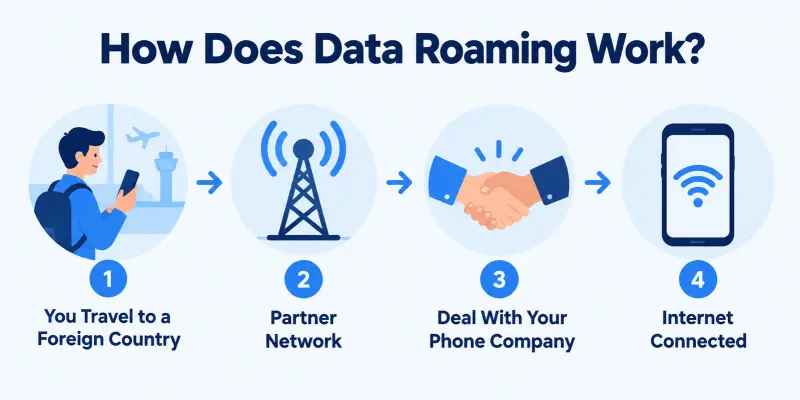
Data roaming works through deals between phone companies. Let’s look at it step by step.
Step by step
- You land in a new place. Your phone looks for a signal.
- Your phone finds a local network. This is the partner network.
- The partner network asks your home company, “Is this person your customer?”
- Your home company says yes.
- Your phone gets internet, calls, and texts.
All this takes a few seconds. You do not see any of it.
A real-life example
Think about an ATM. You use another bank’s ATM when your bank has none nearby. You get your cash. But the other bank may charge a fee. Data roaming works the same way.
What uses roaming data?
- Maps and email
- Social media and messaging apps
- Web browsing
- Apps that update in the background
Do you know which apps use data on your phone? Check this before you travel.
International vs. Domestic Roaming
There are two types of data roaming. Let’s look at each one.
Domestic Roaming
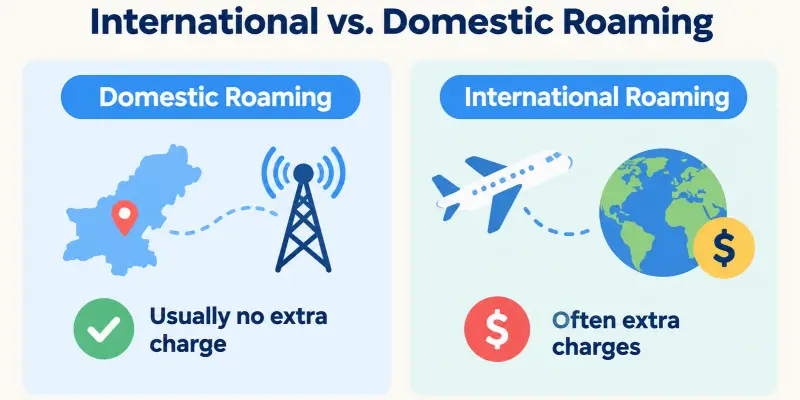
Domestic roaming happens inside your own country. Your phone joins a partner network because your company has weak coverage there.
Example: Ali lives in Lahore. He drives to a small village in the mountains. His company has no tower there. His phone joins a partner network. Ali sees nothing different.
Domestic roaming usually costs nothing extra. Most companies include it in your plan.
International Roaming
International roaming happens when you leave your country. Your phone joins a foreign network.
Example: Sara flies from Islamabad to London. Her phone joins a British network. Her company may charge extra for this.
International roaming often costs more. Rates change from company to company. They also change from country to country.
Quick Comparison
| Points | Domestic Roaming | International Roaming |
| Where | Inside your country | Outside your country |
| Cost | Usually no extra charge | Often extra charges |
| Risk of big bills | Low | Higher |
Does Data Roaming Cost Money?
Yes, it can. But it depends on your phone company and your plan.
Why Does Roaming Cost Extra?
- Your company pays the partner network for your data.
- Your company may pass that cost to you.
- Rates change from country to country.
What Does “Free Roaming” Mean?
- Free roaming means your plan includes roaming at no extra charge.
- It often covers your home country.
- Some plans also cover a few other countries.
Are Roaming Charges Still a Thing?
- Yes. Many companies still charge for international roaming.
- Some companies sell travel passes instead.
- A pass gives you a set amount of data for a set number of days.
A real-life example
Sara flies to London. She does not buy a pass. She uses maps and video calls for a week. Her company charges her for all that data. The bill is high. Sara could have bought a travel pass before her trip.
What Should You Do?
- Call your company before you travel.
- Ask about roaming rates for your country.
- Ask if a travel pass is available.
Do you know what your plan includes?
What Is Roaming Data Usage?
Roaming data usage is the data your phone uses on a partner network. Your phone company counts it apart from your normal data. You can often see it on your bill or in your account.
What Counts as Roaming Data Usage?
- Loading maps, web pages, and email
- Scrolling social media and sending messages
- Apps that update in the background
Which Activities Use the Most Data?
- Video streaming uses a lot of data.
- Video calls also use a lot of data.
- Maps and text messages use very little.
A real-life example
Ali spends one hour on Google Maps in London. That uses very little data. Then he watches one hour of videos at the hotel. That uses much more. His bill grows fast because of the videos, not the maps.
How Can You Check Your Usage?
- Open your phone settings.
- Find the mobile data or cellular section.
- Check the roaming data number.
Do you know how much roaming data you used last time?
Should Data Roaming Be On or Off?
The answer depends on where you are and what you need.
When Should You Keep It Off?
- Keep it off at home.
- Keep it off if you have no travel plans or pass.
- Keep it off if you want to avoid surprise bills.
When Should You Turn It On?
- Turn it on when you travel and need maps or email.
- Turn it on when you have a travel pass or a plan that covers roaming.
- Turn it on in an emergency.
What Is the Simple Rule?
- Check your plan first.
- Turn roaming on only when you need it.
- Turn it off again when you finish.
Remember, turning roaming off does not stop calls and texts at home. It only stops mobile data on partner networks. Wi-Fi still works.
How to Turn Data Roaming On or Off
It takes less than a minute. The steps are almost the same for on and off.
On an iPhone
- Open Settings.
- Tap Cellular. (Some phones say Mobile Data.)
- Tap Cellular Data Options.
- Tap the Data Roaming switch. Green means on. Grey means off.
On an Android Phone
- Open Settings.
- Tap Connections.
- Tap Mobile networks.
- Tap the Data roaming switch to turn it on or off.
Quick Tips
- Menu names change from brand to brand. Use the search bar in Settings. Type “roaming.”
- Check the switch again before you travel.
- Turn it off when you get home.
Did you find the switch on your phone?
Pros and Cons of Data Roaming
Data roaming helps in some cases. It hurts in others. Let’s weigh both sides.
Pros of Data Roaming
- You stay connected without Wi-Fi.
- You can use maps, email, and apps anywhere.
- You do not need to change your SIM card.
Cons of Data Roaming
- It can cost a lot of money.
- Apps use data in the background without telling you.
- It can drain your battery faster. Your phone works harder to find a signal.
- Unknown networks can carry security risks.
Which Side Wins?
It depends on your plan. A travel pass makes roaming safe and easy. No pass often means a big bill.
Which side matters more to you?
How to Avoid Roaming Charges
You can stay connected and still save money. Follow these simple tips.
Before You Travel
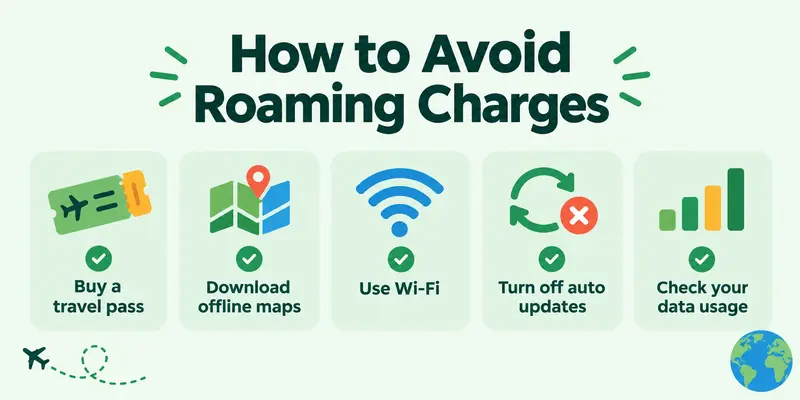
- Buy a travel pass. Ask your phone company about roaming plans for your country.
- Download offline maps. Save your route while you have Wi-Fi.
- Download your music and shows. Do this at home, not on the road.
While You Travel
- Use Wi-Fi. Hotels, airports, and cafes often have it. Be careful with public Wi-Fi. Do not enter bank details on it.
- Turn off auto updates. Let apps update only on Wi-Fi.
- Turn off roaming when you do not need it. Turn it on only for maps or urgent messages.
- Check your usage often. Look at your data number every day.
Other Options
- Local SIM card: Buy one in the country you visit. Your phone must be unlocked. You will get a local number.
- esim: This is a digital SIM. You add a travel data plan on your phone. No plastic card is needed.
Quick tip: Do you want a simple start? Turn on airplane mode, then switch on Wi-Fi. This stops mobile data completely.
Conclusion
So, what is data roaming? It is mobile data on a partner network, outside your home coverage. It can cost extra, but you can control it. Check your plan before you travel. Turn roaming on only when you need it. Do this today: open your phone settings and check your roaming switch. It takes one minute.
Faqs
Your phone may have a weak signal from your own company. So it joins a partner network. This is domestic roaming. It usually costs nothing extra.
It means your phone is on a partner network. LTE and 5G show the speed type of that network.
No. Mobile data is internet on your own company’s network. Data roaming is internet on a partner network.
Yes. Airplane mode turns off your phone’s mobile signal. You can still turn on Wi-Fi. Do you have another question about roaming?


- Be Respectful
- Stay Relevant
- Stay Positive
- True Feedback
- Encourage Discussion
- Avoid Spamming
- No Fake News
- Don't Copy-Paste
- No Personal Attacks
- Be Respectful
- Stay Relevant
- Stay Positive
- True Feedback
- Encourage Discussion
- Avoid Spamming
- No Fake News
- Don't Copy-Paste
- No Personal Attacks
