Replacement Smartphone Batteries: When and How to Replace Yours
Published: 14 Oct 2026
Does your phone die by afternoon? Do you charge it three times a day? You are not alone. Every phone battery wears out with time. Many people buy a new phone when a new battery is enough. Replacement smartphone batteries cost much less than a new device. They can also make your phone feel fresh again. In this guide, you will learn the signs of a weak battery. You will see your repair options. You will also get simple steps to replace the battery safely.
Ready to bring your phone back to full power? Let’s start.
Can You Replace a Smartphone Battery?
Yes, you can. Most smartphones allow a battery replacement. But the steps are not the same for every phone. Can you replace your phone battery at home? Sometimes. Older phones had a back cover you could pop off. Today, makers seal most batteries inside the phone. A trained technician can safely open the phone and swap the battery.
Android phones
Android battery replacement depends on the brand and model. A few models still have easy access. Most need a heat tool and small screwdrivers. Samsung, Xiaomi, and other brands offer repairs at service centers.
iPhones
Apple designs iphone batteries for technicians to replace. You cannot pop one out like an old phone battery. Apple and its approved repair shops do this job. They use parts that fit your model.
Signs Your Phone Needs a New Battery
When should you replace your phone battery? Look for these four signs.
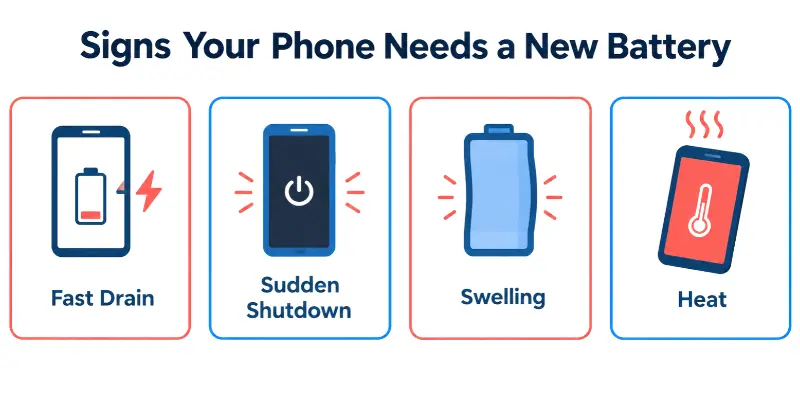
- Fast drain: Your battery falls from 100% to 30% in a few hours.
- Sudden shutdown: Your phone turns off with charge still left.
- Swelling: The screen lifts or the back cover bulges.
- Heat: Your phone feels hot even when you do not use it.
A real-life example
Alex checks his phone at lunch. It shows 50%. Then the screen goes black. He plugs in the charger, and it shows 50% again. This means the battery cannot hold power. It needs a replacement.
How often should you replace your phone battery?
Most phone batteries last about two to three years. Heavy use shortens this time. fast charging and hot weather also wear a battery down.
Do you charge your phone every day? Then expect to replace the battery sooner.
Act fast on swelling.
A swollen battery is dangerous. Stop using the phone. Do not charge it. Take it to a repair shop the same day.
Quick check
- Look at your battery health in your phone settings.
- Note how long a full charge lasts.
- Compare it with last year.
Do you see two or more signs? It is time for a new battery.
Why Phones No Longer Have Removable Batteries
Old phones had a removable phone battery. You popped off the back cover and swapped it in seconds. So why did that change?
Slim design
Makers wanted thinner phones. A sealed battery saves space. It also lets them use the whole body for power.
Water and dust protection
A back cover leaves gaps. Water can enter through them. Makers seal the phone to keep water and dust out.
The new EU rule
The EU replaceable battery law starts on 18 February 2027. It says users should be able to replace batteries in many devices. The goal is to keep phones in use longer and reduce e-waste.
But the rule has exceptions. A phone can keep a sealed battery if it meets strict standards. Strong water resistance and a long-lasting battery are two of them.
Where to Get Replacement Smartphone Batteries
How do you get a new phone battery? You have three choices. Each one has good and bad points.
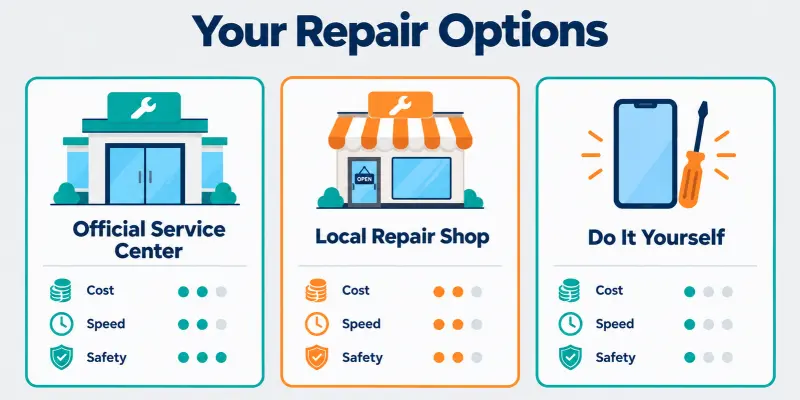
Official service center
Brands like Samsung and Apple run their own service centers. They use original parts. They often give a warranty on the work.
- Good: Safe and trusted.
- Bad: It costs more. You may wait longer.
Local repair shop
A good shop can finish smartphone repair and battery jobs fast. Prices are lower. Many shops work while you wait.
- Good: Quick and cheaper.
- Bad: Quality changes from shop to shop. Ask about the battery brand and warranty first.
DIY replacement
You can buy a battery kit and do the job yourself. This costs the least.
- Good: Low cost.
- Bad: It is risky. One wrong step can damage the phone. It can even cause a fire. Try this only if you have experience.
Quick comparison
| Option | Cost | Speed | Safety |
| Official center | High | Slow | Best |
| Local shop | Medium | Fast | Good |
| DIY | Low | Slow | Risky |
Which one should you pick?
Is your phone new or under warranty? Go to the service center. Is it older? A trusted local shop works well.
How to Replace a Phone Battery Step by Step
Do you want to try it yourself? Follow these steps. Always match the battery to your exact phone model.
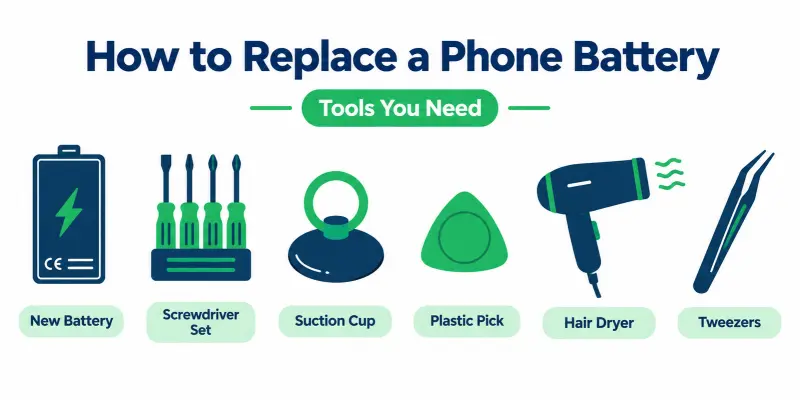
What you need
- New battery for your model
- Small screwdriver set
- Suction cup and plastic pick
- Hair dryer
- Tweezers
Steps
- Turn off your phone. Unplug the charger.
- Heat the back. Warm the edges with a hair dryer for one to two minutes. This softens the glue.
- Open the back. Lift one corner with the suction cup. Slide the plastic pick around the edges.
- Unscrew the inner cover. Remove the small metal cover over the battery plug.
- Disconnect the battery. Lift the plug gently with the plastic pick. Do this first, every time.
- Remove the old battery. Pull the adhesive tabs slowly. If it sticks, add a few drops of alcohol. This is how to remove a battery from a phone safely.
- Fit the new battery. Press it into place. Plug it in.
- Test, then close. Turn the phone on. If it works, press the back cover down firmly.
Safety tips
- Never use metal tools to pry the battery. This can cause a fire.
- Stop if the battery is swollen. Take the phone to a repair shop.
- Recycle the old battery. Do not throw it in the trash.
How Long Does a Phone Battery Replacement Take and What Does It Cost?
How long does a phone battery replacement take? Most repair shops finish in 30 minutes to one hour. A service center may take a few days. DIY can take longer, especially the first time.
What changes the cost?
- Phone model: Premium phones need pricier batteries.
- Battery type: Original batteries cost more than copies.
- Where you go: Service centers charge more than local shops.
- Labor: Sealed phones take more work.
Ask for the full price before you start. Also ask about the warranty on the battery.
What to Do After Replacing Your Phone Battery
You have a new battery. What should you do next? Follow these steps.
- Charge it fully. Use the original charger or a trusted one. Charge it once to 100%.
- Restart your phone. This helps the phone read the new battery.
- Check the battery health. Look in your phone settings. Some phones show a message if they do not recognize the battery.
- Watch it for a few days. Is it draining fast or getting hot? Go back to the repair shop.
- Recycle the old battery. Take it to a repair shop or an e-waste point. Do not throw it in the trash.
Tips to Make Your New Battery Last Longer
A new battery needs good care. Use these five tips.
- Lower your screen brightness. Turn on auto-brightness. The screen uses the most power.
- Close unused apps. Stop apps that run in the background.
- Use a good charger. Pick the original charger or a trusted brand. Cheap chargers can harm the battery.
- Keep your phone cool. Do not leave it in the sun or in a hot car.
- Charge between 20% and 80%. Try not to hit 0% or stay at 100% all night.
Battery draining fast again?
Want to know how to fix a phone battery problem? Try these quick fixes first. Restart the phone. Update your apps and software. Check which app uses the most power in settings.
Conclusion
Replacement smartphone batteries can give your phone a second life. Watch for the warning signs. Pick the repair option that fits your budget and your phone. Then take good care of the new battery. Remember, safety comes first. If a step feels risky, let a professional handle it. Is your phone ready for a new battery? Check its health today.
Faqs
Yes, but it is risky. You need the right tools and the right battery. If you feel unsure, visit a repair shop.
Not always. Low-quality batteries can wear out fast or get hot. Buy from a trusted seller. Ask about the warranty.
Yes, a technician can replace the battery in almost every phone. But most phones today have sealed batteries. You cannot swap them like old removable batteries.
It depends. An official service center keeps your warranty safe. A DIY job or an unapproved shop may void it. Check your warranty terms first.
Usually no. A worn battery cannot be recovered. You can try a restart and a software update. These help if the problem is an app or a bug.
Is the rest of your phone working well? Then replace the battery. It costs less. Is the phone slow or too old for updates? A new phone may be the better choice.



- Be Respectful
- Stay Relevant
- Stay Positive
- True Feedback
- Encourage Discussion
- Avoid Spamming
- No Fake News
- Don't Copy-Paste
- No Personal Attacks
- Be Respectful
- Stay Relevant
- Stay Positive
- True Feedback
- Encourage Discussion
- Avoid Spamming
- No Fake News
- Don't Copy-Paste
- No Personal Attacks
