SIM Cloning: What It Is, How It Works, and How to Stay Safe
Published: 8 Nov 2026
What if someone else could use your phone number? They could read your texts, make calls as you, and even steal your bank codes. This happens through SIM cloning. It means copying your SIM card data onto another SIM. The copy works like the real one. A cloned SIM can cost you money and put your privacy at risk. In this guide, you will learn how SIM cloning works and what warning signs to watch for. You will also get simple steps to protect your number. Ready to keep your phone safe? Let’s start.
What Is SIM Cloning?
SIM cloning means making a copy of a SIM card. The copy holds the same identity data as the original. The network sees both SIMs as one.
Think of a house key. A thief copies your key. Now two keys open the same door.
Every SIM card stores key data:
- IMSI: an ID number that tells the network who you are
- Ki key: a secret code that proves your SIM is real
- ICCID: the serial number printed on your SIM
An attacker copies this data onto a blank SIM. The network then accepts that blank SIM as yours. Here is the scary part. The attacker can use your number without ever touching your phone.
What Is SIM Card Cloning Used For?
Attackers clone SIMs for a few main reasons:
- Make calls and send texts from your number
- Read the OTP codes sent to you
- Break into your bank and social media accounts
- Steal your identity
Imagine a thief gets your bank’s OTP code. He can empty your account before you notice anything.
Is SIM Cloning Legal?
No. Cloning someone’s SIM without their consent is a crime in most countries. Police and forensic teams are the exception. They clone a SIM with a legal order. They use it to study evidence in a case.
Can You Clone a SIM Card?
Yes, you can clone a SIM card, but it is not easy today. Old SIM cards had weak security, so hackers copied them with simple tools. New SIM cards guard their secret key much better. Think of an old padlock and a modern safe. A thief picks the padlock fast, but the safe takes far more skill. Copying contacts is easy, but copying the secret identity of a SIM is very hard.
Which SIM Cards Are at Risk?
Some SIM cards face more danger than others:
- Very old SIM cards: They use outdated security.
- SIM cards with no PIN: Anyone who holds the SIM can try to use it.
- SIM cards a stranger can reach: A phone left at a repair shop is a good example.
Is an eSIM Safer?
An eSIM lives inside your phone. Nobody can pull it out and copy it. This makes physical cloning much harder. Still, no tool is perfect. You need strong passwords and app-based codes too.
Do you know which type of SIM your phone uses? Check your phone settings today.
How Does SIM Cloning Take Place?
SIM cloning happens in a few simple stages. First, the attacker gets access to your SIM or its data. Next, the attacker pulls out your SIM’s secret identity data. Then the attacker writes that data onto a blank SIM. Now two SIMs share one identity. The network cannot tell which one is real.
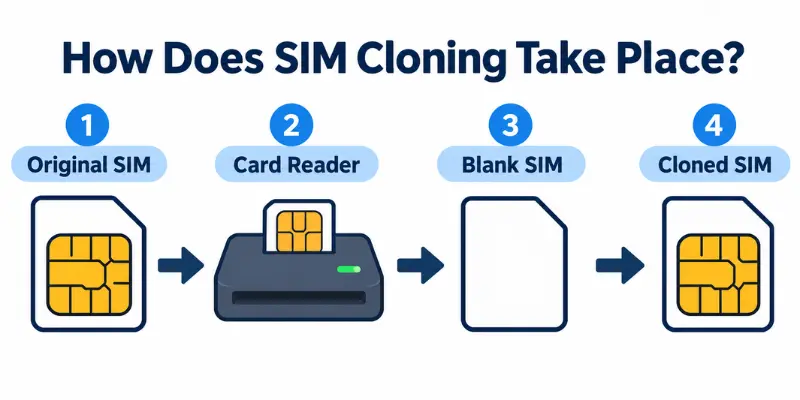
Think of a photocopier in an office. Someone steals a key card and copies it. Now two cards open the same door.
The Role of a SIM Cloning Device
A SIM cloning device is a card reader and writer. It reads data from one SIM and writes it to another. Police and forensic teams use this type of tool in legal cases. Criminals misuse the same idea.
Here is the good news. Modern SIM cards protect their secret key well. A simple device cannot read it. This is why cloning a new SIM is so hard today.
Common Attack Methods
Attackers use different ways to reach your SIM data:
- Physical access: Someone borrows your SIM or phone, even for a short time.
- Malware: A harmful app on your phone steals your data.
- Social engineering: A scammer tricks a telecom worker or you into sharing details.
- SIM-jacker-style attacks: A hidden message sent by SMS targets the SIM itself.
Did you ever leave your phone with a stranger? Even a few minutes can be risky. Keep your phone with you, and use a SIM PIN.
SIM Cloning vs. SIM Swapping
Many people mix up these two attacks. They sound alike, but they work in different ways. With SIM cloning, the attacker copies your SIM. Your own SIM keeps working, so you may not notice anything. With SIM swapping, the attacker tricks your carrier into moving your number to a new SIM. Your own SIM stops working right away.
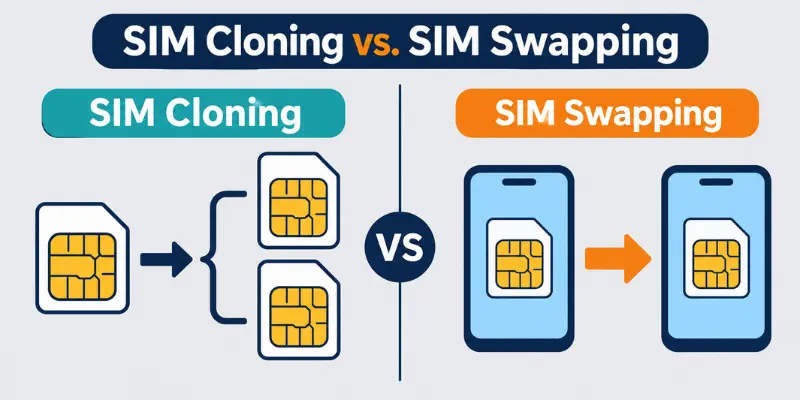
Key Differences
SIM cloning:
- The attacker copies your SIM data.
- Your SIM keeps working.
- It is hard to spot.
- It needs a device and access to your SIM.
- It is rare today.
SIM swapping:
- The attacker moves your number to a new SIM.
- Your SIM stops working.
- It is easy to spot because you lose signal.
- It needs a trick on your carrier.
- It is more common today.
What Is SIM Hijacking?
SIM hijacking is another name for a SIM swap attack. The attacker takes control of your number. Then the attacker resets your passwords using the codes sent to that number.
Here is a real-life example. A user suddenly loses signal on his phone. He thinks it is a network problem. In that time, a scammer gets his bank code on the new SIM and empties his account.
Why does this matter to you? Both attacks aim at the same target. They want your phone number and your OTP codes. So protect your number in both ways.
Warning Signs of a Cloned SIM
A cloned SIM is hard to spot. Your phone keeps working, so you may feel safe. But small clues can show that something is wrong. Watch for these signs:
- Strange activity: You see calls or texts in your history that you never made.
- Unexpected bills: Your bill is higher than usual.
- Messages from you: Friends say they got texts from your number that you did not send.
- Missing codes: You do not get your OTP codes or some calls.
- Odd phone behavior: Your battery drains fast, or your signal drops without a reason.
- Security alerts: Your bank or apps warn you about logins you did not make.
Think of a neighbor who hears your doorbell ring when you are not home. Something is off. You should check right away. Did you notice any of these signs lately? Do not ignore them. One sign alone may be a small network issue. But two or three signs together need quick action.
How to Check If Someone Is Using Your SIM Card
You can check this in a few easy steps:
- Check your call and SMS history. Look for numbers you do not know.
- Call your carrier. Ask for your recent activity and any SIM change requests.
- Review your bank alerts. Look for payments or logins you did not make.
- Check your account logins. Open the security page of your email and social media. See if new devices have signed in.
- Watch your data use. A sudden jump can be a red flag.
If you find anything strange, call your carrier at once. Then change your passwords.
Risks and Real-World Impact
A cloned SIM can hurt you in many ways. The damage goes beyond one lost call. Your phone number is the key to many of your accounts. With that key, a thief can open many doors.
Main Risks of a Cloned SIM
- Bank and wallet fraud: The thief receives your OTP codes. He can move your money before you notice.
- Account takeover: He resets your email and social media passwords. Then he locks you out.
- Identity theft: He poses as you. He can trick your friends and family.
- Business losses: A hacked number can expose work chats, client data, and company accounts.
- Crypto theft: Many crypto accounts use SMS codes. A thief can drain them fast.
- Loss of privacy: He can read your private texts and listen to your calls.
How Long Does the Damage Last?
The harm can last long. You may spend weeks fixing your accounts. You may also lose trust with friends and clients. This is why quick action matters.
A Real-Life Example
Think of a shop owner who gets no calls for a whole day. He thinks the network is down. Meanwhile, a thief uses his number to reset his email password. Then the thief reaches his bank app. By evening, his business money is gone.
Do you use SMS codes for your bank or email? Then your phone number needs strong protection.
How to Protect Yourself from SIM Cloning
You can stop most SIM attacks with a few simple habits. These steps take only a few minutes. Do them today.
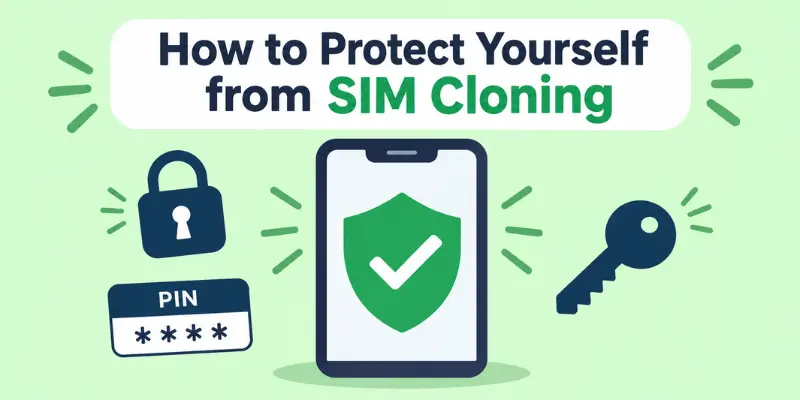
Easy Steps to Keep Your SIM Safe
- Set a SIM PIN. This PIN locks your SIM. A thief cannot use it in another phone without the PIN.
- Add a carrier account PIN. Ask your carrier to add a secret code to your account. This blocks SIM swap tricks.
- Use app-based 2FA. Pick an authenticator app instead of SMS codes. A cloned SIM cannot read them.
- Switch to an eSIM. If your phone supports it, an eSIM is safer. Nobody can pull it out and copy it.
- Keep your SIM with you. Do not hand your phone or SIM to strangers. Take out your SIM before a repair, if you can.
- Avoid unknown links and apps. Install apps only from official stores. Do not tap links in strange messages.
- Update your phone. Updates fix security holes. Turn on automatic updates.
- Never share your details. Do not give your SIM number, OTP, or ID to callers. Your carrier will never ask for your OTP.
Which of these steps have you done already? Start with the SIM PIN. It takes two minutes.
Tips for Businesses
Companies face higher risk. A hacked number can expose client data. Teams can follow these tips:
- Train staff to spot scam calls.
- Check customer identity with strong steps.
- Stop using SMS-only codes for work accounts.
- Use work SIMs with PIN protection.
What to Do If Your SIM Was Cloned
Act fast if you think your SIM was cloned. Every minute counts. Follow these steps in order.
Steps to Take Right Away
- Call your carrier. Tell them you think your SIM was cloned. Ask them to block the old SIM and give you a new one.
- Change your passwords. Start with your email, bank, and social media. Use strong and new passwords.
- Switch to app-based 2FA. Stop using SMS codes for your important accounts.
- Contact your bank. Ask them to check your recent activity. Ask them to freeze your cards if needed.
- Warn your contacts. The thief may message your friends and family as you. Tell them to ignore any odd requests.
- Report the crime. File a complaint with your local cybercrime authority. Keep your call logs and bank alerts as proof.
What to Do in the Next Few Weeks
The danger does not end in one day. Keep an eye on your accounts for a few weeks:
- Check your bank statements often.
- Watch for login alerts in your email and apps.
- Check your credit report if your country offers one.
- Look out for scam calls that use your personal details.
Did you save your call logs and bank alerts? Keep them safe. Police and banks may ask for them.
A Short History of SIM Cloning
SIM cloning is not new. It started in the early days of digital mobile networks.
Key Moments in SIM Cloning
- Late 1990s: Researchers found a weak spot in the code that protected SIM cards. They showed that experts could read the secret key and copy a SIM.
- Early 2000s: Phone makers and carriers added stronger security to new sim cards.
- 3G, 4G, and 5G era: Newer networks use better methods to check a SIM’s identity. Cloning a modern SIM became much harder.
- Rise of SIM swapping: Attackers changed their plan. They moved from copying SIMs to tricking carriers.
- 2019: Researchers found Simjacker. This attack used a hidden text message to target the SIM itself.
Why Does This History Matter?
- Attackers always look for new weak spots.
- Old tricks fade, but new ones appear.
- You must keep your own security up to date.
Myths About SIM Cloning
Many people believe wrong things about SIM cloning. These myths can make you careless. Let’s clear them up.
Common Myths and Facts
- Myth: Anyone can clone a SIM with a free app.
Fact: No app can copy a modern SIM. Cloning needs special tools and access to the SIM. - Myth: A call from a stranger can clone my SIM.
Fact: A call alone cannot copy your SIM. But a scammer can trick you into sharing details. Never give your OTP or SIM number to a caller. - Myth: Only rich or famous people are targets.
Fact: Anyone can be a target. Thieves want your number and your codes, not your fame. - Myth: An esim can never be attacked.
Fact: An eSIM is safer, but it is not perfect. Thieves can still trick your carrier or steal your account details. - Myth: If my phone works, my SIM is safe.
Fact: A cloned SIM does not stop your own SIM from working. Check for the warning signs.
Which of these myths did you believe? Now you know the truth.
Conclusion
SIM cloning means copying your SIM, so someone else can use your number. It is rare today, but the risk is real. A thief can steal your OTP codes and break into your accounts. Strange calls, texts, or bills can be warning signs. Protecting your number is easy. Set a SIM PIN, add a carrier account PIN, and use app-based 2FA instead of SMS codes. Why wait? Set your SIM PIN today and keep your number safe.
Faqs
SIM cloning means copying the identity data of a SIM card onto another SIM. The copy works like the original. The attacker can then use your number.
Yes, but it is hard today. Old SIM cards had weak security and were easy to copy. Modern SIM cards protect their secret key much better.
No. A phone number alone is not enough. An attacker needs data from inside your SIM. But a scammer can still trick you or your carrier. So never share your OTP or SIM details.
Often, yes. Your carrier can sometimes spot two SIMs that use one identity. Police can also ask carriers for call and location records. Report the problem fast so they can act.
It is much harder. These networks use stronger checks to verify a SIM. Old or weak SIM cards face more risk. This is another reason to keep your SIM up to date.
Card readers and writers are sold online. People use them to back up contacts or for forensic work. But cloning someone else’s SIM is a crime. Also, a simple device cannot read the secret key of a modern SIM.



- Be Respectful
- Stay Relevant
- Stay Positive
- True Feedback
- Encourage Discussion
- Avoid Spamming
- No Fake News
- Don't Copy-Paste
- No Personal Attacks
- Be Respectful
- Stay Relevant
- Stay Positive
- True Feedback
- Encourage Discussion
- Avoid Spamming
- No Fake News
- Don't Copy-Paste
- No Personal Attacks
