Advantages and Disadvantages of Android OS
Published: 26 Aug 2026
Have you ever been frustrated by a phone that feels too complicated or restrictive? That’s where Android comes in. It’s a mobile operating system used by millions because it’s simple, customizable, and flexible.
Android offers freedom—whether you’re looking for an affordable phone, want to personalize your device, or just need a smooth, easy experience. It’s the most popular mobile OS because it fits different needs. It’s essential to understand both the advantages and disadvantages of the Android OS before deciding if it’s the right choice for you.
How Android Works: A Simple Explanation
What is Android?
Android is an operating system used on smartphones and other devices. It’s open source, which means its code is available for anyone to see, use, and modify. Think of it like a recipe that anyone can follow or even change to make their version.
What Does “Open-Source” Mean?
When something is open source, its design is free and available for anyone to use. For Android, this allows phone makers to take the basic Android system and make their own versions, adding unique features and designs.
Google’s Role in Android
Although Android is open-source, Google is the main company behind it. Google creates and updates Android with new features and improvements. Google’s role is like a chef making a recipe, while other companies can tweak it to suit their needs.
Android Skins: How Brands Customize Android
One of the excellent things about Android is that phone companies can customize it with their own skins. These skins change how Android looks and what extra features are included.
Here are two examples:
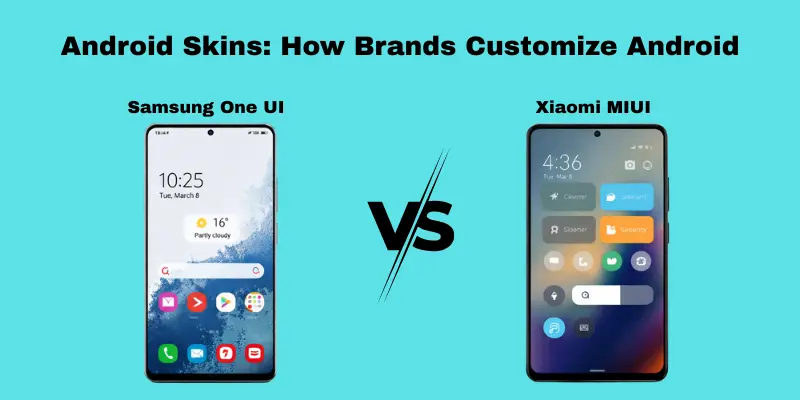
- Samsung’s One UI—Samsung adds its own design to Android, with larger icons and features like Bixby, Samsung’s virtual assistant. This skin is designed to make phones more straightforward to use, especially for people with larger screens.
- Xiaomi’s MIUI—Xiaomi’s MIUI skin changes the look of Android with colorful designs and extra features like storage management tools and customizable themes.
Why It Matters
Android’s open-source nature means different companies can create unique experiences for their users. It’s like having a basic car that you can customize with various colors, seats, and gadgets. Even though Android phones may look different, they all run on the same basic system.
The Advantage of Android OS in Offering a Wide Variety of Devices
There is a device available for every budget and need.
Android offers a wide range of devices, making it a wonderful choice for all kinds of users, whether you’re looking for an affordable phone or a high-end model with premium features.
- Affordable to premium options: Android caters to all budgets, from budget phones to top-tier devices.
- Wide selection for different needs: Android offers a range of devices to suit various preferences and lifestyles.
Budget-Friendly Options
Android offers a variety of affordable devices that include essential features such as calling, messaging, and browsing. These phones are perfect for users who need a reliable device without extra costs.
- Reliable and affordable: Budget Android phones offer great value without sacrificing basic functionality.
- Perfect for everyday tasks: These devices are ideal for basic use, like calls and social media.
High-End Devices for Premium Features
Android also offers premium devices with advanced features like high-quality cameras, powerful processors, and sleek designs, catering to users who want the latest technology.
- Advanced technology: High-end Android phones provide top performance with cutting-edge features.
- Great for demanding users: These devices are perfect for gaming, photography, and multitasking.
Flexibility for Different Needs
Android allows users to choose phones based on their needs, whether budget-friendly or high-end, offering flexibility in both price and functionality.
- Customizable features: Choose devices with specific features like longer battery life or larger screens.
- Brand and feature flexibility: Android offers options across multiple brands and unique features.
Why It Matters
The wide variety of Android devices makes it accessible to all users, regardless of their budget, lifestyle, or preferences, ensuring there’s always a phone for everyone.
How Android Offers Customization Freedom
Android gives users more control over their devices’ appearance and functionality than ios does. Here are some ways Android stands out in customization:
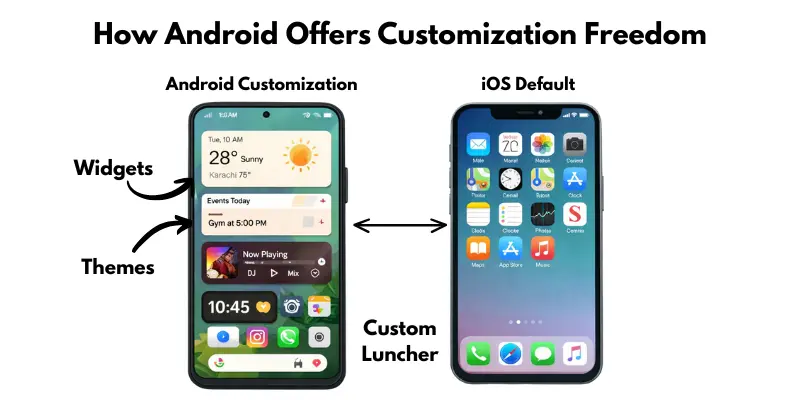
Custom Home Screen Layouts
- Move and resize icons: Arrange apps and resize icons to suit your style.
- Add widgets: Place weather, calendar, or news widgets directly on your home screen for easy access.
Custom Widgets
- Wide range of widgets: Android lets you add interactive widgets from different apps, such as clocks, weather, and music players.
- Tailored placement: You can resize and move widgets around for a personalized look.
Installing Third-Party Launchers
- Custom launchers: Android lets you install third-party launchers to completely change your phone’s interface.
- Unique themes and features: Launchers offer a variety of themes, animations, and shortcuts to customize your device fully.
Comparison with iOS
- Limited options on iOS: iOS allows minimal customization, mostly restricted to wallpaper and app arrangement.
- More freedom on Android: Android offers greater flexibility, letting users fully personalize their phone’s look and behavior.
How Android Offers Affordable Phones for Different Types of Users
Android offers phones at various price points, making it easy to find a device that suits different budgets and needs.
Budget Phones Under $200
- Affordable and basic: Ideal for users who need a phone for calls, texts, and browsing.
- Target audience: Students or budget-conscious users.
- Example: Samsung Galaxy A32, Moto E.
Mid-Range Phones Between $200 and $500
- Good balance of features: Offers better performance, storage, and cameras.
- Target audience: Families or professionals needing a reliable phone.
- Example: Google Pixel 6a, Samsung Galaxy A52.
Premium Phones Over $500
- Top features: Best cameras, processors, and designs for high performance.
- Target audience: Tech enthusiasts, gamers, and professionals.
- Example: Samsung Galaxy S22, Google Pixel 7.
The Benefits of Google Integration in Android
Google integration in Android enhances productivity and simplifies daily tasks by providing seamless access to a variety of useful tools. Together, these tools simplify and organize your life.
Google Calendar for Managing Schedules
- Stay organized: Manage appointments, set reminders, and share schedules.
- Example: Sync events across devices for smooth scheduling.
The Advantage of Expandable Storage in Android Phones
Android phones offer expandable storage via a microSD card, providing flexibility and cost savings that iPhones don’t.
Easy to Add More Space
- Expandable storage: Simply add a microSD card to increase your phone’s storage.
- Example: Add extra space for apps, photos, and videos without hassle.
Comparison with iPhones
- No microSD support on iPhones: iPhones don’t allow expandable storage.
- Higher cost for more space: Users must pay more upfront for higher storage models.
Cost-Saving Benefits
- Affordable upgrades: MicroSD cards are cheaper than upgrading to a higher storage iphone model.
- Example: A 128gb microSD card costs less than $30, saving you $100+ compared to iPhone storage upgrades.
Why It Matters
Expandable storage in Android saves money and offers flexibility, giving users more space without the high cost of larger storage phones.
Google Maps for Navigation
- Easy navigation: Get directions, traffic updates, and route planning.
- Example: Find the fastest route and avoid delays during your commute.
Google Drive for Cloud Storage
- Store and share files: Save documents, photos, and videos securely in the cloud.
- Example: Access and share files across devices with ease.
Why It Matters
Google tools in Android work together to simplify tasks, from scheduling and navigation to file storage, making life more efficient.
The Multitasking Features of Android
Android’s multitasking features, such as split-screen mode, let you use two apps at once, improving productivity.
Split-Screen Mode for Multitasking
- Use two apps simultaneously: View and interact with two apps at the same time.
- Example: Work on a document while checking emails.
Real-Life Use Cases
- Work: Edit a document while attending a video call.
- Study: Refer to notes while taking notes or reading a textbook.
How It Helps Balance Tasks
- Boosts efficiency: Handle work, study, and personal tasks at once without constantly switching apps.
Why It Matters
Multitasking features in Android make it easier to manage different tasks and stay productive throughout the day.
The App Freedom Android Offers
Android allows users to install apps from third-party sources via APKs, offering greater flexibility beyond the Google Play Store.
What Are APKs?
- APKs are files used to install apps directly on your Android device, even if they’re not on the Play Store.
- Example: Install apps directly from trusted websites or developers.
Installing Apps from Third-Party Sources
- Access more apps: Download apps not available on the Play Store via APKs.
- Example: Get special apps or beta versions from trusted sources.
Safety Best Practices
- Download from trusted sources: Avoid sketchy sites to prevent the installation of malicious apps.
- Check app permissions: Review permissions before installing to ensure safety.
Why It Matters
Android’s app freedom allows users to access more apps, but safety practices are key to a secure experience.
Android Beyond Smartphones: TVs, Wearables, and Cars
Android isn’t just for phones. It powers many other devices in your daily life. This is one of its biggest strengths.
Here’s where else you’ll find Android:
- Smart TVs: Android TV runs on many popular television brands. It gives you access to streaming apps, all in one place.
- Smartwatches: Wear OS powers fitness trackers and smartwatches. It tracks your steps, heart rate, and notifications.
- Cars: Android Auto connects your phone to your car’s screen. You get maps, music, and calls without touching your phone.
- Smart Home Devices: Android supports tools like Google Nest. This lets you control lights, thermostats, and cameras from one app.
Have you ever streamed a show on your TV and then checked the time on your smartwatch? Chances are, both used Android. This wide reach makes Android more than an operating system. It becomes a connected system across your whole life.
Disadvantages of Android OS
Android offers excellent flexibility but has some downsides, like delayed software updates, security risks, and performance inconsistencies. In this section, we’ll look at these challenges to help you decide if Android suits your needs.
Security Risks of Android OS and How to Stay Safe
Android is generally safe, but like any other operating system, it can still be dangerous because of malware and data breaches. But you can stay safe without worrying too much by following a few simple steps.
Potential Risks
- Malware: Harmful apps from untrusted sources can steal data or damage your device.
- Data Breaches: If apps or services are compromised, storing personal information can be risky.
Solutions to Stay Safe
- Enable Google Play Protect: Scans apps for malware.
- Use Strong Passwords: Protect your accounts with strong, unique passwords.
- Update Apps Regularly: Security patches are often included in app updates.
- Download from Trusted Sources: Stick to the Google Play Store or reputable sites.
Software Update Delays on Android Devices
Android software update delays are common due to fragmentation, where different manufacturers (like Samsung, Xiaomi, etc.) have their own update schedules.
Fragmentation and Delays
- Different timelines: Each brand has its own schedule, causing delays for some devices.
- Example: Samsung may update faster, while older or lesser-known brands may face delays.
Comparison with iOS
- Uniform updates on iOS: iOS rolls out updates to all compatible devices at once, ensuring quicker access.
- Why it matters: Android users may experience delays, while iOS updates are more consistent.
Why It Happens
- Brand control: Manufacturers manage updates, which can vary in speed, especially for older models.
- Solution: Choose brands known for faster updates, such as the Google Pixel or Samsung’s premium models.
Performance Issues on Low-End Android Phones
Low-end Android phones can experience performance issues, such as slower speeds and lagging apps, especially when running multiple tasks or using resource-intensive apps.
Common Performance Problems
- Lag and slow speeds: Phones like the Motorola Moto E or Samsung Galaxy A01 may struggle with multitasking or demanding apps.
Tips to Improve Performance
- Clear cache: Regularly clear app caches to free up space.
- Disable background apps: Close unused apps to free up memory.
- Use lighter apps: Switch to Facebook Lite or similar apps for better performance.
Optimizing Without a High-End Device
- Simplify usage: Limit open apps and remove unnecessary widgets to boost speed.
App Quality Inconsistency on Android
Android apps can vary in quality, with some working perfectly and others having bugs or crashing.
Why It Happens
- Different developer standards: Some developers maintain high-quality standards, while others may not, leading to inconsistent app performance.
- Example: Apps like Facebook or Instagram are usually stable, but lesser-known apps may experience bugs.
Developer Role and Updates
- Inconsistent updates: Some apps may not receive regular updates or bug fixes, which can affect their performance.
Managing Expectations
- Check reviews: Since app quality varies, it’s important to read user feedback and manage expectations when using Android apps.
The Issue of Bloatware on Android Devices
Bloatware refers to pre-installed apps on Android devices that are rarely used but take up valuable storage and can slow down performance.
Why It Happens
- Pre-installed apps: Manufacturers and carriers often install apps you may never use, which can consume storage and memory.
Example: Apps like social media, games, or manufacturer-specific tools can be unnecessary and take up space.
How to Remove or Disable Bloatware
- Go to Settings: Open your phone’s settings.
- Select Apps: Find and select Apps or Applications.
- Uninstall or Disable: Choose the unwanted app. If it’s removable, tap Uninstall. If not, tap Disable to stop it from running and remove it from your app list.
- Safe Removal: Avoid removing system apps or ones critical to the phone’s operation, as this could affect functionality.
Why It Matters
By removing or disabling bloatware, you free up storage and improve device performance without harming essential functions.
Battery Drain from Background Apps
Android phones can drain battery fast. This happens because many apps keep running in the background, even when you’re not using them.
- Background activity: Apps like social media or messaging keep checking for updates. This uses power all day long.
- Inconsistent optimization: Not every phone brand manages battery the same way. Some brands do this well. Others don’t, so battery life varies a lot between devices.
For example, two people with different Android phones may charge their phones once a day. But one phone might last 12 hours, while the other barely makes it to 8. The difference often comes down to how well that brand manages background apps.
Want to fix this? Close unused apps and check your battery settings often. Small habits can add hours to your battery life.
Android vs iOS
| Feature | Android | iOS |
| Customization | Highly customizable (widgets, themes, third-party launchers) | Limited customization (mostly app icons and wallpaper) |
| App Availability | Larger variety of apps, including third-party sources (via APKs) | Strict app guidelines, only available through the App Store |
| Security | Regular updates, but can be delayed due to fragmentation | Timely updates for all devices, more uniform security control |
| Software Updates | Updates vary by manufacturer; they may be delayed | Updates rolled out uniformly across all compatible devices |
| Pricing | Wide range of prices, from budget to premium | Generally, higher-priced devices, no budget options |
Pros and Cons:
- Android Pros: More customization options, a larger variety of devices, and more affordable options.
- Android Cons: Leading to delayed updates and potential security risks from third-party apps.
- iOS Pros: Timely updates, uniform security, polished app ecosystem.
- iOS Cons: Limited customization, fewer device options, higher price range.
Who Should Use Android?
Android offers various devices that cater to different needs and preferences. Here’s a breakdown of user profiles to help you choose the best Android device based on your specific needs.
1. Budget-Conscious Users
- Who they are: Individuals looking for affordable devices with essential features.
- What to prioritize: price, battery life, and basic functionality (calls, texts, and browsing).
- Buying guidance: Look for budget models under $200 from brands like Motorola, Samsung A series, or Nokia. These phones provide excellent performance for daily tasks without exceeding your budget.
2. Tech Enthusiasts Who Value Customization
- Who they are: Users who love to customize their phone’s interface, settings, and overall experience.
- What to prioritize: Customization features, high performance, and flexibility.
- Buying guidance: Go for phones with Android’s customizability features, such as Google Pixel, OnePlus, or Samsung Galaxy S series. These devices allow you to customize home screens, use third-party launchers, and tweak settings to suit personal preferences.
3. Users Looking for a Variety of Device Options
- Who they are: Users who want a wide range of choices in terms of size, features, and price points.
- What to prioritize: Variety in device design, performance, and price range.
- Buying guidance: Consider mid-range options (between $200 and $500) from Samsung, Xiaomi, or Realme. For premium options, refer to the Samsung Galaxy S series or google pixel for top-tier features and performance.
4. Brand Loyalists
- Who they are: Users who prefer sticking with a particular brand due to familiarity or past positive experiences.
- What to prioritize: Brand reputation, software experience, and customer support.
- Buying guidance: Stick with brands you trust, such as Samsung for reliable performance, Google pixel for a clean Android experience, or OnePlus for quick performance and smooth design.
Who Should Avoid Android?
Android isn’t the right choice for everyone. Here are some user profiles that might prefer other options:
1. Users Who Prefer a Seamless, Uniform Experience
- Why Android might not be the best: Android devices vary widely across manufacturers, leading to inconsistent experiences, especially with updates and app performance.
- Alternative: iOS offers a more consistent, uniform experience with timely updates.
2. Users Who Don’t Want to Deal with Customization
- Why Android might not be the best: Android’s customization options can be overwhelming for those who prefer a simple, out-of-the-box experience.
- Alternative: iOS offers a more straightforward, minimalistic user experience.
3. Users Who Prefer Timely and Uniform Software Updates
- Why Android might not be the best: Due to fragmentation, manufacturers can delay Android updates.
- Alternative: iOS provides uniform, timely updates for all devices.
4. Users Who Don’t Want to Deal with Bloatware
- Why Android might not be the best: Many Android phones come with pre-installed apps (bloatware) that can’t be easily removed.
Alternative: iOS offers fewer pre-installed apps and a cleaner experience.
Best Android Brands in 2026
Here’s an updated list of the top Android brands in 2026, ranked by performance, value for money, user experience, and innovation. This comparison will help you choose the best brand based on your needs, whether you’re looking for high-end features or budget-friendly options.
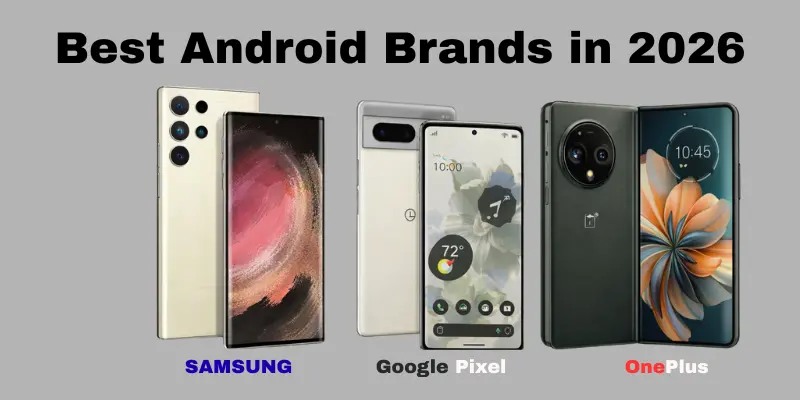
1. Samsung
- Strengths: Samsung remains a leader with its premium devices, including the Galaxy S and Galaxy Z series. Samsung is renowned for its outstanding displays, powerful performance, and excellent cameras.
- Weaknesses: The features offered by some mid-range models may justify their high price. The bloatware in the system can also be an issue for some users.
- Best for: Users who want top-tier features, excellent customer support, and a reliable update schedule.
2. Google
- Strengths: Google offers a clean Android experience with timely software updates. The Pixel series stands out for its AI-driven camera capabilities and seamless integration with Google services.
- Weaknesses: Google offers fewer hardware options than competitors, and some of its devices lack the same premium feel.
- Best for: Users who prioritize software quality, frequent updates, and excellent camera performance.
3. OnePlus
- Strengths: Known for providing high-end features at a competitive price. OnePlus delivers solid performance, fast charging, and a smooth user interface with OxygenOS.
- Weaknesses: The camera performance can sometimes fall short when compared to Samsung and Google flagships.
- Best for: Users looking for flagship-level performance at a more affordable price.
4. Xiaomi
- Strengths: Xiaomi offers incredible value for money, providing high-spec devices at budget-friendly prices. The Mi and Redmi series are popular for their solid performance and great battery life.
- Weaknesses: Xiaomi devices can come with pre-installed bloatware and aggressive ad placement in the system.
- Best for: Users who want excellent performance and features without spending too much.
5. Motorola
- Strengths: Motorola offers reliable mid-range phones with good performance and long battery life. Its Moto G and Edge series are well-regarded for providing excellent value.
- Weaknesses: Slower software updates compared to Google or Samsung. Additionally, the design might feel less premium than other high-end brands.
- Best for: Users looking for budget-friendly, no-frills devices with solid performance.
6. OPPO / Realme
- Strengths: OPPO and its sub-brand Realme offer innovative designs and strong performance at affordable prices. OPPO’s Find X and Realme’s GT series have garnered attention for offering features typically found in more expensive devices.
- Weaknesses: Software support can be inconsistent, and the custom ColorOS can feel cluttered for some users.
- Best for: Users seeking stylish devices with strong performance at a budget-friendly price.
7. Nothing
- Strengths: Known for its unique design and clean, minimalist software experience. Nothing emphasizes long software support, like their recent promises of extended Android updates.
- Weaknesses: Limited device options and no clear premium flagship, which might turn away some high-end users.
- Best for: Users who value design and long-term software support, with a focus on unique, futuristic aesthetics.
Tips to Use Android Safely and Effectively
Here’s a step-by-step guide to using your Android device safely and well. These tips will help you protect your personal data, optimize performance, and ensure a smooth experience.
1. Enable Two-Factor Authentication (2FA)
- Why it matters: 2FA adds an extra layer of security to your accounts, making it harder for unauthorized users to access your apps and services.
- How to do it: Go to Settings > Google > Google Account > Security > 2-Step Verification and follow the instructions.
2. Use a Reliable Antivirus App
- Why it matters: Even though Android is generally secure, using an antivirus app can protect you from malware, phishing attacks, and harmful apps.
- How to do it: Install a trusted antivirus app like Bitdefender, Avast, or Norton from the Google Play Store and run regular scans.
3. Update Your Software Regularly
- Why it matters: Updates often include security patches that protect your device from new threats.
- How to do it: Go to Settings > Software Update and make sure your device is running the latest version. Enable automatic updates if possible.
4. Set App Permissions Carefully
- Why it matters: Some apps may request unnecessary permissions that could compromise your privacy or consume excessive resources.
- How to do it: Go to Settings > Apps & Notifications > App Permissions. Please review and consider revoking any unnecessary permissions for each app.
5. Manage Notifications
- Why it matters: Constant notifications can be distracting and consume battery life.
- How to do it: Go to Settings > Apps & Notifications > Notifications and choose which apps can send notifications, or turn off notifications for apps that aren’t important.
6. Optimize Battery Life
- Why it matters: Prolonging battery life ensures you get the most out of your device throughout the day.
- How to do it: Go to Settings > Battery Saver to enable power-saving features. Furthermore, turn off bluetooth and Wi-Fi when not in use.
7. Protect Your Personal Data
- Why it matters: Protecting your personal data is key to avoiding identity theft and privacy breaches.
- How to do it: Use a strong password or biometric lock (fingerprint, face recognition) to secure your device. Also, enable Find My Device to locate your phone if it gets lost.
8. Back Up Your Data
- Why it matters: Regular backups ensure you don’t lose important information, such as contacts, photos, and documents.
- How to do it: Use Google Drive or other cloud services to back up your data. Go to Settings > Backup and enable automatic backups.
9. Install Apps Only from Trusted Sources
- Why it matters: Downloading apps from untrusted sources can expose your device to malware and security risks.
- How to do it: Only download apps from the Google Play Store. Avoid installing APKs from unofficial websites.
10. Use a VPN for Extra Privacy
- Why it matters: A VPN (Virtual Private Network) helps protect your privacy while using public Wi-Fi and encrypts your internet traffic.
- How to do it: Install a trusted VPN app like NordVPN or ExpressVPN from the Google Play Store and turn it on when using public networks.
Final Verdict
Android offers a wide range of features, but like any operating system, it has its strengths and weaknesses. Here’s a clear summary to help you decide if Android is the right choice for you.
Pros of Android
- Customization: Deep customization with themes, launchers, and settings.
- Device Variety: Options for every budget, from affordable to premium.
- Expandable Storage: Many phones support microSD cards for extra storage.
- App Freedom: Install apps from third-party sources.
- Affordability: Great value for money across different price points.
Cons of Android
- Software Update Delays: Updates can be slower due to fragmentation.
- Bloatware: Pre-installed apps can take up storage and slow down devices.
- Inconsistent App Quality: Some apps work better than others.
- Security Risks: Extra caution is needed when downloading from untrusted sources.
Recommendation
- Budget Users: Android offers great options, such as the Xiaomi and Samsung A series, for budget-friendly devices.
- Tech Enthusiasts: Android is perfect for those who enjoy customizing with OnePlus or Google Pixel.
- Simplicity Seekers: iOS might be better for those who prefer a seamless, uniform experience.
- Premium Users: High-end Samsung Galaxy and Google Pixel devices offer top performance and features.
Conclusion
In this article, we’ve explored the advantages and disadvantages of the Android OS. Android offers flexibility, customization, and a wide range of devices, making it an excellent choice for many users. However, issues such as software update delays, security risks, and bloatware can be concerns. It’s important to understand both sides so you can make an informed decision that fits your needs. While Android’s flexibility comes with some trade-offs, its overall value and variety can outweigh the drawbacks for many.
Now it’s your turn to decide—think smart before choosing!
FAQs
Android offers great customization with themes and widgets. It’s affordable, with a range of devices for all budgets. Many Android phones have expandable storage using microSD cards. Plus, Android provides access to a variety of apps, even from third-party sources.
Software updates can be slow or inconsistent across devices. Android also has bloatware, with pre-installed apps you can’t remove. There are security risks if you download apps from unofficial sources, and some apps may have inconsistent performance.
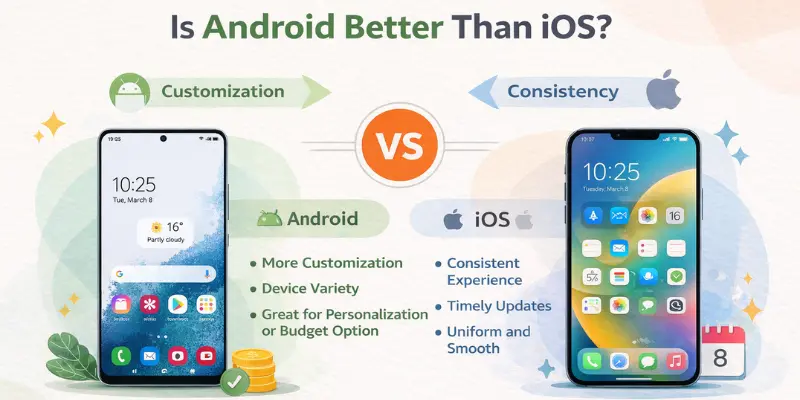
It depends on your needs. Android offers more customization and device variety, while iOS provides a more consistent, streamlined experience. Android is great if you want a personalized phone or a budget option, but iOS might be the better choice if you prefer timely updates and uniformity.
Yes, Android is highly customizable. You can change the home screen, add widgets, use third-party launchers, and modify settings to fit your style. You can also install themes and apps from outside the Play Store.
Bloatware refers to pre-installed apps that are added by manufacturers or carriers. These apps take up storage and can’t always be removed. They’re included to promote services, but they can slow down your phone and use up space.





- Be Respectful
- Stay Relevant
- Stay Positive
- True Feedback
- Encourage Discussion
- Avoid Spamming
- No Fake News
- Don't Copy-Paste
- No Personal Attacks
- Be Respectful
- Stay Relevant
- Stay Positive
- True Feedback
- Encourage Discussion
- Avoid Spamming
- No Fake News
- Don't Copy-Paste
- No Personal Attacks
