What Is the Bezel on a Phone? Complete Easy Guide (2026)
Published: 25 Sep 2026
Have you ever noticed the thin border around your phone screen? That border is called the bezel. It sits between the screen and the phone’s edge — on the top, bottom, and sides. This small area does real work. It can hold the camera or speaker in some phones too. That’s why it changes how modern your phone looks, and why more screen space always feels like a win.
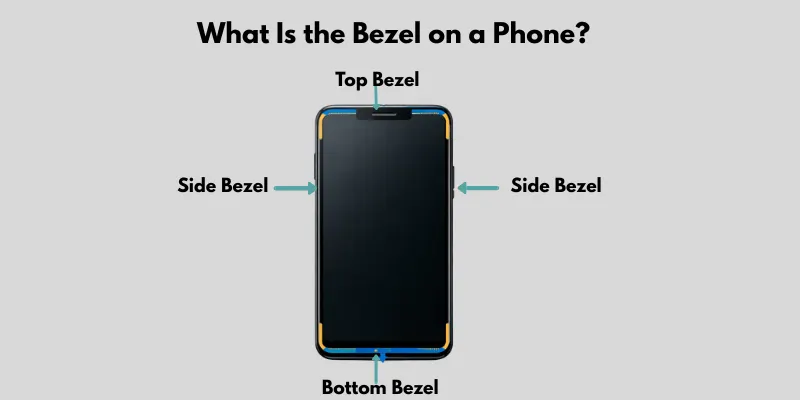
What Is the Bezel on a Phone?
The bezel is the border or frame around your phone‘s screen. It surrounds the display on the top, bottom, and sides. This area may look small, but it does real work. It can hold the camera or speaker in some phones too. That’s why it changes how modern your phone looks.
What Does a Bezel Do on a Phone?
The bezel on a phone is not just for looks. It has some important uses that many people do not notice.
- Protection: The bezel helps protect the screen from cracks if the phone falls. It acts like a small safety edge.
- Space for parts: It gives space for the front camera, sensors, and speakers, especially on some phones.
- Better grip: A bezel phone design helps you hold the device without touching the screen by mistake.
- Strong structure: The bezel in phone design adds strength and keeps the screen fixed in place.
So, when you ask what the bezel on a phone is, it is not just a border. It also plays a key role in safety, function, and comfort.
Why Do Phones Have Bezels?
Many people ask, why do phones have bezels? The answer is simple. Bezels are needed for both design and function.
- Practical reasons: Bezels protect the screen and give space for parts like cameras and sensors. These screen bezels also help you hold the phone without touching the display by mistake.
- Old vs modern phones: Older phones had thick bezels because they needed more space for buttons and hardware. Modern phones now have very thin bezels to give a bigger screen and a clean look.
- Engineering limits: It is hard to make a phone with no bezel at all. Phones still need space for internal parts and strong support, so some bezel is always there.
So, bezels are not useless. They are a smart part of phone design that balances looks and function.
Types of Bezels in Phones
Phones come with different bezel designs. Some have thick borders, while others are almost bezel-less. Understanding these types helps you see how phone designs have changed over time.
Thick Bezels
Older phones, like old iPhones, had thick borders around the screen. These thick bezels were useful for protection and function.
- Extra space for buttons, cameras, and speakers
- Strong protection for the screen against drops
Thin Bezels
Modern smartphones use thinner bezels to give more screen space while keeping the phone sturdy.
- Offers more display area without increasing phone size
- Keeps the phone light and easy to hold
Bezel-Less Phones
Some phones are designed as bezel-less phone models, with very slim edges around the screen.
- Provides an immersive, almost full-screen experience
- A tiny bezel remains for sensors, the front camera, and structural support
What Is a Bezel-less Phone?
A bezel-less phone is a device that has very tiny borders around the screen, giving it an almost full-screen look. Many people wonder what a bezel-less phone is, and the main idea is to maximize the display while keeping the phone compact. In reality, a fully bezel-less display is not possible. Phones still need a small edge for sensors, cameras, and structural support.
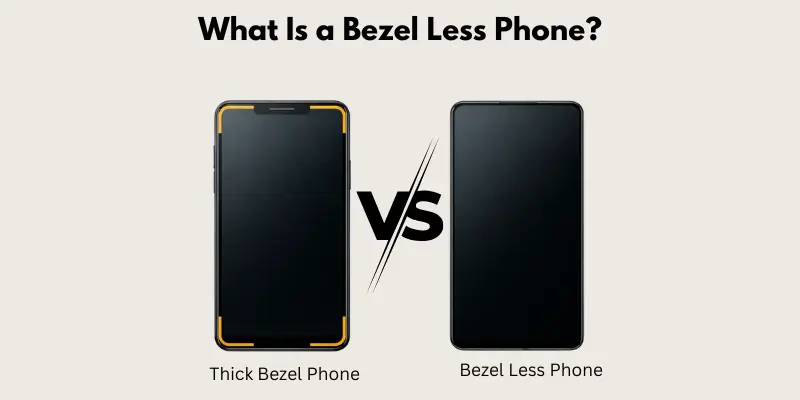
Examples: Modern smartphones like the latest iPhones and Samsung Galaxy devices use bezel-less display designs to make the screen look bigger and more immersive.
Bezels vs Bezel-Less Phones (Key Differences)
Here are the main differences between a bezel phone and a bezel-less phone explained clearly:
- Design:
- Bezel Phone: Thick borders around the screen
- Bezel-less Phone: Slim or almost no borders
- Screen Size:
- Bezel Phone: Feels smaller because borders take up space
- Bezel-less Phone: Feels bigger since more screen is visible
- Look:
- Bezel Phone: Old-fashioned design
- Bezel-less Phone: Modern and sleek appearance
What Phone Has the Thinnest Bezels in 2026?
Here are some phones known for having the thinnest bezels this year — based on general industry trends and design improvements:
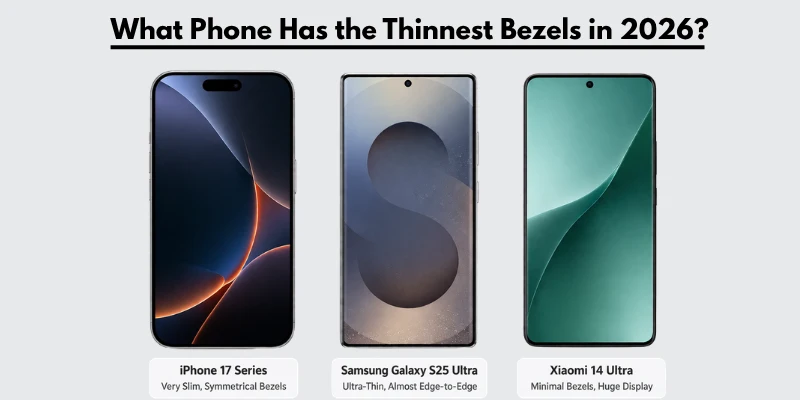
Top Phones with Very Slim Bezels
- iphone 17 Series – Apple keeps shrinking bezels every year. The screens now almost touch the edges, giving a very clean look.
- Samsung Galaxy S25 / S25+ / S25 Ultra – Samsung’s flagship phones have very slim borders, especially on the sides and top.
- Samsung Galaxy Z Fold 7 – Even though it’s a foldable, the unfolded display has very narrow bezels that feel almost edge‑to‑edge.
- Xiaomi 14 Ultra – Xiaomi pushes big screens with minimal bezels, making the display feel larger than the phone.
- OnePlus 16 – OnePlus continues to trim screen borders, making bezels almost invisible.
Notes
No phone has zero bezels, but some come very close. These models are among the phones with the thinnest bezels in 2026. If you ask what phone has the thinnest bezels, these are the top choices that give you a larger screen and a modern look.
Bezels in iPhone vs Android Phones
When comparing iPhone bezels and Android phones, there are some noticeable differences.
- Design Differences: iPhones usually have slightly thicker top and bottom bezels to house the Face ID sensors, while many Android phones push for thinner bezels to maximize screen space.
- Screen Experience: Android phones often feel more “edge-to-edge” because of their slim side bezels, but iPhones give a balanced and sturdy design.
- User Experience: Bezels in iPhones provide a comfortable grip and protect the screen, while Android phones focus on immersive viewing with larger displays.
Overall, iPhones focus on a clean yet functional bezel design, while Android devices try to offer more screen area with slimmer borders. This shows why many users search for this problem.
Advantages and Disadvantages of Bezels
Bezels are more than just a border around your phone’s screen. They play an important role but also have some drawbacks.
Advantages
- Protection: Bezels help protect the screen from cracks or damage if the phone is dropped. They act as a small buffer between the screen and hard surfaces.
- Better Grip: Bezels give your fingers space to hold the phone comfortably. This reduces accidental touches and makes the phone easier to use with one hand.
- Space for Components: Bezels can house front cameras, sensors, and speakers without covering the screen.
Disadvantages
- Less Screen Space: Thick bezels take up space, making the display feel smaller than the actual phone size.
- Old Design Feel: Phones with large bezels can look outdated compared to modern devices with thin or almost bezel-less screens.
- Less Immersive Experience: A bigger bezel can make videos and games feel less immersive because the screen doesn’t extend edge-to-edge.
Are Bezel-Less Phones Better?
Bezel-less phones look modern and offer more screen space, but they are not always better for everyone.
- Gaming and Watching Videos: A bezel-less display gives a bigger viewing area, making games and videos feel more immersive.
- Usability: Slim or no bezels can make accidental touches more common. It can also feel slippery since there is less edge to hold.
- Overall Experience: Bezel-less phones are great if you want a modern look and a bigger screen. However, phones with small bezels still offer better protection and grip.
So, whether a bezel-less phone is better depends on what you value most: screen size or comfort and durability.
Future of Bezels in Smartphones
The future of smartphone design is moving toward almost invisible bezels.
- Under-Display Cameras: New technology hides cameras under the screen, reducing the need for top bezels. This allows phones to have a true bezel-less display look.
- Full-Screen Phones: Future phones aim for edge-to-edge screens with no borders at all. Some prototypes already show almost full-screen devices, giving users a more immersive experience.
- Balanced Design: Even with thinner bezels, phones will need a small border for structural support and durability.
Conclusion
Bezels are the borders around your phone’s screen. They protect the display, hold your camera and sensors, and give you a better grip. Bezel-less phones take a different path. They offer bigger screens and a sleek, modern look. So, which one wins? It depends on you. Want durability and a solid grip? Pick bezels. Want a bigger screen and immersive feel? Go bezel-less. That’s what the bezel on a phone is — the small border that balances protection, function, and style in every device.
FAQs
The bezel is the border or frame around your phone’s screen. It protects the display, holds sensors and cameras, and provides a grip.
A bezel on a phone refers to the edges around the screen that separate the display from the phone’s body. It can be thick or thin depending on the phone’s design.
A bezel-less phone has very slim or almost no borders around the screen. It provides a larger display area and a modern look, though a tiny edge remains needed for cameras and structural support.
Phones have screen bezels for practical reasons: to protect the display, provide space for cameras and sensors, improve grip, and maintain structural strength.
In 2026, phones with the thinnest bezels include the iPhone 17 Series, Samsung Galaxy S25 Series, Samsung Galaxy Z Fold 7, Xiaomi 14 Ultra, and OnePlus 16. These phones offer almost edge-to-edge displays for a modern look.





- Be Respectful
- Stay Relevant
- Stay Positive
- True Feedback
- Encourage Discussion
- Avoid Spamming
- No Fake News
- Don't Copy-Paste
- No Personal Attacks
- Be Respectful
- Stay Relevant
- Stay Positive
- True Feedback
- Encourage Discussion
- Avoid Spamming
- No Fake News
- Don't Copy-Paste
- No Personal Attacks
