How to Create Space on My Phone (Easy & Proven Methods)
Published: 26 Sep 2026
Is your phone storage full? Are you getting annoying ‘storage almost full’ messages? This problem is very common. Apps, photos, videos, and hidden cache files fill your phone up. For example, apps like WhatsApp and TikTok quietly store a lot of data in the background. But don’t worry. In this guide, you will learn how to create space on my phone using simple and proven methods. First, you’ll learn what’s eating your space. Then, you’ll get easy steps to fix it fast. These steps are easy to follow and work for everyone. Ready to free up space and speed up your phone? Let’s get started.
Why Your Phone Storage Gets Full So Fast
Why does your phone storage fill up so fast? It happens because many things keep saving data daily. Apps like WhatsApp and Facebook store extra app data in the background. Photos and videos also take up a lot of space, especially in high quality. Cache files add hidden storage over time. Plus, system storage uses space for updates and important files. If you are thinking about how to free up space on your phone, these are the main reasons.
How to Check What’s Using Your Phone Storage
Before you delete anything, check what’s taking up space. This helps you clean the right things first.
- On Android: Go to Settings > Storage
- On iPhone: Go to Settings > General > iphone Storage
- You’ll see a list of apps, photos, and files by size
- Start cleaning from the biggest items first
How to Create Space on My Phone (Step-by-Step Guide)
Want a simple, step-by-step guide to free up phone storage? Follow these easy steps and get your space back fast.
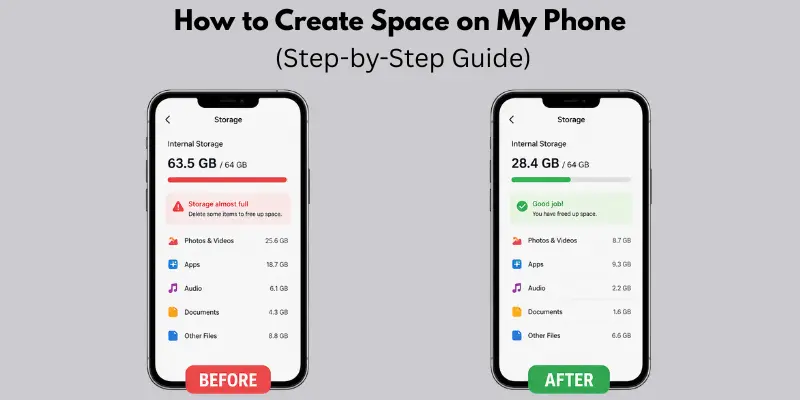
1. Delete Unused Apps
Do you have apps you never use? These apps take up space for no reason. Check your app list and remove the ones you don’t open often. For example, if you stopped using Facebook or any game, delete it.
- Check the apps you have not used in weeks
- Look at the storage size in settings
- Remove games or tools you no longer need
2. Clear App Cache and Data
What is cache? It is temporary data the app stores to load faster. Over time, this cache becomes large. Apps like Instagram and YouTube can store a lot of it. Is it safe to delete? Yes, clearing the cache is safe and will not delete your personal data.
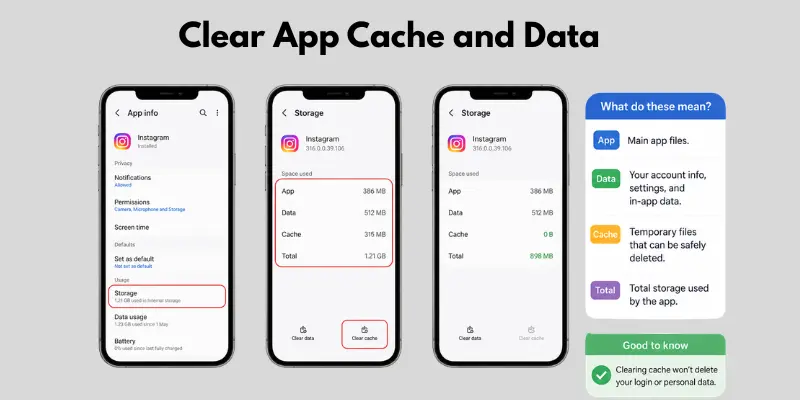
- Open app settings and tap “Clear Cache.”
- Do not clear important app data unless needed
- Repeat this for heavy apps regularly
3. Remove Large Files & Downloads
Open your Downloads folder and check for big files. You may find old APK files, PDFs, or videos you don’t need. These files can take up a lot of space.
- Delete old APK files after installing apps
- Remove unused PDFs and videos
- Sort files by size to find large items fast
4. Optimize Photos and Videos
Photos and videos use the most space. Move them to cloud apps like Google Photos to save space. You can also compress media to reduce size.
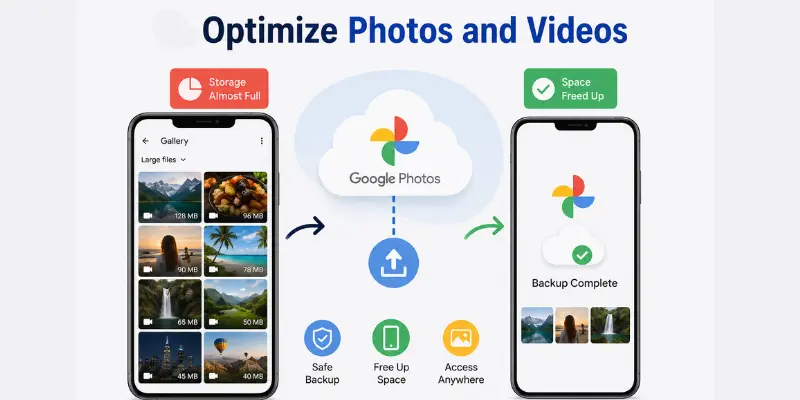
- Back up photos to cloud storage
- Delete duplicate or blurry images
- Use apps to compress videos and photos
5. Use Built-in Storage Cleaner Tools
Most phones have a storage cleaner tool in settings. It shows what you can safely delete and gives smart suggestions.
- Open storage settings on your phone
- Use the “Clean” or “Free up space” option
- Follow the suggested files to remove safely
How to Make Space on Your Phone Without Deleting Important Data
Want to know how to Free Up Space Without Deleting Important Files? You can free up storage without losing your files by using smart methods.
Use Cloud Storage
Cloud storage helps you save files online instead of on your phone. Apps like Google Photos and Google Drive let you store photos, videos, and documents safely.
- Upload photos and videos to the cloud
- Delete them from your phone after backup
- Access your files anytime with the internet
Use an SD Card (If Available)
If your phone supports an SD card, you can move files to it. This keeps your phone storage free while your data stays safe.
- Move photos, videos, and music to the SD card
- Set camera storage to the SD card
- Use it for large files to save internal space
Use Lite Apps
Lite apps are smaller and use less storage. They work like normal apps but take up less space. For example, try Facebook Lite instead of the full version.
- Install lite versions of heavy apps.
- Save storage and use less data.
- Keep your phone running fast.
What Should You Delete When Storage Is Full?
When your phone storage is full, you need to remove items that waste space but are not important. Here’s what you should look at first.
Duplicate Photos
Duplicate photos take up extra space without any reason. They often come from WhatsApp forwards or repeated clicks.
- Check the gallery for repeated images
- Use photo cleaner tools if available
- Keep only the best version of each photo
Old Videos
Old videos use a lot of storage, even short ones. Many users forget about them after saving.
- Delete old recorded videos
- Remove forwarded social media clips
- Keep only important or memorable videos
Unused Apps
Unused apps silently take space and slow your phone. Apps like TikTok or games you no longer use should be removed.
- Check apps you haven’t opened in weeks
- Uninstall heavy or useless apps
- Keep only daily-use apps
Cached Files
Cached files are temporary data saved by apps. Over time, they become large.
- Clear cache from app settings
- It does not delete your personal data
- Helps apps run smoother and faster
Advanced Tips to Free Up More Space on Your Phone
If your phone is still full after basic cleaning, try these advanced tips. These methods help you save a lot of storage and improve speed.
Clear WhatsApp Media
Apps like WhatsApp store images, videos, and voice notes automatically. Over time, this data becomes very large.
- Open WhatsApp storage settings
- Delete large or old chat media
- Turn off auto-download for media files
Delete Offline Downloads (Netflix, Spotify)
Streaming apps save offline content that takes up a lot of space. Apps like Netflix and Spotify store movies and songs offline.
- Remove watched downloaded movies or shows.
- Delete unused playlists or songs.
- Download only what you need.
Manage Google Photos Backup
Cloud apps like Google Photos help save space but can also store duplicate backups if not managed.
- Check backed-up photos in the cloud
- Delete local copies after backup
- Turn on the “free up space” option regularly
Storage vs RAM: What’s the Difference?
Many people mix these up. Storage holds your files, apps, and photos. RAM helps your phone run apps smoothly right now. Clearing storage frees up space. Clearing ram, like closing background apps, makes your phone faster. Both matter, but they solve different problems.
How to Create Space on My Phone Without Deleting Apps
If you want to know how to free up storage without uninstalling apps, you can use smart tricks that free storage but keep your apps safe.
Clear Cache Only
Cache is temporary data saved by apps to load faster. It slowly takes up a lot of space. Apps like YouTube and Instagram store a heavy cache over time.
- Go to app settings and clear cache
- Do not clear data unless necessary
- Repeat this every few weeks
Move Apps to SD Card
If your phone supports an SD card, you can move some apps and data there. This keeps internal storage free.
- Move large apps to the SD card
- Store app data like media files externally
- Keep main apps in phone memory for speed
Use Cloud Sync
Cloud sync saves your data online instead of storing everything on your phone. Apps like Google Drive help keep files safe and accessible.
- Sync photos, videos, and documents
- Access files anytime with the internet
- Reduce local storage usage without losing data
Cross-Device Guide (Extra Value Section)
Different devices also face storage problems. If you learn these simple steps, you can easily manage space everywhere.
How to Free Up Space on My iPad
iPads fill up with apps, browsing data, and media files.
- Remove unused apps from the home screen
- Clear Safari browsing data and history
- Delete downloaded videos and files
How to Free Up Space on My Computer
Computers slow down when storage gets full.
- Delete temporary (temp) files from system folders
- Uninstall software you no longer use
- Clear the recycle bin regularly
How to Free Up Space on My Laptop
Laptops also need regular cleaning to stay fast.
- Use the disk cleanup tool to remove junk files
- Check storage settings for large files
- Delete old downloads and unused folders
How to Clear the Disk Space on a Mac
Mac storage fills with system junk and trash files.
- Empty the trash to free up space instantly
- Remove system junk and cache files
- Use a storage management tool to optimize space
Common Mistakes That Fill Your Storage Again
Many people clean their phones but still face storage issues again. This happens because of small mistakes that keep filling space.
Not Clearing Cache
Cache builds up again if you ignore it. Apps like YouTube and Instagram keep saving temporary files.
- People forget to clear the cache regularly
- Apps store new cache every time you use them
- This slowly fills your storage again
Keeping Duplicate Files
Duplicate files take double the space without any need.
- Same photos saved multiple times
- Repeated downloads from apps
- Screenshots that are no longer useful
Auto-Download ON
Auto-download saves everything without asking you. Apps like WhatsApp automatically download media.
- Images and videos are downloaded in chats
- Files get saved without checking
- Turn off auto-download to save space
Pro Tips to Keep Your Phone Storage Always Free
If you want your phone to stay fast, you need to maintain storage regularly. These simple habits will help you avoid full storage again.
Monthly Cleanup Routine
Make a habit of cleaning your phone every month.
- Delete old photos, videos, and downloads.
- Clear app cache and junk files
- Check storage settings for large files
Use Cloud Regularly
Cloud storage keeps your phone light and safe. Apps like Google Photos and Google Drive help you store files online.
- Back up photos and videos often
- Delete local copies after backup
- Keep important files always accessible
Avoid Heavy Apps
Heavy apps take up a lot of space and slow down your phone.
- Install only useful apps
- Use lite versions when possible
- Remove apps you don’t use daily
Conclusion
So guys, in this article, we’ve covered how to create space on your phone in detail. My personal recommendation is to clean your phone every week and use cloud storage for photos and videos so you never run out of storage again. Simple habits make a big difference in keeping your phone fast and smooth. Try these methods today and see the change yourself. If this guide helped you, share it with others and take action now.
FAQs
You can quickly free up space by deleting unused apps and clearing the cache. Remove large files from your Downloads folder. This gives instant storage relief.
Yes, it is safe to clear the cache. It only removes temporary files that apps use. Your photos, chats, and personal data stay safe.
Start with duplicate photos and old videos. Then remove unused apps and large downloads. These usually take the most space.
Your phone fills up again because apps keep saving new data. Apps like WhatsApp and social media apps store media automatically. Regular cleaning is needed.
Yes, you can. Clear cache, move files to cloud storage, and use SD cards if available. This keeps your apps while freeing up storage.
The easiest way is to delete unused apps and large media files. Also, move photos to cloud storage like Google Photos. These steps give quick results.
Yes, photos and especially videos take up the most storage. High-quality videos can quickly fill your phone. Backing them up helps save space.




- Be Respectful
- Stay Relevant
- Stay Positive
- True Feedback
- Encourage Discussion
- Avoid Spamming
- No Fake News
- Don't Copy-Paste
- No Personal Attacks
- Be Respectful
- Stay Relevant
- Stay Positive
- True Feedback
- Encourage Discussion
- Avoid Spamming
- No Fake News
- Don't Copy-Paste
- No Personal Attacks
