How to Clean a Phone Screen Safely (iPhone, Android, and Laptop)
Published: 28 Sep 2026
When did you last clean your phone screen? Think about it. You touch your phone all day. Fingerprints, oil, and germs build up fast. A dirty screen looks bad. It can also spread germs to your face and hands. The good news is that it is easy to fix. In this guide, you will learn how to clean a phone screen safely in just 5 minutes. The steps work for iPhone, Android, and even your laptop. Let’s start!
Quick version: Clean Your Phone Screen in 4 Steps
Short on time? Follow these four steps:
- Turn off and unplug your phone. Remove the case too.
- Wipe with a dry microfiber cloth. This removes dust and fingerprints.
- Use a slightly damp cloth for stains. Wet the cloth with a little water. Never spray the phone.
- Disinfect if needed. Use a 70% isopropyl alcohol wipe. Wipe gently, then let the screen dry.
Want more detail? Keep reading!
Why You Should Clean Your Phone Screen
How many times do you touch your phone each day? Most of us lose count. Every touch leaves oil and germs on the screen. Think about where your phone goes. You may use it in the bathroom. You may check it at the gym. You may scroll it while you cook. Then you touch your face with the same hand. Smudges also make the screen hard to read. Bright light shows every fingerprint. You squint and rub your sleeve on it. That does not clean it.
What You Need
You do not need fancy tools. Most people already have these at home:
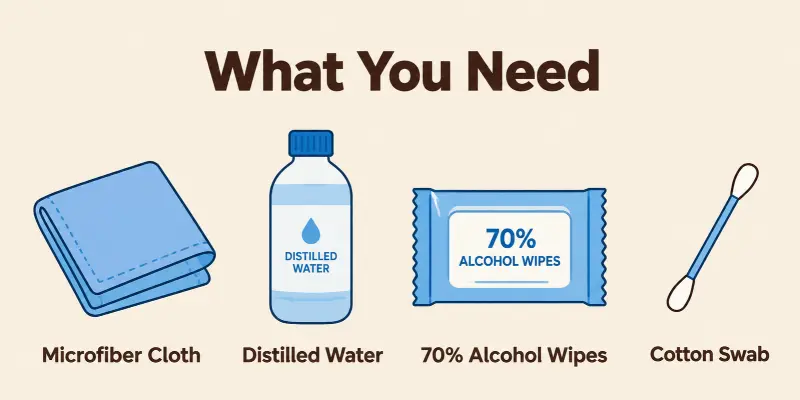
- Microfiber cloth: It is soft and lint-free. It will not scratch your screen.
- Distilled water: It leaves no marks or mineral spots.
- 70% isopropyl alcohol wipes: They kill germs. Use them only when needed.
- Cotton swab: It cleans tight corners and edges.
Do you have all four? Great! Let’s clean.
How to Clean a Phone Screen Step by Step
Ready to clean? Follow these five steps. They take about five minutes.
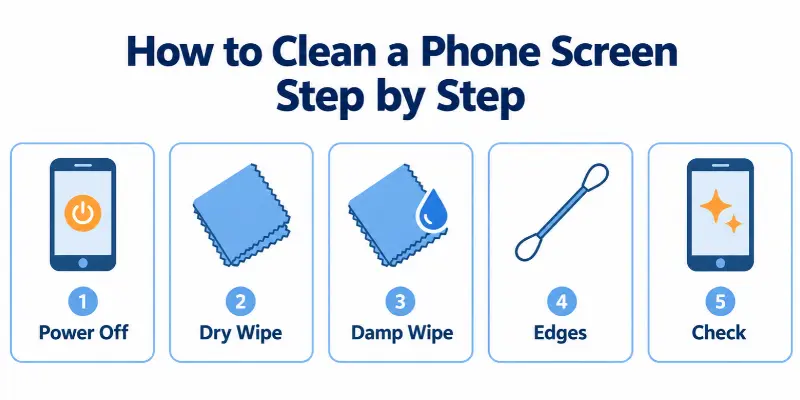
Step 1: Power Off, Unplug, and Remove the Case
Turn off your phone. Unplug any cables. Take off the case. This helps you reach the edges of the screen.
Step 2: Wipe with a Dry Cloth
Take your microfiber cloth. Wipe the screen gently. This removes dust and loose dirt. Do not press hard.
Step 3: Wipe with a Damp Cloth
Dip a corner of the cloth in distilled water. Squeeze out the extra water. The cloth should feel barely wet. Wipe the screen from top to bottom. Use light, small circles on stubborn spots.
Step 4: Clean the Edges
Dirt hides along the screen edges. Use a dry cotton swab to reach them. Go slowly and stay gentle.
Step 5: Dry and Check for Streaks
Wipe the screen with the dry side of your cloth. Tilt the phone under a light. Do you see any streaks? Wipe again until the screen looks clear.
Two Important Tips
- Never spray liquid on your phone. Put it on the cloth first.
- Keep water out of the ports. Water can damage the charging port and speakers.
That’s it! Your screen should look clean and clear.
How to Clean the Screen on an iPhone
Wondering how to clean the screen on an iPhone? Use the same five steps from above. Just keep these iphone tips in mind.
Protect the Special Coating
Your iPhone screen has a thin layer that repels oil. Experts call it an “oleophobic coating.” It helps fingerprints wipe off easily. Harsh cleaners can wear it away. So use only a soft cloth, water, or a 70% isopropyl alcohol wipe.
Skip the Compressed Air
It seems helpful, but it can push dust deeper into your phone. Apple advises against it.
Keep Moisture Out of the Openings
Water can harm the speakers and the charging port. Hold the phone so the liquid does not run into them.
Follow these tips, and your screen will stay smooth and clear!
How to Clean a Samsung Galaxy or Google Pixel Screen
Do you use an android phone? The basic steps stay the same. Each brand has a few small tips.
Samsung Galaxy
Start with a soft microfiber cloth. Add a little distilled water for stubborn dirt. Need to disinfect? Use an alcohol solution with at least 70% alcohol. Put it on the cloth first. Never apply it straight to the phone.
Google Pixel
Use a dry cloth for smudges and dust. Use a damp cloth for color marks, like makeup or dye from new jeans. Skip any wipe that has bleach.
Foldable Phones
The screen is delicate. Never pick at the edges. Never peel off the screen film. It protects the display.
Quick Tip
Not sure what is safe? Check your phone maker’s care page. It takes one minute!
Can You Use Alcohol, Hand Sanitizer or Disinfecting Wipes?
Here is a common question: Is alcohol safe for a phone screen? You may have read two different answers online. Some sites say never use it. Google and Samsung say 70% alcohol is fine.
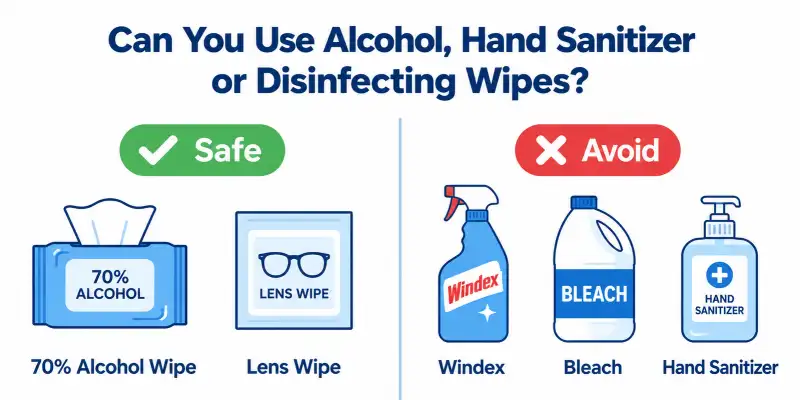
So who is right? Both are partly right. Strong alcohol and heavy rubbing can wear down the screen’s coating. But a 70% isopropyl wipe is safe for most phones when you use it lightly. Wipe once, gently. Do not do it every day.
Quick Safety Table
| Item | Safe? |
| 70% isopropyl alcohol wipe | Yes. Wipe gently. Use it only when you need to disinfect. |
| Household disinfecting wipe (no bleach) | Yes. Check the label for bleach first. Google says these are OK for pixel phones. |
| Lens or eyeglass wipe | Yes. Use it on the screen only. It is gentle and good for smudges. |
| Hand sanitizer | Not advised. It can leave a sticky film. Its alcohol level also changes by brand. |
| Windex or glass cleaner | No. It can damage the screen coating. |
| Hydrogen peroxide | No. It is too harsh for phone screens. |
| Bleach | No. Google and Samsung both say to avoid it. |
What Not to Use on a Phone Screen
The wrong product can hurt your screen. Avoid these:
- Paper towels: They feel soft, but they scratch. They also leave tiny paper bits behind.
- Compressed air: It can push dust deeper into your phone.
- Aerosol sprays: Liquid can seep into the openings.
- Bleach, ammonia, and hydrogen peroxide: These are too harsh. They can strip the screen coating.
- Rough scrubbing: Pressing hard can leave marks.
Remember this simple rule: be gentle. Would you use it on your eyeglasses? If not, skip it.
How to Remove Stains and Smudges
Stubborn marks happen to everyone. Here is how to fix each one.
- Greasy or oily screen: First, wipe the screen with a dry microfiber cloth. Then dampen the cloth with a little water and wipe again.
- Makeup or jeans color transfer: Dark jeans often leave blue marks. Mix one drop of mild soap in water. Dip a cloth in it and wipe in small circles.
- Water marks: Dry the screen right away with a soft cloth. Press lightly. Hard rubbing can scratch the glass.
- Sharpie or sticky residue: Dab a cloth with 70% isopropyl alcohol. Rub the spot slowly. Never spray liquid straight onto the screen.
How to Clean Your Screen Protector, Case and Back Cover
Your phone has more parts than just the screen. Each part needs a slightly different touch.
- Glass protector vs film: Wipe glass with a damp microfiber cloth. Films scratch easily, so use a dry cloth and light pressure.
- Silicone and hard cases: Take the case off first. Wash it with warm water and mild soap. Rinse well and let it dry fully before you put it back.
- Back and sides of the phone: Wipe with a slightly damp cloth. Keep water away from the ports and buttons.
- Camera lens: Use a dry microfiber cloth only. Liquids can leave streaks and seep into the edges.
Do you clean your case as often as your screen?
How to Clean a Notebook (Laptop) Screen
Wondering how to clean a notebook screen the safe way? Laptop screens are softer than phone screens. A few simple steps keep them spotless.
Follow these steps:
- Turn off and unplug. Shut down the laptop and remove the charger. A dark screen shows dust and smudges much better.
- Start with a dry microfiber cloth. Wipe from top to bottom in gentle, straight lines. This removes dust and light fingerprints.
- Use a slightly damp cloth for stains. Wet the cloth with a little water. Squeeze out the excess. Wipe the stain softly.
- Avoid pressing hard. Heavy pressure can leave bright spots on the display.
Real-life example: Many people spray cleaner on the screen, and the liquid runs into the edges. Spray the cloth instead.
How Often Should You Clean Your Phone?
Your phone touches your hands all day. So it collects germs fast. Use this simple plan:
- Quick wipe: Do it daily with a dry microfiber cloth.
- Full clean: Do it once a week. Include the case and ports area.
- Disinfect: Do it after travel, sickness, or time in public places.
Conclusion
Now you know how to clean a phone screen the safe way. You only need a few simple habits. Start with a dry microfiber cloth to remove dust and fingerprints. Then use a slightly damp cloth for stubborn marks. Always wipe gently, because hard pressure can harm the display. Keep liquids away from ports and edges. Clean your phone and laptop often, and disinfect after travel or sickness. These small steps take only a few minutes. They also help your devices look fresh and work well for years. Small habits add up, and your screen will thank you.
Faqs
Yes, but use 70% isopropyl alcohol only. Put a little on a soft cloth. Never spray it on the screen. Too much alcohol can wear off the screen’s coating over time.
It is best to avoid it. Sanitizer has gels and extra ingredients. These can leave sticky marks and damage the coating.
Many phone makers now say these wipes are safe for hard, non-porous surfaces. Wipe gently. Keep moisture out of the ports. Check your phone maker’s advice first.
Dampen a microfiber cloth with plain water. Squeeze out the excess. Wipe softly, then dry with a clean cloth.
First, wipe with a dry microfiber cloth. If grease remains, use a cloth with one drop of mild soap in water. Then dry it well.



- Be Respectful
- Stay Relevant
- Stay Positive
- True Feedback
- Encourage Discussion
- Avoid Spamming
- No Fake News
- Don't Copy-Paste
- No Personal Attacks
- Be Respectful
- Stay Relevant
- Stay Positive
- True Feedback
- Encourage Discussion
- Avoid Spamming
- No Fake News
- Don't Copy-Paste
- No Personal Attacks
