What Are Feature Flags on iPhone? WebKit Feature Flags Explained
Published: 24 Sep 2026
Do you see Feature Flags or WebKit Feature Flags in your iPhone settings? Many users feel confused when they spot this option. Don’t worry—it’s simple. These are hidden testing switches. Developers use them to try new features. Apple tests new tools here before it releases them to everyone. Most users should leave these settings alone.
What are Feature Flags on iPhone?
Many users ask what feature flags are on iPhone when they see this option in settings. In simple terms, feature flags are developer switches. They allow Apple or developers to turn features ON or OFF without changing the whole system.
These switches are mostly used to test new iOS or Safari features. Developers can enable an experimental feature for testing. If it works well, Apple may release it in a future update.
Feature Flag Meaning in Simple Words
The feature flag’s meaning is simple. A feature flag is a switch that controls a feature. It can turn a feature ON or OFF without changing the app code.
This feature flag definition is a tool developers use to test features safely. A simple example of this feature is Apple testing a new web feature in Safari. Developers enable it with a feature flag before releasing it to all users.
What Are WebKit Feature Flags on My iPhone?
Many users ask what WebKit feature flags on my iPhone are when they see this option in Safari settings. WebKit is the browser engine that runs Safari and controls how websites load on your phone. Apple adds WebKit feature flags that iphone users can see in advanced settings to test new web technologies. In simple terms, Safari feature flags are small switches used by developers to try experimental browser features before Apple releases them to everyone.
These feature flags are mainly used to:
- Test new web features before public release
- Improve Safari speed and website compatibility
- Fix bugs and experiment with browser technologies
How to Enable or Disable Feature Flags on iPhone
Want to turn a feature flag on or off? It’s easy. Just follow these steps:
- Open the Settings app on your iPhone.
- Tap Safari.
- Scroll down and tap Advanced.
- Tap Feature Flags.
- Find the option you want. Tap the toggle to turn it on or off.
- Close Safari fully. Then open it again. This applies your change.
Quick tip: There is no search bar here. All flags sit in alphabetical order. So scroll slowly and check each name.
Think of a feature flag like a light switch. You flip it, and something turns on or off. No wiring changes needed. That’s how these settings work too.
How Do Feature Flags Work on iPhone?
Many people wonder how these features work on iPhone. In simple terms, a feature flag system lets developers control features without changing the app code. This system lets Apple test new features safely. It also protects your phone from big changes all at once.
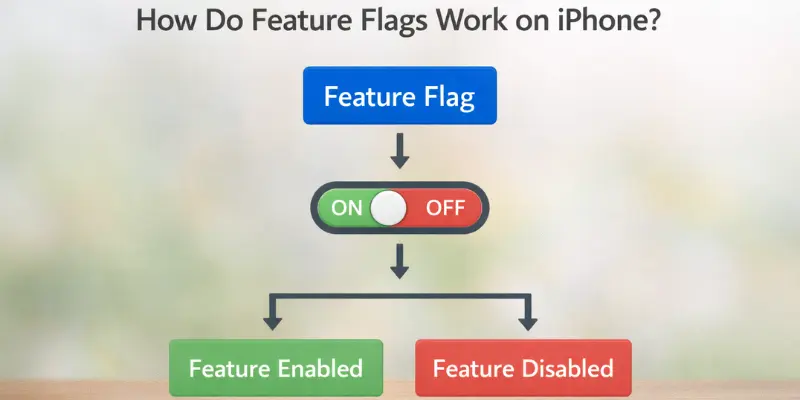
Feature flags in development are used to:
- Test new features safely before release
- Enable features gradually for select users
- Disable buggy or problematic features quickly
This system helps Apple and app developers improve iOS and Safari while keeping your phone stable. It’s a safe way to try changes without affecting everyone at once.
Why Apple Uses Feature Flags in iOS
Apple uses these features in iOS to test and manage new features safely. Several feature flags benefit iPhone performance and user experience.
Safer Feature Testing
With feature flags, Apple can test features before releasing them to everyone. This ensures new functions work properly and reduces the chance of bugs.
Benefits:
- Test new iOS features without affecting all users
- Catch errors early before public release
Gradual Feature Rollout
Apple can enable features slowly using feature flag deployment. This way, only a small group of users tries the feature first. If it works well, it is rolled out to all iPhones.
Benefits:
- Release features to select users first
- Reduce risk of widespread issues
Quick Bug Fixes
If a new feature causes problems, Apple can quickly disable it. This is one reason why using this toggle is important—they let developers fix issues without waiting for a full iOS update.
Benefits:
- Disable buggy features immediately
- Maintain stability for all iPhone users
Should You Turn WebKit Feature Flags On or Off?
Many iPhone users wonder whether to turn WebKit feature flags on or off—should they change them? For most people, the answer is no. Normal users should not change these settings, Why? These switches exist for developer testing, not daily use. Change them, and you might run into trouble.
These are experimental WebKit features meant for testing. Changing them can cause problems, such as:
- Websites may not load correctly
- Safari performance can slow down
- Some features may behave unexpectedly
In short, Safari feature flags are for developers and Apple testing. Leaving them as they are keeps your iPhone safe and your browser stable.
What Happens If You Change Feature Flags on iPhone?
Changing this feature on iPhone can be risky. These feature switches are meant for testing, not daily use. If you enable features without understanding their effects, problems can occur.
Possible risks include:
- Websites may stop loading correctly
- Safari may show bugs or crash
- Apps can behave unexpectedly or crash
- The battery may drain faster than normal
In short, feature-flagged settings are best left alone unless you are a developer. They help Apple test new functions safely without affecting regular users.
Feature Flags vs Experimental Features on iPhone
Many users get confused about the difference between feature flags and experimental features. Apple and developers use both to test new functions safely, but they are different. Here’s a clear breakdown:
Feature Flags:
- Developer control switches
- Turn features ON or OFF without changing app code
- Used to test features safely before release
- Can enable or disable functions for select users
- Part of feature switching in development
Experimental Features:
- New features are still in testing
- Not fully ready for all users
- May appear in Safari or iOS settings for testing
- Help Apple check performance and fix bugs
- Controlled using feature toggles to manage access
In short, feature toggle vs feature flag: feature flags are the switches, while experimental features are the tests that those switches control.
Can Feature Flags Affect iPhone Security?
Normally, using feature flags on iPhone is safe. Apple designs the feature flag system to test new functions without affecting security. However, changing these software flags on your own can cause problems. Experimental features may not be fully secure, and enabling or disabling them incorrectly could affect apps, Safari, or system performance.
In short, it’s best to leave feature flags as they are to keep your iPhone safe and stable.
How to Reset WebKit Feature Flags on iPhone
If you want to undo any changes, you can easily reset WebKit feature flag settings on your iPhone. Follow these steps:
Settings → Safari → Advanced → Experimental Features → Reset All to Default
This will turn off WebKit feature flags and restore all experimental features to their original state.
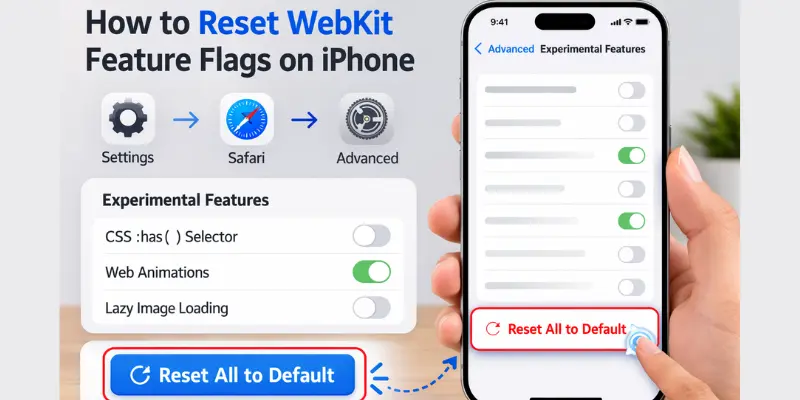
- Resets all changes safely
- Restores default Safari behavior
- Fixes issues caused by changing flags
- Helps websites load correctly again
- Keeps your iPhone stable and secure
Conclusion
What are feature flags on iPhone? They are hidden switches used by Apple and developers to test new features safely. These flags help Apple try new ios and Safari functions, roll out updates gradually, and quickly fix any bugs. For regular users, it’s best to avoid changing these settings because doing so can cause website issues, Safari bugs, or app problems. Leaving feature flags untouched keeps your iPhone stable, secure, and working smoothly.
FAQs
Apple and developers use them to test new iOS or Safari features. They check if a feature works well before they release it to everyone.
These are hidden switches in Safari that let Apple test experimental web features. They control how websites load and function.
No. These features are for testing. Changing them may break websites or affect Safari performance.
Not directly. They are meant for testing, not speed. Changing them can sometimes cause issues instead of improving performance.
No. Changing feature flags does not delete apps, photos, or personal data. It only affects experimental features in iOS or Safari.
Yes. You can reset them by going to Settings → Safari → Advanced → Experimental Features → Reset All to Default. This will safely turn off all WebKit feature flags.
Yes, if left unchanged. They are designed for developers and Apple testing. Changing them without knowledge can cause bugs or website problems.





- Be Respectful
- Stay Relevant
- Stay Positive
- True Feedback
- Encourage Discussion
- Avoid Spamming
- No Fake News
- Don't Copy-Paste
- No Personal Attacks
- Be Respectful
- Stay Relevant
- Stay Positive
- True Feedback
- Encourage Discussion
- Avoid Spamming
- No Fake News
- Don't Copy-Paste
- No Personal Attacks
