What Do SIM Cards Do? A Simple Guide for Everyone
Published: 1 Oct 2026
What do SIM cards do? They connect your phone to a mobile network. This lets you make calls, send texts, and use mobile data. Think of a SIM card as an ID card for your phone. A guard checks your ID before you enter a building. In the same way, the network checks your SIM before it lets you in. Sounds simple, right? In this guide, you will learn how a SIM works and what it stores. You will also see SIM types, costs, and safety tips. Let’s start!
What Is a SIM Card?
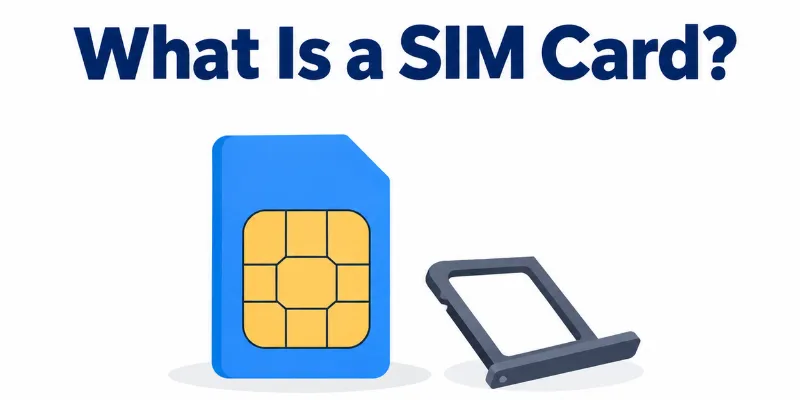
A SIM card is a small chip. It fits inside your phone. Most SIM cards are smaller than your thumbnail. SIM stands for Subscriber Identity Module. That sounds hard, but the idea is easy. The card holds your unique ID. The network reads this ID and knows who you are. Where can you find it? Look at the side of your phone. You will see a tiny tray. Push a small pin into the hole. The tray pops out. Your SIM sits inside. Some new phones have no tray. They use an eSIM instead. You will learn about it later in this guide.
What Do SIM Cards Do?
A SIM card does four main jobs. Let’s look at each one.
1. It connects you to a network
Your phone cannot join a network alone. The SIM card proves who you are. Then the network lets you in.
2. It lets you call and text
Every call and text uses your SIM. Without it, your phone cannot make normal calls or send SMS.
3. It gives you mobile data
Do you use maps or WhatsApp outside your home? Your SIM connects you to fast mobile internet. This is what people call 4G or 5G.
4. It keeps your phone number
Your phone number is linked to your SIM. The number stays with the card, not with the phone.
A real-life example
Your phone breaks. You borrow a friend’s phone. You move your SIM into it. Now your number works on that phone. Your friend’s calls stay separate.
How Does a SIM Work?
A SIM works like a security check. It takes only a second. You never see it happen.
The 3 steps
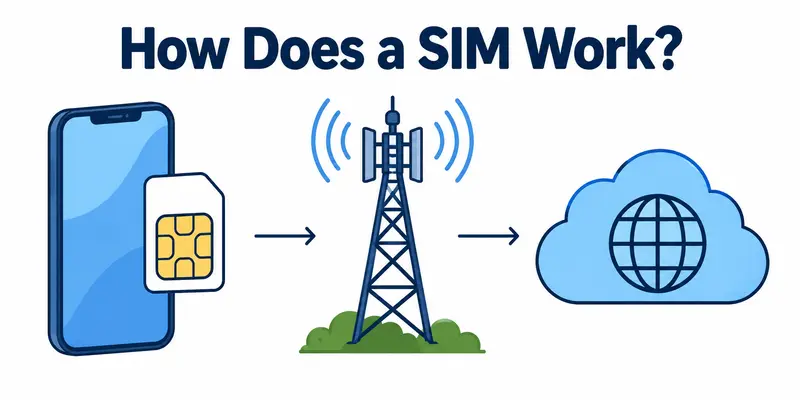
Step 1: Your phone sends a signal.
You dial a number or open a website. Your phone asks the nearby tower for access.
Step 2: The network checks your SIM.
Your SIM holds a unique ID. The phone sends this ID to the network. The network looks for it in its records.
Step 3: You get access.
The ID matches, and your plan is active. Your call connects. Your data starts working.
What if the ID is wrong or your plan has ended? The network says no. Your call will not go through.
A real-life example
Picture a guard at an office gate. You show your ID card. The guard checks the list. Your name is there, so he opens the gate.
What Is Stored on a SIM Card?
A SIM card is tiny. It holds only a small amount of data. Here is what you will find inside.
- Network ID: A unique number that tells the network who you are.
- Phone number: Your number links to your SIM.
- Some contacts and SMS: You can save a few on the card. The space is very small.
- PIN and security info: A PIN lock protects your SIM from misuse.
A real-life example
Think of your SIM as a small wallet. It holds your ID and a few notes. It cannot hold a big bag of stuff.
Does a SIM Card Store Photos?
No, it does not. A SIM card has far too little space for photos. One photo is bigger than the whole card’s memory.
So where do your photos live? They stay in one of three places:
- Your phone’s memory
- An SD card
- The cloud, like Google Photos or iCloud
Quick tip: Want to keep your contacts safe? Save them to your Google or Apple account. Do not rely only on your SIM.
SIM Card vs SD Card: What Is the Difference?
Many people mix these two cards up. They look alike, but they do different jobs.
SIM card
- Main job: It gives you network access.
- What it holds: Your phone number and network ID.
- When you need it: To call, text, and use mobile data.
- Can you skip it? Not on most phones.
SD card
- Main job: It adds extra storage.
- What it holds: Photos, videos, music, and apps.
- When you need it: When your phone memory is full.
- Can you skip it? Yes. It is optional.
A real-life example
Your SIM is like your ID card. Your SD card is like a backpack. The ID proves who you are. The backpack carries your things.
Quick tip: Is your phone storage full? Buy an SD card. Do not buy a new SIM.
How Much Do SIM Cards Cost?
The SIM card itself is cheap. Often, it is free. Most people pay for the plan, not the card.
SIM card cost vs plan cost
- The SIM card: This is the small chip. It usually costs $0 to $10.
- The plan: This gives you calls, texts, and data. A prepaid pack with a plan can cost $15 to $60 or more.
Always check which one you are paying for. Is the price $10 or less? You are likely buying only a SIM kit. Is it $15 or more? The price probably includes service.
Prepaid, postpaid, and SIM-only
- Prepaid: You pay first, then use. Some brands sell a SIM kit for a few dollars.
- Postpaid: You pay each month after you use it. The SIM is often free. Big carriers like AT&T, t-mobile, and Verizon often charge $0.
- SIM-only: You keep your own phone. You buy only the SIM and a plan. This is often the cheapest way.
What if you lose your SIM?
A replacement SIM is often free or very cheap. Many carriers charge around $5 to $10.
4 tips to pay less
- Order online. Many carriers waive the SIM fee at checkout.
- Ask for a free SIM when you sign up for a plan.
- Look for sales and referral deals.
- Try an eSIM. You do not need a physical card.
Prices change by country and carrier. Check your carrier’s website first.
Types of SIM Cards
SIM cards come in four main types. The card must fit your phone.
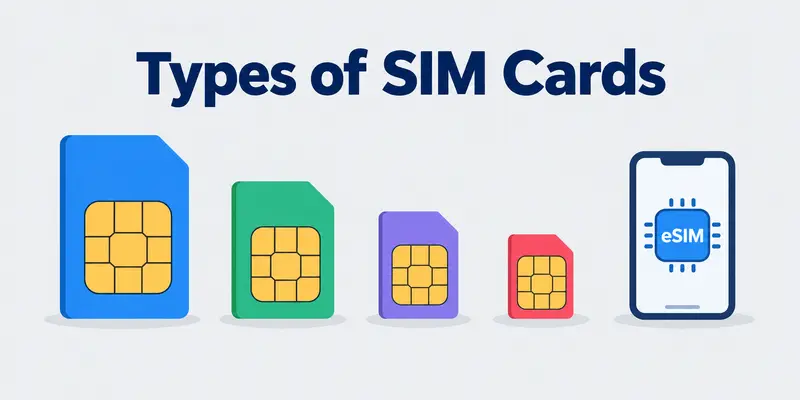
- Standard SIM: This is the biggest one. It is about the size of a small stamp. Only very old phones use it.
- Micro SIM: This one is smaller. Some older smartphones use it.
- Nano SIM: This is the smallest physical card. Most new phones use it.
- eSIM: This one has no card at all. It is built into your phone. You set it up with your carrier.
A real-life example
Think of shoes. A size 8 shoe will not fit a size 5 foot. In the same way, a Standard SIM will not fit a Nano slot.
Is the size a problem?
Not always. Many carriers sell a 3-in-1 SIM. It has three sizes in one card. You press out the size you need.
Do All Phones Need a SIM Card?
Most phones need a SIM to use a mobile network. But a phone still works in some ways without one.
Without a SIM, you can:
- Use Wi-Fi for browsing, video calls, and apps.
- Take photos and play music.
- Make an emergency call in many countries. This does not work everywhere.
Without a SIM, you cannot:
- Make normal calls.
- Send SMS.
- Use mobile data.
Some phones have no SIM tray at all. They use an esim. It does the same job.
Quick tip: Is your old phone lying around? Use it with Wi-Fi as a music player or a camera.
Quick Tips to Use Your SIM Safely
Your SIM holds your number. Protect it with these steps.
- Set a SIM PIN. A thief cannot use your SIM without it.
- Report a lost phone fast. Call your carrier. Ask them to block the SIM.
- Watch for SIM swap fraud. A scammer tricks your carrier into moving your number to their SIM. Do you lose signal for no reason? Call your carrier right away.
- Never share your OTP codes. Not even with a “bank agent.”
Conclusion
A SIM card is small, but it does big work. It connects your phone to a network, holds your number, and proves who you are. It lets you call, text, and use mobile data. The card is cheap and often free, while the plan is the main cost. Keep your SIM safe by setting a PIN. Call your carrier fast if you lose your phone. Now you know what SIM cards do. Which SIM type does your phone use? Check it today!
Faqs
Yes, most do. Your carrier gives you a number when you sign up. Some data-only SIMs have no number.
No. Some phones use an eSIM. Others use both.
Often, yes. The size must fit. The phone must also be unlocked. A locked phone works with only one carrier.
A SIM can last many years. A carrier may turn off a SIM you never use. Rules differ by carrier.

- Be Respectful
- Stay Relevant
- Stay Positive
- True Feedback
- Encourage Discussion
- Avoid Spamming
- No Fake News
- Don't Copy-Paste
- No Personal Attacks
- Be Respectful
- Stay Relevant
- Stay Positive
- True Feedback
- Encourage Discussion
- Avoid Spamming
- No Fake News
- Don't Copy-Paste
- No Personal Attacks
