T-Mobile 5G Home Internet Gateway: Complete Guide, Features, Pros, and Cons
Published: 7 Feb 2026
Slow internet can disrupt work, study, and entertainment, so many people now look for a simple, fast option like T-Mobile 5G Home Internet. It is a wireless home internet service that uses 5G towers instead of cables, and setup is very easy—just plug in the device and connect to Wi-Fi. Many users switch to this service because it is affordable and works well in places where cable internet is limited. In this guide, you will learn what this service offers, who should use it, who should avoid it, and how to decide if it is the right choice for your home.
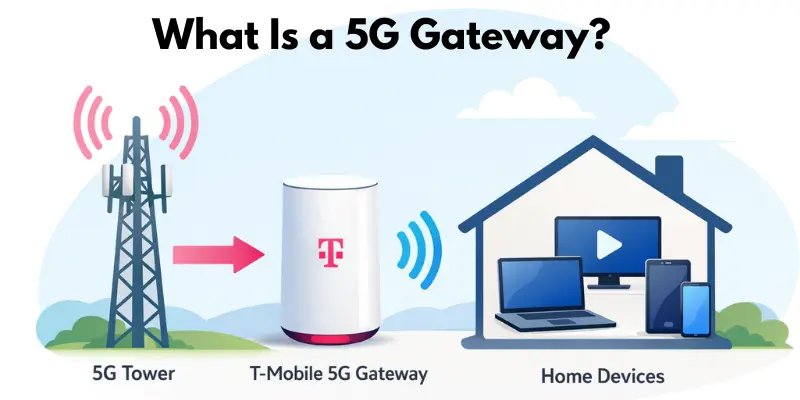
What Is a 5G Gateway?
A 5G gateway is a device that brings the internet to your home using 5G mobile signals. It works as both a modem and a Wi-Fi router in one unit, so you do not need two separate devices like in traditional cable internet. The modem part receives the 5G signal from nearby towers, and the router part shares that internet with all your home devices through Wi-Fi. For example, you just plug the gateway into power, place it near a window for a better signal, and connect your phones, laptops, or smart TVs to start using the internet.
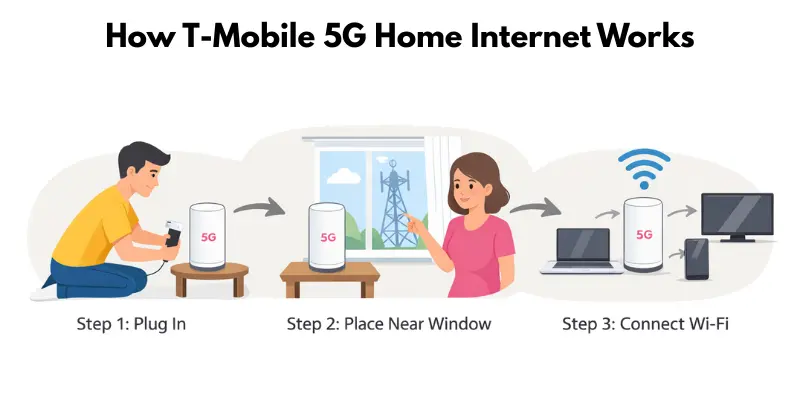
How T-Mobile 5G Home Internet Works
T-Mobile 5G Home Internet uses 5G signals from nearby towers, and the gateway turns them into Wi-Fi for your devices. Setup is easy: plug in the gateway, place it near a window for the best signal, and connect your devices. Internet speed depends on how close you are to a 5G tower—closer towers give faster, more reliable internet.
Key Features of T-Mobile 5G Gateway
The T-Mobile 5G Gateway is a simple, all-in-one device that brings fast home internet using 5G signals. It is easy to set up, provides strong Wi-Fi for multiple devices, and can be managed from a phone app. It also has wired ports for devices that need extra speed.
Plug-and-Play Setup
- Ready to use in minutes
- No technician or complicated installation needed
- Just plug in and connect your devices
Wi-Fi 6 / Wi-Fi 7 Support
- Fast internet for multiple devices at the same time
- Smooth streaming, video calls, and gaming
- Works well with modern smartphones, laptops, and smart TVs
App Control and Management
- Monitor connected devices easily
- Restart Wi-Fi remotely from your phone
- Check internet speed and usage anytime
Ports and Wired Connections
- Ethernet ports for high-speed wired devices
- Ideal for gaming consoles or smart TVs
- Ensures stable internet for devices that need it
Easy but Limited
- Beginner-friendly and simple to use
- Lacks advanced router settings
- Limited customization for tech-savvy users
T-Mobile 5G Home Internet Plans
T-Mobile offers three main plans for T-Mobile 5G Home Internet to fit different needs and budgets. Each plan provides fast wireless internet but differs in speed, features, and perks. Comparing them helps you pick the plan that works best for your home.
Rely Plan
- Affordable choice for light internet users
- Good for web browsing, email, and SD streaming
- Basic speed and features included
Amplified Plan
- Mid-tier plan for families or multiple devices
- Faster speeds for HD streaming and online gaming
- Extra perks like higher data priority during peak hours
All-In Plan
- Best for heavy internet users
- High-speed internet for 4K streaming, gaming, and multiple devices
- Includes full features and priority access on the network
Real-World Performance (Speed, Latency, Stability)
T-Mobile 5G Home Internet is fast and convenient, but real-world performance depends on location, signal strength, and the number of connected devices.
Expected Download and Upload Speeds
The speeds you get can vary, so it’s important to know what’s typical in most homes. T-Mobile advertises high speeds, but actual numbers are usually lower.
- Download speeds typically 40–150 Mbps
- Upload speeds are usually 5–20 Mbps
- Faster near strong 5G signals
Latency for Gaming and Video Calls
Latency measures the delay in your connection. Lower latency means smoother video calls and gaming, but it can rise if the network is busy.
- Average latency around 30–50 ms
- Smooth for video calls and casual gaming
- Slight delays may occur during peak hours
Performance in Urban vs Rural Areas
Internet quality depends heavily on your location. Urban users often enjoy strong, stable connections, while rural users may face slower or unstable signals.
- Urban areas often have stronger signals and faster speeds
- Rural areas may experience slower or unstable connections
- Closer 5G towers improve stability
Advantages and Disadvantages of T-Mobile 5G Home Internet
T-Mobile 5G Home Internet offers a simple, fast, and flexible way to get internet at home. While it has many benefits like easy setup and unlimited data, it also comes with some limitations, such as speed fluctuations and dependence on tower signals. Here’s a clear breakdown for readers:
Advantages
- No contracts – you can switch or cancel anytime
- Unlimited data for streaming, gaming, and browsing
- Easy plug-and-play installation, no technician needed
- Affordable pricing compared to many cable and fiber plans
- Wi-Fi 6/7 support for faster and more stable connections
- App-based control for managing devices and speed
- Works in areas where cable or fiber internet is unavailable
Disadvantages
- Speeds can be inconsistent depending on location and tower proximity
- Limited advanced router settings for power users
- Latency spikes may affect gaming or video calls
- Performance depends heavily on signal strength
- Rural areas may experience slower or unstable connections
- Customer support can be slow or limited for technical issues
- Not ideal for users who need full customization or enterprise-level features
Tips to Improve 5G Gateway Performance
Even though T-Mobile 5G Home Internet is easy to use, its performance can vary depending on placement, obstacles, and connected devices. These tips help you get the most stable and fast connection at home.
Best Placement Tips
Where you place the gateway affects signal strength and speed.
- Position near a window facing the nearest 5G tower
- Keep it off the floor and away from thick walls
- Avoid placing near microwaves or other electronics that cause interference
Signal Boosting Techniques
Small adjustments can improve coverage and speed.
- Use a Wi-Fi range extender to cover larger areas
- Reboot the gateway occasionally to refresh the connection
- Reduce interference by limiting nearby electronics
Using Mesh Systems or External Routers
For larger homes, additional devices can improve Wi-Fi reach.
- Connect a mesh system to extend coverage throughout the house
- Use an external router for advanced control and stronger signals
- Ideal for multiple floors or homes with thick walls
Comparison With Cable, Fiber, and Satellite Internet
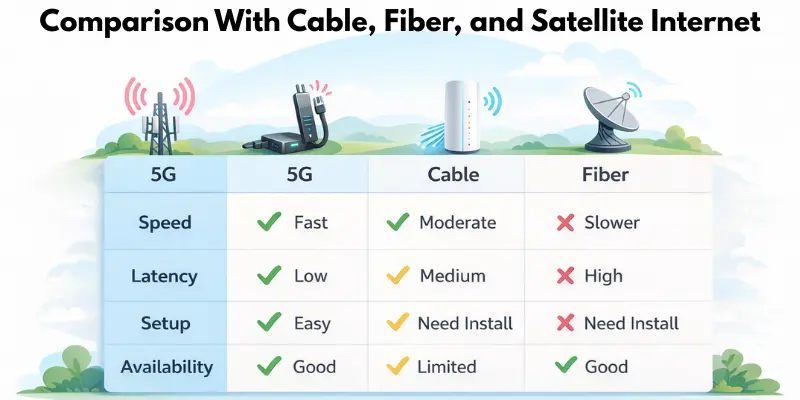
T-Mobile 5G Home Internet is a strong alternative to traditional internet options, but it isn’t always the best choice. Comparing it with cable, fiber, and satellite helps you decide which service fits your needs.
When 5G Is Better Than Cable
5G can be faster and easier to set up, especially in areas with limited cable infrastructure.
- Quick plug-and-play setup without professional installation
- Works in areas where cable is slow or unavailable
- Flexible for renters or temporary homes
When Fiber Is Still the Best Option
Fiber offers the most consistent speed and low latency for heavy users.
- Ideal for 4K streaming, large downloads, and gaming
- Extremely low latency for competitive online gaming
- Stable speeds regardless of network congestion
When Satellite Is the Only Choice
Satellite internet is useful in remote or rural areas where other services are unavailable.
- Available in very remote locations
- Can provide basic internet where cable, fiber, or 5G are unavailable
- Higher latency and slower speeds compared to 5G or fiber
Conclusion
So guys, in this article, we’ve covered T-Mobile 5G Home Internet in detail. If you’re looking for fast, flexible, and easy-to-set-up internet without contracts, I personally recommend giving it a try, especially for light to medium users, families in areas where cable or fiber isn’t reliable, or anyone who wants a hassle-free connection at home. With unlimited data, strong Wi-Fi support, and simple app-based management, it’s a convenient option for everyday internet needs. Check your coverage today and see if this service is the right fit for your home!
FAQs
T-Mobile 5G Home Internet is a wireless service that brings internet to your home using 5G mobile signals. It uses a gateway device that acts as both a modem and a router. You just plug it in, connect your devices, and start browsing.
Speeds can vary depending on your location and signal strength. Most users get 40–150 Mbps download and 5–20 Mbps upload. Speeds are usually higher near strong 5G towers.
No, T-Mobile 5G Home Internet comes with no contracts. You can switch plans or cancel anytime without extra fees. This makes it flexible for renters or temporary homes.
Yes, it works for casual gaming and video calls. Latency is usually 30–50 ms, which is fine for most users. Competitive gamers may notice slight delays during peak hours.
Not at all. It’s a plug-and-play setup—just place the gateway near a window, plug it in, and connect your devices. No professional installation is required.
You can connect multiple devices, including phones, laptops, tablets, and smart TVs. Wi-Fi 6/7 support ensures stable connections even with several devices. However, very heavy simultaneous usage may slow speeds slightly.
It is available in areas with 5G coverage. Urban areas usually have strong signals, while some rural locations may have slower or less stable connections. You can check your address on T-Mobile’s coverage map before signing up.
Yes, using a mesh system or an external router can improve coverage in larger homes. This is helpful for multiple floors or houses with thick walls. It also gives you more control over your Wi-Fi network.
Pricing depends on the plan you choose: Rely, Amplified, or All-In. Plans are generally affordable compared to cable or fiber, with no hidden fees. Check the T-Mobile website for exact pricing in your area.
It may not be ideal for heavy gamers, users who need ultra-low latency, or people who want advanced router settings. Rural users far from 5G towers may experience slower speeds. Otherwise, it’s a great option for light to medium internet users.




- Be Respectful
- Stay Relevant
- Stay Positive
- True Feedback
- Encourage Discussion
- Avoid Spamming
- No Fake News
- Don't Copy-Paste
- No Personal Attacks
- Be Respectful
- Stay Relevant
- Stay Positive
- True Feedback
- Encourage Discussion
- Avoid Spamming
- No Fake News
- Don't Copy-Paste
- No Personal Attacks
