How to Fix Phone Overheating (Complete Guide)
Published: 10 Sep 2026
Is your phone getting hot and slow? Is the battery draining fast? Phone overheating is common in 2026, especially during gaming, video calls, or fast charging. A hot phone can reduce speed and damage the battery. Many people search for how to fix phone overheating at home. Others want to know how to fix phone problems quickly and safely. The good news is that most causes are simple to fix. In this guide, you will learn quick fixes and permanent solutions to keep your phone cool and working smoothly. Let’s begin.
Why Is My Phone Overheating? (Real Causes Explained)
Does your phone feel hot even when you are not using it much? You may wonder what causes phone overheating. Before you learn how to reduce phone heat, you must understand why your phone gets hot in the first place.
Heavy Apps & Background Processes
Some apps use too much power. Gaming apps, video editing apps, and social media apps run constantly. Many apps also work in the background without you knowing. For example, Facebook or Google Maps may keep using data and location. This puts pressure on the processor. When the processor works hard, it creates heat. More work means more heat.
Tip: Close unused apps and restart your phone daily.
Gaming & High Brightness
Do you play games for long hours? Heavy games use graphics and battery at full power. This makes the phone warm very quickly. High screen brightness also adds heat. If you play PUBG or watch YouTube at full brightness, your phone heats up faster.
Tip: Lower brightness and take short breaks while gaming.
Charging Issues & Fake Chargers
Are you using a cheap or fake charger? This is a common reason behind phone overheating. Low-quality chargers do not control power properly. Fast charging also creates heat. It is normal, but too much heat is not safe. Always use the original charger that comes with your phone.
Tip: Avoid charging your phone under a pillow or on a bed.
Hot Weather & Sun Exposure
Weather also matters. If you live in a hot city and use your phone outside, it can heat up quickly. Direct sunlight increases internal temperature. For example, using your phone for navigation on a car dashboard under the sun can make it very hot.
Tip: Keep your phone in the shade and avoid direct sunlight.
Software Bugs & Updates
Sometimes the problem is inside the system. A bad software update can cause overheating. Bugs force the processor to work harder than normal. Have you noticed heating after a recent update? That could be the reason why the phone gets hot suddenly.
Tip: Update your phone regularly to fix bugs.
Battery or Hardware Damage
Old batteries can also cause heat. A damaged battery struggles to provide power. This creates extra heat inside the phone. If your phone heats up even during light use, the battery may be weak. In some cases, internal hardware damage can also be the cause.
Tip: Visit a trusted repair center if overheating continues.
Is Phone Overheating a Sign of Malware or Virus?
Sometimes your phone gets hot for no clear reason. You are not gaming. You are not charging. But it still feels warm. This could mean malware is hiding inside your phone. Malware runs in the background without you knowing. It uses your processor to do bad tasks. This creates extra heat, even when your phone is idle.
How Malware Causes Overheating
Bad apps can mine crypto, steal data, or show endless ads. All these tasks need power. Your phone’s processor works overtime. This makes your phone hot and drains the battery fast.
Tip: If your phone is hot while sitting idle, check for unknown apps.
Signs Your Phone May Have Malware
- Phone gets hot even when not in use
- Battery drains much faster than normal
- Strange apps appear that you didn’t install
- Phone feels slow and laggy all the time
How to Fix It
- Scan your phone with a trusted antivirus app
- Delete apps you don’t recognize
- Check app permissions in Settings
- Update your phone’s software regularly
Tip: Never download apps from unknown websites. Stick to the official app store.
How to Fix Phone Overheating Immediately
Is your phone hot right now? Don’t panic. Here is how to fix phone overheating in just a few minutes with simple actions.
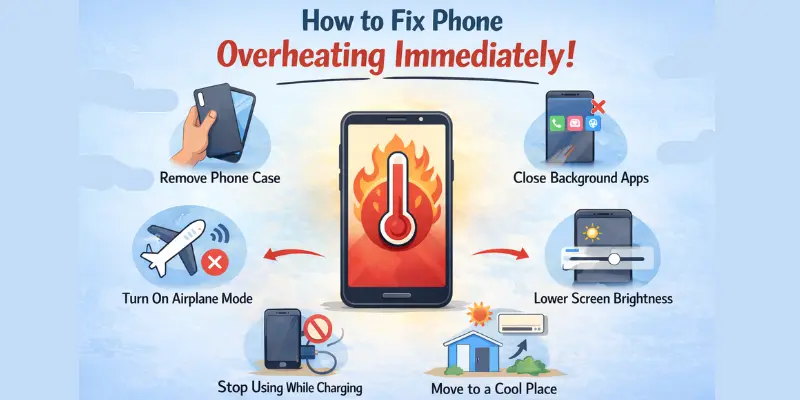
Remove Phone Case
Some phone cases trap heat inside. Thick rubber or plastic cases block airflow. Remove the case and let your phone breathe. Place it on a table and allow natural cooling.
Close Background Apps
Many apps run silently in the background. They use battery and processor power. Open recent apps and close everything you are not using. This helps fix overheating phone issues quickly.
Turn On Airplane Mode for 5 Minutes
Network signals also create heat. Wi-Fi, mobile data, and Bluetooth keep working in the background. Turn on Airplane Mode for 5 minutes. This gives your phone a short break and reduces heat fast.
Lower Screen Brightness
High brightness increases battery use. More battery use means more heat. Reduce brightness to a comfortable level. You can also turn on auto-brightness.
Stop Using While Charging
Using your phone while charging creates extra heat. Gaming or watching videos makes it worse. Plug in your phone and leave it alone. Let it charge without heavy use.
Move to a Cool Environment
Are you sitting in direct sunlight? Is the room hot? Move to a cooler place with shade or air conditioning. Keep your phone away from sunlight and hot surfaces. If your phone is hot right now, follow these steps to fix an overheating phone fast. Remove the case, close apps, turn on Airplane mode, lower brightness, stop using it while charging, and move to a cool place.
Try these steps now. Your phone should feel cooler within minutes.
Common Mistakes to Avoid When Your Phone Overheats
When your phone gets hot, you may want a quick fix. But some quick fixes can hurt your phone more. Let’s look at what NOT to do.
Don’t Put Your Phone in the Fridge
This sounds like a fast cooldown, right? It’s not. Cold air causes condensation inside your phone. Moisture can damage the circuit board. Your phone may stop working completely.
Don’t Point AC Vents Directly at Your Phone
Blasting cold air from your car’s AC seems helpful. But it causes the same problem as the fridge. Sudden cold can create moisture inside your phone.
Don’t Trust “Phone Cooler” Apps
Many apps claim to cool your phone instantly. Most don’t work. Some are fake and just close background apps, which your phone already does on its own. Others may even be malware in disguise.
Tip: Stick to real fixes—remove the case, close apps, or move to a cool spot.
How to Fix Overheating Phone Permanently
If your phone keeps getting hot often, it’s time to learn how to cool down your phone. These steps will help prevent heat, improve performance, and extend battery life.
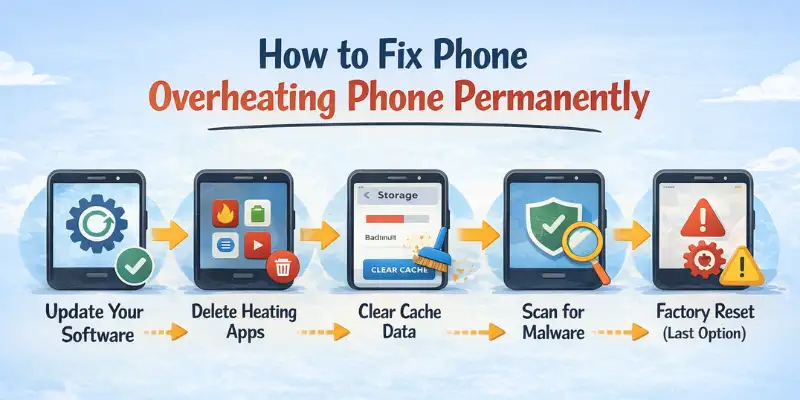
Update Your Software
Keeping your phone software up to date can fix bugs that make it overheat.
- Go to Settings → Software Update → Download and Install.
- Updates improve system efficiency and reduce processor load.
- Regular updates help your phone run cooler and smoother.
Delete Heating Apps
Some apps use too much battery or processor power, causing your phone to heat up.
- Identify apps that drain battery quickly or run constantly.
- Uninstall or disable apps you rarely use.
- Focus on lightweight apps to reduce overall heat.
Clear Cache Data
Cache files can slow your phone and increase heat over time.
- Go to Settings → Storage → Cached Data → Clear.
- Clearing the cache frees up storage and reduces the processor’s workload.
- Helps the phone cool down faster during heavy use.
Scan for Malware
Malware or hidden apps can force your phone to overwork and get hot.
- Use a trusted antivirus app to scan your device.
- Remove any suspicious apps or files.
- Protects your phone from overheating caused by malware.
Reset Network Settings
Network problems can make your phone work harder, creating heat.
- Go to Settings → System → Reset → Reset Network Settings.
- Fixes Wi-Fi, bluetooth, and mobile data issues that drain battery.
- Reduces unnecessary processor load and heat generation.
Factory Reset (Last Option)
A factory reset removes hidden bugs and heavy apps that cause overheating.
- Back up all important data before resetting.
- Go to Settings → System → Reset → Factory Data Reset.
- Use this only if other methods fail to permanently fix overheating.
How to Fix Overheating Samsung Phone Devices
If you are searching for how to fix an overheating Samsung phone, you are in the right place. Samsung phones, especially the Galaxy S and Note series, can heat up during heavy use, gaming, or fast charging. Here are simple steps to keep your device cool and running smoothly. These steps help stop your phone from heating up. Samsung models like the Galaxy S series and other Samsung devices.
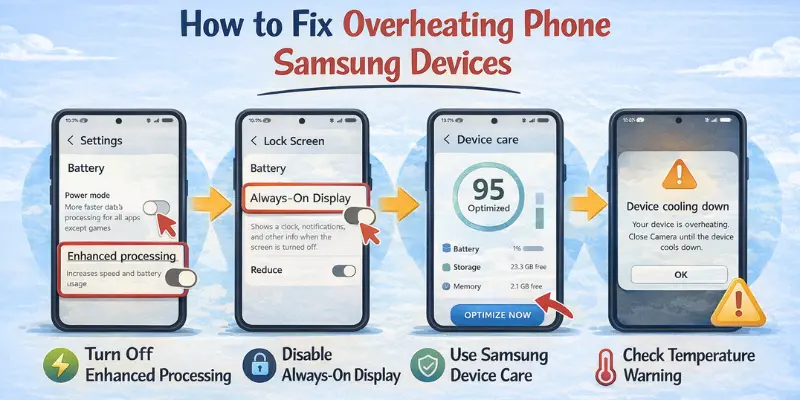
Turn off Enhanced Processing Mode
Enhanced Processing Mode boosts performance but increases heat.
- Go to Settings → Device Care → Battery → Power Mode.
- Switch to a balanced or optimized mode.
- Reduces processor load and keeps your phone cooler.
Disable Always-On Display
Always-On Display uses battery and keeps the screen active.
- Go to Settings → Lock Screen → Always-On Display.
- Turn it off or set a schedule.
- Saves power and reduces heat.
Use Samsung Device Care
Device Care optimizes battery, storage, and memory automatically.
- Go to Settings → Device Care → Optimize Now.
- Clears background apps and frees up resources.
- Helps prevent overheating during daily use.
Check Samsung Temperature Warning
Samsung devices show a temperature warning when the phone is too hot.
- Avoid using the phone until it cools down.
- Disconnect the charger and remove any case.
- Follow the on-screen instructions to reduce heat safely.
Safe Mode Test for Samsung
Safe Mode helps identify apps causing overheating.
- Press and hold the Power button → Tap Power Off → Hold Power Off until Safe Mode appears.
- Use the phone in Safe Mode and see if it heats up.
- Uninstall apps causing excessive heat.
These steps are effective ways to fix overheating Samsung phones and ensure your Galaxy or other Samsung phone stays cool during heavy use.
Why Phone Overheats While Charging (And How to Fix It)
Many users search for how to fix phone overheating while charging. This is a common problem, especially with fast charging or cheap chargers. Using your phone while charging or keeping it in a thick case can make it very hot. Here are simple ways to prevent overheating during charging.
Use Original Charger
Using cheap or fake chargers can cause your phone to overheat.
- Always use the charger that came with your phone.
- Certified chargers provide stable power to prevent excess heat.
- Avoid high-voltage chargers not designed for your device.
Avoid Using Phone While Charging
Playing games or watching videos while charging increases heat.
- Leave your phone idle during charging.
- Avoid heavy apps or multitasking while plugged in.
- Let the phone cool naturally for faster charging.
Clean Charging Port
Dust and dirt can block proper connections and generate heat.
- Inspect the charging port for dust or lint.
- Use a soft brush or compressed air to clean gently.
- A clean port ensures safe and efficient charging.
Remove Case During Charging
Thick cases trap heat inside the phone.
- Remove the case while charging.
- Place the phone on a flat, cool surface.
- Helps the device stay cooler and charge safely.
These steps help prevent heat build-up and provide easy ways to fix phone overheating while charging safely.
Why Phone Get Hot While Gaming
Gaming is one of the most common reasons a phone gets hot. If gaming causes heat, you can apply the same how to reduce phone heating steps above to cool it down and improve performance.
Graphics Settings Too High
High graphics settings use more processor and battery power.
- Lower the game graphics to medium or low settings.
- Disable extra visual effects if possible.
- Reduces processor load and prevents overheating.
Background Apps Running
Other apps running in the background make the processor work harder.
- Close unused apps before starting a game.
- Restart your phone if needed.
- Helps the device stay cooler during long sessions.
Weak Internet Signal
A poor Wi-Fi or mobile network forces the phone to work harder.
- Move closer to the router or switch networks.
- Avoid areas with a weak signal when gaming.
- Reduces unnecessary battery and processor use, keeping your phone cooler.
What Happens If Phone Overheats?
Overheating can cause several problems if not addressed. Here’s what can happen to your phone:
Battery Damage
High temperatures can shorten battery lifespan.
- Repeated overheating reduces battery capacity.
- May cause faster battery drain.
- Can lead to permanent battery issues over time.
Performance Slowdown
A hot phone cannot run apps efficiently.
- The processor slows down to prevent damage.
- Apps may lag or freeze.
- Multitasking becomes difficult and frustrating.
Automatic Shutdown
Phones may turn off automatically when too hot.
- Protects internal components from heat damage.
- Can interrupt work, calls, or games.
- Signals that overheating is severe and needs attention.
Screen Discoloration
Excess heat can affect the display over time.
- Colors may appear dull or uneven.
- Prolonged exposure can cause permanent damage.
- Avoid using the phone when it is extremely hot.
Explosion Myth Clarification
Phones rarely explode from overheating.
- Modern devices have safety measures to prevent explosions.
- Extreme overheating may cause battery swelling, not an explosion.
- Still, always take overheating seriously and cool your phone promptly.
How to Prevent Phone Overheating in the Future
Preventing overheating is easier than fixing it. Following these tips reduces the need to search for how to cool down your phone again and keeps your device running smoothly.
Keep Storage Free
A phone with full storage works harder and generates heat.
- Delete unnecessary files and apps regularly.
- Move photos or videos to cloud storage.
- Free space helps the phone run cooler and faster.
Avoid Direct Sunlight
Heat from the sun adds to your phone’s internal temperature.
- Don’t leave your phone on a car dashboard or near windows.
- Use shade or keep it in a bag when outside.
- Protects your phone from unnecessary heat.
Don’t Overcharge
Charging beyond 100% can create heat and stress the battery.
- Unplug the phone once it’s fully charged.
- Avoid overnight charging if possible.
- Helps prolong battery life and reduce overheating risk.
Use Certified Accessories
Cheap chargers or cables can send unstable power.
- Always use original or certified accessories.
- Prevents excess heat caused by faulty charging.
- Ensures safe and efficient power delivery.
Keep Apps Updated
Old apps can have bugs that increase processor workload.
- Regularly update apps from trusted sources.
- Updates improve performance and reduce heat.
- Helps prevent overheating caused by software issues.
When to Visit a Repair Center
Sometimes, overheating cannot be fixed at home. If you notice serious issues, it’s time to get professional help.
Phone Extremely Hot
If your phone becomes dangerously hot to touch:
- Stop using it immediately.
- Turn it off and remove the case.
- Continuing to use it may cause permanent damage.
Swollen Battery
A swollen or bulging battery is a serious warning sign:
- Stop charging and using the phone.
- Avoid pressing or puncturing the battery.
- Take it to a certified repair center for replacement.
Burning Smell
A burning or unusual smell indicates internal damage:
- Power off the device immediately.
- Keep it away from flammable surfaces.
- Seek professional inspection to prevent hazards.
Won’t Turn On
If your phone refuses to turn on even after cooling:
- Check the charger and cable first.
- If it still doesn’t start, hardware damage may be the cause.
- Take it to a trusted repair center for diagnosis and repair.
These signs mean overheating is severe and cannot be solved by home methods. Professional help is the safest option.
Conclusion
By following this guide on how to fix phone overheating, you now know quick fixes, permanent solutions, and ways to prevent heat during charging or gaming. Apply these steps regularly, keep your phone updated, and monitor its temperature. With these simple habits, your device will run smoother, stay safe, and last longer. You’ve learned the steps—now put them into action and keep your phone cool!
FAQs
Phones can overheat for many reasons. Heavy apps, long gaming sessions, high screen brightness, and charging issues are common causes. Even hot weather or software bugs can make your phone warm. Closing unused apps and lowering brightness often helps.
It’s not safe to use an overheating phone. Using it can make the heat worse and damage the battery. Take a break and let it cool down first. Remove the case and move to a cooler area for faster cooling.
Yes, restarting can help. It closes all background apps and gives the processor a break. This reduces heat immediately. It’s one of the quickest ways to fix overheating temporarily.
Often, yes. Low-quality or fake chargers provide unstable power, which can make your phone hot. Always use the original or certified charger. This prevents unnecessary heat and protects your battery.
Keep storage free and apps updated. Avoid direct sunlight and don’t overcharge. Use certified chargers and remove heavy cases while charging. Regular care keeps your phone cool and efficient.
Yes, if it happens often. It can reduce battery life, slow performance, or even affect the screen. Following the steps to fix overheating can prevent long-term damage.
If it overheats even after trying fixes, visit a repair center. There may be battery or hardware issues. Professionals can safely check and fix your phone.




- Be Respectful
- Stay Relevant
- Stay Positive
- True Feedback
- Encourage Discussion
- Avoid Spamming
- No Fake News
- Don't Copy-Paste
- No Personal Attacks
- Be Respectful
- Stay Relevant
- Stay Positive
- True Feedback
- Encourage Discussion
- Avoid Spamming
- No Fake News
- Don't Copy-Paste
- No Personal Attacks
