Bright Spot on Screen – Causes and Easy Fixes for Phone Users
Published: 8 Sep 2026
A bright spot on screen can worry many phone users because it appears as a small white or glowing area that does not disappear while watching videos, reading messages, or using apps. In many cases, this issue is not serious, and simple steps can help fix it at home. In this guide, you will learn the common causes of a bright spot on a mobile screen and easy solutions you can try to solve the problem quickly. Have you ever noticed a glowing patch on your phone display and wondered why it appeared?
What Is a Bright Spot on Screen?
A bright spot on screen is a small glowing area that stays visible all the time. It can look like a tiny white dot or a light patch on the display. Many people notice a bright spot on their phone screen when they open a dark app or watch a video. It becomes clearer on black backgrounds.
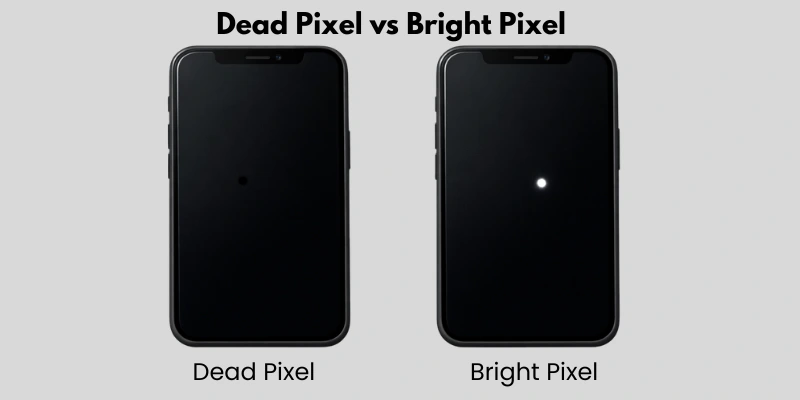
Dead Pixel vs Bright Pixel
A dead pixel is a small black dot that does not light up. It stays dark on every screen, regardless of color. A bright pixel is the opposite. It stays white or colored and shines more than the rest of the screen. This is often the reason behind a bright spot on your phone screen.
Small Glowing Dot vs White Patch
Sometimes the problem looks like a tiny glowing dot. This usually means one or two pixels are stuck. Other times, it looks like a bigger white patch. This can happen because of screen pressure, display damage, or backlight issues. The size of the spot helps you understand how serious the problem is.
Why Is There a Bright Spot on My Phone Screen?
A bright spot on screen usually happens because of pixel problems, screen pressure, backlight issues, water damage, or a factory defect. The spot may look small, like a dot, or large, like a white patch. The exact cause depends on how the spot looks and when it appeared. Below are the most common reasons in simple words.
Stuck or Hot Pixel
A stuck or hot pixel is one small pixel that stays lit all the time. It may appear as a tiny white, red, green, or blue dot. This is a very common reason for a bright spot on screen. For example, you may notice it clearly while watching a dark video at night.
Screen Pressure Damage
Sometimes pressure damages the display. This can happen if you sit on your phone or keep it in a tight pocket. The pressure pushes the screen layers and creates a light patch. Many users see a bright spot on an iPhone screen after accidental pressure.
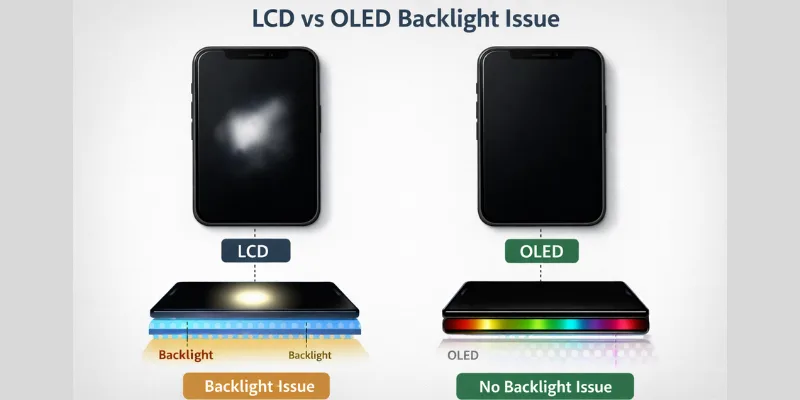
LCD or OLED Backlight Issue
Phones use LCD or OLED panels to show images. If the backlight inside an LCD screen becomes uneven, it creates a bright area. This often looks like a small white cloud. It is more common in LCD screens than OLED screens.
Water or Moisture Damage
Water can damage the inside parts of your phone. Even small amounts of moisture can affect the display panel. You may see a glowing patch after the phone gets wet. Did your phone recently fall into water or get exposed to rain?
Manufacturing Defect
Sometimes the issue comes from the factory. The screen may have a defect from the start. In this case, the bright spot on the screen appears without any damage or pressure. If your phone is new, this could be the reason.
Dust or Particle Trapped Under the Screen
Sometimes a bright spot is not a screen problem at all. It can just be dust or a tiny particle stuck under your screen protector.
How Dust Causes a Fake Bright Spot
- Often looks like a bright dot near the edges
- Appears and disappears based on light angle
- Common after applying a new screen protector
How to Check and Fix It
- Remove the screen protector carefully
- Clean the screen with a soft, dry microfiber cloth
- Apply a new protector, making sure no dust sticks to it
Battery Swelling
Yes, a swollen battery can push against your screen and cause a bright spot. This cause is more serious than dust or a stuck pixel.
How Battery Swelling Affects the Screen
- The battery swells due to age, heat, or overcharging
- Pressure from the battery pushes the display outward
- Can cause the screen to lift slightly from the frame
Signs of a Swollen Battery
- Screen looks slightly raised or uneven
- Phone feels warmer than usual
- Back cover or screen edges seem to be popping out
Bright Spot on iPhone Screen – Is It Different?
A bright spot on the iPhone screen usually happens because OLED pixels get stuck or overlit. These spots are sharper and more noticeable on dark backgrounds compared to LCD screens. They can appear after long usage, minor pressure, or small screen faults.
Common iPhone models affected include the iPhone 12, 13, 14, and 15 series. If the bright spot on the iPhone screen does not disappear after restarting or gentle care, it is best to visit an Apple service center for inspection or a possible screen replacement.
How to Fix a Bright Spot on Your Phone Screen
If you notice a bright spot on your phone screen, there are simple ways to try fixing it at home before visiting a repair center. Some methods work for small stuck pixels, while others help with minor display issues. Here are the most effective solutions.
Restart Your Phone
Sometimes a simple restart can fix minor screen glitches. Turn off your phone, wait a few seconds, and then turn it back on. Many users see the bright spot on the phone screen disappear after this quick step.
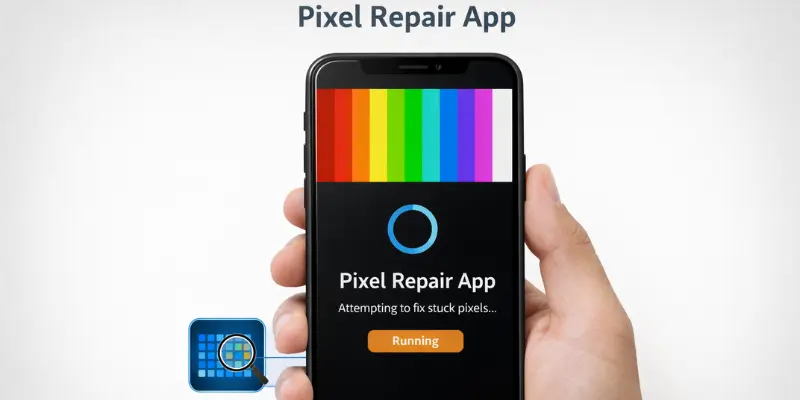
Use Pixel Fixing Apps
There are apps available that cycle colors rapidly on your screen to unstick pixels. Running these apps for a few minutes can sometimes remove the glowing dot. This method works best for small stuck pixels causing a bright spot on phone screen.
Gently Massage the Area (Safe Method)
If the spot is caused by slight pressure, gently pressing and massaging the affected area with a soft cloth can help. Be careful not to press too hard, or it may worsen the issue.
Check Screen Brightness Settings
Sometimes the bright spot on my phone screen looks worse at high brightness. Lowering the screen brightness or enabling auto-brightness can reduce how noticeable the spot is.
Visit a Repair Center
If none of these steps work, it’s time to visit a professional repair center. A technician can check for backlight issues, pixel problems, or screen damage. This is the safest way to fix a persistent bright spot on your phone screen.
Can a Bright Spot on Screen Spread Over Time?
A bright spot on screen usually stays small, but in some cases, it can get worse over time. If the underlying cause is a stuck pixel or minor pressure, it may remain stable. However, backlight issues, water damage, or screen faults can make the spot grow, or new spots appear.
When It Gets Worse
You may notice the spot expanding, becoming brighter, or more visible in different apps. If multiple spots appear, it shows the screen is deteriorating.
Signs You Need Screen Replacement
If the bright spot on the screen spreads, flickers, or affects your viewing experience, it’s a sign that simple fixes won’t work. Persistent spots, patches, or cracks mean it’s time to visit a repair center for a screen replacement.
How Much Does It Cost to Fix a Phone Screen Bright Spot?
The cost to fix a bright spot on screen depends on your phone type and the damage level. Small stuck pixels may be fixed at home, but bigger spots often require professional repair or screen replacement.
iPhone Repair Cost Range
For iPhones, repairing a bright spot on the iphone screen can cost anywhere from $100 to $300, depending on the model and whether the screen needs full replacement. Newer models like iPhone 14 or 15 may be on the higher end.
Android Repair Cost Range
Android phones are usually cheaper to repair. The cost ranges from $50 to $200 depending on the brand, model, and screen type (LCD or OLED). High-end devices may be more expensive, while budget phones cost less.
When Replacement Is Better Than Repair
If the spot spreads, flickers, or backlight issues persist, replacing the screen is often the best option. Repairing small pixels may not fix underlying damage, so replacement ensures your display works like new.
By knowing the cost ranges, you can plan whether to try at-home fixes or visit a professional.
How to Prevent Bright Spots on Phone Screen
Preventing a bright spot on screen is easier than fixing one. Simple care habits can keep your phone display healthy and glowing.
- Avoid Pressure: Don’t sit on your phone or keep it in tight pockets. Pressure can damage pixels and create bright spots.
- Use a Screen Protector: A good protector reduces scratches and pressure, helping prevent glowing patches.
- Keep Away from Heat: Excessive heat from the sun or chargers can harm the display. Avoid leaving your phone in hot places.
- Avoid Moisture: Water or high humidity can damage the screen layers. Keep your phone dry to prevent bright spots on the screen.
Bright Spot vs White Spot vs Dead Pixel – What’s the Difference?
Many phone users get confused between a bright spot on the screen, a white spot, and a dead pixel. Here’s a simple way to tell them apart:
- Bright Spot: A small glowing area that stays lit. It can be a single stuck pixel or a tiny patch. You may notice it on dark backgrounds.
- White Spot: Usually a larger area that looks like a faded or cloudy patch. It often happens because of screen pressure, backlight issues, or minor damage.
- Dead Pixel: A black dot that never lights up. Unlike a bright spot, a dead pixel is completely dark and stays the same on every screen color.
Understanding these differences helps you decide whether you can fix it at home or need professional help. Have you noticed a small glowing dot or a bigger patch on your phone display?
Conclusion
So, guys, in this article, we’ve covered the bright spot on screen in detail. From stuck pixels to backlight issues, most problems are easy to identify and sometimes fix at home. My personal recommendation is to try simple steps like restarting your phone or using pixel-fixing apps first, and only visit a repair center if the spot persists. Don’t wait—check your phone display today and take action before it gets worse!
FAQs
No, a bright spot on the screen is usually not dangerous. It often happens due to a stuck pixel or light screen pressure. It does not harm your phone’s performance. However, if the spot grows or affects display clarity, you should get the screen checked.
Sometimes, yes. If the bright spot on iPhone screen is caused by a minor pixel glitch, restarting the phone or updating ios may fix it. But if the issue is hardware-related, like display damage, a software update will not solve it.
Dropping your phone can damage the internal display layers or backlight. This pressure can push pixels out of alignment and create a bright spot on the screen. Even if the glass looks fine, internal screen damage may still appear.
Small stuck pixels may disappear after restarting the device or using a pixel-fixing app. However, bright spots on screen caused by hardware damage usually stay. If the spot remains for several days, professional repair may be needed.
Yes, minor bright spot on my phone screen issues can be fixed at home. You can try restarting your phone, lowering the brightness, or using a pixel repair app. If the problem continues, a technician should inspect the display.
It depends on the cause. If the bright spot on iPhone screen is due to backlight damage or internal pressure, it may spread slowly. If it is just a stuck pixel, it may stay the same. Monitor the size regularly.
Avoid pressing hard on your phone screen or keeping it in tight pockets. Protect your phone from heat and moisture. Use a high-quality screen protector and handle your device carefully to prevent screen pressure damage.




- Be Respectful
- Stay Relevant
- Stay Positive
- True Feedback
- Encourage Discussion
- Avoid Spamming
- No Fake News
- Don't Copy-Paste
- No Personal Attacks
- Be Respectful
- Stay Relevant
- Stay Positive
- True Feedback
- Encourage Discussion
- Avoid Spamming
- No Fake News
- Don't Copy-Paste
- No Personal Attacks
