What Is Screen Refresh Rate on a Mobile? Complete Beginner’s Guide
Published: 8 Sep 2026
Many people see terms like 60Hz, 90Hz, or 120Hz on phone specs and feel confused about what they really mean. If you also wonder, “What is Screen Refresh Rate in Mobile?”, this guide will explain everything in simple terms. We will explain why it matters, how it affects scrolling and gaming, and how to choose the right refresh rate for your daily use. By the end, you will know exactly what to look for when buying your next smartphone.
What Is Screen Refresh Rate in Mobile?
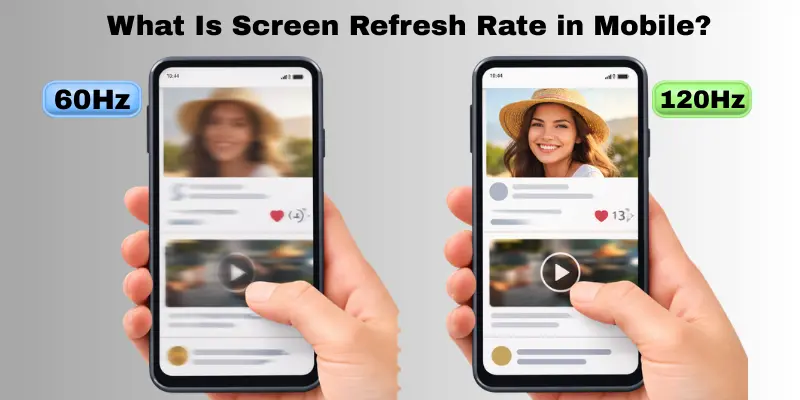
The screen refresh rate on a mobile shows how many times your phone screen updates the image each second. A higher refresh rate makes the screen look smoother. Hz means Hertz, which counts these updates. For example, 60Hz refreshes the screen 60 times per second, while 120Hz refreshes it 120 times. Phones like the Google Pixel series use high refresh rates to make scrolling and animations feel very smooth. That is why scrolling Instagram or playing games feels smoother on a 120Hz phone than on a 60Hz phone.
What Does Hz Mean in Screen Refresh Rate?
Hertz (Hz) shows how many times a screen updates the image in one second. In mobile displays, refresh rate and Hz mean the same thing. A higher Hz number means smoother motion on the screen.
What Is Hertz (Hz)?
Hertz is a measurement unit. It counts how many times something repeats in one second. In phones, it counts how many times the screen refreshes each second.
Is Refresh Rate the Same as Hz?
Yes. When you see 60Hz, 90Hz, or 120Hz on a phone, it simply tells you the screen refresh rate.
What Does 60Hz Mean?
A 60Hz screen refreshes the image 60 times per second. It works well for daily tasks like calls, browsing, and watching videos.
What Does 120Hz Mean?
A 120Hz screen refreshes the image 120 times per second. It makes scrolling, animations, and gaming feel much smoother.
Common Mobile Screen Refresh Rates Explained
Different phones come with different mobile screen refresh rates. Here’s a simple guide to understand them.
60Hz – Standard Refresh Rate
- Good for normal daily use like browsing, social media, and watching videos.
- Battery-friendly and doesn’t drain much power.
90Hz – Smoother Experience
- Found in budget and mid-range phones with higher refresh rates.
- Makes scrolling and animations feel smoother than 60Hz.
120Hz – Premium Smoothness
- Common in flagship phones and gaming-focused devices.
- Ideal for fast gaming and smooth app navigation.
144Hz & Above – Highest Refresh Rate Phones
- Mostly in gaming phones and high-end devices.
- Only needed if you play competitive games or want ultra-smooth visuals.
60Hz vs 120Hz – What’s the Real Difference?
When choosing a phone, many people wonder about 60Hz vs 120Hz. Here’s a clear look at the differences.
Smoothness Difference
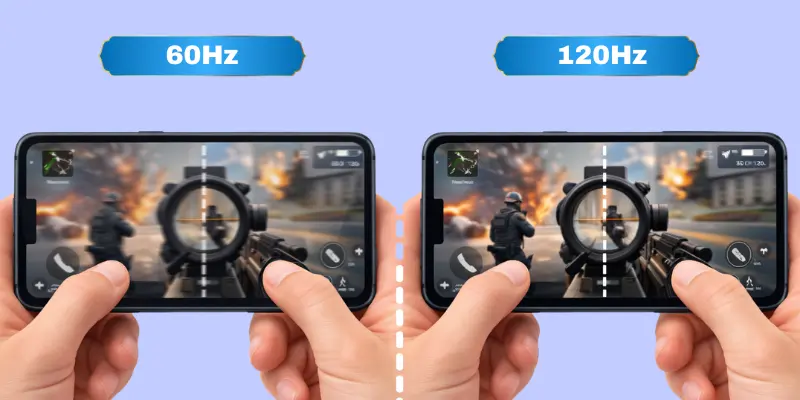
A 60Hz screen looks normal while scrolling and watching videos. A 120Hz screen feels much smoother and more fluid. Animations and app transitions are noticeably better.
Gaming Difference
In gaming, 120Hz gives faster and smoother visuals. Fast-moving games feel more responsive. 60Hz works fine for casual gaming, but isn’t as fluid for high-speed action games.
Battery Drain Comparison
Higher refresh rates use more battery. A 60Hz phone is more battery-friendly. A 120Hz phone drains faster, though some phones adjust the refresh rate automatically to save power.
Is 60Hz Still Good?
Yes. For normal use like browsing, social media, and watching videos, 60Hz is enough.
Is 120Hz Worth It?
If you play games often, scroll a lot, or want a very smooth screen, 120Hz is worth it. Otherwise, 60Hz can save battery without feeling slow.
Adaptive Refresh Rate in Mobile Phones
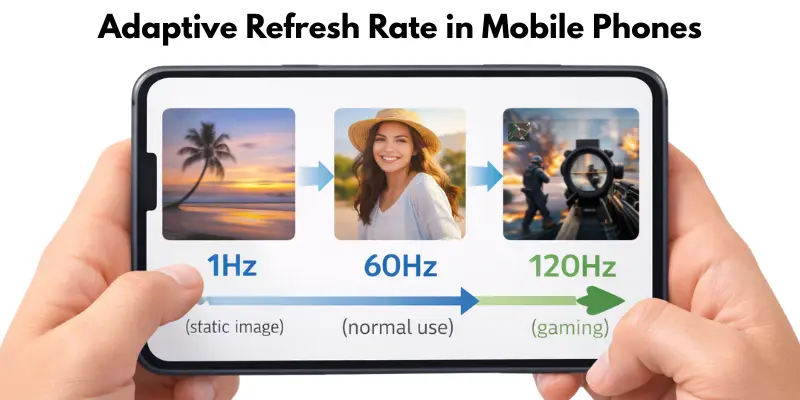
Adaptive refresh rate is a feature that lets your phone change its screen refresh rate automatically. It saves battery by using a high rate only when needed, like 120Hz for gaming or scrolling, and a low rate, even 1Hz, for static images. This makes the screen smooth and responsive while keeping battery life longer. That’s why many flagship phones use adaptive refresh rates—to give the best performance without wasting power.
What Is LTPO Display Technology?
You already know what adaptive refresh rate is. But have you wondered how phones switch the refresh rate so smoothly? The answer is LTPO.
What Does LTPO Mean?
LTPO stands for Low-Temperature Polycrystalline Oxide. It is a special screen design that changes the refresh rate on its own.
- Works like a smart light switch, not a normal on-off switch
- Drops refresh rate as low as 1Hz for still images
- Jumps up to 120Hz instantly when you scroll or play games
Why LTPO Matters for Battery Life
LTPO saves a lot of battery. Your phone uses less power when a high refresh rate is not needed.
- Found in flagship phones like the Samsung Galaxy S25 and pixel 9 series
- Budget phones usually skip this technology
- Helps balance smooth visuals with longer battery life
Quick tip: If battery life matters to you, look for “LTPO display” in the phone specs before buying.
Is a Higher Mobile Screen Refresh Rate Always Better?
A higher screen refresh rate can make your phone feel very smooth. Pros include smoother scrolling, better gaming experience, and more responsive animations. However, there are cons too. High refresh rates use more battery and can drain your phone faster if not managed properly.
Who should buy a high refresh rate phone? Gamers, heavy social media users, and anyone who loves smooth visuals will benefit most. For most people, 90Hz or 120Hz is enough. If you want to save battery, a 60Hz screen still works perfectly for everyday tasks.
Phones With High Refresh Rate in 2026
Many phones in 2026 come with high refresh rate screens, giving smoother scrolling, better gaming, and fluid animations. Let’s see the main options.
Best 120Hz Smartphones
These are great for daily use with smooth displays:
- Samsung galaxy s26 series – flagship smoothness with balanced battery life.
- OnePlus Nord 6 – mid-range phone with a premium-feeling screen.
- Xiaomi Redmi Note 16 Pro – high refresh rate at a budget-friendly price.
Best 144Hz Gaming Phones
Designed for gamers who want the fastest motion:
- iQOO Neo series – smooth visuals for fast games.
- Infinix Note Pro gaming edition – responsive screen for competitive gaming.
- RedMagic gaming phones – high refresh and strong performance.
Phone With the Highest Refresh Rate
Some flagship gaming phones now reach 165Hz–185Hz, giving ultra-smooth gameplay and animations. These are mostly for gaming enthusiasts or anyone who wants the absolute smoothest experience.
How to Check Mobile Phone Screen Refresh Rate
Checking your phone’s screen refresh rate is simple. Here’s how to do it on different devices:
Android Steps
- Open Settings.
- Go to Display or Screen settings.
- Look for Refresh Rate or Motion Smoothness.
- Select the available options like 60Hz, 90Hz, or 120Hz.
Samsung Refresh Rate Settings
- Open Settings → Display.
- Tap Motion Smoothness.
- Choose Standard (60Hz) or Adaptive (up to 120Hz).
iPhone Steps
- Open Settings → Accessibility → Motion.
- On newer iPhones, the screen adjusts automatically up to 120Hz (ProMotion display).
Developer Options
- Enable Developer Options by tapping Build Number 7 times in About Phone.
- Go to Developer Options → Show Refresh Rate.
- The screen will display the current refresh rate in real time.
Refresh Rate Test Apps
There are apps available on the Google Play Store and App Store that show your screen’s refresh rate. They also test if the phone is running at the advertised Hz.
This way, you can easily see your phone’s refresh rate and make sure it’s running smoothly.
Screen Refresh Rate vs Frame Rate (FPS)
Refresh rate (Hz) is how many times your screen updates per second. FPS is how many frames your game or app produces per second. Both matter for gaming. A higher refresh rate makes motion smoother, but if FPS is lower, you won’t see all frames. For example, a 90 FPS game on a 60Hz screen won’t look as smooth as on a 120Hz screen, where gameplay feels much more responsive.
Touch Sample Rate vs Screen Refresh Rate
Have you ever heard the term “touch sample rate” and gotten confused with refresh rate? You are not alone. But these two are not the same thing.
What Is Touch Sample Rate?
Touch sample rate tells you how many times the screen checks for your finger touch each second. It works differently from refresh rate.
- Measured in Hz, just like refresh rate
- Checks your taps and swipes, not the image
- A phone can have a 120 Hz refresh rate and 240 Hz touch sample rate together
Why Touch Sample Rate Matters in Gaming
A higher touch sample rate means less delay between your tap and the on-screen action. This gives gamers a quick edge.
- Reduces input lag in fast games
- Helps in games like PUBG and Free Fire
- Not very noticeable during normal browsing or texting
Quick tip: Look for a touch sample rate of 180Hz or higher if you play competitive mobile games.
Does Mobile Screen Refresh Rate Affect Battery Life?
Yes, screen refresh rate affects battery life. Higher refresh rates use more power because the screen updates more times per second. A 60Hz phone usually lasts longer on a single charge, while a 120Hz phone drains faster if used constantly at a high refresh rate. Many phones use an adaptive refresh rate, which lowers the rate for simple tasks and raises it for gaming or scrolling. This keeps the screen smooth while saving battery.
Screen Refresh Rate vs Display Quality
Screen refresh rate affects smoothness, while display quality includes resolution, brightness, and color accuracy.
Resolution vs Refresh Rate
Higher resolution makes images sharp, but a high refresh rate makes motion look smooth.
Brightness vs Smoothness
Brightness affects visibility in sunlight, while refresh rate affects how fluid the screen feels.
Which Matters More?
It depends on your use. For gamers and heavy scrollers, refresh rate matters more. For watching videos or viewing photos, display quality matters more.
Conclusion
In this guide, we explained everything about mobile screen refresh rate—what it is, how Hz works, the difference between 60Hz and 120Hz, adaptive refresh rate, and how it affects gaming, battery, and display quality. My recommendation, guys, is to choose a phone with at least 90Hz if you scroll a lot or play games. It makes your phone feel smooth and responsive without draining too much battery. Keep exploring your phone’s features, buddies, and enjoy the smooth experience. Stay tuned for more tips.
FAQs
A good refresh rate depends on how you use your phone. 90Hz or 120Hz feels smooth when scrolling or playing games. For everyday use, 60Hz is still fine.
Yes, higher refresh rates use more power because the screen updates more often. Phones with adaptive refresh rate can save battery by lowering the rate when high speed isn’t needed.
Yes, a 120Hz screen feels much smoother than 60Hz. Scrolling through apps or playing games looks more fluid and responsive.
Not all apps take advantage of high refresh rates. Only apps or games optimized for higher Hz will feel smoother. Normal apps may still run at 60Hz.
Yes, many phones let you change it in Display settings. Some phones also adjust automatically using an adaptive refresh rate to save battery.





- Be Respectful
- Stay Relevant
- Stay Positive
- True Feedback
- Encourage Discussion
- Avoid Spamming
- No Fake News
- Don't Copy-Paste
- No Personal Attacks
- Be Respectful
- Stay Relevant
- Stay Positive
- True Feedback
- Encourage Discussion
- Avoid Spamming
- No Fake News
- Don't Copy-Paste
- No Personal Attacks
