Dropped Your Phone in Water? Here’s What to Do Next
Published: 31 Aug 2026
Did you just drop your phone in water and feel a wave of panic? It’s a stressful moment, but don’t worry—you’re not alone! In this guide, we’ll show you exactly what to do step by step to give your phone the best chance of survival. From the initial steps to proper drying, we’ll cover everything you need to know. By the end, you’ll feel more confident and know how to handle the situation calmly and effectively. Let’s get your phone back on track!
Initial Actions
Dropped your phone in water? It’s okay; take a deep breath. Many guides jump straight into technical details. But they skip the simple first steps that actually make the biggest difference.
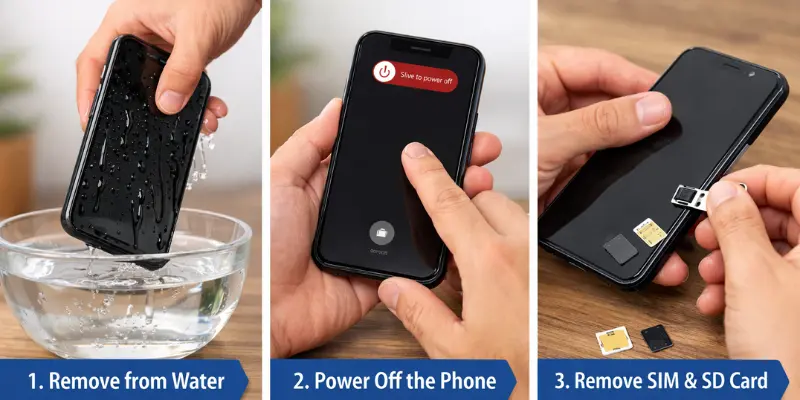
Here’s where you can stand out. Start by offering clear, simple instructions that users can follow right away:
- Take the phone out of the water immediately. The faster you act, the better the chances of saving it.
- Power off the phone. This helps prevent any short circuits or additional damage.
- Remove the SIM and SD card. This will protect your important data from water damage.
Saltwater or Pool Water? The Difference Matters
Not every phone drops in water the same way. Some phones fall in a sink, some in a pool, and some in the sea or a toilet. Does it make a difference? Yes, a big one!
Salt water and chlorine water cause more damage than plain water. They speed up corrosion and can harm the circuits inside your phone faster.
Here are tips for each situation:
- Fresh water (sink, rain, or a glass of water): Just turn the phone off and start drying it. No extra cleaning needed.
- Pool water: Chlorine can corrode your phone’s parts. If your phone is water-resistant, rinse it briefly in fresh water, then dry it.
- Salt water (sea or ocean): This is the most damaging. Salt forms crystals and can block the circuits. Rinse it with fresh water right away (only if your phone is water-resistant), then start drying it immediately.
- Toilet water: Rinse it with fresh water first, then follow the normal drying steps.
Remember: If your phone is not water-resistant, don’t dip it in water again—even just to rinse it. Simply wipe it gently and go straight to the drying process.
Drying the Phone
Once you’ve taken the initial steps, drying your phone is essential. A towel can help by absorbing moisture from the surface, but the key is also to air-dry the phone. This allows moisture to naturally evaporate, which is much more effective than trapping it inside the device.
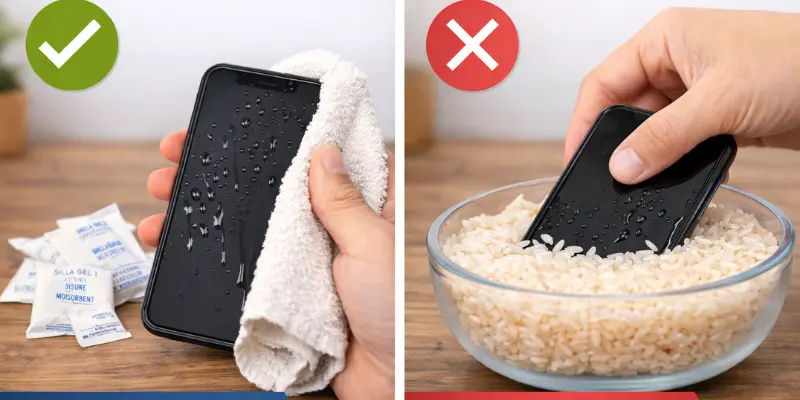
Avoid the rice trick, as it’s not a reliable solution. Instead, try using silica gel packets, which are designed to absorb moisture more effectively. If the phone has significant water damage, seeking help from professional drying services can be the best option to ensure thorough drying without causing further harm.
How to Remove Water from the Charging Port and Speakers
Even after drying your phone, water can still get trapped in the charging port or speaker. This can slow down charging or make sound come out muffled. Follow these steps:
To Remove Water from the Charging Port:
- Keep the phone turned off.
- Take off the case.
- Remove the battery, if possible.
- Wipe the phone with a dry, soft towel.
- Use compressed air, or gently blow, to push extra water out of the port.
- Stand the phone upright with the port facing down, so gravity pulls the water out.
To Remove Water from the Speakers:
- Gently clean around the speaker area with a cotton swab.
- Stand the phone upright with the speaker facing down, and let it sit for a while.
- Using an iphone? Try the “Water Eject” shortcut—it plays a tone through the speaker that helps push out any leftover water.
Important: Don’t charge the phone until the port and speaker are completely dry. A partly wet charging port raises the risk of a short circuit.
Common Mistakes to Avoid
When your phone gets wet, it’s easy to make mistakes that can make the situation worse. Many guides, including some posts, fail to highlight these common missteps. For instance, people often overlook common mistakes like shaking the phone or turning it on too quickly, which can result in even more damage.
Here’s where you can help your users by pointing out what not to do:
- Do not shake or tap the phone. Shaking it can spread water inside, causing more damage.
- Avoid using hair dryers or ovens. High heat can damage the phone’s internal components.
- Don’t use rice. It’s a common myth, but rice can introduce dust and particles that could further harm the phone.
How to Check for Water Damage
Water damage can be hard to spot at first, but it’s important to check your phone for signs as soon as possible. Here’s a simple, step-by-step guide to help you visually inspect your phone and catch any early signs of moisture damage. By doing this, you can take the right action before the damage gets worse.
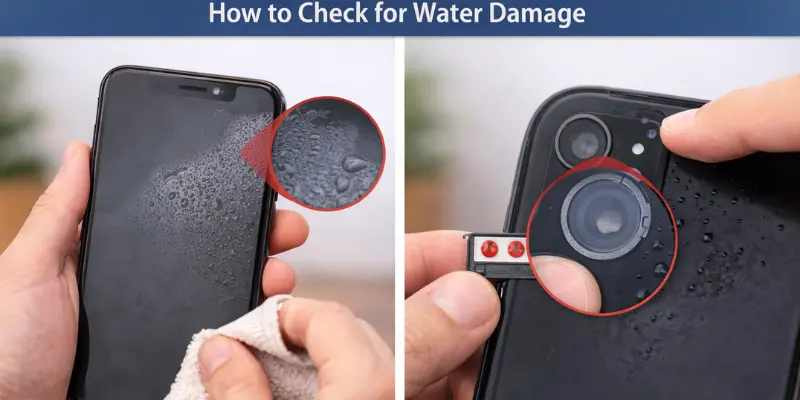
- Look for watermarks: Examine areas like the camera lens, charging port, and screen. These parts often show visible signs of moisture, like fog or water spots.
- Check the water indicator stickers: Many phones come with special moisture detection stickers. These change color when exposed to water. Look for red or pink stickers near the battery or SIM card tray, which can indicate water damage.
Advanced Steps for Severe Damage
DIY methods can help with minor water damage, but they often aren’t enough for more severe cases. If the water has reached the internal components or caused corrosion, it’s time to seek professional help.
In such situations, techniques like dehumidifying or board cleaning are often necessary to properly save the device. For more complex issues, specialized tools like ultrasonic cleaning or thermal treatment are required to repair the damage effectively.
Prevent Future Water Damage
Preventing water damage is much easier than dealing with it later. With the right precautions, you can reduce the risk of your phone getting waterlogged. Let’s explore the best ways to protect your phone from water damage and extend its life.
Invest in Waterproof Cases
The best way to safeguard your phone is with a waterproof case. These cases provide a strong barrier, keeping your phone safe from water even during submersion. Make sure the case fits perfectly, covers all key areas, and doesn’t block essential functions like charging ports or buttons.
- Full protection: Keeps your phone safe from water, even when submerged.
- Perfect fit: Ensure it covers key areas like buttons and ports without blocking any functions.
Use Water-Resistant Covers
For everyday protection, consider a water-resistant cover. While not as strong as waterproof cases, these covers are excellent for handling spills, splashes, and light rain. They help protect your phone without adding too much bulk.
- Slim design: Protects your phone without adding bulk.
- Everyday use: Great for spills, splashes, and light rain.
Know Your Phone’s IP Rating
Understand your phone’s ip rating (Ingress Protection rating), which tells you how well it resists water. IP67 offers protection against submersion in water up to 1 meter for 30 minutes, while IP68 provides even better protection for deeper submersion. A higher IP rating means better water resistance.
- IP67: Protection against water immersion up to 1 meter for 30 minutes.
- IP68: Offers deeper submersion and better water resistance.
Avoid Unnecessary Water Exposure
Even with protection, avoid exposing your phone to water unnecessarily. Don’t take your phone into pools or showers unless it’s specifically designed for that. Avoid large bodies of water where waves or splashes could overwhelm the phone’s protection.
- Don’t risk it: Avoid bringing your phone into pools or showers unless it is designed for water.
- Be cautious: Stay away from large bodies of water where waves could damage the phone.
Regularly Inspect Your Protection Gear
Check your waterproof case or cover regularly for signs of wear and tear. Cracks, tears, or loose seals can reduce its effectiveness. If any damage is visible, replace the protection gear to ensure your phone’s continued safety.
- Look for wear: Check for cracks, tears, or loose seals that reduce protection.
- Replace if damaged: Make sure your protection gear is in good condition to keep your phone safe.
When to Contact Insurance or Warranty for Water Damage
It’s important to know when to reach out to your insurance provider or check your warranty for phone damage, especially when water is involved. Some people overlook this step, which can cost them time and money.
Check Your Warranty or Insurance Coverage
Start by reviewing your phone’s warranty or insurance policy to see if water damage is covered. Some policies specifically mention water damage, while others may exclude it. It’s important to check the terms and conditions to understand what is included and what isn’t.
How to File a Claim
Once you’ve confirmed that your phone is covered, follow these steps to file a claim:
- Gather documentation: Collect any receipts, proof of purchase, and pictures of the damage.
- Contact your provider: Reach out to the customer support team for your warranty or insurance company. You can typically contact them through their website, app, or phone support.
- Follow the instructions: Your provider will guide you through the process, which may include sending your phone for inspection or repair.
What to Expect from Insurance or Repair Services
Here’s what you can expect when you contact your insurance or warranty provider:
- Costs: Some policies require a deductible or service fee, while others might cover the full repair or replacement cost.
- Timeline: The process can take anywhere from a few days to a few weeks, depending on the severity of the damage and the provider’s process.
- Coverage: Make sure to clarify whether repairs are fully covered or if you’ll need to pay for parts or labor. Some warranties or insurance policies may provide a replacement phone if the damage is severe.
Conclusion
Water damage can be overwhelming, but the key to saving your phone is acting quickly and confidently. Many guides fall short, leaving users uncertain about their next steps. Here’s your chance to take control and prevent further damage.
Don’t wait—every minute counts! If you’ve dropped your phone in water, follow the steps in this guide right away to give it the best chance of surviving water damage. Whether it’s turning off your device, drying it properly, or seeking professional help, the sooner you act, the better the outcome.
FAQs
The first thing you should do is immediately take the phone out of the water. Then, power it off to prevent further damage. Finally, remove the SIM and SD cards to protect your data.
Yes, you still have a chance to save it! The quicker you act, the better. Follow the steps for drying and inspecting the phone, and consider professional repair if the damage is severe.
No, rice isn’t the best method. It may not fully dry your phone and could introduce dust and particles. It’s better to use a towel, air dry, or silica gel for more effective drying.
Look for visible watermarks around the camera lens, charging port, or screen. Also, check the water indicator stickers inside the phone—if they’ve turned red or pink, that’s a sign of water exposure.
“Waterproof” means the phone can handle full submersion in water, while “water-resistant” means it can handle splashes or brief exposure. Always check the IP rating to understand your phone’s water protection level.
It’s best to power off the phone immediately and let it dry before using it again. Trying to turn it on too soon can cause more damage. Once dry, inspect it for any issues before powering it up.
No, using a hairdryer can cause heat damage to your phone’s internal components. It’s safer to let the phone air dry or use silica gel for drying. High heat can lead to more problems.
Check your phone’s warranty or insurance policy for specific coverage details on water damage. Some warranties cover it, but many don’t. If it’s covered, follow the process to file a claim.
You should wait at least 24 to 48 hours for the phone to dry out completely before trying to turn it on. The longer you wait, the less likely it is that moisture will cause internal damage.
Invest in a waterproof case or water-resistant cover to protect your phone in case of accidents. Also, check your phone’s IP rating and avoid exposing it to water whenever possible. Regularly inspect your protection gear for wear and tear.

Everything You Need to Know About Phone Code 442: History, Significance, and Modern Use



- Be Respectful
- Stay Relevant
- Stay Positive
- True Feedback
- Encourage Discussion
- Avoid Spamming
- No Fake News
- Don't Copy-Paste
- No Personal Attacks
- Be Respectful
- Stay Relevant
- Stay Positive
- True Feedback
- Encourage Discussion
- Avoid Spamming
- No Fake News
- Don't Copy-Paste
- No Personal Attacks
