What Is RAM in a Smartphone? A Simple Guide
Published: 12 Jan 2026
Many smartphone users hear the word “RAM” again and again but still feel unsure about what it really does or why it even matters. This confusion is normal, especially when phones seem to work fine until they suddenly slow down or freeze. This guide will clear that confusion step by step. It will explain how RAM affects daily phone use and why it plays a key role in how your phone feels and responds. By the end, you will understand RAM in a simple and clear way, without any technical language or confusion.
What is RAM in a smartphone?
RAM is a type of short-term memory inside your smartphone. It helps the phone remember what you are doing right now. Apps and tasks stay active in RAM while you use them. RAM matters because it controls how smooth your phone feels during daily use. When enough RAM is available, apps open faster and run without freezing. You can move between apps without delays or interruptions.
What Does RAM Do in a Mobile Phone?
RAM is the short-term memory of a mobile phone that helps it handle current tasks. When you open an app, the phone keeps it in RAM so it can run smoothly. RAM allows apps to open faster and stay active in the background. In simple terms, RAM helps your phone feel quick and responsive during use.
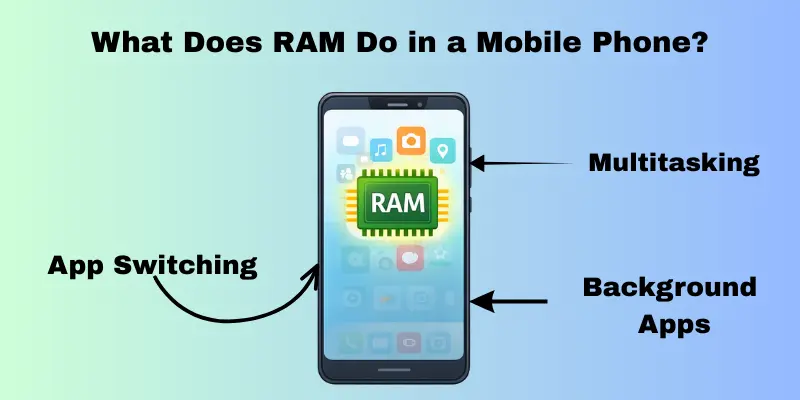
App Switching
When you move from one app to another, RAM helps the phone remember where you left off. This makes switching feel quick and smooth instead of slow and irritating.
- You return to an application and continue from the same screen.
- Apps open instantly instead of loading again
- Your phone feels faster during normal use.
Apps Running in the Background
Some apps stay active even when you are not using them. RAM keeps these apps ready so they can respond quickly when needed.
- Music keeps playing while you’re opening other apps.
- Messages appear without delay.
- Navigation apps stay active while the screen is off.
Multitasking During Normal Phone Use
In just a few minutes, many people use more than one app. RAM helps your phone do this without any problems or delays.
- You chat, browse, and check photos smoothly.
- Apps do not close when you switch often.
- The phone feels stable and responsive.
What is the ROM in mobile phones?
Mobile phones use ROM, a permanent storage space, to store all system files, apps, photos, and videos. Even when the phone is off or restarted, it keeps your data safe. ROM is not used to run tasks like RAM is. Instead, it stores everything on the phone. In short, the ROM on your phone holds all of the data that you have saved.
ROM vs RAM: What’s the Real Difference?
ROM and RAM sound similar, but they work in very different ways. ROM keeps your data saved, while RAM helps your phone work smoothly at the moment.
- ROM holds apps, files, and saved data.
- RAM handles active apps and current tasks.
- ROM stays full; RAM changes all the time.
ROM is your phone’s storage space
The ROM on your phone is where all of your data is stored. The ROM stores things you save until you delete them.
- Apps stay installed even after a restart.
- Photos and videos remain saved.
- System files keep the phone working.
RAM vs. ROM—what’s the difference?
People often mix up RAM and ROM when talking about phones, which can be confusing. They sound the same, but they help your phone in very different ways. Knowing the difference clears up a lot of confusion in daily life.
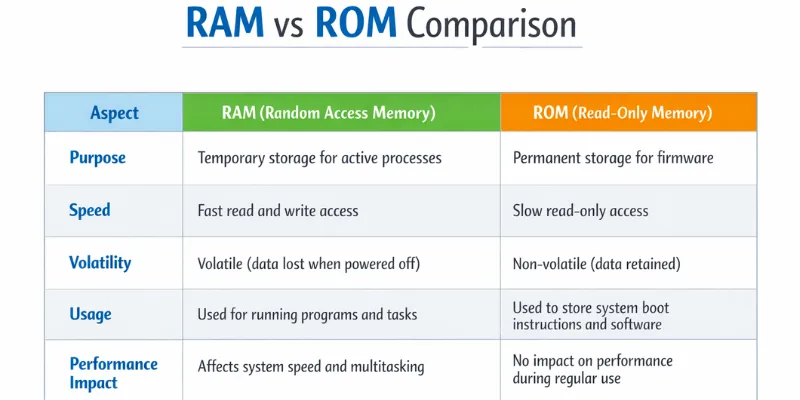
RAM vs ROM Comparison Table
This table shows how RAM and ROM support different parts of phone use. RAM affects how fast your phone feels when opening apps or switching between them. If RAM is limited, apps reload and the phone may feel slow.
ROM affects how much content your phone can store. When ROM fills up, you may struggle to save new photos or install apps. In simple terms, RAM controls speed, while ROM controls storage. Understanding these differences makes phone features much easier to judge.
How Much RAM Do You Need?
Many people think more RAM always means a better phone, but that is not true for everyone. RAM needs to change based on how you use your phone each day. Light use and heavy use do not require the same amount of RAM.
Casual/Student users
This group mostly uses phones for calling, messaging, social apps, videos, and light browsing. They typically use only a few apps at once.
Recommended RAM: A basic to moderate amount is enough and works well for daily needs. This level of RAM can easily last the next 3–5 years for normal use.
- Apps open smoothly for everyday tasks.
- Switching between a few apps feels stable.
- The phone stays responsive for study and casual use.
Business/Professional Users
These users depend on their phones for work, emails, meetings, and productivity apps. They often switch between apps and keep several running together.
Recommended RAM: A balanced amount that supports multitasking without slowdown. This choice remains reliable for the next 3–5 years as work apps grow.
- Multiple apps stay active without reloading.
- Faster app switching during busy hours.
- This results in smoother performance for work-related tasks.
Gaming/power users
Power users play games, edit media, and run many apps at once. Their phone stays under heavy use for long periods.
Recommended RAM: A higher amount that handles demanding apps comfortably. This level stays useful for the next 3–5 years as apps become heavier.
- Games run smoothly with fewer interruptions.
- Apps stay open even during heavy multitasking.
- The phone feels stable during long usage sessions.
Does More RAM Always Mean Better Performance?
Many people believe that adding more RAM will automatically speed up a phone. This idea sounds simple, but it is not always true. RAM in a smartphone works with the processor and the phone’s software, not on its own.
RAM and Processor: How They Work Together
RAM helps apps stay open, but the processor does the actual thinking and work. If the processor is slow, extra RAM alone cannot fix performance issues.
- Apps may stay open, but actions still feel slow.
- Games load but do not always run smoothly.
- Daily tasks depend on both speed and balance.
Software Optimization Matters More Than Numbers
The software on the phone’s RAM is essential. Good software doesn’t waste RAM; it uses it wisely.
- Apps close and open at the right time
- Background tasks do not slow down the phone.
- The phone feels smooth, even with moderate RAM.
Android vs. iOS: Why RAM Usage Feels Different
Different systems handle RAM in different ways. One may use more RAM openly, while the other manages it quietly in the background.
- One system keeps more apps active
- The others close apps to save resources.
- Both can feel smooth when well managed.
Virtual RAM / RAM Expansion
Virtual RAM uses a small amount of storage space to make your phone act like it has more RAM. When the real RAM runs out, the phone uses this space to keep apps from closing too quickly. This type of memory is a backup, not real RAM.

When is virtual RAM useful?
Virtual RAM can help in limited situations, especially on phones with low real RAM. It supports basic multitasking but does not boost real speed.
- Apps stay open a little longer in the background.
- Fewer app restarts during light use.
- The switching process is slightly smoother in simple tasks.
When Virtual RAM Is Useless or Misleading
You can’t use virtual RAM instead of real RAM because it has limits. Virtual RAM operates much slower than real RAM because it depends on storage, and it cannot resolve significant performance issues.
- It does not make apps run faster.
- Heavy apps still slow down or reload.
- It cannot fix a weak processor or poor software.
RAM for Gaming—What Actually Matters
Gaming performance does not depend on RAM alone. A game runs smoothly only when RAM, the processor, and the graphics unit work well together. If one part struggles, the game can lag or glitch.
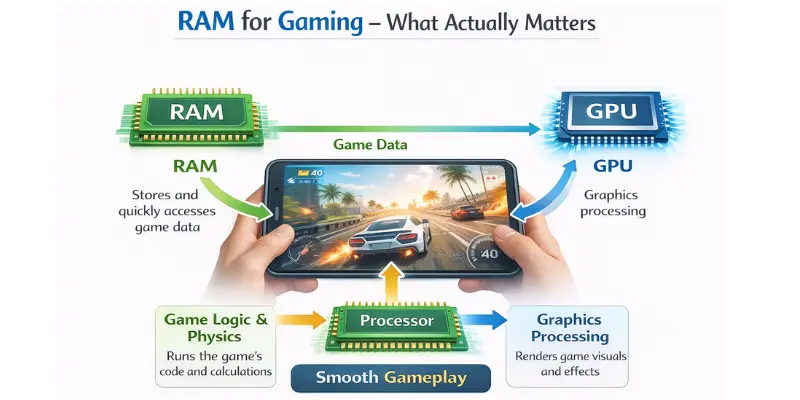
RAM vs. GPU vs. Processor: Who Does What in Games
Each part has a different role during gaming. RAM keeps the game ready, the processor handles game actions, and the graphics unit draws what you see on the screen.
- RAM helps games stay open without reloading.
- The processor controls movement, logic, and response.
- The graphics unit affects visuals and frame stability.
Real Gaming Scenarios That Affect Performance
In real gameplay, smooth performance depends on more than just having a lot of RAM. When one part falls behind, competitive players quickly notice problems.
- Low RAM causes lag when switching screens.
- Weak graphics lead to drops in smooth motion.
- Slow processors delay actions and controls.
Future RAM Needs (2025–2026)
Phone software is changing all the time, which means that RAM needs are growing faster than ever. Over time, new features and smarter apps use more memory. Software growth will have a bigger impact on future RAM needs than how people use their phones now.
Apps get smarter and more interactive every day. These features work in the background and need more room to do their jobs.
- Apps keep learning user habits and stay active.
- Camera and photo apps process more data live.
- Every day apps use more memory than before.
Android Updates and Long-Term Performance
System updates add new features and improve security, but they also increase memory usage. Phones with enough RAM handle these updates better over time.
- Updates run smoothly without slowing the phone.
- Apps remain stable after new system changes.
- Multitasking stays smooth for years.
Conclusion
So guys, in this article, we’ve covered what RAM in a smartphone is in detail. Based on daily use and long-term experience, I recommend choosing RAM according to how you actually use your phone, not just big numbers. Think about your apps, multitasking habits, and future use. If this guide helped you, share it with others and explore our other smartphone basics articles.
FAQs
RAM is the phone’s working memory that helps apps run and stay active. It stores tasks you are using right now, which helps the phone feel smooth and responsive during daily use.
ROM is the phone’s storage space where apps, photos, videos, and system files are saved. It keeps data safe even when the phone is turned off or restarted.
RAM and ROM serve different purposes. RAM affects speed and multitasking, while ROM affects how much data you can store. Both are important, but they solve different needs.
More RAM helps apps stay open and reduces reloads, but it does not guarantee faster performance. Speed also depends on the processor and how well the phone’s software is optimized.
When RAM fills up, the phone closes background apps. This causes apps to reload when you return to them, which can make the phone feel slower during multitasking.
Virtual RAM cannot replace real RAM. It uses storage space to support memory needs, but it works more slowly and only helps slightly with app switching.
For normal use like calls, messaging, browsing, and videos, a moderate amount of RAM is enough. It keeps apps running smoothly without frequent slowdowns.






- Be Respectful
- Stay Relevant
- Stay Positive
- True Feedback
- Encourage Discussion
- Avoid Spamming
- No Fake News
- Don't Copy-Paste
- No Personal Attacks
- Be Respectful
- Stay Relevant
- Stay Positive
- True Feedback
- Encourage Discussion
- Avoid Spamming
- No Fake News
- Don't Copy-Paste
- No Personal Attacks
