What is eSIM? A Complete Guide
Published: 14 Jan 2026
In today’s fast-paced world, staying connected is more important than ever. That’s where eSIM technology comes in, making mobile connectivity easier and more flexible for everyone. eSIM, or Embedded SIM, is changing the way we use our phones by eliminating the need for a physical SIM card. With eSIM, you can switch carriers, update your plan, or add new networks all with a few taps, without having to swap out SIM cards.
For modern mobile users, eSIM provides a more straightforward and convenient way to stay connected. Whether you’re travelling abroad or simply looking to change your phone plan, eSIM makes the process faster and easier. This technology is designed to enhance your mobile experience, making it smoother, more flexible, and hassle-free. So, let’s explore why eSIM is a game-changer in today’s mobile world.
What is eSIM, and how does it work?
In today’s world, we use mobile phones for much more than making calls. We rely on them to stay connected, work, and even travel around the world. But for years, we’ve used a small, physical SIM card to connect our phones to mobile networks. Enter eSIM technology—a revolutionary step forward in the way we connect our devices.
What is eSIM?
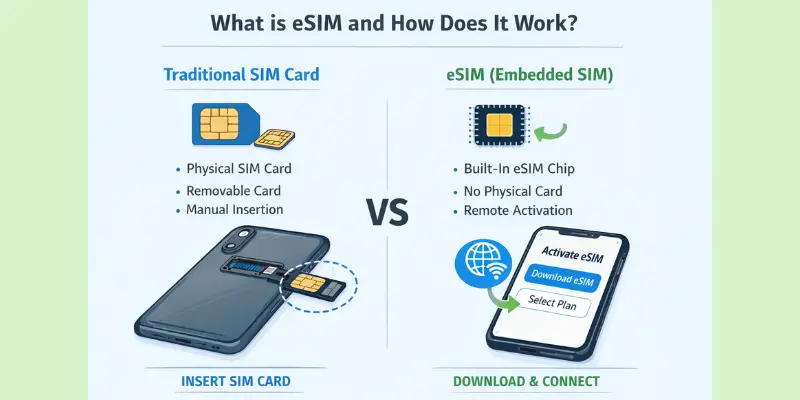
eSIM stands for Embedded Subscriber Identity Module. Instead of being a physical card that you insert into your phone, the eSIM is built into your device. It’s a tiny chip that stores all the information your phone needs to connect to your mobile carrier.
How Does eSIM Work?
The main idea behind eSIM technology is that it allows you to connect to a mobile network digitally instead of using a physical SIM card. Here’s how it works:
- No Physical SIM Card Needed: With an eSIM, your mobile network information is stored digitally inside the phone. This means you don’t have to worry about inserting or swapping out a physical SIM card.
- Remote Activation: To activate an eSIM, you don’t need to visit a store or wait for a physical SIM to be sent to you. You can activate the eSIM remotely, usually by scanning a QR code or entering details provided by your mobile carrier.
- Switching Networks Made Easy: One of the best things about eSIM is that you can switch between mobile carriers or plans easily. Instead of having to physically change the SIM card, you can update your settings to switch to a new carrier without needing to swap out a physical card.
- Multiple Plans on One Device: With eSIM, you can store more than one plan or network profile on your phone at the same time. For example, you could have one network for personal use and another for work, all within the same device.
Comparing eSIM with Traditional SIM Cards
To understand the benefits of eSIM, it helps to compare it with the traditional physical SIM card that most of us are familiar with. Here’s a simple comparison:
| Feature | eSIM | Traditional SIM Card |
| Physical Form | No physical card—it’s built into the device. | A small, removable card that you insert into your device. |
| Activation | Can be activated remotely with a QR code or carrier details. | Requires a physical card, often activated by a store visit or phone call. |
| Switching Carriers | Easily switch carriers through settings. | Requires physically swapping SIM cards. |
| Storage | Can store multiple profiles (e.g., different networks or plans). | Can only store one profile at a time. |
| Device Space | Takes up very little space in the device. | Requires space for a SIM card slot. |
Key Benefits of eSIM Technology
eSIM technology is transforming the way we use our mobile devices, offering a range of benefits that simplify life, enhance security, and promote a more environmentally friendly approach. Here are some of the key advantages of using eSIM:
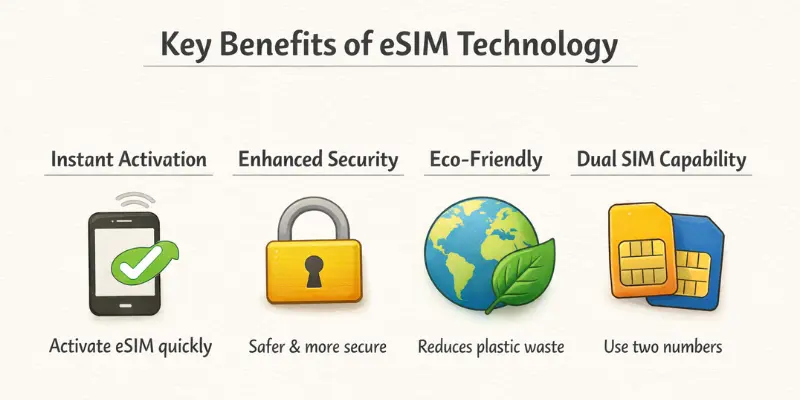
Instant Activation: eSIM lets you activate your mobile plan instantly without waiting for a physical SIM card. Scan a QR code or enter activation details.
Increased Security: Since eSIM is embedded in the device, it’s harder to steal or swap. This adds an extra layer of protection compared to traditional SIM cards.
Environmental Benefits: eSIM eliminates the need for plastic SIM cards, reducing waste. It’s a more eco-friendly solution for mobile connectivity.
Greater Flexibility for International Travel: With eSIM, you can switch to local networks abroad without swapping SIM cards. It saves time and roaming costs.
Dual SIM Capability: eSIM enables you to use two phone numbers simultaneously on a single device. Perfect for separating personal and work calls or having a local number while traveling.
How to Set Up an eSIM on Android and iPhone Devices: A Step-by-Step Guide
Setting up an eSIM on your phone is easy and convenient, offering flexibility in managing your mobile plan without the need for a physical SIM card. Whether you’re using an Android or an iPhone, the general process is similar, but there are some slight differences between the two. This guide will walk you through the steps for both devices and help you troubleshoot common issues.
General Steps for Activating an eSIM
Before diving into specific instructions for Android and iPhone, let’s go over the general steps that apply to both devices:
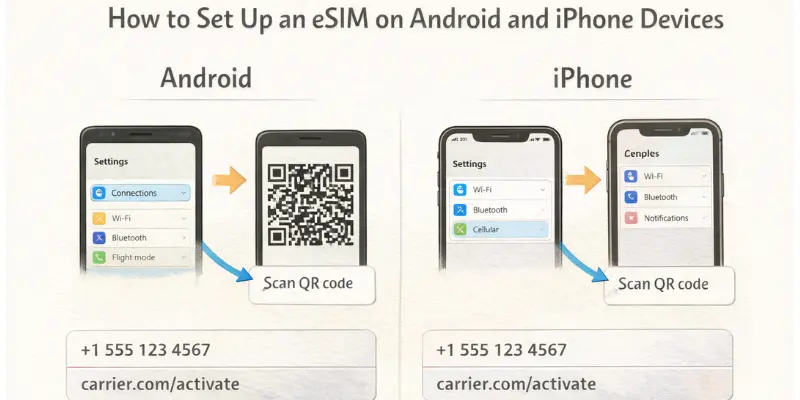
- Get eSIM Activation Details: Your carrier will provide you with the activation details. This could be in the form of a QR code, a manual setup code, or an activation link.
- Open Your Phone’s Settings: On both Android and iPhone, go to the “Settings” app to begin the setup process.
- Add eSIM to Your Device: Both phones allow you to add a mobile plan via eSIM. This usually involves scanning the QR code or entering the details manually.
- Complete the Setup: Follow on-screen instructions to activate the eSIM. Your phone should connect to the network automatically once activated.
How to Set Up eSIM on iPhone
Follow these steps if you’re using an iPhone (iOS 14 or later):
- Open Settings: Go to your iPhone’s Settings app.
- Select Cellular or Mobile Data: Tap on Cellular or Mobile Data, depending on your version.
- Add Cellular Plan: Tap on Add Cellular Plan.
- Scan the QR Code or Enter Details: You will either scan the QR code provided by your carrier or manually enter the activation details if provided.
- Follow the On-Screen Instructions: If prompted, confirm the plan and follow any additional on-screen instructions.
- Label Your Plans (Optional): After activation, you can label your eSIM plan (e.g., “Personal” or “Work”) if you have multiple plans.
- Set Default Line (if using Dual SIM): If you’re using dual SIM, choose your default line for calls, texts, and data usage.
- Complete Setup: Once the activation is complete, your iPhone will automatically connect to the carrier’s network.
How to Set Up eSIM on Android
The process on Android phones can vary slightly depending on the manufacturer, but the general steps are as follows:
- Open Settings: Go to Settings on your Android device.
- Select Network & Internet: Tap on Network & Internet, then choose Mobile Network.
- Add Carrier or eSIM: Look for the + icon or Add Mobile Plan option. Tap it.
- Scan the QR Code or Enter Details: Scan the QR code you received from your carrier, or manually enter the activation details if provided.
- Follow the On-Screen Instructions: Complete any further instructions prompted by your device to finish the setup.
- Set Preferred Network: If you’re using dual SIM, you can choose your preferred SIM for calls, texts, or data usage.
- Confirm Activation: Once activated, your Android phone will automatically connect to the network.
Common Setup Issues and Troubleshooting
If you encounter any issues while setting up your eSIM, here are some common problems and how to fix them:
1. eSIM Not Activating
- Cause: This could be due to an incorrect QR code or activation details, or network issues.
- Solution: Ensure you’re using the correct QR code or activation details provided by your carrier. Try scanning the code again or entering the details manually. Ensure you have a stable Wi-Fi connection during setup.
2. No Signal After Activation
- Cause: The eSIM may not be properly activated, or there may be a problem with your carrier’s network.
- Solution: Try restarting your device. If the problem persists, go to Settings > Network & Internet (Android) or Settings > Cellular (iPhone) and toggle your mobile data on and off. You can also try removing and re-adding the eSIM plan.
3. Can’t Scan the QR Code
- Cause: The QR code may not be scanning properly due to issues with lighting, positioning, or the camera.
- Solution: Ensure good lighting and hold the QR code steady while scanning. Alternatively, manually enter the activation details provided by your carrier.
4. Dual SIM Not Working
- Cause: You may have accidentally selected the wrong default line or haven’t configured dual SIM settings correctly.
- Solution: Go to your device’s Cellular or Mobile Network settings and ensure that you’ve set up your preferred SIM for calls, texts, and data usage. Double-check that both SIMs are activated.
5. eSIM Not Showing Up in Settings
- Cause: Your device might not support eSIM, or the software may need to be updated.
- Solution: Ensure your device supports eSIM (check your device’s manual or the manufacturer’s website for confirmation). If your phone is compatible, check for any available software updates and install them.
Devices that Support eSIM Technology
eSIM technology has made modern devices more flexible and user-friendly. Many smartphones, tablets, and smartwatches now support eSIM, enabling users to connect to mobile networks without the need for a physical SIM card. Below is a list of popular devices from leading brands that support eSIM technology, making switching networks faster and more convenient.
Apple Devices
Apple has been a leader in eSIM adoption, and many of its latest devices support eSIM technology.
iPhones (From iPhone XS and newer):
- iPhone XS, XS Max
- iPhone XR
- iPhone 11, 11 Pro, 11 Pro Max
- iPhone SE (2nd and 3rd generation)
- iPhone 12, 12 Mini, 12 Pro, 12 Pro Max
- iPhone 13, 13 Mini, 13 Pro, 13 Pro Max
- iPhone 14, 14 Plus, 14 Pro, 14 Pro Max
- iPhone 15, 15 Plus, 15 Pro, 15 Pro Max
Note: iPhone 14 and newer models in the U.S. no longer have a physical SIM card slot and rely entirely on eSIM for activation.
iPads (With cellular models):
- iPad Pro (all models with cellular support)
- iPad Air (3rd generation and newer)
- iPad (7th generation and newer)
- iPad Mini (5th generation and newer)
Samsung Devices
Samsung is another big brand supporting eSIM, particularly in their premium models.
Galaxy S Series:
- Galaxy S20, S20+ and S20 Ultra
- Galaxy S21, S21+ and S21 Ultra
- Galaxy S22, S22+ and S22 Ultra
- Galaxy S23, S23+ and S23 Ultra
Galaxy Z Series (Foldables):
- Galaxy Z Fold 2, Z Fold 3, Z Fold 4, Z Fold 5
- Galaxy Z Flip 3, Z Flip 4, Z Flip 5
Other Samsung Models:
- Galaxy Note20 and Note20 Ultra
- Galaxy A54 5G, A55 5G
- Galaxy A52 5G, A72 5G (Some models)
Google Pixel Devices
Google has consistently included eSIM support in its Pixel lineup.
Google Pixel Models:
- Pixel 2, Pixel 2 XL
- Pixel 3, Pixel 3 XL
- Pixel 3a, Pixel 3a XL
- Pixel 4, Pixel 4 XL
- Pixel 4a, Pixel 4a 5G
- Pixel 5, Pixel 5a 5G
- Pixel 6, Pixel 6 Pro
- Pixel 6a
- Pixel 7, Pixel 7 Pro
- Pixel 8, Pixel 8 Pro
- Pixel 9 , Pixel 9Pro ,Pixel 9Pro XL
Other Android Devices
Several Android brands support eSIM, particularly in their higher-end models.
Huawei:
- Huawei P40, P40 Pro
- Huawei Mate 40 Pro
OnePlus:
- OnePlus 9, 9 Pro
- OnePlus 10, 10 Pro
- OnePlus 11, 11 Pro
Motorola:
- Moto Razr (2020 model and newer)
- Moto Edge series (Edge+, Edge 20, Edge 30)
Xiaomi:
- Xiaomi 12, 12 Pro
- Xiaomi 13, 13 Pro
- Redmi Note 12 Pro+ 5G
Oppo:
- Oppo Find X3, X5, Find N series
- Oppo Reno 6, Reno 7 series
Sony Xperia:
- Xperia 1 II, 1 III, 1 IV
- Xperia 5 II, 5 III, 5 IV
Vivo:
- Vivo X60, X70 series
- Vivo V21e
Nokia:
- Nokia XR20
- Nokia X30 5G
Other Devices
eSIM isn’t just for phones—several other devices, like smartwatches and tablets, also support eSIM.
Smartwatches:
- Apple Watch Series 3 and later (All models support eSIM)
- Samsung Galaxy Watch 4 and later (Galaxy Watch 5, Watch 5 Pro)
- Huawei Watch 3 and Watch GT 3 series
- Garmin Venu 2 Plus, Forerunner 945 LTE
Tablets:
- Microsoft Surface Pro X (Supports eSIM with certain carrier plans)
Checking Carrier Support for eSIM
It’s essential to note that not all carriers support eSIM on every device, even if the device itself is eSIM-compatible. You’ll need to check with your carrier to make sure they offer eSIM plans for your specific phone or device. Most major carriers worldwide, including Verizon, T-Mobile, AT&T, Vodafone, and EE, support eSIM; however, carrier support may vary by region.
How eSIM Technology Enhances Security and Privacy
In today’s digital world, keeping our personal information secure is more critical than ever. eSIM technology plays a key role in improving mobile security and privacy. Here’s how eSIMs help protect your data and keep your device safer than traditional SIM cards.
1. Advanced Encryption for Enhanced Protection
eSIMs use strong encryption to protect your mobile data, ensuring it is secure from unauthorized access. This encryption makes it much more difficult for hackers to steal sensitive information. Unlike traditional SIM cards, which are vulnerable to being swapped or cloned, eSIMs offer more advanced security that keeps your data safe and secure.
2. Better Encryption
eSIMs use advanced encryption to protect your mobile data. This encryption ensures that only authorized parties can access your information. Compared to traditional SIM cards, eSIMs offer stronger security, making it more difficult for hackers to steal your personal data.
3. Less Risk of Theft or Cloning
Since eSIMs are embedded inside your device, they can’t be physically removed or stolen like traditional SIM cards. This makes it much more difficult for anyone to steal your eSIM and misuse it. Also, eSIMs are harder to clone, reducing the chances of fraud.
4. Remote Management
If your phone is lost or stolen, your carrier can remotely lock or deactivate the eSIM, preventing unauthorized access to your account and services. This is a key security feature that traditional SIM cards can’t offer. You don’t need to worry about physically swapping out SIM cards to protect your data.
5. Protection Against SIM Swapping
eSIM technology makes SIM swapping attacks much more difficult. Unlike physical SIM cards, changing eSIM profiles requires verification steps that protect against fraudsters. This added layer of security ensures your phone number and data stay safe from being hijacked.
6. Why eSIM’s Security Features Matter
eSIM’s security features are crucial because they protect your personal information in a world where digital threats are growing. With encryption, remote management, and protection against theft, eSIMs provide stronger security than traditional SIM cards. These features make eSIM a safer and more private option, helping ensure your mobile data stays secure from hackers and fraudsters.
Conclusion
So, we’ve covered a lot about eSIM technology today—from how it works to its security benefits and why it’s a game-changer for mobile users. eSIM offers enhanced encryption, protection against theft and cloning, and greater control over mobile data, making it a safer and more flexible choice than traditional SIM cards.
My personal recommendation? If your device supports eSIM, it’s definitely worth considering. The added security and convenience it provides will make managing your mobile services much easier and safer, especially in today’s connected world.
Stay tuned, folks, for more tech tips and tricks to make your life a little simpler! Keep learning and exploring!
FAQs
eSIM stands for Embedded Subscriber Identity Module. It’s a digital SIM that’s built into your phone or device. You don’t need to insert a physical SIM card; the eSIM can be activated remotely. This makes it easier to switch networks and manage mobile plans.
eSIM works by storing your mobile network information directly on a chip inside your device. You can activate it by scanning a QR code or entering the details provided by your carrier. It works just like a traditional SIM card, but without the need for a physical one.
eSIM offers better security, more flexibility, and reduces plastic waste. You can easily switch carriers without needing to swap out a physical SIM card. Plus, it’s great for people who travel internationally, as you can change networks quickly.
Most modern smartphones, including iPhones (iPhone XS and newer), Samsung Galaxy models, and Google Pixel phones, support eSIM. Tablets and smartwatches, like the Apple Watch and Samsung Galaxy Watch, also support eSIM. You can check your device’s specifications to confirm eSIM compatibility.
Yes, many devices allow you to use both an eSIM and a physical SIM card at the same time. This is called dual SIM functionality. You can have two different phone numbers on the same device, which is useful for separating work and personal calls or for making calls while traveling.


- Be Respectful
- Stay Relevant
- Stay Positive
- True Feedback
- Encourage Discussion
- Avoid Spamming
- No Fake News
- Don't Copy-Paste
- No Personal Attacks
- Be Respectful
- Stay Relevant
- Stay Positive
- True Feedback
- Encourage Discussion
- Avoid Spamming
- No Fake News
- Don't Copy-Paste
- No Personal Attacks
