What is an iPhone?
Published: 5 Feb 2026
An iPhone is a smartphone made by Apple that helps you stay connected, browse the internet, and do a ton of other things, all from your hand.
Have you ever wondered how your phone does so much with just a tap? From making calls and sending messages to playing games or taking photos, an iPhone makes it all possible. Whether you’re new to smartphones or just curious about the iPhone, it’s wonderful how this little device can do so much! Let’s dive in and explore what makes the iPhone so special.
Who Makes iPhones?
The iPhone is manufactured by Apple, one of the world’s most well-known tech companies.
Apple has earned the trust of millions of people because its products are easy to use, reliable, and always designed with the user in mind. For example, think about how easy it is to set up your new iPhone. With just a few simple steps, you’re ready to go, and that’s because Apple focuses on making things as simple as possible for you. That’s why so many people choose Apple—they make technology that just works.
The main features of an iPhone
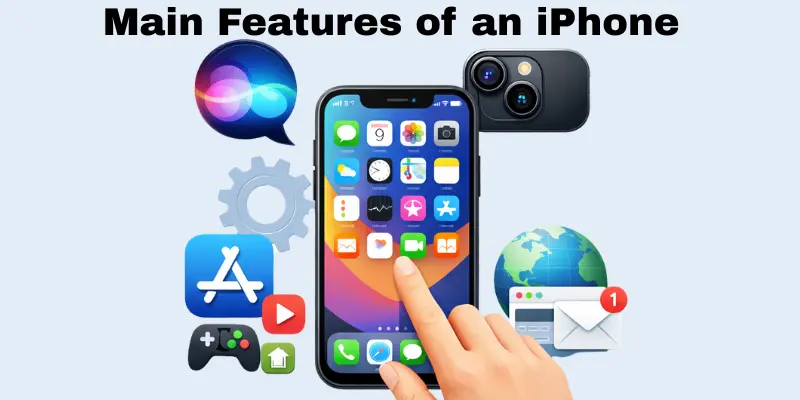
The iPhone is packed with amazing features that make it a powerful and easy-to-use device. From its sleek design to its powerful camera and everything in between, each feature is designed to make your life easier and more enjoyable. Here, we’ll explore the iPhone’s key features so you can see what makes it unique. Let’s take a look at what your iPhone can do!
Touchscreen Display
You can control the iPhone by tapping, swiping, and pinching the screen with your fingers because it has a touchscreen.
For example, to unlock your iPhone, you simply tap the screen. To scroll through photos, you swipe your finger up or down. And if you want to zoom in on a picture or a map, just pinch your fingers apart.
This makes it easy to use the iPhone without having to press any buttons. You can do anything with just a touch!
iOS
The operating system that runs your iPhone is called iOS. It functions like the brain of the phone, ensuring that everything operates smoothly.
It makes sure everything is safe and secure and controls how apps work and how you use the phone.
Your iPhone wouldn’t be able to do anything without iOS. It makes your phone simple to use and helps it run quickly.
Camera and Internet Use
The iPhone’s camera and internet are two features that many people use every day to capture moments and stay connected.
With the camera, you can take a quick photo of your lunch to share with friends or snap a picture of your kids at a family gathering. The internet helps you check emails, browse social media, or look up the latest news – all in just a few taps.
The iPhone’s camera makes it easy to capture memories on the go, and the fast internet keeps you in touch with the world, whether you’re at home or travelling. These features help you stay connected to the people and moments that matter most.
Siri
Siri is your personal assistant on the iPhone. You can talk to her and ask her to do things for you, like sending a text, setting a reminder, or getting directions.
For example, if you say, “Hey Siri, what’s the weather like today?” She’ll give you the answer right away. Siri makes it easy to get things done without even needing to touch your phone
App Store
The App Store is where you can find and download all kinds of apps for your iPhone. Apps are programs that help you do things like play games, chat with friends, track your fitness, and much more.
With just a few taps, you can search for apps, read reviews, and download them straight to your phone. The App Store offers something for everyone, whether you’re searching for productivity apps, educational resources, or entertainment. Plus, many apps are free to download, and others can be purchased for a one-time fee or with a subscription.
What Can You Do with an iPhone?
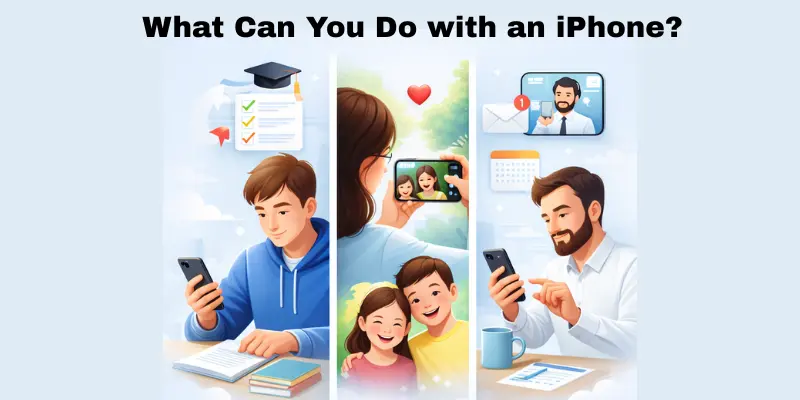
An iPhone is more than just a phone; it can help you with many things in your daily life.
For Students
If you’re a student, your iPhone can help you keep track of homework, set reminders for assignments, and even attend online classes. You can use apps to study, take notes, or search for information whenever you need it.
- Use educational apps like Duolingo or Khan Academy to help with learning.
- Use the Notes or Voice Memos apps to quickly write down notes or record lectures.
For Parents
As a parent, your iPhone can be a lifesaver. It helps you stay connected with your kids, keep an eye on their schedules, and even take adorable photos of family moments. You can use parenting apps to track milestones and even manage family calendars.
- Use family apps like Life360 to track your kids’ whereabouts and stay in touch.
- Keep the family organized with shared calendars and reminders in the iPhone’s Calendar app.
For Workers
The iPhone is a portable office for workers. When you’re on the go, you can check your email, go to virtual meetings, and keep track of your work tasks. You can work from anywhere with apps like Microsoft Office or Google Docs. Reminders help you remember when things are due.
- Stay connected with colleagues through apps like Slack or Zoom.
- Organize tasks and to-do lists using apps like Trello or Todoist.
Why Is the iPhone So Popular?
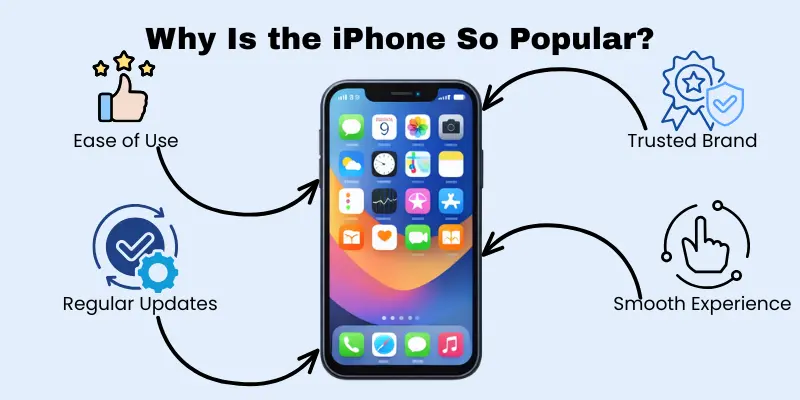
The iPhone is one of the most popular smartphones in the world. But why do millions of people love it so much?
Easy to use.
iPhones are simple to set up and use, even for people who aren’t tech-savvy. Everything is easy to find, and the design is clean and intuitive.
- The home screen is organized so you can quickly find apps and tools.
- The settings are simple to navigate, allowing you to customize the phone to your liking.
Trusted Brand
Apple has built trust with users over the years. People know that their iPhone will be reliable, secure, and last for a long time.
- Apple offers regular software updates to keep your phone secure and up-to-date.
- The brand is known for its excellent customer support, whether you need help setting up your phone or resolving an issue.
Smooth Experience
The iPhone runs smoothly, and the apps work seamlessly together. Whether you’re browsing the web or using social media, everything just works.
- The iPhone’s performance is quick, with minimal lag when switching between apps.
- It syncs well with other Apple devices, such as iPads, Macs, and Apple Watches, for a smooth, connected experience.
The iPhone’s popularity comes down to how easy it is to use, how much you can rely on it, and how it just makes life simpler and more connected.
How Is iPhone Different from Other Smartphones?”
There are many different smartphones to choose from. What sets the iPhone apart from other phones?
Easy to use.
The iPhone is known for being effortless to use. Whether you’re setting it up for the first time or opening an app, everything feels smooth and simple.
- The interface is clean, with easy navigation and no complicated settings.
- Features like Face ID and Siri make the phone even more convenient to use.
Consistent Updates
Unlike many other smartphones, the iPhone gets regular updates, which means you’ll always have the latest features and security improvements.
- iPhones receive software updates at the same time worldwide, ensuring all users get the latest version.
- These updates improve performance and security and add new features to keep your phone feeling fresh.
Reliable App Store
Apple’s App Store has strict guidelines, so you can trust that the apps you download are safe and well-made.
- Apps go through a thorough review process, ensuring quality and security.
- The App Store also offers a wide variety of apps for every need, from education to entertainment.
Strong Customer Support
If you ever run into an issue, Apple’s customer support is known for being helpful and easy to reach, making it easier to get help when you need it.
- Apple has many support options, including phone, chat, and in-person assistance at Apple Stores.
- The Apple Support app helps you troubleshoot and solve problems on your own.
Brief History of the iPhone
Here’s the updated timeline with added specifications for display, camera, and battery for each key iPhone model from 2007 to 2025:
2007: The First iPhone
Apple released the first iPhone, changing the way we think about phones. It combined a phone, music player, and internet device into one compact device.
- Display: 3.5-inch LCD screen, 320×480 resolution
- Camera: 2 MP rear camera
- Battery: 1400 mAh, up to 8 hours of talk time
2008: App Store Launch
Apple launched the App Store, allowing people to download apps directly to their phones, opening up endless possibilities.
- Display: 3.5-inch LCD screen, 320×480 resolution
- Camera: 2 MP rear camera
- Battery: 1400 mAh, up to 8 hours of talk time
2010: iPhone 4 with Retina Display
The iPhone 4 introduced the “Retina Display,” offering clearer and sharper images, making it great for watching videos and browsing the web.
- Display: 3.5-inch Retina Display, 960×640 resolution
- Camera: 5 MP rear camera with HD video recording
- Battery: 1420 mAh, up to 7 hours of talk time
2016: iPhone 7 and the Removal of the Headphone Jack
The iPhone 7 was the first model to remove the headphone jack, pushing wireless audio with Bluetooth headphones.
- Display: 4.7-inch Retina HD display, 1334×750 resolution
- Camera: 12 MP rear camera with optical image stabilization
- Battery: 1960 mAh, up to 14 hours of talk time
2020: iPhone 12 with 5G
The iPhone 12 introduced 5G connectivity, providing users with faster internet speeds and improved performance.
- Display: 6.1-inch Super Retina XDR display, 2532×1170 resolution
- Camera: Dual 12 MP (wide and ultra-wide) rear cameras with Night Mode
- Battery: 2815 mAh, up to 17 hours of video playback
2021: iPhone 13 with Improved Battery and Camera
The iPhone 13 introduced even better battery life and camera improvements, including the new Cinematic Mode for video and a smaller notch, providing more screen space.
- Display: 6.1-inch Super Retina XDR display, 2532×1170 resolution
- Camera: Dual 12 MP (wide and ultra-wide) rear cameras with Sensor-shift OIS
- Battery: 3227 mAh, up to 19 hours of video playback
2022: iPhone 14 with Dynamic Island and Safety Features
The iPhone 14 introduced the Dynamic Island, a new interactive way to receive alerts and notifications, and added safety features such as crash detection and satellite connectivity for emergencies.
- Display: 6.1-inch Super Retina XDR display, 2532×1170 resolution
- Camera: Dual 12 MP (wide and ultra-wide) rear cameras with Photonic Engine for detail-rich photos
- Battery: 3279 mAh, up to 20 hours of video playback
2023: iPhone 15 with USB-C and Enhanced Performance
The iPhone 15 switched to USB-C charging, offering faster data transfer, and included even better performance with the new A17 chip and improved camera capabilities.
- Display: 6.1-inch Super Retina XDR display, 2556×1179 resolution
- Camera: Triple 48 MP (wide), 12 MP (ultra-wide), and 12 MP (telephoto) rear cameras with improved Night Mode
- Battery: 3350 mAh, up to 22 hours of video playback
2024: iPhone 16 with Advanced AI Features
The iPhone 16 is expected to introduce even more advanced artificial intelligence features, such as a smarter Siri and enhanced photo and video editing tools powered by AI.
- Display: 6.1-inch OLED ProMotion display, 2778×1284 resolution
- Camera: 50 MP main sensor, 12 MP ultra-wide, and improved telephoto lens with AI-powered features
- Battery: Estimated 3500 mAh, expected longer battery life with better power efficiency
2025: iPhone 17 with Full-Display Touch and AR Integration
Rumors suggest that the iPhone 17 will feature a full-display touch interface, where the entire screen will be interactive, as well as deeper integration of augmented reality (AR) for a more immersive experience.
- Display: 6.7-inch Full-screen OLED display with 3200×1440 resolution
- Camera: Quad 64 MP (wide), 16 MP (ultra-wide), 12 MP (telephoto), and a 3D depth sensor for AR
- Battery: Expected 4000 mAh, optimized for longer usage with faster charging
Is iPhone Easy for Beginners?”
If you’re new to smartphones or iPhones, you may wonder if it’s easy to start. The good news is, iPhones are designed to be simple and innovative for beginners!
Easy Setup
When you first get your iPhone, the setup process is straightforward. Just follow a few on-screen instructions, and you’ll be ready to go in no time.
- Apple’s helpful prompts guide you through each step, from connecting to Wi-Fi to setting up your Apple ID.
- You can also transfer information from your old phone easily using iCloud or the Quick Start feature.
Simple Interface
The iPhone’s home screen is clean and organized, making it easy to find the apps you need. You don’t need to worry about complicated menus or settings.
- Icons are easy to understand, with clear labels for each app.
- The control center and settings are simple, so you can access everything quickly.
Helpful Features
The iPhone has built-in tutorials and tips that show you how to use features step-by-step. Plus, Siri, the voice assistant, can help you with tasks like sending texts or setting reminders.
- The Tips app offers short, helpful lessons for getting started and mastering your iPhone.
- Siri can be activated by voice, making it easy to ask for help without touching your phone.
The iPhone is easy to use, whether you’re a first-time user or upgrading. You’ll quickly find it simple, intuitive, and ready to help you stay connected.
Conclusion
In this article, we’ve covered the basics of the iPhone, its features, and why it’s so popular. We also studied how it differs from other smartphones and how easy it is to use, especially for beginners.
If you’re looking for a smartphone that’s reliable, easy to use, and offers a smooth experience, the iPhone could be a great choice. It’s perfect for anyone who wants a device that just works and stays up-to-date with the latest features.
So, now that you know what the iPhone has to offer, do you think it’s the right fit for you?
FAQS
An iPhone is a smartphone made by Apple that lets you make calls, send texts, browse the internet, and use apps. You can also take photos, listen to music, and watch videos. It’s a multi-purpose device that helps you stay connected and organized.
You can find your iPhone model by going to Settings > General > About. The model name or number will be listed there. You can also identify your model by checking the physical features, like the size or number of cameras.
Yes, iPhones are designed to work best with an Apple ID. This allows you to access the App Store, iCloud, iMessage, FaceTime, and other Apple services. Without an Apple ID, you won’t be able to use many of the iPhone’s features.
Many iPhone apps are free, but some may have in-app purchases or require payment to download. You can search for both free and paid apps in the App Store and choose which ones to download based on your preferences.
Yes, the iPhone is designed to be user-friendly. The interface is simple and intuitive, with clear icons and straightforward navigation. Whether you’re a tech expert or a beginner, the iPhone is easy to set up and start using right away.

- Be Respectful
- Stay Relevant
- Stay Positive
- True Feedback
- Encourage Discussion
- Avoid Spamming
- No Fake News
- Don't Copy-Paste
- No Personal Attacks
- Be Respectful
- Stay Relevant
- Stay Positive
- True Feedback
- Encourage Discussion
- Avoid Spamming
- No Fake News
- Don't Copy-Paste
- No Personal Attacks
