Smartphone Connectivity Features Explained Simply
Published: 19 Feb 2026
Smartphone connectivity features help your phone connect to the internet and other devices. These include Wi-Fi, Bluetooth, mobile data, hotspot, and NFC. The smartphone link concept means your devices work together smoothly. For example, you can share the internet with your laptop or connect wireless earbuds in seconds. These features make daily life easier and faster.
What Is Smartphone Connectivity?
Smartphone connectivity means how your phone connects to networks and other devices. A mobile network lets you make calls and use mobile data with your SIM card. A wireless connection like Wi-Fi or Bluetooth connects your phone without wires. Device linking connects your phone to devices like a TV or laptop. For example, calling uses a mobile network, while screen mirroring uses a wireless connection.
Core Smartphone Connectivity Features
Smartphone Connectivity Features help your phone connect to the internet and other devices easily. These features make daily tasks simple and fast. Let’s look at the main Smartphone Connectivity Features in easy words.
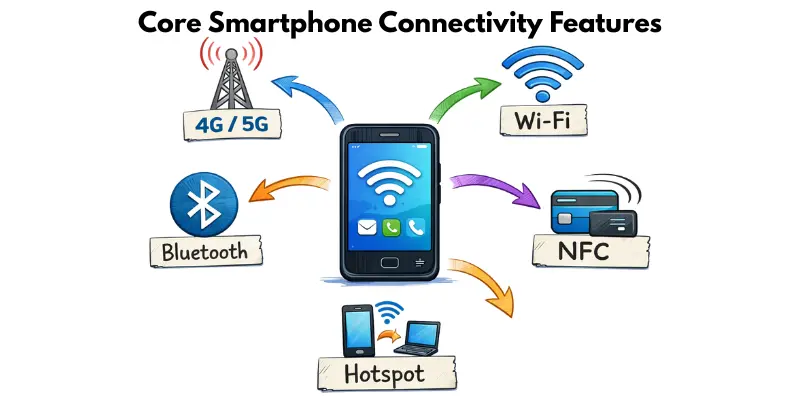
Cellular Network (4G / 5G)
What it does:
It lets you make calls, send messages, and use mobile internet without Wi-Fi.
How it works:
Your phone connects to nearby mobile towers through your SIM card. The towers send signals to your phone.
Real-life example:
You use 4G or 5G data to watch YouTube while traveling.
Wi-Fi Connectivity
Home vs Public Wi-Fi:
Home Wi-Fi is usually faster and more secure. Public Wi-Fi is free but less safe.
Limited connection issue:
Sometimes Wi-Fi shows “connected,” but the internet does not work. This happens due to router or network problems.
Hidden networks:
Some Wi-Fi names are hidden. You must enter the network name and password manually.
Bluetooth
Bluetooth is one of the most useful Smartphone Connectivity Features for short-distance connections.
- Connect wireless earbuds to listen to music.
- Pair a smartwatch to track steps and calls.
- Connect your phone to your car for hands-free calling.
NFC (Near Field Communication)
NFC is another helpful Smartphone Connectivity Feature. It works when two devices are very close.
- Make contactless payments at stores.
- Tap to quickly pair devices like speakers.
Hotspot & Tethering
Hotspot and tethering are powerful Smartphone Connectivity Features for sharing the internet.
- Wi-Fi hotspot: Share the internet wirelessly with nearby devices.
- USB tethering: Connect your phone to a laptop using a cable for internet access.
These Smartphone Connectivity Features keep your phone connected anytime and anywhere.
Smartphone Link: How Devices Connect Together
A smartphone link means your phone connects and works with other devices smoothly. This makes it easier to share, control, or view content across gadgets.
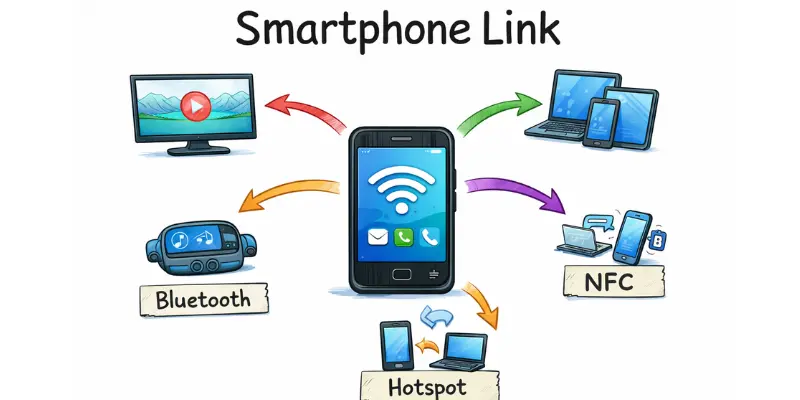
- Phone to TV: You can mirror your phone screen on a smart TV using features like Chromecast or screen mirroring.
- Phone to Tablet: Share files, notifications, or apps between devices for seamless use.
- Phone to Laptop: Use your phone’s hotspot, sync files, or control presentations.
- Phone to Car: Connect via Bluetooth or Android Auto to play music, navigate, or take calls safely.
Android Ecosystem Example
The Android ecosystem makes smartphone linking simple:
- Chromecast & Cast feature: Stream videos from your phone to your TV easily.
- Screen mirroring: Show your phone screen on bigger devices.
- Nearby Share: Quickly send files to nearby Android devices.
- Cross-device services: Sync messages, photos, and apps across phones, tablets, and laptops in the Google ecosystem.
Advanced & Hidden Connectivity Features
Some smartphones have advanced and hidden connectivity features that give more control and options.
- Wi-Fi advanced settings: Adjust network priority, set static IPs, or enable faster roaming.
- Hidden SSID detection: Find and connect to Wi-Fi networks that don’t broadcast their names.
- IoT hidden menu: Access smart home and IoT device settings directly from your phone.
- Connectivity labs (Samsung devices): Test experimental features like improved network stability or advanced Bluetooth options.
How Smartphone Connectivity Actually Works
Smartphone connectivity works using a mix of towers, routers, and radio waves to send information.
- Towers: Mobile networks use towers to send and receive signals for calls and mobile data.
- Routers: Wi-Fi routers connect your phone to the internet at home or in public places.
- Radio waves: Both mobile and Wi-Fi signals travel through radio waves.
- Data packets: Information like messages, videos, or files is broken into small packets and sent over the network. Your phone puts them back together so you can use them instantly.
This system makes it possible for your phone to stay connected anywhere.
Common Connectivity Problems & Fixes
Even with great smartphone Connectivity Features, problems can happen. Here are some common issues and easy fixes:
Why Does My Phone Say “Limited Connection”?
- Router issue: Restart your Wi-Fi router to refresh the connection.
- IP conflict: Reconnect to the network or set a new IP in advanced Wi-Fi settings.
- Weak signal: Move closer to the router or remove obstacles blocking the signal.
Quick fix: Turn Wi-Fi off and on, or restart your phone.
Bluetooth Not Connecting
- Clear cache: Go to Bluetooth settings and clear the app cache.
- Forget device: Remove the paired device and reconnect.
- Reset network settings: This fixes persistent connection problems.
These simple steps solve most connectivity issues quickly.
Smartphone vs Feature Phone Connectivity
Smartphones offer much more than basic calling and texting. Their connectivity features make them smarter and more useful.
- Smart features: Smartphones can connect to Wi-Fi, Bluetooth, NFC, and mobile networks, while feature phones mostly rely on calls and basic mobile data.
- App ecosystem: Smartphones can run apps for messaging, social media, and productivity, all connected through the internet.
- Cloud sync: Smartphones can back up photos, contacts, and files to the cloud, keeping your data safe and accessible on multiple devices.
Benefits of Strong Smartphone Connectivity
Strong Smartphone Connectivity Features make life easier and more enjoyable.
- Faster work: Quickly send emails, join video calls, and share files.
- Entertainment: Stream videos, music, and browse social media without interruptions.
- Smart home control: Manage lights, cameras, and appliances from your phone.
- Remote work: Stay productive from anywhere with stable internet and cloud access.
- Gaming: Play online games smoothly with minimal lag.
Good connectivity keeps your phone efficient and fun to use every day.
Future of Smartphone Connectivity
The future of Smartphone Connectivity Features looks exciting and more advanced.
- 6G: Next-generation mobile networks will be faster and more reliable than 5G.
- Satellite connectivity: Phones may connect directly to satellites, giving internet in remote areas.
- IoT integration: Smartphones will control more smart devices seamlessly, from home gadgets to wearables.
- AI-powered connection switching: Phones will automatically choose the best network or Wi-Fi for smoother performance.
These innovations will make smartphones even more powerful and connected.
Conclusion
So, guys, in this article, we’ve covered Smartphone Connectivity Features in detail. My advice is to take a few minutes to check your phone’s settings and try features like hotspot, Bluetooth, or screen mirroring—you’ll be surprised how much they improve your daily routine. Don’t wait—start using these features and stay connected smarter.
FAQs
Smartphone connectivity is how your phone connects to the internet, networks, and other devices. It allows calls, messages, file sharing, and app use without wires.
These are tools that let your phone connect smoothly to networks and devices. Examples include Wi-Fi, Bluetooth, mobile data, hotspot, NFC, and screen mirroring
The two main methods are Bluetooth and NFC. They let devices share data or pair without internet or cables.
Smartphone link is when your phone connects and works with other devices like TVs, tablets, laptops, or cars. It allows sharing files, screen mirroring, and controlling smart devices easily.
You can connect a smartphone to a TV using screen mirroring, Chromecast, or the Cast feature. This lets you display your phone’s screen on a bigger display
A smartphone has advanced connectivity features, runs apps, and supports cloud syncing. It can access the internet, manage files, and connect with other devices seamlessly.



- Be Respectful
- Stay Relevant
- Stay Positive
- True Feedback
- Encourage Discussion
- Avoid Spamming
- No Fake News
- Don't Copy-Paste
- No Personal Attacks
- Be Respectful
- Stay Relevant
- Stay Positive
- True Feedback
- Encourage Discussion
- Avoid Spamming
- No Fake News
- Don't Copy-Paste
- No Personal Attacks
