What are MB or GB?
Published: 11 Feb 2026
Have you ever asked, “Why does my phone show 128GB storage, but downloads are in MB?” If you are wondering what MB or GB are, they are simple units used to measure digital data and storage. Small files, such as photos or songs, usually use MB (megabytes), while large files, such as games, videos, or phone storage, use GB (gigabytes). For example, a photo may take 3–5 MB, while a mobile game may need 2–5 GB of space. Understanding what MB or GB are helps you manage storage better and download files with confidence.
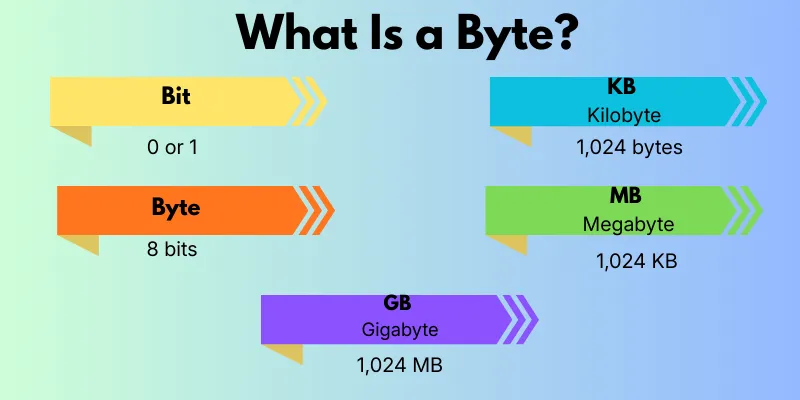
What Is a Byte?
Digital data starts with a tiny unit called a bit. Eight bits together make one byte, which is the basic unit computers use to store letters, numbers, or symbols. As data gets bigger, the units grow step by step: Byte → KB → MB → GB. Understanding this order helps you see how file sizes increase from very small to very large. For example:
- Text: A short message may use just a few bytes.
- Photos: A photo may take several MB.
- Movies/Games: Large files like movies or games can take GB.
What Is a Megabyte (MB)?
A Megabyte (MB) is a unit of digital data that comes after KB in size. It is often used for files that are bigger than simple texts but smaller than large apps or videos. MB helps us understand and measure everyday digital files, like photos, songs, and small apps. Knowing about MB makes it easier to manage your device storage and see how much space each file may take.
Common uses include:
- Photos: One photo may take about 3–5 MB.
- Songs: A typical song usually uses 5–10 MB.
- Apps: Small mobile apps or documents are often measured in MB.
What Is a Gigabyte (GB)?
A Gigabyte (GB) is a larger unit of digital data that comes after MB. It is commonly used to measure bigger files and device storage. Understanding GB helps you see how much space apps, videos, and games take up on your phone or computer. Common uses include:
- Videos: One HD movie may take around 2–3 GB.
- Games: Many mobile or computer games need several GB.
- Phone Storage: Your phone’s total storage, like 64GB or 128GB, is measured in GB.
Which Is Bigger: MB or GB?
Many people get confused about MB or GB. Here’s the simple answer: 1 GB is bigger than 1 MB. In fact, 1 GB = 1024 MB, which means a single GB can hold over a thousand MB-sized files.
| Unit | Common Use |
| MB | Photos, songs, small apps |
| GB | HD videos, games, phone storage |
This makes it easier to understand file sizes and manage storage on your devices.
MB vs GB in Real Life
Understanding MB or GB becomes much easier when we look at real-life examples. These units show the size of everyday files, apps, and data on your devices. For instance:
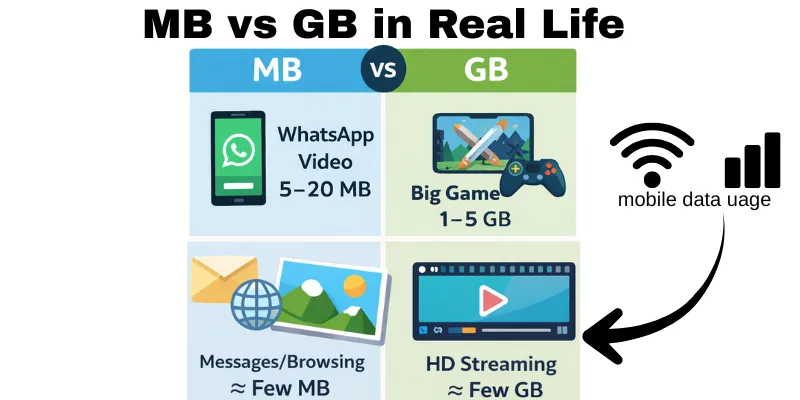
- WhatsApp videos: A short clip may take 5–20 MB, while a longer video could be 100–200 MB.
- App downloads: Small apps like calculators or note apps may be 10–50 MB, but big games or editing apps can take 1–5 GB.
- Mobile data usage: Sending messages or browsing uses a few MB, while streaming HD videos can quickly consume several GB.
Knowing MB or GB in practical terms helps you manage storage, track data use, and avoid running out of space.
MB vs Mb (Important Confusion)
Many people often get confused between MB or Mb, but they are not the same. MB stands for megabytes and is used to measure storage on your phone, computer, or apps. Mb stands for Megabit and is used to measure internet speed.
For example:
- Download a file: Your device shows the file size in MB, which tells you how much storage it will use.
- Internet speed: Your Wi-Fi or mobile data plan shows speed in Mb/s, which tells you how fast data can be downloaded or uploaded.
Understanding the difference between MB and Mb helps you manage storage better and avoid confusion when checking your internet speed.
How Much Storage Do You Need?
Choosing the right storage or data plan can be confusing. Here’s a simple guide based on how you use your device:
- Light users: If you mostly use your phone for calls, messages, and a few photos, 32–64 GB is usually enough.
- Average users: For people who take many photos, install several apps, and watch videos, 128–256 GB works well.
- Heavy users: Gamers, video editors, or anyone who stores large files may need 512 GB or more to avoid running out of space.
Quick Conversion Table (MB to GB)
Converting MB to GB is easier with a simple table. Here are some common examples:
| MB | GB |
| 500 MB | 0.49 GB |
| 1024 MB | 1 GB |
| 2048 MB | 2 GB |
| 5120 MB | 5 GB |
This table helps you quickly understand how many MB make a GB and estimate file sizes or storage needs.
Conclusion
In this guide, we covered everything you need to know about MB or GB, from the smallest units like bytes to practical examples in your daily life. We also looked at common confusions like MB vs Mb, how much storage you might need, and even a quick conversion table. My recommendation, guys, is to always check your file sizes and storage before downloading or buying a device—it really helps you avoid running out of space and manage your data smartly. Keep learning, buddies, and soon, understanding digital storage will feel super easy!
FAQs
MB or GB are units that measure digital files and storage. MB is usually for smaller files like photos, songs, or documents. GB is for bigger files like videos, games, or your phone storage. They help you understand how much space a file or device needs.
One GB equals 1024 MB. That means a single GB can hold over a thousand MB-sized files. Knowing this helps you compare file sizes and storage easily.
Phones show storage in GB because the total storage is large. Downloads are shown in MB because individual files are smaller. This makes it easier to see and manage your storage.
Yes, a GB is much bigger than an MB. One GB can hold over a thousand MB-sized files. That’s why big apps, movies, or games are measured in GB instead of MB.
Yes, the size of files in MB or GB affects your mobile data usage. Downloading a 500 MB video will use more data than a 5 MB photo. Understanding MB or GB helps you control data usage and avoid extra charges.



- Be Respectful
- Stay Relevant
- Stay Positive
- True Feedback
- Encourage Discussion
- Avoid Spamming
- No Fake News
- Don't Copy-Paste
- No Personal Attacks
- Be Respectful
- Stay Relevant
- Stay Positive
- True Feedback
- Encourage Discussion
- Avoid Spamming
- No Fake News
- Don't Copy-Paste
- No Personal Attacks
