iPhone Battery Comparison: Size, Types & Battery Life Explained
Published: 21 Feb 2026
In 2026, doing an iPhone battery comparison is even more important before buying a new iPhone. Every new model comes with a different battery size and performance. Some iPhones give longer screen time for gaming and streaming. Others are better for simple daily tasks. When you check an iPhone comparison battery life, you clearly see which phone can last all day without charging stress. This small step helps you choose smartly and avoid confusion.
iPhone Battery Types – What Kind of Battery Does iPhone Use?
When we talk about iPhone battery types, the answer is simple and clear. Apple uses modern lithium-based rechargeable batteries in all iPhones. These batteries store more power in a small space. They charge fast and work efficiently. That is why your iPhone feels smooth and lasts longer during daily use.
Lithium-Ion vs Lithium-Polymer in iPhones
- Most iPhones use lithium-ion batteries.
- Some models use a lithium-polymer design for better shape flexibility.
- Lithium-ion charges fast and gives strong backup.
- Lithium-polymer is lighter and fits slim phone bodies.
- In daily use, both perform almost the same for users.
How Apple Optimizes Battery Chemistry
- Apple designs the battery and iOS to work together.
- The system controls power use smartly.
- It reduces background apps to save battery.
- Optimized Charging protects battery health at night.
- This helps the battery last longer over time.
Do all iPhones use the Same Battery Type?
- Almost all iPhones use lithium-based batteries.
- The battery technology is similar in every model.
- Battery size is different in each iPhone.
- Pro Max models have bigger batteries.
- Mini or standard models have smaller batteries.
iPhone Battery Size Comparison (mAh & Wh by Model)
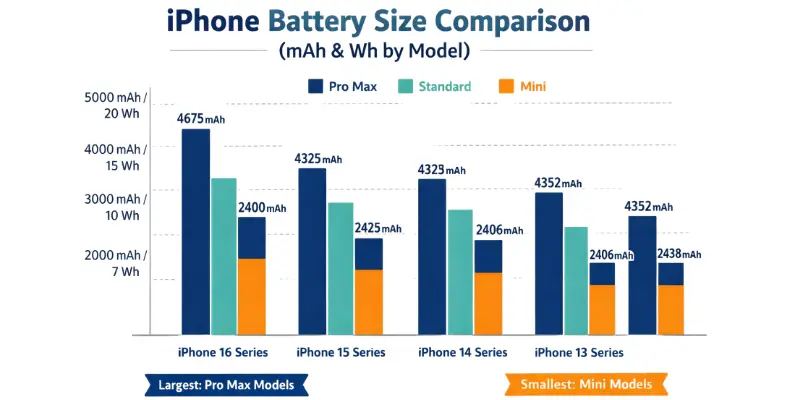
An iPhone battery size comparison helps you see how much power each iPhone holds. Battery size is shown in mAh (milliampere-hour) and Wh (watt-hour). Bigger numbers usually mean longer energy backup, but software and chips also affect real-life battery life. Let’s compare recent models simply.
Battery Capacity of Recent iPhone Models
iPhone 16 Series
- iPhone 16 – around 3,500 mAh
- iPhone 16 Plus – around 4,500 mAh
- iPhone 16 Pro – around 3,350 mAh
- iPhone 16 Pro Max – around 4,550 mAh
Newer models usually improve battery and efficiency. So the 16 series may give longer real use time.
iPhone 15 Series
- iPhone 15 – around 3,349 mAh
- iPhone 15 Plus – around 4,383 mAh
- iPhone 15 Pro – around 3,274 mAh
- iPhone 15 Pro Max – around 4,422 mAh
The Plus and Pro Max models give longer screen time. They are better for gaming and watching videos.
iPhone 14 Series
- iPhone 14 – around 3,279 mAh
- iPhone 14 Plus – around 4,325 mAh
- iPhone 14 Pro – around 3,200 mAh
- iPhone 14 Pro Max – around 4,323 mAh
Bigger models last longer in everyday use.
iPhone 13 Series
- iPhone 13 – around 3,240 mAh
- iPhone 13 mini – around 2,406 mAh
- iPhone 13 Pro – around 3,095 mAh
- iPhone 13 Pro Max – around 4,352 mAh
The mini model has the smallest battery, while Pro Max gives the strongest backup.
iPhone Battery Size Comparison
- iPhone 16 Pro Max – ~4,550 mAh | ~17.5 Wh | Up to 30 hours video
- iPhone 15 Pro Max – 4,422 mAh | ~17.1 Wh | Up to 29 hours video
- iPhone 14 Pro Max – 4,323 mAh | ~16.7 Wh | Up to 29 hours video
- iPhone 13 Pro Max – 4,352 mAh | ~16.8 Wh | Up to 28 hours video
- iPhone 15 – 3,349 mAh | ~12.9 Wh | Up to 20 hours video
- iPhone 13 mini – 2,406 mAh | ~9.5 Wh | Up to 17 hours video
An iPhone battery size comparison helps you see how much power each iPhone holds. In a complete iPhone Battery Comparison, capacity numbers should always be reviewed along with software efficiency and chip performance.
Does Bigger mAh Mean Better Battery Life?
Not always. Bigger mAh means more stored energy. But real battery life also depends on the phone’s chip and software. A newer chip can use power more smartly. This can make a smaller battery last longer.
For example, a newer iPhone with a better chip can beat an older phone with a bigger mAh. Apple’s system also saves power in real use.
iPhone Comparison Battery Life – Real-World Performance
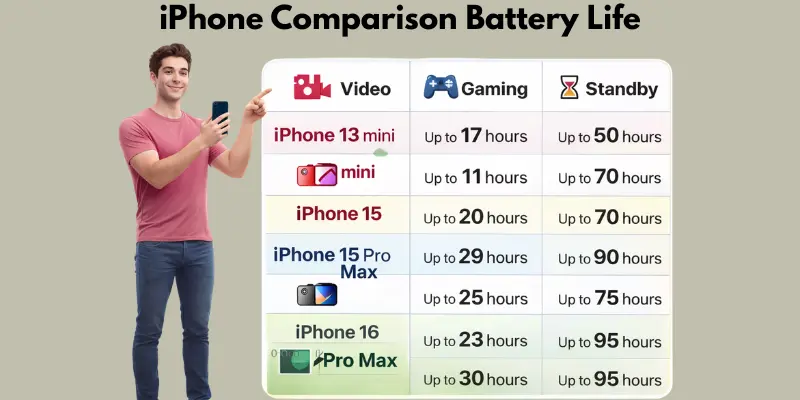
When you check iPhone battery comparison life, numbers on paper don’t tell the full story. Real-world use is different. Video, gaming, and standby all affect how long your iPhone lasts. Let’s break it down simply so you can pick the right model.
Video Streaming Test
- Pro Max and models last longest for video streaming.
- For example, the iPhone 16 Pro Max can stream up to 30 hours before charging.
- Smaller models like the iPhone 13 mini last around 17–18 hours.
- Higher brightness and 120Hz refresh can reduce streaming time.
Gaming Battery Drain
- Gaming drains battery faster than video or social media.
- Pro Max models still perform better due to bigger batteries.
- iPhone 15 Pro lasts shorter in gaming than Pro Max.
- New chips in the 16 series manage power more efficiently, so gameplay lasts longer.
Standby Performance
- All recent iPhones hold a charge well in standby.
- Even mini and standard models can stay 1–2 days with minimal use.
- iOS automatically reduces background activity to save power.
- Optimized Charging also helps maintain battery health over time.
Which iPhone has the Best Battery Life?
- If you want the longest real-life battery, choose Pro Max or Plus models.
- For normal daily use, standard models are enough.
- Gaming or video-heavy users benefit most from bigger batteries.
- iPhone 16 Pro Max is expected to give the best overall battery life in 2026.
When you check iPhone comparison battery life, numbers on paper don’t tell the full story. A proper iPhone Battery Comparison should always include streaming, gaming, and standby testing.
iPhone Battery Features Comparison (Beyond Just mAh)
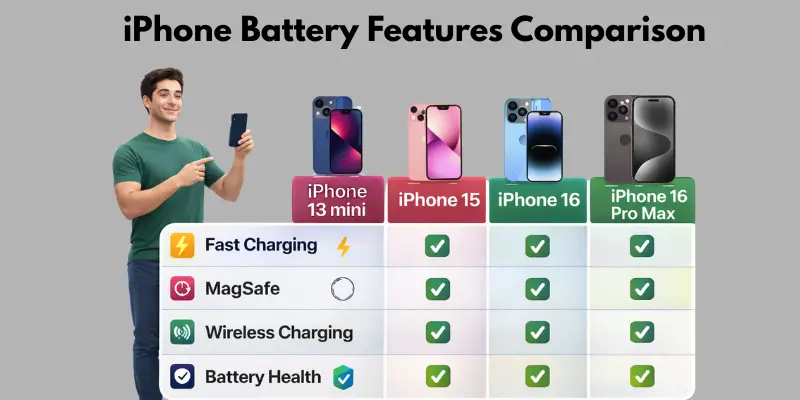
An iPhone battery features comparison is more than just numbers. Yes, mAh shows capacity, but real value comes from extra features. Apple focuses on charging speed, battery health, wireless options, and performance. These small differences make your iPhone more reliable in daily life. Let’s explore the unique features that most competitors miss.
Fast Charging Speeds by Model
- Recent iPhones support fast charging up to 20–27W (depends on model).
- iPhone 16 Pro and Pro Max charge faster than standard models.
- You can get around 50% charge in just 30 minutes with the right charger.
- Fast charging is ideal for users who are always on the go.
MagSafe & Wireless Charging Support
- All iPhones from iPhone 12 onwards support MagSafe.
- MagSafe allows wireless charging with magnetic alignment, making it simple to snap your charger.
- Standard Qi wireless charging works too, but MagSafe is faster and more precise.
- Great for office desks or car mounts without cables.
Battery Health & Cycle Count Features
- iPhones track battery health and cycle count in settings.
- Apple shows the maximum capacity percentage to indicate wear.
- Users can see when battery replacement is recommended.
- Helps maintain long-term performance and avoid unexpected shutdowns.
Peak Performance Capability Explained
- iOS manages peak performance to prevent slowdowns.
- Older batteries may reduce peak power temporarily to avoid crashes.
- New iPhones keep performance high while protecting battery health.
- Users get smooth operation for apps, games, and video playback even after months of use.
An iPhone battery features comparison is more than just numbers. A full iPhone Battery Comparison also includes charging speed, MagSafe support, and battery health tools.
What Is a Good iPhone Battery Health Percentage?
Battery health shows how much your iPhone battery can hold compared to when it was new. Checking it helps you know if your phone still lasts all day or needs attention. Most users wonder: is 90% okay? Or should it be 100%? Let’s break it down clearly.
100% vs 90% vs 80%
- 100% – Your battery is brand new or very healthy. Full power and peak performance.
- 90% – Still good for normal daily use. You may notice slightly shorter screen-on time.
- 80% – Battery is aging. You may need to charge more often, and performance may reduce under heavy use.
When Should You Replace a Battery?
- Replace the battery if it drops to 80% or below, and daily use feels short.
- If your iPhone shuts down unexpectedly even with a charge, it’s time for a replacement.
- Apple officially recommends replacement when the maximum capacity hits 80%.
How Many Charge Cycles Last?
- iPhone batteries last about 500 full charge cycles before capacity drops significantly.
- One cycle means using 100% of the battery, not necessarily in one charge. Example: 50% today + 50% tomorrow = 1 cycle.
- Proper charging habits (avoiding extreme heat, using optimized charging) help extend battery life.
How Long Do iPhone Batteries Last?
iPhone batteries are designed to last 2–3 years on average. After that, you may notice reduced backup or slower charging. Battery life depends on usage, charging habits, and temperature. Understanding how long your battery lasts helps you plan replacements and keep your iPhone running smoothly.
Average Lifespan
- Most iPhones maintain 80% capacity after 500 full charge cycles.
- This usually takes 2–3 years of regular use.
- Heavy users who game, stream, or use GPS may see faster battery aging.
Signs of Battery Degradation
- Shorter screen-on time than usual.
- Frequent need to recharge during the day.
- Unexpected shutdowns even when the battery shows remaining charge.
- Slower app launch or occasional lag.
When Performance Throttling Happens
- iOS reduces peak performance automatically on older batteries.
- Throttling prevents sudden shutdowns with worn-out batteries.
- You may notice slower app loading or lower frame rates in games.
- Replacing the battery restores full performance.
Which iPhone Should You Buy for Best Battery Life?
Choosing the right iPhone for battery life depends on how you use your phone every day. Some users need all‑day power, while others use phones lightly. Let’s break it down simply so you can pick the best one for your needs.
For Heavy Users
If you use your iPhone all day for video, social apps, and work:
- Go for Pro Max or Plus models
- These have larger batteries and longer real‑life hours
- Good for travel, videos, and long browsing
Example: iPhone 16 Pro Max or iPhone 15 Plus gives power you can trust without frequent charging.
For Light Users
If you mainly use calls, messages, and simple apps:
- Standard models are enough
- They still last a full day with light use
- They are more affordable, too
Example: iPhone 15 or iPhone 14 works well for daily basics.
For Gamers
Gaming uses a lot of power and heats the battery: Choose Pro or Pro Max models
- Bigger batteries and efficient chips help with longer gaming sessions
- Better cooling and performance support heavy use
Example: iPhone 16 Pro or 16 Pro Max is ideal for gamers.
For Small Phone Lovers
If you want a compact iPhone that fits easily in your hand:
- Choose the mini or smaller standard models
- They are light and easy to carry
- Battery is smaller, but still decent for moderate use
Example: iPhone 13 mini is perfect if size matters more than a long‑lasting battery.
Choosing the right model becomes easier after a detailed iPhone Battery Comparison, especially if you know your daily usage habits.
Final Verdict
Choosing the right iPhone battery comes down to your daily usage and priorities. Here’s a quick summary to make it simple.
Quick Summary
- Pro Max & Plus models – Biggest batteries, longest real-life backup.
- Standard models – Good for daily calls, messaging, and light apps.
- Mini models – Compact design, smaller battery, decent for moderate use.
- iPhone 16 series – Most efficient chips and slightly bigger batteries than the 15 series.
- Battery features – Fast charging, MagSafe, and battery health tools matter beyond mAh.
Who Should Upgrade
- Heavy users who drain batteries quickly.
- Gamers or video streamers who need longer sessions.
- Users with older iPhones (13 or below) are looking for modern battery efficiency.
Who Should Replace the Battery Instead
- iPhones with battery health below 80%.
- Phones that shut down unexpectedly or show slow performance.
- Users who like their current model but need a full-day backup.
After this complete iPhone Battery Comparison, you can confidently decide which model matches your lifestyle, whether you need maximum battery backup or balanced everyday performance.
Conclusion
So guys, in this article, we’ve covered iPhone Battery Comparison in detail. From battery types and sizes to real-world performance, you now know which iPhone suits your needs. Personally, I recommend choosing a Pro Max or Plus model if you want the longest battery life, especially for gaming or heavy use. Check your daily usage and pick the model that fits best. Don’t wait—compare the latest iPhones today and choose the right one for you.
FAQs
iPhones use lithium-based rechargeable batteries. Most models use lithium-ion, while some designs use lithium-polymer. Both are safe, charge fast, and last long in daily use.
An iPhone battery comparison shows battery size, features, and real-world performance. It helps you pick the model that fits your daily needs. You can decide between longer video time, gaming, or normal use.
Based on iPhone battery comparison, Pro Max and models last the longest. They are perfect for heavy users and gamers. Standard and mini models are fine for light daily use.
iPhone batteries usually last 2–3 years before a noticeable capacity drop. Heavy use, charging habits, and heat affect lifespan. Proper care helps them stay healthy longer.
Go to Settings → Battery → Battery Health & Charging. You can see the maximum capacity and whether performance management is active. This helps you know if your battery needs replacement.
Replace it if battery health drops below 80%. You may also notice shorter screen-on time or unexpected shutdowns. Replacing restores full performance and a longer backup.
Most iPhones from iPhone 8 onward support fast charging and wireless charging. Newer models also support MagSafe for faster and easier wireless charging. This makes daily charging simple and convenient.



- Be Respectful
- Stay Relevant
- Stay Positive
- True Feedback
- Encourage Discussion
- Avoid Spamming
- No Fake News
- Don't Copy-Paste
- No Personal Attacks
- Be Respectful
- Stay Relevant
- Stay Positive
- True Feedback
- Encourage Discussion
- Avoid Spamming
- No Fake News
- Don't Copy-Paste
- No Personal Attacks
