What Is Digital WellBeing in Android? A Simple Guide
Published: 9 Jan 2026
Do you feel like you spend too much time on your phone? You can easily lose track of how much screen time you get each day, which can make you wonder if there is a better way to balance things. This guide explores Android’s digital well-being features and explains how they can help you manage your device usage smoothly.
We’ll discuss the most important things that Android can do, give you advice on how to set limits, and show you how to change your phone habits for a healthier digital life.
What is Android Digital Wellbeing?
Android Digital Wellbeing is a set of features designed to help users take control of their phone usage and create healthier digital habits. It supports a balanced relationship with technology, making it easier to avoid excessive time spent on apps and distractions.
The purpose of Android Digital Wellbeing is to provide users with tools that enable them to track and manage their screen time, reduce interruptions, and set boundaries on their device usage.
Why Digital Wellbeing Matters Today
We always have our smartphones with us, which makes it easy to spend too much time on them. Such behavior can cause people to become addicted to screens, which makes them lose track of time and feel alone. It also causes mental health problems like stress, anxiety, and trouble sleeping. It’s essential to maintain balance when there are so many things happening.
- Screen addiction: Excessive phone use can create unhealthy habits.
- Mental health impact: Too much screen time can cause stress and anxiety.
- Finding balance: Digital well-being helps manage screen time and reduce distractions.
How to Start Using the Digital Wellbeing App Today
Getting started with the Digital Wellbeing app on your Android device is simple. Here’s a step-by-step guide to help you set it up and begin using its features right away.
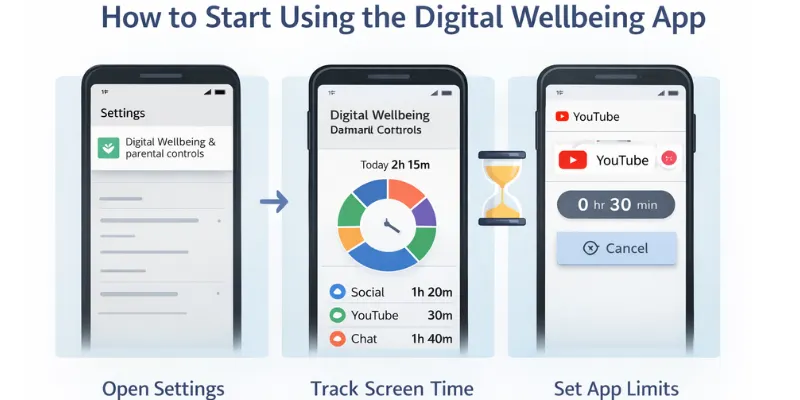
Step 1: Open the Digital Wellbeing App
- Go to your phone’s settings.
- Scroll down and tap on Digital Wellbeing & Parental Controls.
- You will be directed to the Digital Wellbeing app, where you can see your screen time and app usage.
Step 2: Set Up Dashboard and Track Screen Time
- In the app, you will see the Dashboard. This shows how much time you’ve spent on apps.
- Tap on any app to see detailed stats.
- Set time limits for apps by tapping the hourglass icon next to each app. Once the time limit is reached, the app icon will be grayed out to remind you to take a break.
Step 3: Use Focus Mode
- Go to the Focus Mode tab in the app.
- Enable Focus Mode to temporarily pause distracting apps, such as social media, and focus on your important tasks.
- You can customize which apps are paused and set a schedule for when Focus Mode should activate automatically.
Step 4: Set Up Bedtime Mode
- In the Wind Down section, you can turn on Bedtime Mode.
- This will reduce blue light exposure and mute notifications during your set bedtime hours, helping you sleep better.
Benefits of Digital Wellbeing on Android
Android Digital Wellbeing offers several key benefits that help users create healthier and more balanced relationships with their phones. By managing screen time and reducing distractions, these features promote improved focus and mental well-being.
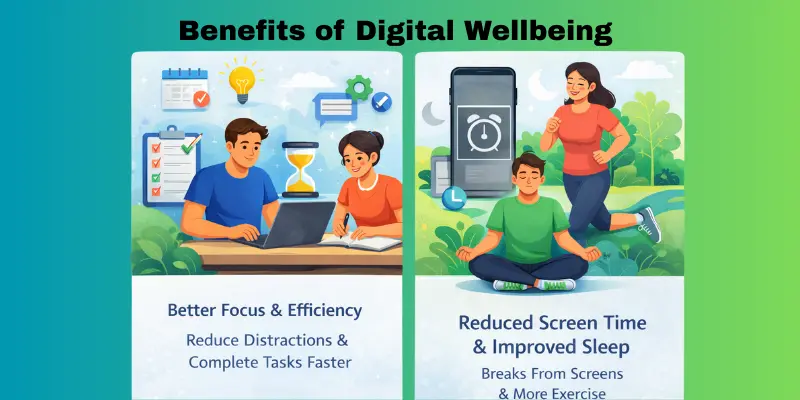
Improved Screen Time Management
Digital Wellbeing helps you track the amount of time you spend on your phone and specific apps. With features like the Dashboard, you can see exactly where your time goes and set screen time limits to avoid overuse. This helps you become more mindful of your phone habits and encourages healthier use of your device.
- Track app usage: View detailed reports on how much time you spend on each app.
- Set daily limits: Establish time limits for apps to prevent excessive usage.
Better Focus and Productivity
With tools like Focus Mode, you can temporarily pause distracting apps, making it easier to focus on tasks like work, studying, or personal projects. This boosts productivity by minimizing interruptions, enabling you to stay focused and complete tasks more efficiently.
- Minimize distractions: Pause apps like social media or games during work or study hours.
- Increase efficiency: Stay focused on important tasks by blocking out digital distractions.
Healthier Digital Habits
Digital Wellbeing helps you make healthier choices by encouraging you to take breaks and get more sleep. Bedtime Mode and Wind Down are two features that help you limit how much time you spend in front of a screen before bed. This makes it easier for you to sleep well. Setting limits on apps also stops people from scrolling through social media or playing games for hours on end.
- Better sleep quality: Reduce screen time before bed to improve your sleep cycle.
- Mindful Phone Use: Set Boundaries to Avoid Excessive Usage and Support Mental Health.
Seven Dimensions of Digital Wellbeing
Digital well-being is more than just managing screen time—it involves balancing various aspects of your digital life to improve both your physical and mental health. The seven dimensions of digital well-being each focus on a different area of your life, contributing to a more balanced, mindful, and healthy relationship with technology.
Balance
Finding balance means managing your phone use in a way that doesn’t overwhelm other parts of your life. It’s about setting limits and ensuring technology doesn’t interfere with personal time, relationships, or productivity.
- How it helps: Balance lets you use technology without it taking over your day. Setting limits on how much time you spend in front of a screen will help ensure that technology doesn’t take over your life.
Focus
Focus helps you stay on task by minimizing distractions from your phone. Digital Wellbeing features, such as Focus Mode, allow you to pause apps that consume too much of your attention, helping you stay productive and engaged in important activities.
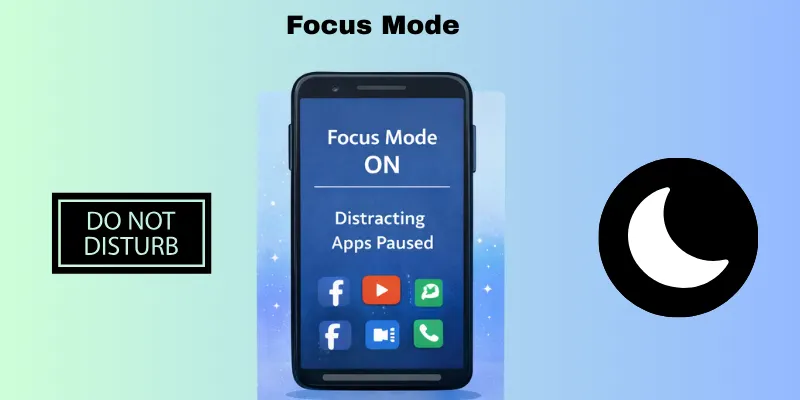
- How it helps: Focusing on tasks improves productivity and helps you complete work without interruption, whether you’re studying, working, or enjoying quality time with loved ones.
Relaxation
Relaxation is all about using technology to rest and reduce stress. Digital well-being tools like Wind Down and Bedtime Mode encourage you to take breaks from screens before bed, creating a more peaceful atmosphere for sleep and decreasing mental distraction.
- How it helps: Relaxation features help you disconnect from digital stress, allowing your body and mind to recharge and prepare for the next day.
Mental Health
Digital well-being is all about keeping your mind healthy by avoiding too much digital activity. You can feel less anxious and stressed by controlling how much time you spend on your phone and the number of notifications you receive. This will help you have a calmer, more balanced mind.
- How it helps: Tools like Do Not Disturb and Focus Mode reduce digital noise, helping you focus on your mental well-being and avoid burnout.
Productivity
Productivity is about using technology efficiently to achieve goals and stay on track. With Digital Well-being tools, you can monitor your device usage, set time limits, and create boundaries, allowing you to use your time more effectively.
- How it helps: Staying productive enables you to achieve more in less time, reducing wasted time and the stress of unfinished tasks
Social Connection
People can use digital tools to connect with friends and family in healthy ways, as long as they don’t overuse them. Digital Well-being helps you spend less time on screens that aren’t good for you, have meaningful conversations that benefit you, and limit the time you spend on social media.
- How it helps: By balancing social media use and real-world connections, you can maintain positive relationships without feeling overwhelmed by online content.
Physical Health
The physical health dimension focuses on limiting the impact of technology on your body. Overuse of smartphones can lead to poor posture, eye strain, or a lack of physical activity. Digital Wellbeing helps by encouraging breaks and limiting screen time to protect your physical health.
- How it helps: By using features like screen time tracking and reminders to take breaks, you can maintain a healthier physical lifestyle and avoid the negative effects of excessive screen use.
What Does the Digital Wellbeing App Do?
The Digital Well-being app on Android provides various features designed to help users track their phone usage, manage distractions, and promote healthier digital habits. It allows users to make more mindful choices about how and when they interact with their devices, ensuring that technology enhances, rather than delays, their daily lives.
Screen Time Tracking
One of the core features of the Digital Well-being app is screen time tracking. It shows you how much time you spend on each app throughout the day. Providing you with a clear picture of your usage helps you identify habits that may be consuming too much time. You can view daily and weekly reports to see where your time goes.
- How it helps: Knowing how much time you spend on different apps allows you to make better decisions about how to manage your time. For example, if you notice you’re spending hours on social media, you can adjust your habits accordingly.
App Usage Insights
The app provides comprehensive information about your usage patterns. For each app, it shows how often you open it, how long you use it, and how many times you unlock your device throughout the day. This information helps you understand your behavior and where you might need to cut back.
- How it helps: Understanding your app usage allows you to identify which apps are distractions and which are beneficial. You can use this information to set goals for reducing screen time or breaking away from unhealthy habits.
Focus Mode
Focus Mode is another key feature of the Digital Well-being app that helps users stay on task by temporarily pausing distracting apps. When you turn on Focus Mode, apps like social media, email, or games are blocked for a set period, allowing you to concentrate on important activities like work, studying, or spending quality time with family.
- How it helps: Focus Mode stops you from using digital devices so you can get your attention back. This technique can help you stay on task all day and get more done.
Bedtime Mode and Wind Down
The app also offers features like Bedtime Mode and Wind Down to help improve your sleep habits. Bedtime Mode reduces blue light exposure by turning your screen to grayscale and silencing notifications at a set time each night. Wind Down gradually prepares you for sleep by reminding you to stop using your phone.
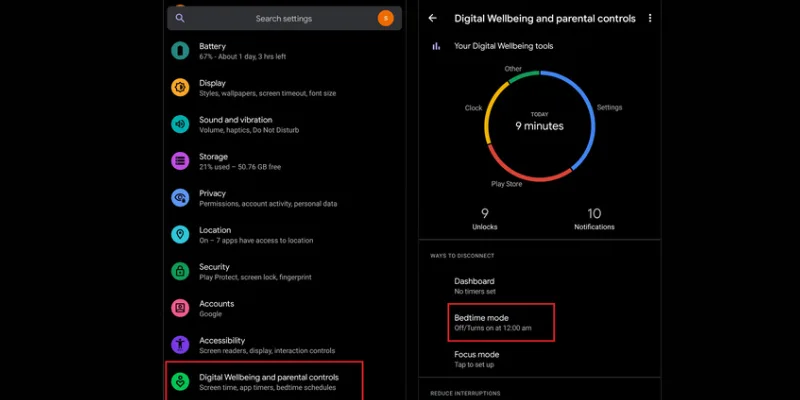
- How it helps: These tools promote better sleep hygiene by reducing screen time before bed, which can help improve sleep quality and make it easier to relax at night.
App Timer and Limits
With the Digital Wellbeing app, you can set daily usage limits for individual apps. Once you reach the limit, the app icon is greyed out, reminding you to take a break. This feature helps users reduce the time spent on apps that may be addictive or distracting.
- How it helps: Setting app timers encourages you to take control of your phone usage and avoid mindless scrolling. By setting limits, you can spend more time on meaningful activities and less time getting lost in apps.
Do Not Disturb
The Do Not Disturb mode allows you to silence calls, messages, and app notifications, giving you a peaceful break from digital interruptions. You can set it to activate manually or schedule it to turn on automatically during specific hours.
- How it helps: By minimizing distractions, Do Not Disturb helps you focus on important tasks or enjoy some uninterrupted personal time.
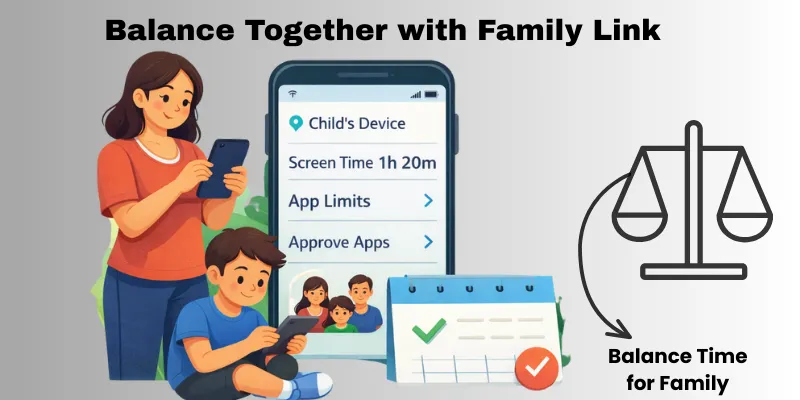
Find Balance Together with Family Link
Google’s Family Link app is a powerful tool that complements Android’s Digital Well-being features, especially for families. While Digital Wellbeing focuses on helping individuals manage their own screen time, Family Link extends this control to children’s devices, allowing parents to guide and monitor their kids’ digital habits in a healthy way. This combination creates a balanced approach to technology for the whole family.
Managing Children’s Screen Time
Family Link allows parents to track and control their children’s device usage. Parents can set daily screen time limits and see detailed reports of app usage.
- How it helps: Parents can ensure that their children balance screen time with other activities, such as homework or play.
Setting App Limits and Approving Apps
Family Link lets parents approve or block apps before kids can download them. It also allows you to set time limits for specific apps.
- How it helps: Parents can control access to apps and ensure children use their devices responsibly.
Fostering Digital Balance Together
Family Link and Digital Wellbeing work together to help families manage screen time and maintain healthy habits.
- How it helps: It encourages open communication and shared responsibility, allowing both parents and children to maintain balance in their digital lives.
By using both Digital Wellbeing and Family Link, families can enjoy a more balanced and mindful relationship with technology.
New Ways to Find Balance for You and Your Family
It’s challenging to find a balance between technology and family life in today’s digital world. It’s important to come up with ways for everyone to stay in touch while still staying healthy, since there are screens all over the place. Here are some useful tips for keeping your family life in balance in the digital age.
Set Digital Boundaries
Establish clear rules about when and how much time is spent on devices. For example, limit screen time during meals or family time to encourage conversation and bonding. Set specific times for checking emails or social media and stick to those limits to avoid excessive use.
- How it helps: Setting boundaries keeps everyone focused on what matters most—spending quality time together without constant distractions from devices.
Create Device-Free Zones
Designate certain areas in your home as device-free zones, such as the dining room or bedrooms. This encourages family members to engage with one another without the distraction of screens, resulting in better communication and relaxation.
- How it helps: Device-free zones reduce screen time and encourage family members to connect face-to-face, leading to stronger relationships and a more peaceful environment.
Promote Healthy Screen Habits for Both Kids and Adults
Encourage healthy screen habits for everyone in the family. This includes setting screen time limits, taking regular breaks, and practicing proper posture while using devices. Adults can lead by example by limiting their screen time and setting healthy boundaries for their children.
- How it helps: By modeling good digital habits, you create a family culture that values balance and encourages mindful use of devices, leading to healthier relationships with technology.
My Personal Experience Using Digital Wellbeing
I recently decided to take charge of how I use my phone. It has been an eye-opening experience for me to utilize digital well-being tools. I didn’t know how much time I was wasting on apps that weren’t relevant. The reports on daily use were surprising. I could see exactly how many hours I spent watching videos or scrolling through social media. It made me think about my habits and make small changes.
Focus Mode was one of the most beneficial tools for me. While I was working or studying, it stopped apps that were getting in the way. I noticed that I got more done in less time. I also liked setting timers for my apps. They helped me reduce the time I spent on apps and stop scrolling without thinking. I feel less stressed and more in charge of my time since I started using these tools. I even slept better because I stopped checking my phone late at night. It taught me that little things can make a big difference.
Conclusion
Today, we’ve explored how Digital Wellbeing in Android can help us manage screen time, improve focus, and create healthier digital habits. We examined key features such as screen time tracking, Focus Mode, and Bedtime Mode, as well as how tools like Family Link can help families find a balance together. It’s clear that making mindful choices about how we use our devices can lead to a more balanced and better life.
As a personal recommendation, I encourage you all to start using these tools—whether it’s setting app limits or creating device-free zones at home. It’s important to find balance in this digital world, not only for your well-being but also for the well-being of those around you. Trust me, it makes a difference!
FAQs
Digital well-being is about keeping a healthy balance with technology in your life. It helps you understand how much you use your devices and apps. The goal is to reduce stress and stay focused on what matters. It reminds you to use tech in a beneficial, mindful way.
Digital well-being tools help you track the time you spend on your phone and apps. You can set time limits for apps that distract you the most. When your time is up, the app pauses for the day. This helps you reduce screen time.
Yes, it can help you get a better night’s sleep. Bedtime Mode and Wind Down are two options that turn off notifications and lower blue lights at night. This method makes it easier to relax before bed. Better phone habits can help you sleep better over time.
Yes, it helps you focus better. Tools like Focus Mode pause distracting apps during work or study time. This keeps notifications and interruptions away. You can stay on task longer and finish more work.
You can start by opening your phone’s settings and finding “Digital Well-being.” There, you will see your screen time dashboard and options, such as app limits and Focus Mode. Tap the tools you want and set up limits or schedules as needed. It’s easy and takes only a few taps.






- Be Respectful
- Stay Relevant
- Stay Positive
- True Feedback
- Encourage Discussion
- Avoid Spamming
- No Fake News
- Don't Copy-Paste
- No Personal Attacks
- Be Respectful
- Stay Relevant
- Stay Positive
- True Feedback
- Encourage Discussion
- Avoid Spamming
- No Fake News
- Don't Copy-Paste
- No Personal Attacks
