How to Use Dark Mode: Dark Mode Benefits on Your Phone in 2026
Published: 23 Feb 2026
Dark mode is a screen setting that uses a black or dark background with light text, which makes the display look softer and less bright. Today, people spend many hours on their phones for social media, videos, work, and study, and mobile usage is growing fast every year. That is why screen comfort now matters more than ever.
Dark mode benefits are important in 2026 because high screen time can cause eye strain and faster battery drain. A bright white screen can feel harsh, especially at night, while dark mode feels easier on the eyes and can help save battery on many phones. But is it really better for daily use? Let’s explore.
What Is Dark Mode on a Phone?
Dark mode is a display setting that changes your phone’s background to black or dark gray with light text. If you ask, what does dark mode mean, it simply means using a dark color theme instead of a bright white screen, also called a dark theme on a phone. So, what does dark mode do? It changes app and menu colors to darker shades for a softer look. Dark mode benefits include less eye strain and better comfort. It works on both Android and iPhone and can be turned on in display settings.
How Many People Use Dark Mode?
Many people now enjoy dark mode benefits on their phones. Surveys show that a large number of users choose dark mode over light mode. Younger users especially like it because it feels modern and easy on the eyes. Programmers and people who use phones at night also prefer dark mode to reduce eye strain. Overall, this shows a shift in user experience trends, with dark mode becoming a popular choice for comfort and style.
Top 7 Dark Mode Benefits in Mobile
Using dark mode benefits on your phone can improve comfort, battery life, and overall experience. Here are the top reasons to switch to dark mode in 2026.
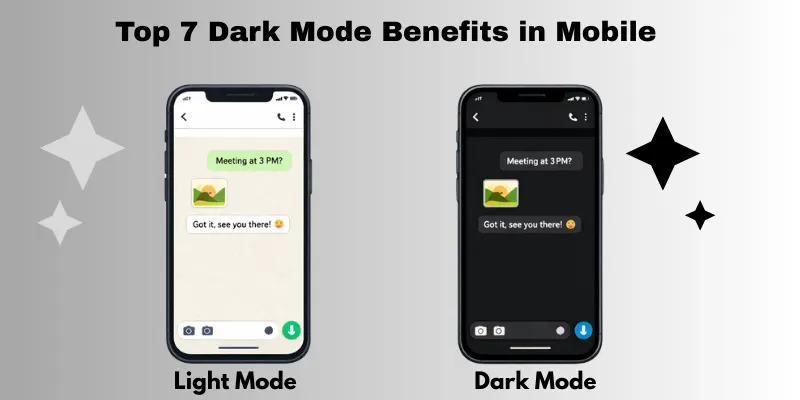
Dark Mode Benefits for Eyes
- Reduces glare and harsh light in low-light conditions.
- Makes reading and scrolling more comfortable at night.
- Softens the impact of blue light, though bright sunlight may be harder to read.
Dark Mode on Phone Benefits for Battery Life
- Black pixels on AMOLED/OLED screens save energy.
- Can extend screen-on time with noticeable battery improvement.
- LCD screens see smaller but still helpful energy savings.
Better Night-Time Viewing Experience
- Reduces discomfort when using the phone in dark rooms.
- Dark backgrounds make videos and reading easier on eyes.
- Minimizes sudden brightness that can strain eyes at night.
Improved Focus and Less Distraction
- High contrast makes content stand out clearly.
- A cleaner interface reduces visual clutter.
- Helps you concentrate while reading or working in apps.
Aesthetic and Modern Look
- Gives apps a sleek, professional appearance.
- Popular among younger users and tech enthusiasts.
- Follows current UX and app design trends.
Helpful for OLED & AMOLED Displays
- Dark pixels use less power because each light is used individually.
- Maximizes battery efficiency on OLED/AMOLED screens.
- Brighter pixels consume more energy; dark mode reduces this.
Reduced Screen Flicker in Low Light
- Limits flicker that can be visible in dim environments.
- Makes scrolling and reading more comfortable at night.
- Many apps offer built-in dark themes for better eye comfort.
Dark Mode vs Light Mode – Which Is Better?
Many people wonder, is dark mode better than light mode? The choice depends on your environment, screen type, and personal comfort. Here’s a simple explanation of dark vs light background features:
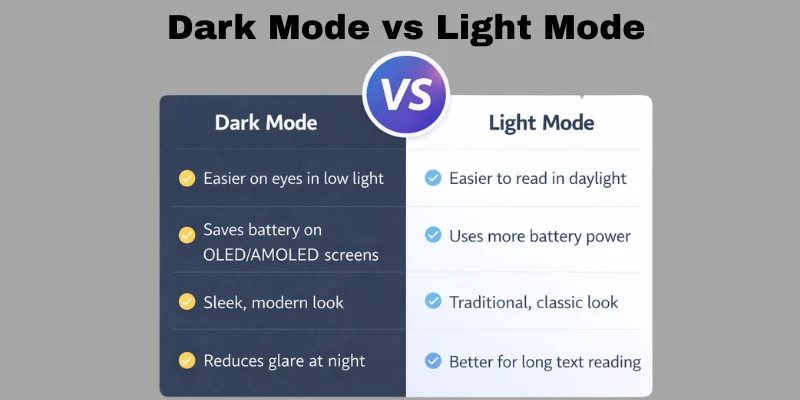
Dark Mode:
- Softer on the eyes in low-light conditions, reduces glare.
- Saves battery on OLED and AMOLED screens.
- Comfortable for reading at night.
- Cleaner interface with fewer distractions.
- Gives apps a modern and sleek look.
Light Mode:
- Easier to read in bright daylight or well-lit rooms.
- Uses more power, especially on bright screens.
- Better for long text reading in daylight.
- Highlights content clearly in bright apps.
- Classic, familiar interface for most users.
When to use dark mode:
- At night or in dim lighting.
- On OLED/AMOLED phones, to save battery.
- For a stylish, modern look.
When to use light mode:
- During the day or in bright sunlight.
- For reading long texts comfortably.
- If you prefer a traditional, bright interface.
When Dark Mode May Not Be Good
While dark mode benefits are clear for many users, it’s not perfect for every situation. Here’s why some people wonder why dark mode is bad:
- Hard to read in sunlight – Dark backgrounds can be difficult to see outdoors or in bright rooms.
- Some eye conditions – People with astigmatism or other vision issues may find dark text on a dark background uncomfortable.
- Accessibility factors – Users with certain visual impairments may struggle with contrast in dark mode.
- Not ideal for long reading sessions – Extended reading on dark backgrounds can cause eye fatigue for some users.
- App and website limitations – Some apps or websites may not fully support dark mode, leading to inconsistent visuals.
If you ask, why is my screen so dark, it might be because dark mode is enabled in bright conditions, making content harder to read. In such cases, switching back to light mode can improve visibility and comfort.
How to Turn on Dark Mode on Your Phone
Wondering how to make phone dark mode or how to turn your phone on dark mode? It’s simple and works on both Android and iPhone. Here’s a step-by-step guide.
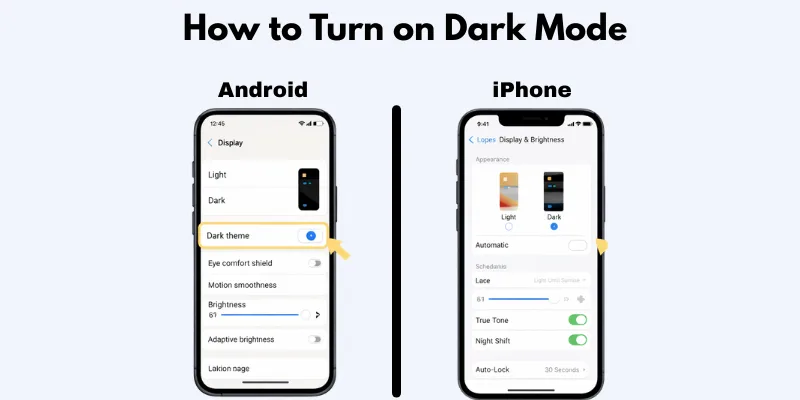
Android Steps
- Go to Settings > Display.
- Look for Dark Theme or Dark Mode.
- Toggle it ON to activate dark mode.
- Some phones allow scheduling dark mode for nighttime automatically.
- You can also enable dark mode in individual apps like WhatsApp or YouTube.
(If you’re asking where dark mode is on Android, it’s usually under Display settings.)
iPhone Steps
- Open Settings > Display & Brightness.
- Tap Dark under Appearance to enable dark mode.
- To schedule, select Automatic and set preferred times.
- Many apps automatically follow the iPhone’s dark mode setting.
(If you’re asking how to put your phone on dark mode on iPhone, these steps will work.)
Dark Mode Features in Mobile Apps
Many users enjoy the dark mode benefits in mobile apps because it improves comfort and usability. Most apps now offer dark mode in settings, allowing you to switch the theme individually. Some apps follow the system dark mode, automatically adapting when your phone switches between light and dark.
Other common features include:
- App-specific dark mode – Enable dark mode for only certain apps without changing the whole phone.
- Automatic scheduling – Set dark mode to turn on at night and off during the day.
- Adaptive dark mode – Some apps adjust darkness based on ambient light for better eye comfort.
Conclusion
So guys, in this article, we’ve covered dark mode benefits in detail. Personally, I recommend turning on dark mode, especially if you use your phone at night, spend long hours on apps, or want to save battery on OLED screens. Dark mode not only reduces eye strain but also makes your phone look modern and sleek. Give it a try today and notice how much easier, comfortable, and enjoyable your screen time can become.
FAQs
Dark mode changes your phone’s background to black or dark gray with light text. It reduces glare and makes reading in low light easier.
Yes, dark mode can reduce eye strain in dim environments, but it may not be ideal in bright sunlight.
On OLED or AMOLED screens, dark mode uses less power, helping to extend battery life.
Programmers often use dark mode because it reduces eye fatigue during long coding sessions, especially at night.
No, dark mode does not damage your eyes. It can actually make screen use more comfortable for long periods.
The main dark mode benefits include reduced eye strain, improved battery life, and a more comfortable viewing experience at night.
Some apps support full dark mode, while others only change certain elements. Using dark mode in apps that fully support it gives the maximum dark mode benefits.
Yes, the dark mode benefits help reduce glare, minimize distractions, and make extended phone use easier on your eyes and battery.




- Be Respectful
- Stay Relevant
- Stay Positive
- True Feedback
- Encourage Discussion
- Avoid Spamming
- No Fake News
- Don't Copy-Paste
- No Personal Attacks
- Be Respectful
- Stay Relevant
- Stay Positive
- True Feedback
- Encourage Discussion
- Avoid Spamming
- No Fake News
- Don't Copy-Paste
- No Personal Attacks
