Wireless Charging: Benefits, Drawbacks, and Everything You Need to Know
Published: 7 Sep 2026
Wireless charging is changing how we power our devices every day. It lets you charge your phone, earbuds, or smartwatch without plugging in a cable. Just place the device on a charging pad, and power starts flowing. This simple method saves time and reduces cable mess on your desk or bedside table. Today, many people use wireless charging at home, in offices, and even in cars. Want an easier and cleaner way to charge your devices? Wireless charging makes daily life more convenient.
How Wireless Charging Works
Wireless charging works through a simple process that moves power without cables. It uses special parts inside the charging pad and your device. When both parts connect correctly, your battery starts charging automatically. Let’s break it down into easy steps.
Qi Standard
The Qi standard is the common system used in most wireless charging devices today. It makes sure chargers and devices can work together safely.
- It allows many brands to use the same charging pad.
- It keeps wireless charging safe and stable.
- It supports phones, earbuds, and smartwatches.
Magnetic Induction
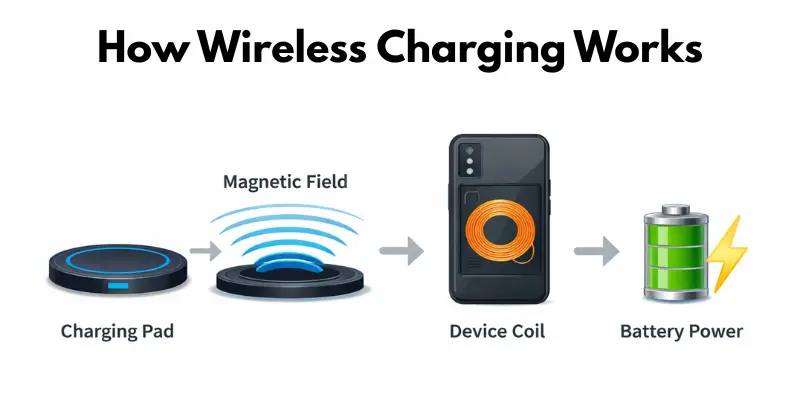
Magnetic induction is the method that moves power from the pad to your device. It uses energy created by a magnetic field.
- The charging pad creates a magnetic field.
- The phone receives this energy through its internal coil.
- The phone converts the energy into battery power.
Coil Alignment
Coil alignment means placing your device in the correct position on the pad. Proper placement helps charging work smoothly.
- The device must sit in the center of the pad.
- Good alignment improves charging speed.
- Poor placement can slow down or stop charging.
Types of Wireless Charging Technologies
Not all wireless chargers work the same way. Different brands use different methods to send power. Knowing the types helps you pick the right charger for your device. Let’s look at the main ones.
Inductive Charging (Qi Standard)
Inductive charging transfers power between two coils placed very close together.
- It is the most common wireless charging type.
- Almost every modern phone, earbuds case, and smartwatch supports it.
- It works over a very short distance, usually less than a centimeter.
Resonant Charging
Resonant charging uses magnetic resonance, which lets you charge a device from a slightly longer distance.
- It is more flexible than simple induction.
- It helps charge multiple devices at the same time.
- Some smart desks and public charging stations use this method.
Magnetic Charging (MagSafe and Similar Systems)
Magnetic charging uses magnets on both the pad and the device, so alignment happens automatically.
- The device snaps into the perfect position automatically.
- It fixes the alignment problem found in basic chargers.
- Apple’s MagSafe is the most popular example of this system.
Which type should you choose? If you want simple, budget-friendly charging, go with a basic Qi pad. If you want faster and easier alignment, a magnetic charger is worth the extra cost.
Advantages and Disadvantages of Wireless Charging
Wireless charging has grown popular because it makes charging easier and cleaner. But like any technology, it has both pros and cons. Let’s explore the main advantages first, followed by the limitations.
Advantages of Wireless Charging
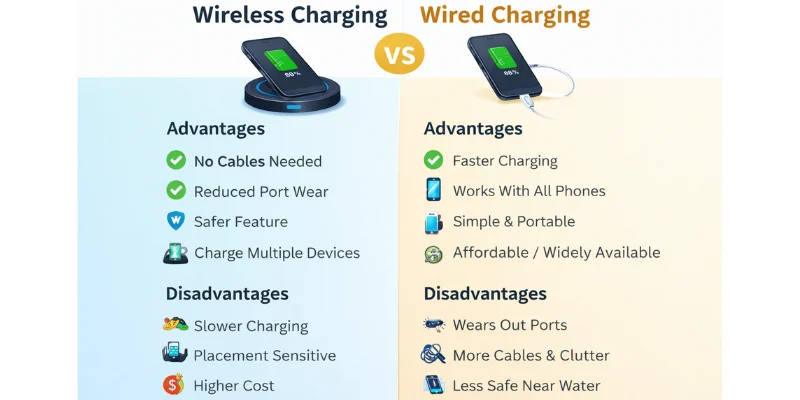
- Place your device on the pad, and it charges automatically, no cable needed.
- Keeps desks, nightstands, and rooms clean and cable-free.
- Reduces wear and tear on charging ports, extending device life.
- Most pads have safety features like overheat detection.
- Some chargers can charge multiple devices at once.
- Slow and steady charging can help maintain battery health over time.
Disadvantages of Wireless Charging
- Charging is usually slower than using a cable.
- Less energy-efficient and can generate heat during use.
- Devices must be properly aligned on the pad to charge.
- Not all devices support wireless charging, especially older models.
- Wireless chargers are often more expensive than wired chargers.
- Pads are less portable and need flat surfaces to work properly.
Wireless vs Wired Charging
Charging devices can be done wirelessly or with a cable. Both methods work, but the best choice depends on your situation—overnight, travel, or quick top-ups.
Comparison Table
| Feature | Wireless vs Wired |
| Speed | Wireless is slower (1–2 hrs full), wired is faster (can fully charge in 1 hr). |
| Convenience | Wireless is easy and cable-free; wired requires plugging in a cable. |
| Port Wear | Wireless avoids wear on device ports; wired can wear out ports over time. |
| Safety | Wireless chargers often have overheat detection; wired depends on the charger. |
| Multi-device Use | Wireless can charge multiple devices at once; wired usually charges one device per cable. |
| Portability | Wireless pads need flat surfaces and are less portable; wired chargers are easy to carry. |
Scenario-Based Advice
- Overnight charging: Wireless is ideal for slow, safe charging while you sleep.
- Traveling: Wired chargers are better for fast and portable charging.
- Quick top-ups: Use a wired fast charger when you need power in 15–30 minutes.
Tips for the Best Wireless Charging Experience
To get the most from wireless charging, small habits make a big difference. Follow these tips to charge safely, efficiently, and quickly.
- Place your device properly in the center of the charging pad for stable charging.
- Avoid thick, metal, or magnetic phone cases that can block charging.
- Use certified chargers and pads that follow the Qi standard for safety.
- Keep your device’s software and firmware updated to improve charging efficiency.
- Remove any objects between the device and pad that may interfere with power transfer.
- Charge on a flat, stable surface to prevent misalignment and slow charging.
Real-Life Applications of Wireless Charging
Wireless charging sirf bedside table tak mehdood nahi hai. Ye ab daily life ke kai hisson mein use ho raha hai. Kya aap ne ye kahin dekha hai?
- Cars mein: Kai nayi cars mein dashboard ya console par wireless charging pad built-in hota hai. Drivers apna phone charge kar sakte hain GPS use karte hue ya call karte hue.
- Offices mein: Desks aur meeting tables ab built-in charging pads ke sath aate hain. Employees aur guests bina cable dhundhe apne devices charge kar sakte hain.
- Healthcare mein: Wearable health monitors aur kuch medical devices wireless charging use karte hain. Ye sensitive equipment ko seal rakhta hai aur clean karna asaan banata hai.
- Public spaces mein: Cafes, airports, aur hotels travelers ke liye wireless charging stations laga rahe hain.
- Smart furniture mein: Lamps, tables, aur mirrors mein bhi ab hidden charging pads hote hain — ek clean, modern look ke sath.
Future Trends in Wireless Charging
Wireless charging is evolving fast. New technologies are making it faster, smarter, and more convenient. Here are key trends to watch:
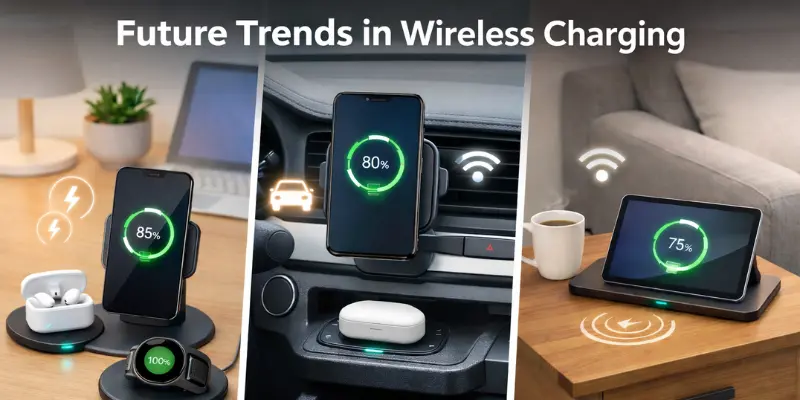
- Higher-Watt Wireless Charging: Chargers with more power will allow faster charging for phones and laptops.
- Magnetic Alignment Technology: Magnets in pads and devices will help auto-align for optimal charging.
- Integration into Furniture: Tables, desks, and lamps with built-in wireless charging will become common.
- Integration into Vehicles: Cars will offer wireless charging pads for phones and smart devices on the go.
- Multi-Device Charging Improvements: Future chargers will handle multiple devices more efficiently at once.
- Smarter Safety Features: Advanced sensors will prevent overheating and overcharging, and improve battery life.
Conclusion
Wireless charging is convenient, cable-free, and protects your device ports. It also supports multiple devices and has safety features. However, it can be slower, less energy-efficient, and sometimes expensive or less portable. If you want ease, tidy spaces, and safe charging at home or work, wireless charging is a great choice. For fast charging or travel, wired charging may be better. Understanding these pros and cons will help you pick the best option for your needs.
FAQs
No, wireless charging does not harm your battery if you use certified chargers. Modern wireless pads include safety features like overheat and overcharge protection. Slow, steady charging can even help maintain your battery’s long-term health.
Yes, you can use your phone while it’s charging on a wireless pad. However, using it may slightly slow down the charging process and can make your device warm. For the fastest charge, it’s best to keep the phone still on the pad.
Wireless charging has improved with newer technology. High-wattage chargers and magnetic alignment help devices charge faster than before. While wired charging is still generally quicker, wireless charging is becoming much more practical for everyday use.
The best chargers are certified Qi wireless pads from trusted brands. Multi-device pads are useful if you have a phone, earbuds, and a smartwatch. Magnetic alignment and safety features like overheat detection make charging safer and easier.
No, not all phones support wireless charging. Most modern smartphones do, but older or budget devices may require special adapters or cases to work with wireless pads. Always check compatibility before buying a charger.
It depends on the case. Thin, non-metallic cases usually work fine, but thick or metal cases can block charging or slow it down. For best results, use a case that supports wireless charging or remove it while charging.



- Be Respectful
- Stay Relevant
- Stay Positive
- True Feedback
- Encourage Discussion
- Avoid Spamming
- No Fake News
- Don't Copy-Paste
- No Personal Attacks
- Be Respectful
- Stay Relevant
- Stay Positive
- True Feedback
- Encourage Discussion
- Avoid Spamming
- No Fake News
- Don't Copy-Paste
- No Personal Attacks
