What is a characteristics of a smartphone?
Published: 1 Sep 2026
Many people use smartphones every day, but they still feel confused about their features. Phones look simple, yet they do many things at once. This can make people wonder what really matters in a smartphone. In this guide, we will clear up the confusion and explain the key points in an easy-to-understand way. We will talk about daily use, real needs, and helpful features without any complex words. By the end, you will clearly understand the characteristics of a smartphone. And why it matters in your everyday life.
What Makes a Smartphone “Smart”?
A smartphone is called “smart” because it can do much more than make calls or send messages. It runs special software that lets people use apps and the internet. This helps users work, learn, and enjoy fun activities on one device. People send emails, attend online classes, watch videos, and play games every day. This ability to support daily tasks through apps and internet access is what makes a smartphone truly smart.
Operating System (OS)
An operating system, or OS, is the main program that runs a smartphone and controls its operation. It matters because it shapes the full phone experience. The OS decides how the phone looks, how smooth it feels, and how safe it stays. It also affects how easy the phone is to use every day.
Why the OS is important for users:
- It controls which apps people can download
- It manages phone updates and security fixes
- It affects ease of use and daily comfort
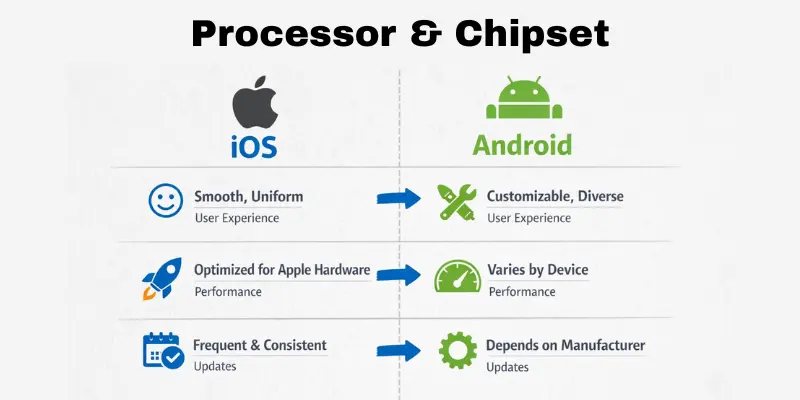
Simple comparison: iOS vs Android
- ios: Simple design, fast updates, easy to use
- Android: More choices, more control, many phone types
Physical Characteristics
Physical characteristics are the parts of a smartphone that you can see and touch. These include the screen, size, weight, and body design. They matter because people hold and use their phones for many hours each day. A comfortable phone feels good in the hand and is easy to use. Strong physical features also help the phone last longer in daily life.
Display & Screen Quality
A phone display is the screen where you see text, images, and videos.
Screen quality affects how clear and comfortable the phone feels. Different screen types display colors and light in different ways.
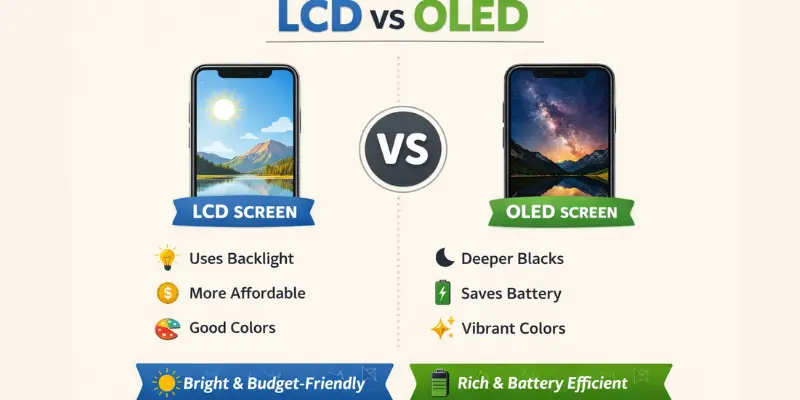
LCD vs OLED (simple comparison):
- LCD: Uses a backlight, shows good colors, and costs less
- OLED: Lights each pixel itself, shows deeper colors, and saves battery
Refresh rate means how smoothly things move on the screen. A higher refresh rate makes scrolling and games look smoother and less jumpy.
Good screen quality helps in many ways:
- Eye comfort: Soft light reduces eye strain
- Reading: Clear text feels easy on the eyes
- Videos: Bright colors improve viewing
- Games: Smooth motion feels more fun
Real-life example:
If you read news or watch videos at night, a good display feels more relaxing.
Build & Design
Build and design mean how a smartphone is made and how it feels in your hand. These features matter because people use their phones all day. A well-designed phone feels comfortable and easy to handle.
The material of a phone affects its strength and feel.
- Plastic: Light in weight and less likely to break, but feels simple
- Glass: Looks premium and smooth, but can break easily
- Metal: Feels strong and solid, but can feel heavy
Size and weight also change how easy a phone feels. A smaller and lighter phone feels better for one-handed use. A bigger phone gives a larger screen, but it may feel hard to hold for long. Heavy phones can get tiring after a while.
Durability means how well a phone handles drops, scratches, and daily use. A well-designed phone lasts longer. Phones with solid frames and good covers handle daily wear better.
Design affects daily habits in many ways.
- One-handed use: Slim phones feel easier to control
- Carrying: Thin phones fit better in pockets or bags
- Long-term use: Comfortable phones reduce hand strain
Real-life example:
If you travel often, a light and strong phone feels easier to carry all day.
Durability & Build Protection
Every phone can fall. Every phone can get wet in the rain. This is why durability is an important characteristic.
What Is an ip rating?
An IP rating shows how well a phone resists dust and water. It appears as two numbers, like IP68.
- First number: Dust protection
- Second number: Water protection
A higher number means stronger protection.
Real-life example: If your phone has an IP68 rating, it stays safe in light rain. Without this rating, even a little water can damage the phone.
Other durability factors:
- Gorilla Glass: Protects the screen from scratches and cracks
- Reinforced frame: Protects the phone from drops
- Sealed ports: Keep dust from getting inside
Hardware & Performance
Hardware means the physical components inside a smartphone. Performance means how fast and smoothly the phone works. These two things matter because people use their phones for many tasks each day. A phone with good performance feels quick and easy to use. It saves time and reduces stress during daily work, learning, and fun.
Processor & Chipset
A processor is the brain of the smartphone. It tells the phone how to think and act. A chipset is the group of main parts that work with the processor to run the phone smoothly.
The processor controls how fast the phone works.
- Phone speed: Apps open quickly without waiting
- Gaming: Games run smoothly without freezing
- Multitasking: You can use many apps at the same time
Real-life example:
If your phone opens apps fast and games run without lag, the processor is doing its job well.
Better processors give a smoother experience. They help the phone respond faster and handle heavy tasks with ease.
RAM & Storage
RAM helps the phone handle tasks you are using right now. More RAM keeps apps running smoothly and helps the phone feel fast when you switch between apps.
Storage is the space where apps, photos, videos, and files are stored. More storage gives you more room to save what you need.
- Fixed (internal) storage: Built into the phone and always ready
- Expandable storage: Extra space added with a memory card
Expandable storage helps store many photos and videos. It is useful for heavy users, but it can be slower and may not support all apps.
Real-life example:
If you use many apps and take lots of photos, extra RAM and storage help a lot.
Sensors
Smartphones have small sensors built inside. These sensors help the phone understand the world around it. Without these sensors, a phone cannot do many smart things.
Motion sensors
- Accelerometer: This sensor measures the phone’s movement. It rotates the screen when you turn the phone. It also counts your steps.
- Gyroscope: This sensor tracks the phone’s rotation and direction with high precision. It helps with gaming and camera stabilization.
Environment sensors
- Proximity sensor: This sensor turns off the screen during a call. It stops accidental touches near your ear.
- Ambient light sensor: This sensor checks the light around you. Then it adjusts screen brightness on its own.
Battery Life & Charging
Battery life means how long a phone works before it needs charging. It affects how freely you can use your phone each day. A phone with good battery life lets you call, text, and stay online without worry.
The mAh number shows battery size, but it is not the full story. Phone settings, screen quality, and apps also change how long the battery lasts.
Battery life depends on daily activities:
- Calling and messaging: Uses less battery
- Watching videos: Drains battery faster
- Gaming: Uses a lot of battery
- Browsing and social media: Uses battery at a medium level
Charging speed is how fast the battery charges. fast charging saves time and helps when you are in a hurry. wireless charging lets you charge without a cable, but it works more slowly.
Real-life example:
If you watch videos and play games daily, a strong battery and fast charging help a lot.
Connectivity Features
Connectivity features help a smartphone connect to the internet and other devices. These features let the phone share data, find locations, and stay in touch with the world. This makes connectivity one of the most important characteristics of a smartphone.
Strong connectivity improves daily life. It helps people work online, learn from anywhere, and enjoy entertainment without breaks. It also supports quick payments, safe travel, and easy sharing.
4G / 5G
4G and 5G provide mobile internet. Faster internet helps stream videos without pauses. It improves online games and speeds up downloads.
Real-life use: Watching movies on the go or playing online games smoothly.
Wi-Fi
Wi-Fi connects the phone to the internet at home, work, or public places. It saves mobile data and gives stable speed.
Real-life use: Attending online classes or working from home.
Bluetooth
bluetooth connects the phone to nearby devices. It helps share files and use wireless tools.
Real-life use: Listening to music with wireless earbuds or connecting a smartwatch.
NFC
nfc allows quick, touch-based actions. It works for contactless payments and fast sharing.
Real-life use: Paying at a store by tapping the phone.
GPS
GPS helps the phone find locations and show maps. It supports travel and daily navigation.
Real-life use: Finding directions while driving or locating a nearby place.
These connectivity features make smartphones more useful and reliable every day. Which connectivity feature do you use the most in your daily life?
Camera & Multimedia Features
The camera is one of the most loved smartphone features. People use it to capture moments, record videos, and share memories. This makes the camera one of the key characteristics of a smartphone.
Many people think that more megapixels means better photos. This is not always true. Good photos also depend on lighting, software, and how the camera handles colors and focus.
Smartphones use helpful camera features to improve photos:
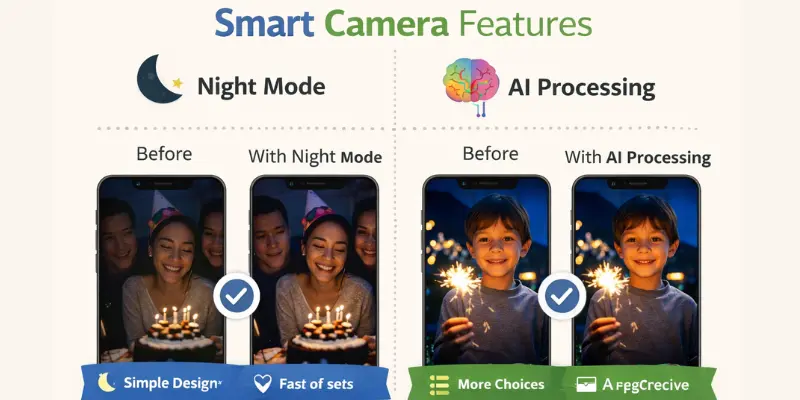
- Night mode: Helps take clear photos in low light
- AI processing: Smart software that fixes brightness and colors
- Portrait mode: Keeps the person clear and blurs the background
Camera software plays a big role in photo quality. It adjusts light, sharpness, and balance to improve photos. This happens automatically, even for beginners.
Good camera quality improves daily use:
- Family pictures: Clear photos of special moments
- Social media: Better posts and stories
- Videos: Smooth and clear memories
Real-life example:
A good night mode helps you take clear photos at a birthday party or dinner.
Software & User Experience
User experience is how easy and pleasant a smartphone feels to use. It includes how the phone looks, how fast it responds, and how simple tasks feel. Good software makes daily phone use smooth and stress-free. This is why software is one of the most important characteristics of a smartphone.
Software controls how the phone works every day. It helps users open apps, change settings, and move around the phone with ease. When software is well designed, the phone feels friendly and easy for everyone.
Key parts of software and user experience:
- User Interface (UI): The screen design, icons, and layout you see
- Ease of use: Simple menus and smooth movement
- Accessibility features: Tools that help older users or people with special needs
- Customization: Changing themes, layouts, and settings to match your style
Security is also part of good software. Phones use smart tools to keep personal data safe.
- Fingerprint unlock: Opens the phone with a touch
- Face unlock: Uses your face to unlock quickly
- Data encryption: Keeps your files and information private
Real-life example:
A phone with clear menus and fingerprint unlock feels faster and safer during daily use.
Emerging Technologies
Emerging technologies are new tools and features that are still growing and improving. These technologies shape how smartphones will work in the future. As phones become smarter, future tech is increasingly important to smartphone features.
AI (Artificial Intelligence)
Artificial intelligence helps the phone learn your habits and make smart choices. It improves camera quality, saves battery, and suggests useful actions.
Real-life use: Your phone adjusts brightness or suggests replies in messages.
Voice assistants
Voice assistants let you control the phone using your voice. You can ask questions, set alarms, or send messages.
Real-life use: Asking your phone to set a reminder while your hands are busy.
Smart camera features
Smart cameras use software to improve photos and videos. They adjust light, focus, and colors on their own.
Real-life use: Taking clear photos without changing settings.
Automation and smart suggestions
Phones can now do tasks automatically. They suggest apps, routes, or settings based on use.
Real-life use: Your phone suggests a route on a map before you leave home.
5G
5G gives faster internet speed. It helps download files quickly and makes streaming and gaming smooth.
Real-life use: Watching high-quality videos without buffering.
Foldable phones
Foldable phones open into bigger screens. They offer new ways to work and enjoy content.
Real-life use: Reading, multitasking, or watching videos on a larger screen.
AR (Augmented Reality)
AR adds digital images to the real world through the camera. It helps with games, learning, and shopping.
Real-life use: Try furniture in your room before buying.
How to Choose a Smartphone
Choosing the right smartphone matters because people use it every day. The right phone saves money, time, and effort. A good choice feels comfortable and useful for daily needs.
Understanding the characteristics of a smartphone helps buyers pick the right device. When you know what features matter, you avoid paying for things you do not need.
Best phone for students
Students need a phone that works well and costs less.
- Look for a fair price and good battery life
- Basic performance is enough for study and apps
Example: Online classes, notes, and social apps work smoothly.
Best phone for gaming
Gamers need strong performance and smooth visuals.
- Choose a fast processor and enough ram
- A good screen helps games feel smooth
Example: Games run without lag or heating.
Best phone for photography
Photo lovers need smart camera features.
- Focus on camera software and night mode
- Video quality also matters
Example: Clear photos at parties or in low light.
Best phone for business
Business users need safety and long battery life.
- Strong security features protect data
- Reliable battery supports long workdays
Example: Emails, calls, and meetings without worry.
Smartphones vs Basic Phones
A basic phone is a simple device made mainly for calling and sending text messages. It has physical buttons and a small screen. It focuses on simple communication and long battery life.
A smartphone is a modern phone with a large touch screen. It supports apps, internet use, a camera, and many daily tasks. It helps people work, learn, and enjoy entertainment in one device.
Simple comparison:
- Basic phone: Calls and SMS only
- Smartphone: Apps, internet, camera, games, and multitasking
Who should use which phone?
- Basic phone: Good for elderly users or people who want simple use
- Smartphone: Best for modern users who need many features
Real-life example:
An elderly person may prefer a basic phone for easy calling. A student or worker may choose a smartphone for apps and internet use.
Which phone type best fits your daily needs?
Conclusion
We’ve covered a lot about the characteristics of a smartphone in this article. From the basics of battery life and performance to the latest emerging technologies, we’ve explored how these features shape your phone experience. Whether you’re looking for a device for gaming, photography, or business, understanding these characteristics helps you make the best choice.
My personal recommendation? Always think about what matters most to you. If you need great battery life, go for a phone with a strong battery. If you love taking photos, focus on camera quality. It’s all about finding what works best for your daily needs. Stay tuned for more helpful tips, folks! Keep learning and enjoy your smartphone experience.
FAQs
A smartphone has a touch screen, internet access, and apps. It also has a camera, battery, and fast processor. These features help people work, learn, and have fun. They make daily tasks easier and faster.
They decide how well the phone works in daily life. Good battery, speed, and camera make the phone more useful. Strong security keeps data safe. Better features give a smoother experience.
A smartphone uses apps and the internet. A basic phone mainly supports calls and texts. Smartphones have better cameras and screens. They can also handle many tasks at once.
It depends on the user. Some people care about battery life. Others need a good camera or fast speed. Students may focus on apps and storage. Gamers look for strong performance.
They change how fast and easy tasks feel. Better screens help with reading and videos. Faster processors improve apps and games. Strong connectivity helps calls, streaming, and maps.




- Be Respectful
- Stay Relevant
- Stay Positive
- True Feedback
- Encourage Discussion
- Avoid Spamming
- No Fake News
- Don't Copy-Paste
- No Personal Attacks
- Be Respectful
- Stay Relevant
- Stay Positive
- True Feedback
- Encourage Discussion
- Avoid Spamming
- No Fake News
- Don't Copy-Paste
- No Personal Attacks
