Best Travel Apps for 2026 (Simple Guide)
Published: 27 Aug 2026
Why do travel apps feel confusing when you only want a smooth trip? When you open the app store, you are confronted with too many choices, and many of the apps appear similar. Some apps promise a lot, but they don’t help you quickly when you need answers. You also waste time when you jump between apps for one small task. This Best Travel Apps keeps things clear and easy, helping you pick the right apps without stress. Could you please let us know which app you require first?
Quick picks (Top 10 apps in 1 list)
This checklist is a fast Top 10 list you can scan in one minute. I added “Best for …” so you can pick quickly. Which app do you need most right now?
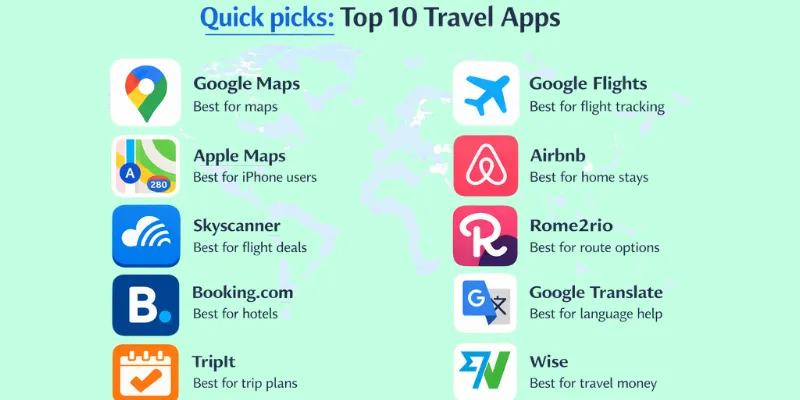
- Google Maps
Best for maps
It quickly locates routes and provides clear turn-by-turn directions. - Apple Maps
Best for iphone users
Works smoothly with iPhone tools and saved places. - Skyscanner
Best for flight deals
It allows users to compare multiple flight prices in a single search. - Google Flights
Best for flight tracking
It displays price changes and provides useful flight time options. - Booking.com
Best for hotels
Books stays fast with many choices. - Airbnb
Best for home stays
It facilitates the search for homes, rooms, and extended stays. - TripIt
Best for trip plans
Keeps your bookings in one simple timeline. - Rome2rio
Best for route options
It provides information on how to travel by bus, train, car, or flight. - Google Translate
Best for language help
It quickly translates words and signs. - Wise
Best for travel money
The app helps you send and spend money at fair rates.
How to pick fast
- Pick one map app, one booking app, and one money app.
- Select apps you frequently use to simplify the learning process.
- Remove the rest after your trip to keep your phone clean.
Pick the right app swiftly (comparison table)
This table saves time because you can scan it in seconds. You do not need to scroll through long lists. You match your need with the best app and move on.
| Need | Best app | Works offline? | Free/paid | Best for who |
| Maps and directions | Google Maps | Sometimes | Free | all travelers |
| Flight search | Skyscanner | No | Free | budget travelers |
| Flight tracking | Google Flights | No | Free | planners |
| Hotel booking | Booking.com | No | Free | hotel stays |
| Home stays | Airbnb | No | Free | families |
| Trip plan in one place | TripIt | Sometimes | Free + Paid | busy travelers |
| Local rides | Uber | No | Free | city travelers |
| Language help | Google Translate | Sometimes | Free | first-time travelers |
| Travel money | Wise | No | Free + Paid | international travelers |
| Split group costs | Splitwise | Sometimes | Free + Paid | friends’ groups |
How to use this table
- Pick the top three needs for your trip.
- Download those apps and ignore the rest for now.
- Test each app at home before travel day.
Which need matters most for your next trip?
Simple meanings of key words (no hard words)
These simple meanings help you understand travel apps faster. They also help you feel safe when you tap “pay” or “book”. If you know the words, you make fewer mistakes.
- Offline: works without internet
Example: You open a saved map on a plane. - GPS: helps your phone find your place
Example: Your map dot shows where you stand on a street. - esim: provides internet access without the need for a plastic SIM card.
Example: You buy data for Spain without changing your SIM card. - Itinerary: your full trip plan in order
Example: One page shows flights, hotels, and activities by day. - Booking: saving a spot you will use later
Example: You book a hotel room for Friday night. - Check-in: telling the airline you will take the flight
Example: You check in online and get your boarding pass. - Boarding pass: a ticket you show before you enter the plane
Example: You scan your boarding pass at the gate. - Currency exchange: changing money from one country to another
Example: You change rupees into euros in an app. - Rate: the price of one money type compared to another
Example: The app shows how many euros you get for 1,000 rupees. - Alerts: quick messages that warn or remind you
Example: Your phone alerts you when your gate changes. - Push message: an app message that pops up on your screen
Example: A flight app shows a delay message right away.
- Roaming: using mobile data in another country
Example: Your SIM works abroad but may cost more. - Data plan: the internet package you buy for your phone
Example: You buy 5 GB of data for one week. - Wi-Fi: the internet you use through a local network
Example: You use hotel Wi-Fi to message your family. - PIN code: a secret number to unlock or pay
Example: You type your card PIN at a shop. - Two-step login: a second check to keep your account safe
Example: You enter a code sent to your phone. - Verification: is a process that confirms your identity.
Example: The app asks for a code before you sign in. - Refund: money you get back after you pay
Example: A hotel sends your money back after a change. - Cancellation: ending a booking before you use it
Example: You cancel a ride because the driver is far. - Support chat: a chat box to get help
Example: You message support when your booking shows an error. - Download maps: saving maps to use later
Example: You download a city map before you leave home. - Save favorites: keeping places you like in a list
Example: You save a cafe so you can find it again. - Ratings: star scores people give after using a service
Example: You pick a hotel with high ratings. - Promo code: a special code that can lower the price
Example: You enter a promo code and get a discount. - Time zone: the local time of a place
Example: Your app shows Tokyo time, not Karachi time.
How you picked the apps (trust section)
I did not pick these apps at random. I also did not pick apps only because I “like” them. I used simple rules so the list stays fair and honest. These rules help beginners feel safe and confident.
- Easy to use
Meaning: The app feels simple from the first tap.
Example: You find a map or booking button in under 10 seconds. - Clear prices
Meaning: The app shows costs before you pay.
Example: You see the total price before you confirm a hotel. - Helpful support
Meaning: The app helps you when something goes wrong.
Example: You use chat help to fix a booking issue quickly. - Strong ratings
Meaning: Many users give favourable reviews over time.
Example: You see steady high stars, not just a few new reviews. - Useful offline tools
Meaning: The app still helps when the internet is weak.
Example: You open saved maps or tickets without data.
What we avoided
- We avoided hidden fees that appear at the final step of the process.
- Confusing screens that waste time
- Apps that fail without internet
Before You Go (Plan and Book)
This section helps you plan and book in the right order. You will know what to do first and what to do next. You will waste less time and make fewer mistakes. Do you want a simple “do this, then this” plan?
Step Order (checklist)
- Pick your travel dates and set a budget.
- Search flights and turn on price alerts.
- Book your stay after you confirm your flight times.
- Make your trip plan for each day.
- Buy key tickets and tours early.
- Save all bookings and tickets in one safe place.
Flights and price alerts
A price alert tells you when a flight price goes up or down.
- Search flights at a few time options, not just one.
- Turn on alerts for 2–3 routes you can accept.
- Check baggage rules before you pay.
Real-life example: You set an alert for Karachi to Dubai, and you book when the price drops.
Hotels and stays
- Stay near the places you will visit most.
- Read recent reviews to spot real problems.
- Choose free cancellation options when you can.
Check the total price before paying, including taxes and extra fees.
Real-life example: You pick a hotel near the metro, so you save taxi money.
Trip plan (your schedule)
A schedule is your simple plan for what you do and when.
- Morning: breakfast, main visit, and travel time
- Afternoon: lunch, second visit, and rest time
- Evening: dinner, short walk, and next-day check
Real-life example: You plan a museum in the morning and a market in the evening.
AI Trip Planning Apps (New in 2026)
Planning a trip used to take hours of tabs and research. Now, AI trip planning apps do this work for you in minutes. Want a full plan without the hassle?
What is it?
You tell the app your dates, budget, and interests. It builds a day-by-day plan with places to visit and things to do.
Why it helps
- Saves hours of research
- Matches your style (food, hiking, museums)
- Lets you drag and drop to rearrange days
- Links your flights and hotels in one view
Quick tips
- Try the free plan first
- Enter your budget early for better suggestions
- Double-check each spot before you go
- Save the plan offline before travel
Real-life example: You type “5 days, Istanbul, love food and history.” The app builds a plan with markets, mosques, and food stops. You just check it and go.
Tickets and tours
A tour is a guided visit where someone leads the group.
- Buy tickets early for busy places.
- Read what the ticket includes before you pay.
- Save a screenshot of your ticket in case the internet is weak.
Safety tip: Share your plan and meeting point with someone you trust.
Real-life example: You book a city tour for day one, so you learn the area fast.
Quick recap
- Book flights first, then book your stay.
- Keep a simple daily plan, not a packed one.
- Save tickets and bookings where you can find them quickly.
What type of trip do you plan next: family, solo, or friends?
During the Trip (Maps and Transport)
Travel problems happen fast. You may face a weak signal, no internet, and wrong turns. You may get lost or take the wrong bus. This section gives easy fixes you can use right away. Do you want fewer “oh no” moments?
Do this first (quick checklist)
- Download your main city map before you leave the hotel.
- Please save the hotel name and address in your notes.
- Screenshot your tickets and booking pages.
- Save a pin on the map for your hotel and key places.
- Keep one small paper note with your hotel address.
Maps + offline maps
Offline maps mean you use them without the internet.
Practical tips
- Download the map on Wi-Fi before you go out.
- Turn on GPS so your dot still shows your place.
- Save your hotel and three key spots as favourites.
- Screenshot your route to the hotel as a backup.
- Keep your phone battery high before long walks.
How to download a map (3 steps)
- Open your map app while you have Wi-Fi.
- Find the city and choose “download” or “save offline”.
- Check the map once it’s in aeroplane mode to test it.
Real-life example: Your data stops working, but your saved map guides you back.
Local transport (bus/train/metro)
Practical tips
- Check the line name and last stop before you enter.
- Match the station name on the signs with your phone map.
- Keep small cash or a travel card ready for tickets.
- Avoid rush hour if you’re carrying bags or travelling with kids.
- Stand away from the door so you do not miss your stop.
Common mistake: You enter the right bus but in the wrong direction.
Fix: Check the last stop name on the front sign.
Real-life example: You confirm the last stop, and then you ride the correct metro line.
Taxi/ride apps
Safety + money tips
- Compare the price before you book the ride.
- Use the pickup pin so the driver finds you faster.
- Sit in the back seat and keep your bag close.
- Share your trip with a trusted person when you can.
- Avoid street deals if the price feels unclear.
Before you ride (quick checklist)
- Check that the car plate number matches the app.
- Ask the driver your name, not your destination.
- Confirm the route on the map before you start.
Real-life example: A driver stops at the wrong place, but your pickup pin fixes it.
Find Places to Eat and Visit
You just left your hotel. Where do you eat? What is worth seeing nearby? Reviews apps answer these questions fast, using ratings from real travelers.
What is a reviews app?
A reviews app shows ratings and comments from people who already visited a place. You use it to pick good restaurants, sights, and activities.
Practical tips
- Check the star rating first, then read two or three recent reviews.
- Look at photos other travelers posted, not just the ones from the business.
- Filter by “open now” so you don’t walk to a closed spot.
- Save your favorite picks in a list for later.
Use this when…
- Use this when you feel hungry and need a good spot nearby.
- Use this when you have free time and want to see something new.
- Use this when you want to avoid a low-rated or unsafe place.
No internet? Do this.
- Ask a shop or hotel for Wi-Fi for two minutes.
- Use your offline map to reach the nearest main road.
- Show your saved hotel address to a local worker.
- Call your hotel from a shop phone if needed.
- Use a paper map sign at a metro station.
- Stay in a safe, bright place until you feel sure.
Quick recap
- Save maps, addresses, and tickets before you go out.
- Check the direction and last stop for buses and the metro.
- Confirm car details and price before a ride.
Money Apps (Budget, Exchange, Split Bills)
Money problems can ruin a wonderful trip. You may overspend without noticing. You may also get a negative rate when you change money. Friends may fight about who paid what. This section gives simple fixes with real examples. Do you want to stay in control of your money?
Quick money safety (checklist)
- Set a daily spending limit before you leave your hotel.
- Keep one backup card in a separate place.
- Carry a small amount of cash for emergencies.
- Turn on payment alerts so you see every charge.
- Save your bank support number in your phone notes.
Budget tracker
A budget is the money plan you follow each day.
Practical tips
- Set one daily limit and stick to it.
- Write every expense right after you pay.
- Divide needs and wants into two clear categories. groups.
- Check your total every night for 30 seconds.
Real-life example A (daily limit, 5-day trip)
You have 50,000 rupees for five days. You set a daily limit of 10,000 rupees. You spend 9,500 on day one, so you feel safe.
Real-life example B (food vs transport)
You track food and transport in two lines. You see, food stays low, but taxis get high. You switch from one taxi ride to the metro.
Currency converter
An exchange rate is how much one money type equals another.
Practical tips
- Please ensure you verify the rate before making a purchase or payment.
- Convert high prices first, not every small item.
- Compare two places before you change money.
- Save the rate in your notes for the day.
Real-life example A (menu price)
A burger costs 18. You convert it, and you see it equals about 5,000 rupees. You decide if it fits your budget.
Real-life example B (airport vs city)
The airport gives less money for the same cash. The city exchange gives more. You change a small amount at the airport, then change more in the city.
Split bills with friends
Splitting bills means you share a cost and pay your part.
Practical tips
- Add each cost as soon as you pay it.
- Write who paid and who shared the cost.
- Settle small costs daily to avoid a big fight later.
- Use the same money type for the full trip.
Real-life example A (3 friends split a taxi)
A taxi costs 30. Three friends share it. Each person pays 10.
Real-life example B (hotel payback)
One friend pays 300 for the hotel. Three friends stay together. Each friend pays back 100.
Do this in 2 minutes
- Set your daily limit in your notes.
- Turn on payment alerts in your bank app.
- Save today’s exchange rate in one line.
- Make two budget lines: food and transport.
- Agree on bill split rules with your friends.
Quick recap
- Set a daily limit and check it each night.
- Check the rate before you change money or pay.
- Track shared costs right away to avoid stress.
Language and Internet (Translate + Stay Connected)
Language problems can slow you down fast. A weak signal can also break your plans. Roaming can cost more than you expect. This section helps you choose what to use and when. Do you want simple choices that work on real trips?
Quick choice guide
- Use a translation app when you need help with words right now.
- Use camera translation when you have to read signs or menus quickly.
- Use saved basic phrases when you want quick, polite talk.
- Use Wi-Fi when you can to avoid mobile data costs.
- Use an eSIM when you want easy internet without a shop visit.
- Use offline downloads when you expect weak or no internet.
Translate app (text + camera)
Camera translate means the app reads text through your camera.
Tips
- Download the language pack before you leave Wi-Fi.
- Type short words first, not long sentences.
- Speak slowly if you’re using voice translation.
- Use camera translation in good light for better results.
- Save keywords like “hotel”, “help”, and “pharmacy”.
Use this when…
- Use this function when you need to ask for directions.
- Use this when you want to check a menu before you order.
- Use this when you need to show a driver your destination.
Real-life example: You point your camera at a sign and find the metro exit.
Basic phrases
- Hello—start a talk
- Please—ask politely.
- Thank you—be polite.
- Sorry—fix a small mistake
- Yes—agree
- No—say no clearly
- How much? — check the price
- Where is the toilet? — find a restroom
- Help, please—get assistance fast
- I need a doctor—get medical help.
Use this when…
- Use this when you greet hotel staff or shop workers.
- Use this when you pay and want to sound polite.
- Use this when you feel lost and need simple help.
Real-life example: You say “How much?” before you buy a snack.
eSIM/internet apps
eSIM = phone internet without a plastic SIM
‘Roaming’ means your SIM uses data in another country.
Tips
- Check if your phone supports eSIM before you travel.
- Buy data before you land, if possible.
- Turn off roaming if it costs too much.
- Use Wi-Fi for big uploads like videos.
- Save important pages as screenshots for backup.
Use this when…
- Use this when you want internet right after landing.
- Use this when you do not want to hunt for a SIM shop.
- Use this when you need maps and rides all day.
- Use this when you travel through many cities in one trip.
Real-life example: You land, turn on eSIM data, and book a ride in minutes.
No internet? Do this.
- Ask a cafe or hotel for Wi-Fi for one minute.
- Use offline maps to reach a main road.
- Show the worker your saved hotel address.
- Use a paper note with your hotel name and area.
- Call your hotel if you can.
- Stay in a bright, safe place until you feel sure.
Quick recap
- Use translation tools for signs, menus, and quick questions.
- Use phrases for polite, rapid talk.
- Use eSIM or Wi-Fi to stay online without high costs.
Safety + 10-Minute Setup Checklist
This setup takes about 10 minutes. It helps you stay calm if the internet fails. It also helps if you lose your phone or if it stops working. Do you want to feel ready before you step out?
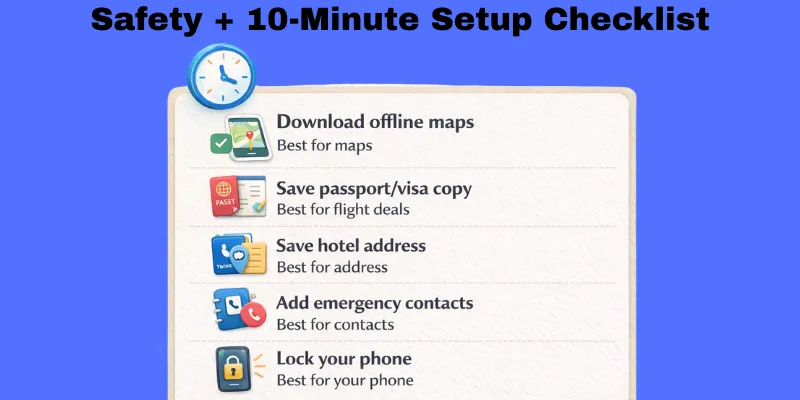
10-Minute Setup Checklist
- Download offline maps
- What to do: Save your city map for use without the internet.
- Why it matters: You can still find your way with a weak signal.
- Quick tip: Try it once in aeroplane mode.
- What to do: Save your city map for use without the internet.
- Save passport/visa copy
- What to do: Save clear photos in a safe folder.
- Why it matters: You can show details if you need help.
- Quick tip: Email a copy to yourself as a backup.
- What to do: Save clear photos in a safe folder.
- Save the hotel address
- What to do: Write the hotel name, address, and phone number.
- Why it matters: You can return easily if you get lost.
- Quick tip: Keep one paper note in your wallet, too.
- What to do: Write the hotel name, address, and phone number.
- Add emergency contacts
- What to do: Save 2–3 trusted contacts and local emergency numbers.
- Why it matters: You can reach help fast when plans change.
- Quick tip: Add one contact as “ICE” (In Case of Emergency).
- What to do: Save 2–3 trusted contacts and local emergency numbers.
- Lock your phone
- What to do: Turn on a strong lock like a PIN or fingerprint.
- Why it matters: It protects your apps and payments.
- Quick tip: Use a 6-digit PIN, not 4.
- What to do: Turn on a strong lock like a PIN or fingerprint.
If you have 2 more minutes
- Turn on “Find My Phone” so you can locate it.
- Screenshot key bookings and tickets for offline viewing.
- Save your travel insurance number, if you have one.
Quick recap
- Save maps, ID copies, and your hotel address.
- Add emergency contacts and lock your phone.
- Keep one backup, like screenshots or email copies.
Conclusion
So guys, in this article, we’ve covered the Best Travel Apps for 2026 in detail. The best plan stays small, clear, and easy to follow. I recommend you use one trip plan app to keep tickets and bookings in one place, because it saves time when you feel rushed. Keep your phone ready, and keep backups like screenshots. Do your part now pick your top apps, set them up, and share this guide with a friend who travels.
FAQs
No, you do not need all of them. Pick 3–5 apps that match your trip. Start with maps, bookings, and money.
Install a map app first, because you will use it the most. Then add a flight or booking app if you still need to book. Add a translation app if you travel to a place with a new language.
Download offline maps before you leave Wi-Fi. Screenshot your tickets, hotel address, and key plans. Keep one small paper note with your hotel address too.
Offline maps are maps you can use without internet. You download a city area while you have Wi-Fi. Then you can still see roads and your location later.
It can be safe if you lock your phone and use trusted apps. Turn on payment alerts so you see every charge. Avoid saving your card in apps you do not trust.
Check the final total before you tap pay. Look for extra taxes, service fees, or cleaning fees. Read the cancel and refund rules in simple words.
eSIM = phone internet without a plastic SIM. It helps when you want data fast after landing. You only need it if your phone supports it and you want easy internet.
Roaming means your SIM uses data in another country. Some networks charge high prices for it. Check your plan first, or use Wi-Fi or an eSIM.
Write every shared cost right after you pay. Keep it simple and settle daily if you can. Use one app or one notes list that everyone agrees on.
Save them in one place, like a trip plan app or a folder. Also take screenshots in case the app does not load. Keep the hotel address and booking number in your notes.



- Be Respectful
- Stay Relevant
- Stay Positive
- True Feedback
- Encourage Discussion
- Avoid Spamming
- No Fake News
- Don't Copy-Paste
- No Personal Attacks
- Be Respectful
- Stay Relevant
- Stay Positive
- True Feedback
- Encourage Discussion
- Avoid Spamming
- No Fake News
- Don't Copy-Paste
- No Personal Attacks
