What Is a DECT Phone? How It Works, Range, Security, and Buying Guide (2026)
Published: 27 Aug 2026
Have you ever heard a word you didn’t know? It’s okay that you’re not alone. This guide will explain what a DECT phone is, why people use it, and how it works in everyday life. You will learn the basics in a way that is easy to understand and doesn’t use any hard words. We’ll keep things simple so you can get it right away. Are you ready to understand everything?
What Does DECT Stand For? (Meaning and Origin)
DECT stands for Digital Enhanced Cordless Telecommunications. It is a wireless standard for cordless phones. People use it every day, but few know where the name comes from. Let’s break it down in simple words.
The story starts in Europe in 1987. Engineers wanted one shared standard for cordless phones. Before DECT, many countries used different systems that did not work well together. So, a group called ETSI (European Telecommunications Standards Institute) built DECT to fix this problem.
At first, the “E” in DECT stood for “European.” But DECT grew fast. Soon, people used it outside Europe too. In 1995, the name changed to “Enhanced” instead of “European.” This showed that DECT was now a global standard, not just a European one.
Real-Life Example:
Think of DECT like a common language for phones. Just as English helps people from different countries talk to each other, DECT helps phones from different brands work together. Your Panasonic handset can connect to a Gigaset base because both follow the same DECT rules.
Today, DECT is used in over 100 countries. It powers home cordless phones, office phone systems, and even baby monitors. Isn’t it amazing how one 1987 idea still shapes the way we call each other today?
How a DECT Phone Works
Let’s see what happens when you call. The steps are easy to understand and follow. This tutorial will help you understand how a DECT phone works in the real world.
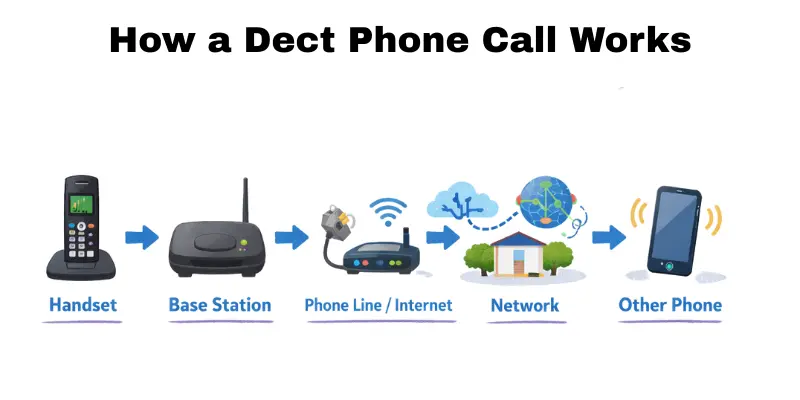
Step-by-Step Call Flow
- You pick up the handset.
The handset wakes up and gets ready to call. - The handset talks to the base station.
The base station is the main unit that controls the call. - The base station sends the call out.
It sends the call to your phone line or internet phone service. - The call travels through the network.
The network finds the other person’s phone. - The other phone rings.
When they answer, the call connects. - You talk and listen.
Your voice goes back and forth through the same path.
Simple Call Path
Handset → Base Station → Phone Line / Internet → Network → Other Phone
Real-Life Example
Call a friend now that you’re home. You pick up the DECT phone and call the number. Your internet line connects the call to the base station. When your friend calls, you pick up the phone right away.
DECT Frequency Band: Why It Avoids Interference
Have you ever wondered why your DECT phone rarely cuts out, even with Wi-Fi and Bluetooth running nearby? The answer lies in its frequency band.
What is a frequency band?
A frequency band is like a radio channel. Different devices use different channels so they don’t clash with each other.
DECT phones use a frequency band near 1.9 GHz. This band is set aside just for DECT devices. Wi-Fi routers, Bluetooth speakers, and microwave ovens use other bands, like 2.4 GHz. Because DECT has its own space, it does not fight with these devices for signal room.
Why this matters to you:
- Fewer dropped calls: Your DECT phone does not compete with your home Wi-Fi.
- Clearer sound: Less noise means better call quality.
- Steady connection: Even in a busy house full of gadgets, your DECT phone stays stable.
Real-Life Example:
Picture a busy kitchen. Your Wi-Fi router sends internet signals. Your microwave heats lunch. Your bluetooth speaker plays music. In the middle of all this, your DECT phone still rings clear. Why? Because it works on its own frequency lane, away from the traffic.
Quick Tip: If your area code uses “DECT 6.0,” don’t worry — it’s the same 1.9 GHz technology. The “6.0” name is just a regional label used in the US and Canada. It does not mean extra power or range.
Range and Coverage: What to Expect
Range tells you how far your phone can work from the base. Many people feel confused about this part. Let’s make it easy to understand. Want to know how far your phone can really go?
Real-World DECT Range
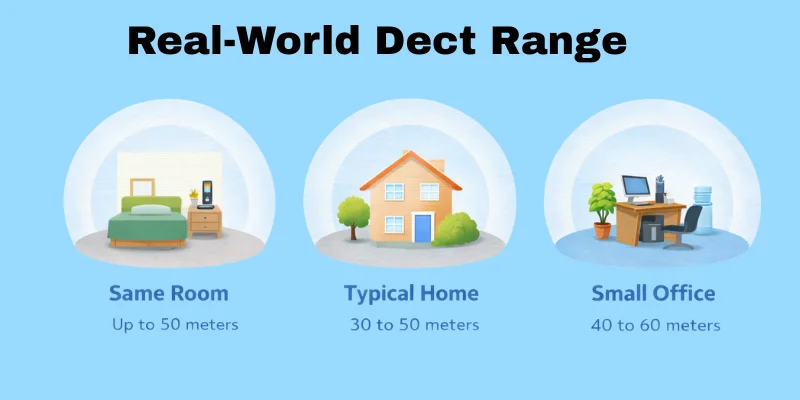
Here is what you can expect in daily use:
- Same room: Up to 50 meters
You can expect clear sound and a strong signal. - Typical home: 30 to 50 meters
It functions effectively in both rooms and floors. - Small office: 40 to 60 meters
It is suitable for both desks and open spaces.
These numbers show real use, not lab tests. The DECT range can change based on your space.
What Reduces Range
- Thick walls (brick or concrete)
They block the signal. - Floors and ceilings
Signals lose strength when going up or down. - Metal items
Cabinets and racks stop signals from moving. - Building layout
Long halls and closed doors weaken coverage.
Each of these can shorten the DECT range without you noticing.
Quick Ways to Improve Coverage
- Place the base in a central spot
- Keep the base higher on a shelf
- Move it away from metal objects.
- Avoid closed cabinets
- Use a repeater for large areas
A repeater is a small device that extends the range of a signal.
Real-Life Example
In a house:
The base sits in the living room. The phone works well in bedrooms. It drops in the basement because of the thick walls.
In an office:
The base stays near the center desk. Calls stay clear in open areas. Sound drops near storage rooms with metal shelves.
Dect Security
DECT phones can be safe, but you need to know what “safe” really means. Some guides say “it’s encrypted” and stop there. This section explains DECT security in a clear, useful way.
What encryption means
Encryption means the phone turns your voice into a secret code while it travels.
It helps stop other people from listening to your calls through the air.
Repeater caveat
A repeater helps your phone reach farther. It can also change how security works. Some repeaters keep the same encryption. Some do not. Some need a special setting.
So, do not guess. Check the product page or manual. Look for terms like “encrypted repeater support” or “secure repeater mode.” Keep it simple: use parts that support secure links end-to-end.
Best practices for a safer DECT setup
- Update the base and handset firmware when updates come out.
- Use a pairing or registration PIN. Do not use “0000” or “1234.”
- Turn off extra handsets you do not use. Remove them from the base list.
- Place the base in a safe spot inside your home or office.
- Use trusted brands and official repeaters made for your system.
- Use a secure repeater mode when you need a repeater.
- Reset the base and handsets before you sell or gift them.
- Do not share admin codes with people you do not trust.
Quick checklist
- Firmware up to date
- Secure PIN set
- Secure repeater support confirmed
DECT vs. alternatives
People call in many ways at home and at work. Each option has strong points and weak points. This guide stays neutral and helps you choose fast. What kind of calls do you need most each day?
Mini definitions
- DECT: A cordless phone link that uses a base and handsets.
- Wi-Fi: A local wireless network that connects phones to the internet.
- VoIP: Voice over Internet Protocol, which means calls travel over the internet.
Comparison table
| Option | Best for | Range in building | Call quality | Setup effort | Main drawback |
| DECT phone | Home or office desk calls | Good in many homes | Steady | Low | Needs a base and power |
| Wi-Fi calling / Wi-Fi phone | Places with strong Wi-Fi | Depends on Wi-Fi | Can be great | Medium | Drops on weak Wi-Fi |
| mobile phone (cellular) | Calls on the go | Depends on the signal | Varies | Low | Indoor dead zones happen |
| Corded landline | One fixed desk spot | Not about range | Very steady | Low | No mobility |
| VoIP desk phone (wired) | Office desk use | Not about range | Often very clear | Medium | Needs a good internet and router |
Quick picks
- Pick a DECT phone for steady calls and easy setup.
- Pick Wi-Fi calling when you already have strong Wi-Fi coverage throughout the space.
- Pick a mobile when you move a lot and need one device everywhere.
- Pick wired VoIP if you want desk calls over your internet.
Action steps
- Walk around your space and note weak spots for Wi-Fi and mobile signal.
- Please identify your primary need: range, call clarity, or easy setup.
- Match your needs with the table, then choose one option to test first.
Use this guide for “DECT vs Wi-Fi” and “DECT vs VoIP” searches, and compare based on your real space and needs. A DECT phone works well for many people, but other options fit better in some places.
Use Cases
A DECT setup works in many places. It makes calls clear and easy to use. It also has some limits. Will you use your phone more in one place or while you’re moving around?
Best use cases at home
- You can make daily calls in a house or flat that has a stable base spot.
- You can share a family line with multiple handsets.
- These are great for rooms where the mobile signal is weak.
- This device is ideal for use in a home office, providing the convenience of a desk phone.
- Having a simple call option during power cuts, coupled with a backup power base, is ideal.
- The device can also be used as a silent night phone in a bedroom or kitchen.
Real-life example: A parent keeps one handset in the kitchen and one in the study, and both ring on the same call.
Best use cases for business
Retail store
- Staff move between the counter, department, and back room.
- A DECT phone helps staff answer quickly without a desk.
Clinic or small office
- Front desk calls need clear sound and quick pickup.
- A DECT phone helps staff move between rooms and still answer calls.
Warehouse or back-of-house
- Staff work near shelves and stock areas.
- DECT can cover indoor zones better than some mobile spots.
Real-life example: A small clinic keeps one handset at reception and one with a nurse, so calls reach the right person fast.
When not to use DECT
- Large sites with multiple floors and long distances between them are not suitable for using DECT.
- Large outdoor spaces, such as yards or open lots, are good for DECT.
- These areas often feature thick concrete or heavy metal walls.
- Groups that need all the tools for an app, like chat and video, in one place.
- Sites lacking a secure location for a base station are also included.
- Some locations require a single number to be used across numerous remote sites.
- The work requires making calls while driving or when the location is far from the base.
Quick decision guide
Good fit when…
- You want a simple call for a home or one building.
- You need a clear voice and easy handsets.
- You need an indoor range without using Wi-Fi.
Not a good fit when…
- You need wide outdoor coverage for business sites.
- You need app-first tools for every user.
- You cannot place a base in a safe indoor spot.
DECT works best when there are clear paths inside one building. It struggles to function effectively in large, complex environments. Do you need help finding the right setup for your space?
Buying guide checklist (handsets, calls, coverage, features, PBX/VoIP)
A DECT phone system can work wonderfully at home or at work. You get the best fit when you plan your needs first. This buying checklist helps you purchase with clear steps. What do you need most: more handsets, better range, or better call handling?
Quick checklist
Handsets
- Count how many people need a handset each day.
- Count extra spots that need a shared handset.
- Pick a simple handset for light use.
- Pick a tough handset for drops, dust, or wet hands.
Calls
- Check voice clarity during a test call.
- Check the speakerphone sound for group talk.
- Check call hold, call mute, and call waiting.
- Check the voicemail and message lights or alerts.
Coverage
- Walk the real rooms and floors you will use.
- Note dead spots near thick walls or metal areas.
- Check base range claims, but trust real tests more.
- Check repeater support for hard-to-reach areas.
Features
- Check the transfer for moving calls to another handset.
- Check headset support for hands-free work.
- Check a shared directory for names and numbers.
PBX/VoIP
- Check if the system works with your PBX or VoIP service.
- Check how it connects: wired port, internet box, or phone port.
- Check how many lines or calls it can handle at once.
PBX = a phone control box that shares lines in an office.
VoIP = calls that travel over the internet.
3-step way to choose
- Count needs: List people, rooms, and peak call times.
- Map coverage: Draw your floor plans and mark thick walls and distant rooms.
- Match features: Mark must-have tools, then add nice-to-have tools.
A DECT phone system works best when your plan matches your space and call style. Do you want help turning your home or office layout into a simple coverage plan?
Setup guide (register, expand, test roaming, verify quality)
A good DECT setup gives clear calls and a steady range. You can finish most installs in one short session. This guide uses simple steps that work for home or office. Do you want better calls and fewer dead spots?
Before you start
- Put the base in a central, open spot in the building.
- Place the base up high on a shelf or desk.
- Keep the base away from thick metal and big power boxes.
- Plug the base into power before anything else.
- Charge each handset fully before you register it.
- Keep your phone line, internet box, or office phone port ready.
Step-by-step setup
- Connect the base: Plug in the power. Connect to your phone line, internet, or office phone system as needed.
- Charge the handset: Place it on the charger until it shows a full battery.
- Register the handset: Start “register” on the handset, then press the base button.
- Registering means you link the handset to the base so they talk.
- Registering means you link the handset to the base so they talk.
- Add more handsets: Repeat the same register steps for each extra handset.
- Add a repeater (optional): Put the repeater between the base and the weak area. Register it to the base using the repeater steps in the manual. Keep the repeater in an open spot.
Test roaming
- “Roaming” means your call stays on while you walk to another area.
- Make a test call to a friend or a second phone.
- Walk slowly to the far rooms and halls you use.
- Listen for cuts, pops, or delays.
- Make a simple note of the weak spots.
- Move the base or repeater once, then test again.
Verify call quality.
- Check the sound of the voice in a quiet room.
- Check the voice sound in a noisy room.
- Check for dropouts while you talk.
- Check for any delay between the talk and the reply.
- Test the mic close and a bit farther away.
- Test speaker mode for echo and volume.
- Test mute to make sure it works fast.
- Please test the call, hold, and resume functions.
Quick fixes
- Move the base higher and closer to the center.
- Keep the base away from metal shelves and boxes.
- Move the charger and base away from other gear.
- Update firmware on the base and handsets.
- Check cables and ports for a firm fit.
Troubleshooting (common issues)
DECT phones work well, but small setup issues can cause big problems. This DECT troubleshooting guide helps you resolve common problems fast. You can try these steps at home or at work. Do you want to resolve the issue in the next 10 minutes?
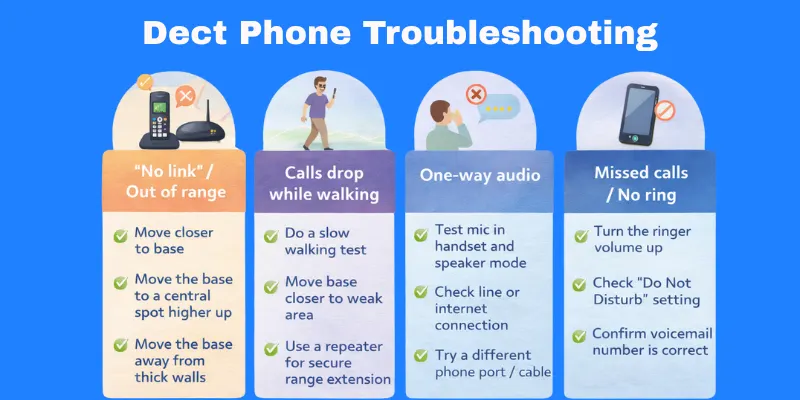
Fast checks first
- Check the power to the base and charger.
- Charge the handset until the battery shows full.
- Check base lights for normal status.
- Push cables in tight at both ends.
- Restart the base and handset. Turn them off and on.
Common problems and fixes
The handset shows “No link” / “Out of range.”
- Move closer to the base.
- Move the base to a higher, central spot.
- Remove the base from metal shelves and thick walls.
Calls drop while walking.
- Do a slow walking test in your real rooms.
- Move the base closer to the weak area.
- Add a repeater that supports secure mode and proper pairing.
One-way audio (I hear them; they can’t hear me.)
- Test the mic in handset mode and speaker mode.
- Check the line or internet connection to the base.
- Try a different phone port or cable.
Echo or delay
- Lower speaker volume on one side.
- Turn off speaker mode and test again.
- Check the internet quality for internet-based lines.
Crackling or noise
- Move the base away from power bricks and large screens.
- Replace a loose or old cable.
- Test in a quieter room to rule out background noise.
Short range in the building
- Put the base in the center, not in a corner.
- Put the base higher, not on the floor.
- Avoid thick concrete and metal near the base.
The handset does not register.
- “Register” means you link the handset to the base.
- Put the handset close to the base during setup.
- Check the base “pair” button or menu steps in the manual.
- Please remove the handset from the base list and then try again.
Repeater not working
- Place the repeater between the base and the weak spot.
- Register the repeater to the base, not to a handset.
- Check the product page for “encrypted repeater” or “secure repeater mode.”
Missed calls or the phone does not ring.
- Turn the handset’s ringer volume up.
- Check “Do Not Disturb” or quiet mode settings.
- Check that the handset stays registered to the base.
Voicemail not working
- Voicemail means a voice message box that saves missed calls.
- Check the voicemail setup in your phone service or office system.
- Check the voicemail number in the handset settings.
- Test by calling your number from another phone.
When to get help
- The base overheats or smells hot.
- The battery swells, leaks, or gets very hot.
- Dropouts happen in the same spot after the base moves and tests.
- The base lights show a fault pattern that never clears.
- You hear a loud noise on every call, in every room.
This DECT troubleshooting list covers the most common fixes. Please perform the quick checks, and then align your issue with the one listed above. Could you please let us know what issue you are currently experiencing with your handset?
Conclusion
In this guide, we covered the core of a DECT phone system. We talked about security, repeaters, and simple best practices. We compared DECT to Wi-Fi, VoIP, mobile, and corded phones. We also shared real use cases, a buying checklist, a setup flow, and quick fixes for common problems.
Here’s my personal take, folks: plan your space first, then test your calls right away. This step matters because good placement and testing prevent most issues later. Keep learning, buddies—and stay tuned for more simple, helpful tips.
FAQs
A DECT phone helps you make and take calls around a home or office. It uses a small base and one or more handsets. The base connects to your phone line or your internet phone service. You can move room to room and keep the call in range
Most cordless home phones use DECT today. DECT is the wireless system that links the handset to the base. A cordless phone is the type you hold in your hand. DECT is the tech inside many cordless phones.
A DECT phone uses its own link between the base and the handset. Wi-Fi calling uses your Wi-Fi network for calls. DECT often stays steady inside a building. Wi-Fi calling can drop when Wi-Fi feels weak.
Many DECT phones use encryption. Encryption means the phone turns your voice into a secret code in the air. Security can change by model and brand. Some repeaters can also change how security works, so check for “secure repeater mode.”
DECT 6.0 is a name many makers use in the US and Canada. It points to the DECT type used in that region. It does not indicate that the call range is “six times better.” You still get the best results from proper base placement and a clean setup.




- Be Respectful
- Stay Relevant
- Stay Positive
- True Feedback
- Encourage Discussion
- Avoid Spamming
- No Fake News
- Don't Copy-Paste
- No Personal Attacks
- Be Respectful
- Stay Relevant
- Stay Positive
- True Feedback
- Encourage Discussion
- Avoid Spamming
- No Fake News
- Don't Copy-Paste
- No Personal Attacks
