Screen Bleeding Explained: Causes, Fixes, and When You Should Worry
Published: 26 Aug 2026
You unlock your phone and notice something looks wrong, but you can’t quite explain it. The screen still works, yet the colors don’t look clean anymore, and your eyes keep going back to the same spot. If this circumstance sounds familiar, you’re not alone. In this guide, we’ll walk you through everything you need to know about phone screen bleeding, including why it happens, how to check it properly, whether it gets worse, and what you can realistically do about it. By the end, you’ll feel clear, confident, and ready to decide your next step.
What Is Screen Bleeding, and Why Does It Happen?
When light shows up on parts of the screen where it shouldn’t, that’s called screen bleeding. It usually shows up close to the corners or edges. The light isn’t even and can be hard on your eyes, especially on dark screens.
You may notice it when:
- Watching a dark movie scene
- Using your phone or laptop at night
- Looking at a black or dark wallpaper
Instead of a clean, dark screen, you see bright patches or cloudy light. These spots do not move. They stay in the same place every time. Have you ever watched a movie and felt the corners of the screen looked brighter than the rest?
What Screen Bleeding Looks Like in Real Life
In daily use, screen bleeding can look like:
- Yellow or white light around edges
- Uneven brightness in dark areas
- Light “leaking” through black screens
It becomes easier to see in a dark room or when the screen brightness is high.
Why Screen Bleeding Happens
Modern screens are thin and tightly packed. This makes them look sleek, but it also makes them more sensitive.
Common reasons include:
- Pressure on the screen
Pressing too hard or sitting on the device can cause light to spread unevenly. - Tight screen fitting
Parts inside the screen are pressed together, which can push light into dark areas. - Everyday use over time
Heat and long hours of use can slowly affect how light spreads.
Modern screens focus on slim designs and bright displays. This design choice makes screen bleeding more likely, especially in low light.
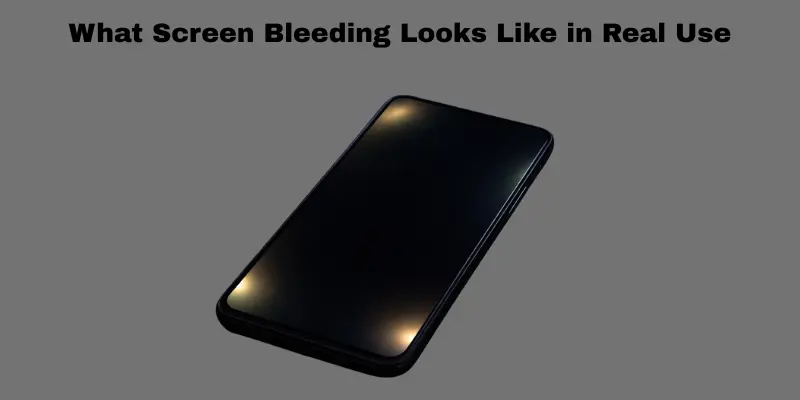
What Screen Bleeding Looks Like in Real Use
Screen bleeding looks like light showing through dark parts of the screen. The screen is still working, but the dark areas do not look fully dark. Instead, you see bright spots or glowing edges. This light does not move. It stays in the same place every time you use the device.
When Screen Bleeding Is Easy to Notice
Screen bleeding becomes more visible in certain situations, such as
- Using dark mode on your phone or app
- Watching movies with dark scenes
- Playing games at night in a dim room
In these moments, the screen should look dark and even. If light appears around the edges or corners, it often means screen bleeding.
How Screen Bleeding Appears in Daily Use
In real life, screen bleeding may look like:
- White or yellow light near the edges
- Cloudy patches on dark screens
- Uneven brightness in black areas
It is harder to see during the day. It becomes clear in dark rooms or at low light.
Minor vs. Serious Screen Bleeding
Not all screen bleeding is the same. Some cases are so light that most people never notice them. Others are strong enough to distract your eyes and affect how you enjoy the screen. Understanding the difference between minor and serious screen bleeding helps you decide whether it’s normal or something that needs attention.
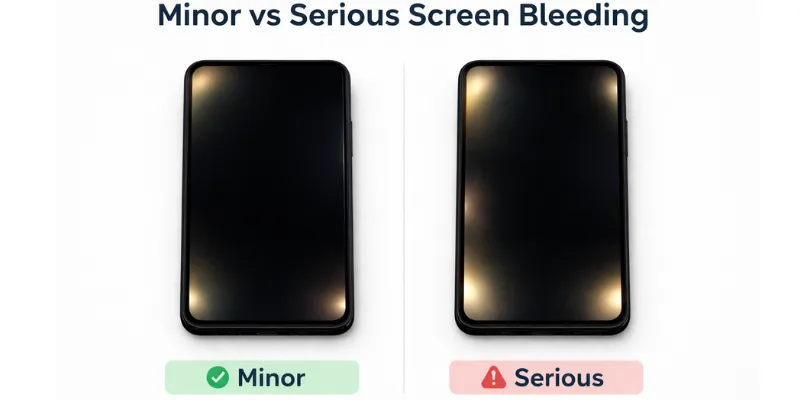
Minor screen bleeding (usually normal):
- Very light glow near corners
- Only visible in complete darkness
- Does not affect daily use
Serious screen bleeding (problematic):
- Bright light that pulls your focus
- Clearly visible during movies or games
- Makes dark content difficult to enjoy
If you forget about it after a few minutes, it is likely minor. If your eyes keep going back to it, the bleeding may be serious.
Screen Bleeding vs. Other Display Problems
Many people see a screen issue and think it is screen bleeding. In reality, several screen problems look similar. This causes confusion. Let’s clear it up simply.
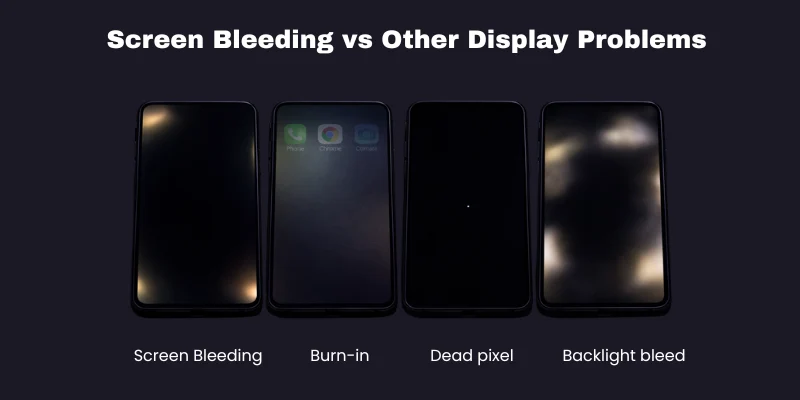
Each problem looks different and happens for a different reason.
| Screen Problem | What It Looks Like in Real Use | Why It Happens |
| Screen bleeding | Light glows near edges or corners on dark screens, especially at night | Light spreads unevenly inside the screen |
| Burn-in | Faded images, icons, or lines stuck on the screen | The same image stays on the screen for too long |
| Dead pixels | Tiny black, white, or colored dots that never change | Small screen dots stop working |
| Backlight bleed | Bright patches behind dark images, stronger than normal glow | Light leaks from behind the screen |
How Each Problem Looks in Real Life
Screen bleeding
- Light shows near edges or corners
- Most visible in dark scenes
- Common when watching movies at night
Burn-in
- You may see icons or lines from old apps
- Happens after long use of the same screen
- Often seen on navigation bars or logos
Dead pixels
- Small dots that stay black, white, or red
- Do not move or fade
- Easy to spot on plain backgrounds
Backlight bleed
- Looks like bright clouds behind the image
- Stronger than normal screen glow
- Often seen on new or poorly fitted screens
How to Tell What You Have
Ask yourself a simple question:
Does the light move or change when the screen changes?
- If the light remains in the same edge area, it is likely indicative of screen bleeding.
- If an image remains visible even after closing an app, this indicates burn-in.
- If a tiny dot never changes, it’s a dead pixel
Once you know these differences, it’s easier to understand what’s happening on your screen and what to do next.
Main Causes of Screen Bleeding
Screen bleeding does not have one single cause. It can happen for different reasons. Some causes are related to how the screen was made. Some happen because of how the device is used over time.
Let’s look at the main causes in a clear and simple way.
Manufacturing Issues
Sometimes the problem starts before you even use the device.
- Parts inside the screen may be pressed too tightly.
- Light may not spread evenly during assembly.
- Small fitting mistakes can cause light to leak.
This type of screen bleeding often shows up early, even on new devices. You cannot control this cause.
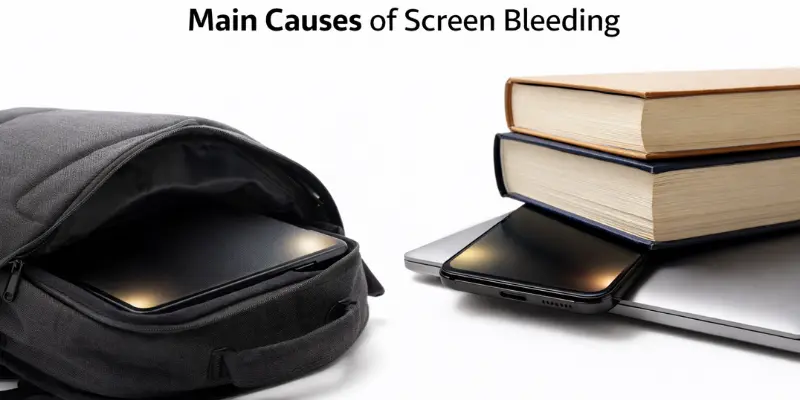
User damage (pressure, drops, and tight lids)
Daily use can slowly damage the screen.
- Pressing hard on the screen can push light into dark areas.
- Dropping the phone or laptop can loosen screen parts.
- Closing a laptop that contains objects inside can apply pressure to the screen.
For example, carrying a laptop in a tight bag or sitting on a phone can create pressure that leads to screen bleeding.
Have you ever packed your laptop tightly in a backpack?
Heat and Long-Term Overheating
Heat plays a big role in screen problems.
- High heat can weaken parts inside the screen.
- Long gaming or charging sessions create extra warmth.
- Hot rooms or cars can make the problem worse.
Using a device for long hours in a hot room or leaving it in a car can increase the risk over time.
Poor-Quality Screen Repairs or Replacements
Not all screen repairs are equal.
- Cheap screens may not fit properly
- Poor installation can leave gaps inside the screen
- Low-quality parts spread light unevenly
For example, replacing a broken screen with a low-cost part may save money at first, but it can lead to visible screen bleeding later.
Water or Liquid Exposure
Water is a silent enemy for phone screens. Even a small splash can cause big damage.
- Steam or rain: Moisture can seep inside the screen and mess with its inner layers.
- “Water-resistant” isn’t “waterproof”: Many phones claim water resistance, but this fades over time. A phone that survived a splash last year may not survive one today.
For example, using your phone with wet hands in the rain seems harmless. But over time, tiny drops of moisture can build up inside. This slowly damages the screen and causes bleeding.
What You Can and Cannot Control
- You cannot control manufacturing issues.
- You can control pressure, drops, heat, and repair quality.
Knowing the cause helps you prevent further damage and decide the right next step.
Is Screen Bleeding Normal or a Defect?
Screen bleeding is not always a serious problem. In some cases, it is normal. In other cases, it points to a real defect. The key is how strong it is and how it affects daily use.
Let’s break it down in a simple way.
When Screen Bleeding Is Normal
Small amounts of screen bleeding can happen on many screens.
This is usually normal when:
- The glow is very light
- It only appears in dark rooms
- It stays near the edges or corners
- You do not notice it during normal use
For example, a slight glow in the corners when watching a movie at night is common. Many users never notice it unless they look closely.
When Screen Bleeding Is a Defect
Screen bleeding becomes a defect when it affects how you use the screen.
This may be a defect if:
- Bright patches are easy to see
- Light appears even in normal lighting
- It distracts you during videos or games
- Dark scenes look uneven or washed out
For example, seeing bright areas while browsing or watching videos during the day indicates that the issue is no longer minor.
How to Decide If Action Is Needed
Ask yourself a simple question:
Does the light bother me during normal use?
- If not, the screen bleeding is likely normal
- If yes, it may be a defect worth attention
Simple Signs to Guide You
No action needed:
- You forget about it after a few minutes
- It only shows in dark mode or at night
Consider next steps:
- Your eyes keep going back to the bright area
- The screen looks uneven all the time
Knowing this difference will help you stay calm and make a choice you feel good about without rushing.
Can Screen Bleeding Be Fixed? (Myths vs. Reality)
Many fixes online sound simple and tempting. Sadly, most of them do not work. Some can even make the problem worse. Let’s separate the myths from the reality clearly and honestly.
Common Myths About Fixing Screen Bleeding
These methods are often shared online, but they are not proven.
- Pressing the screen
People say gentle pressure can push the light back. In reality, pressure can damage the screen and increase bleeding. - Using apps or special videos
Some apps claim to “fix” screen problems. They only change colors on the screen. They do not fix how light spreads inside. - “Screen massage” tricks
Rubbing or massaging the screen does not repair internal parts. It can scratch or crack the display.
If these tricks really worked, would screen problems continue to occur?
The Reality of Screen Bleeding Fixes
The truth is simpler and more limited.
- No fix is needed
If the bleeding is very light and does not affect use, nothing needs to be done. - Settings may reduce how noticeable it looks
Lower brightness or avoiding dark mode can make bleeding less visible. This does not fix it, but it can help with comfort. - Repair or replacement is the only real fix
When bleeding is strong and distracting, only replacing the screen can truly solve it.
What Actually Helps
- Understanding how serious the issue is
- Avoiding pressure and heat to prevent it from getting worse
- Ignoring risky “quick fixes”
Screen bleeding is not something software or tricks can truly repair. Knowing this saves time, money, and stress.
DIY Repair vs. Professional Repair vs. Warranty
When dealing with screen bleeding, most people have three main options. Each option has pros and cons. The right choice depends on your device, the problem, and your comfort level.
Let’s look at each option in simple terms.
What Each Option Means
DIY repair
- You try to fix the problem yourself
- Often involves opening the device or pressing parts
- Guided by online videos or tips
Professional repair
- A trained technician checks and fixes the screen
- Usually done at a repair shop
- Uses proper tools and parts
Warranty or replacement
- The maker fixes or replaces the device
- Works only if the device is still covered
- Often, the safest choice for new devices
Simple Comparison Table
| Option | Risk Level | Cost | Skill Needed | Chance of Success |
| DIY repair | High | Low | High | Low |
| Professional repair | Medium | Medium | Low | Medium to High |
| Warranty | Very Low | Low or Free | None | High |
When Each Option Makes Sense
DIY repair may fit if:
- The device is old
- The warranty has ended
- You accept the risk
DIY fixes can cause more damage if done wrong.
Professional repair makes sense if:
- Screen bleeding is strong
- The device is out of warranty
- You want a proper fix
For example, an older laptop with serious bleeding may benefit from a professional screen replacement.
Warranty is the safest choice if:
- The device is new
- Screen bleeding appeared early
- No physical damage is present
The maker should always check a new laptop under warranty first.
How to Choose the Right Option
Ask yourself a simple question:
Is my device still under warranty, and does the problem affect daily use?
- If yes, the warranty is usually best
- If not, weigh repair cost against device value
Understanding your options helps you act calmly and avoid costly mistakes.
How Much Does It Cost to Fix Screen Bleeding?
Money is often the first question on your mind. Let’s break it down simply.
Repair Costs by Phone Type
- iphone: Repairs usually cost $130 to $330. Newer Pro models sit at the higher end.
- Samsung Galaxy: Prices range from $140 to $400, depending on the model.
- Other Android phones: Budget models cost less, often $50 to $200.
Ways to Lower Your Cost
- Check your warranty first: If your phone is new, repair may be free.
- Use protection plans: AppleCare+ or Samsung Care+ can drop your cost to just $29 to $99.
- Compare shops: Third-party repair shops often charge less than official service centers. But parts quality can vary, so ask questions first.
Is your phone still under warranty? Check before you pay for anything. That single step can save you hundreds of dollars.
How to Prevent Screen Bleeding in the Future
Screen bleeding does not always happen by chance. In many cases, positive daily habits can lower the risk. Small changes in how you use and carry your device can make a big difference over time.
Here are simple ways to protect your screen.
Handle Your Device Gently
- Hold your phone or laptop with care
- Avoid twisting or bending the device
- Do not press hard on the screen
Gentle handling keeps the screen parts in place and stops light from spreading unevenly.
Avoid Pressure on the Screen
- Do not sit on your phone
- Do not place heavy items on a laptop
- Keep objects away when closing a laptop
Pressure can push light into dark areas and cause bleeding.
Do you ever stack books on top of your laptop?
Keep Devices Cool
- Avoid using devices in very hot rooms
- Do not leave them in cars
- Take breaks during long use
Heat can weaken screen parts over time and increase bleeding.
Use Proper Bags or Cases
- Use padded bags for laptops
- Use strong cases for phones
- Avoid tight bags that squeeze the screen
Good protection spreads pressure and keeps screens safe.
Choose Quality Repairs or Parts
- Avoid very cheap screen replacements
- Choose trusted repair services
- Make sure parts fit correctly
Poor-quality parts often cause uneven light.
Build Long-Term Screen Care Habits
- Treat screens as fragile parts
- Protect them during travel
- Think before applying pressure or heat
Prevention is easier and cheaper than fixing screen problems later. With the right habits, your next screen can last much longer.
Conclusion
So guys, in this article, we’ve covered phone screen bleeding in detail. From what I’ve seen, most cases are minor and can be used without worry, especially if daily use isn’t affected. My personal recommendation is to observe the screen during normal use before making any decision. If it stays subtle, enjoy your device without stress. Take a moment today to check your screen carefully and decide your next step with confidence.
FAQs
Yes, it can get worse if the device faces pressure, heat, or repeated drops. Often, it stays the same if handled carefully. Good habits help slow or stop further damage.
Yes, light screen bleeding can appear even on new devices. This often comes from how the screen is fitted during production. Minor bleeding is usually considered normal.
No, screen bleeding does not affect touch response or speed. It only changes how the screen looks. Your device will still work normally.
Screen bleeding does not harm your eyes directly. It may cause discomfort in dark rooms due to uneven light. Lowering brightness can help reduce strain.
Not always. If the bleeding is minor and does not bother you, replacement is not needed. Replacement makes sense only when daily use feels uncomfortable.
Yes, visible screen bleeding can reduce resale value. Buyers often see it as screen damage. Minor bleeding may still be acceptable, depending on the buyer.
No, software updates cannot fix screen bleeding. The issue comes from how light spreads inside the screen. Software can only reduce how noticeable it looks.





- Be Respectful
- Stay Relevant
- Stay Positive
- True Feedback
- Encourage Discussion
- Avoid Spamming
- No Fake News
- Don't Copy-Paste
- No Personal Attacks
- Be Respectful
- Stay Relevant
- Stay Positive
- True Feedback
- Encourage Discussion
- Avoid Spamming
- No Fake News
- Don't Copy-Paste
- No Personal Attacks
